
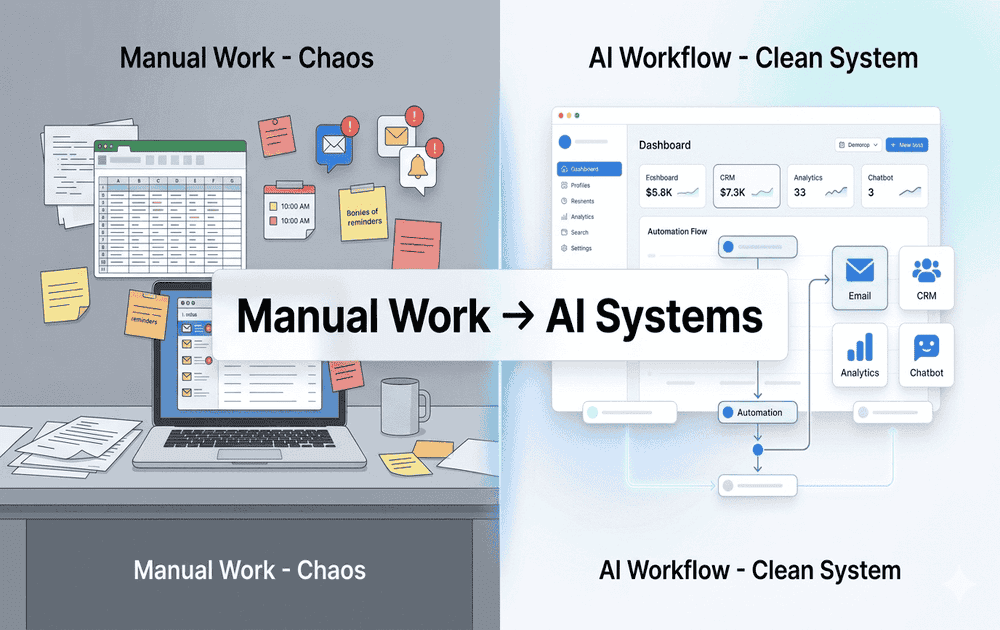
How AI Tools Are Replacing Manual Tasks at Work (Save Time & Scale Faster)
Table of Contents
How AI Is Quietly Transforming Everyday Work
Manual work isn’t disappearing overnight—but it’s steadily being replaced where it matters most: repetitive, time-consuming tasks that slow businesses down.
Activities like sending follow-up emails, managing lead data, updating records, and responding to common queries are no longer done manually in high-performing businesses. AI tools now handle these processes automatically, faster and with more consistency.
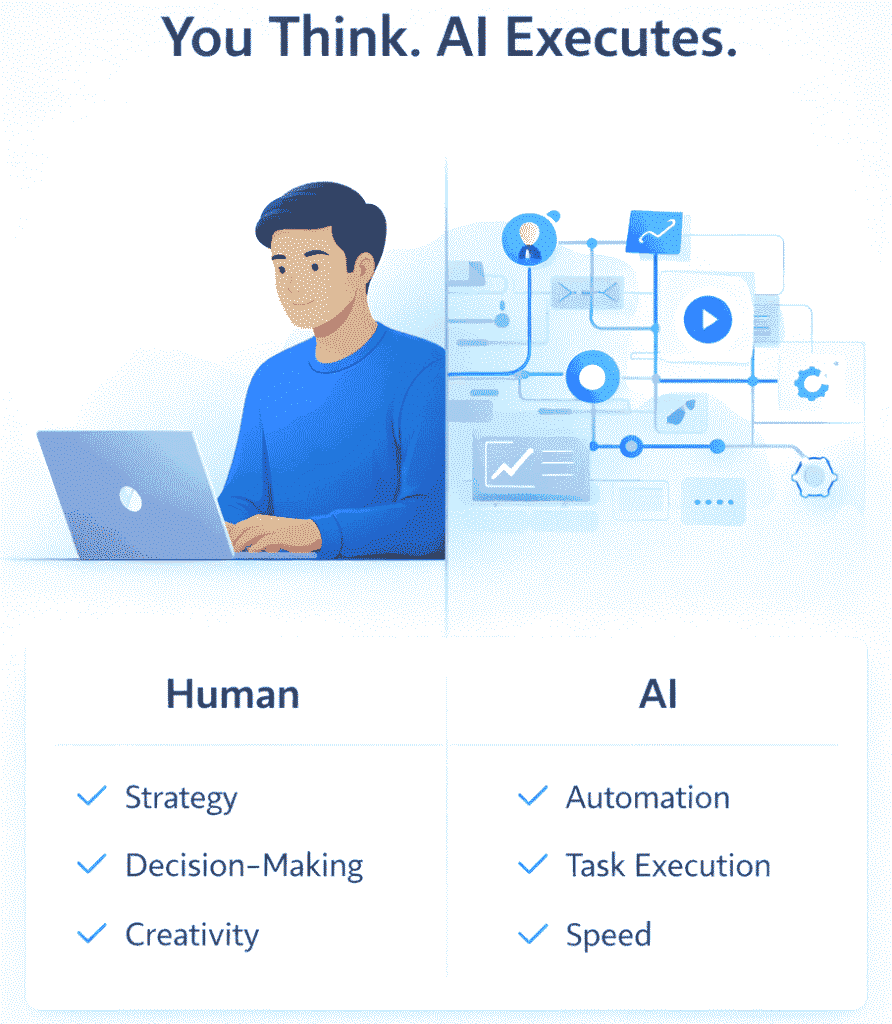
This shift isn’t about replacing people—it’s about removing inefficiencies and freeing up time for higher-value work like strategy, decision-making, and growth.
In this guide, you’ll understand how AI is changing day-to-day business operations, which tasks are being automated, and how you can apply these systems to reduce manual effort and build a more scalable workflow.
What Does “Replacing Manual Tasks” Actually Mean?
When people hear that AI is replacing manual work, it often creates confusion. In reality, AI is not replacing jobs—it’s replacing repetitive, low-value tasks that consume time and slow down productivity.
Instead of spending hours on routine activities, AI tools take over these processes and execute them automatically based on predefined rules, user behavior, and triggers.
What Counts as Manual Tasks
Manual tasks are activities that are repetitive, time-consuming, and follow a predictable pattern.
Common examples include:
• Sending follow-up emails one by one
• Updating and managing leads in spreadsheets
• Responding to frequently asked customer queries
• Posting content manually across platforms
• Tracking performance data and compiling reports
These tasks are necessary, but they don’t require deep thinking or creativity—making them ideal for automation.
How AI Replaces These Tasks
AI tools work by following simple logic and automation triggers.
For example:
When a lead signs up → send a welcome email
If there’s no response → trigger a follow-up
If a customer asks a common question → send an instant reply
Instead of manually handling each step, the system runs continuously in the background.
From Tasks to Systems
The real transformation happens when individual tasks are connected into workflows.
Instead of thinking:
“I need to send emails”
You shift to:
“I have a system that handles communication automatically”
This turns scattered activities into structured processes that run without constant input.
What Changes in Your Daily Work
Before AI:
You spend time doing tasks repeatedly
After AI:
You focus on improving strategy while systems handle execution
This shift allows you to:
• Save time on repetitive work
• Reduce errors and missed steps
• Maintain consistency across processes
• Scale operations without increasing workload
Why This Matters
Manual work limits growth because it depends on time and effort. As workload increases, it becomes harder to manage everything efficiently.
AI removes this limitation by automating execution, allowing you to handle more volume without adding complexity.
Simple Way to Understand
Manual work = Task-based thinking
AI workflows = System-based thinking
Final Insight :
AI doesn’t replace what you do—it changes how you do it.
By automating repetitive tasks, you create systems that run continuously, giving you more time to focus on growth, strategy, and high-impact decisions.
👉 If you want a deeper breakdown of how these systems work in real business scenarios, check out this complete guide on AI workflows for small businesses and automation systems.
Key Areas Where AI Is Replacing Manual Work
1. Lead Generation & Prospecting
Lead generation is one of the most time-consuming tasks in any business. Traditionally, it requires manual research, data collection, and filtering—often taking hours or even days to build a usable list.
How It Works Manually
In a manual process, you typically:
• Search for potential leads on platforms like LinkedIn or directories
• Visit profiles one by one
• Collect names, emails, and company details manually
• Organize everything in spreadsheets
• Filter out irrelevant or low-quality leads
This approach is slow, repetitive, and often inconsistent. It also increases the chances of errors and outdated data.
How AI Transforms This Process
AI tools automate the entire prospecting process by identifying and filtering the right leads based on your target criteria.
Instead of searching manually, you define:
• Industry
• Job role
• Company size
• Location
• Buying intent (in advanced tools)
The system then generates a list of relevant prospects automatically.
What Actually Changes
You move from manual research to automated data collection.
Instead of spending hours finding leads, you can generate a targeted list in minutes. This allows you to focus more on outreach and conversion rather than data gathering.
Practical Example
Instead of manually searching for marketing managers in the US, you set filters once. The tool instantly provides a list of matching prospects along with relevant details.
This list can then be directly used for outreach or stored in your CRM.
Benefits of AI in Lead Generation
• Saves significant time on research
• Improves lead quality through better filtering
• Reduces manual errors and duplication
• Creates a consistent and scalable lead pipeline
When You Should Use This
This workflow is especially useful when:
• You struggle to find consistent leads
• You spend too much time on research
• Your outreach lacks targeting
• You want to scale prospecting without hiring
Simple Flow
Target Criteria → AI Lead Search → Filtered Prospects → Ready for Outreach
Key Insight :
Lead generation is no longer about manual effort—it’s about smart targeting.
By automating prospecting, you shift your focus from searching for leads to converting the right ones.
👉 To learn how to build a targeted lead list and improve prospecting accuracy, read this guide on AI-powered lead generation strategies for beginners.
2. Email Outreach & Follow-Ups
Email outreach is a core part of sales and marketing, but when done manually, it quickly becomes repetitive, time-consuming, and inconsistent.
How It Works Manually
In a manual process, you typically:
• Write individual emails for each prospect
• Send messages one by one
• Keep track of replies manually
• Remember to follow up after a few days
• Manage everything across inboxes or spreadsheets
This often leads to missed follow-ups, delayed responses, and inconsistent communication.
How AI Transforms This Process
AI tools automate outreach by creating structured email sequences that are sent automatically based on timing and user behavior.
Instead of sending emails manually, you set up:
• A sequence of emails (initial + follow-ups)
• Time delays between each message
• Personalization fields (name, company, role)
• Triggers based on actions (opened, clicked, no reply)
Once set up, the system runs continuously without daily effort.
What Actually Changes
You move from one-time manual emails to continuous automated communication.
Instead of remembering to follow up, the system ensures every lead receives consistent and timely messages.
Practical Example
You send an initial email to a prospect.
If there’s no reply:
• Day 3 → Follow-up message
• Day 5 → Reminder
• Day 7 → Final check-in
If the prospect replies at any stage, the sequence automatically stops.
Benefits of AI in Outreach
• Ensures no lead is missed
• Improves response rates with consistent follow-ups
• Saves time on repetitive email tasks
• Maintains personalization at scale
When You Should Use This
This workflow is useful when:
• You’re not getting replies from cold emails
• You forget or delay follow-ups
• You want to scale outreach without extra effort
• You need consistent communication with leads
Simple Flow
Lead Added → Email Sequence → Follow-Ups → Response or Conversion
Key Insight :
Most conversions don’t happen on the first email—they happen in the follow-up.
AI ensures that every opportunity is followed through consistently, without relying on manual effort.
👉 You can follow a step-by-step setup in this detailed guide on Automating email outreach and follow-up sequences at scale.
3. CRM & Data Management
Managing leads and customer data is critical for any business, but when handled manually, it quickly becomes disorganized and difficult to maintain.
How It Works Manually
In a manual process, you typically:
• Store lead details in spreadsheets
• Update information after every interaction
• Track conversations across emails and notes
• Move leads between stages manually
• Try to remember follow-ups and deal status
Over time, this leads to messy data, missed updates, and lack of clarity on where each lead stands.
How AI Transforms This Process
AI-powered CRM systems automatically capture, update, and organize lead data without manual input.
Instead of updating everything yourself, the system:
• Stores all lead information in one place
• Tracks emails, calls, and interactions automatically
• Updates deal stages based on activity
• Sends reminders for follow-ups
• Provides insights into pipeline progress
This creates a centralized system where all data is accurate and always up to date.
What Actually Changes
You move from manual data entry to automated data tracking.
Instead of managing spreadsheets, you get a real-time view of your entire pipeline with clear visibility into each stage.
Practical Example
A lead responds to your email.
The system automatically logs the interaction, updates the lead status, and moves them to the next stage in your pipeline. It can also trigger a reminder or next action without manual input.
Benefits of AI in CRM Management
• Eliminates manual data entry and errors
• Ensures no lead or interaction is missed
• Provides clear visibility of your sales pipeline
• Helps prioritize high-value opportunities
When You Should Use This
This workflow is useful when:
• Your lead data is scattered across multiple places
• You miss follow-ups or lose track of conversations
• Your sales process feels unorganized
• You want better visibility into performance and progress
Simple Flow
Lead Captured → Data Stored → Interaction Tracked → Status Updated → Action Triggered
Key Insight :
A CRM is not just a storage tool—it’s the backbone of your sales process.
With AI handling data management, you move from tracking information manually to managing a structured system that keeps everything organized and actionable.
👉 If you’re new to CRM systems, this beginner guide on How to manage leads and sales pipelines effectively will help you set it up correctly.
4. Customer Support
Customer support is essential for building trust, but handling every query manually can quickly become overwhelming as your business grows.
How It Works Manually
In a manual process, you typically:
• Respond to each customer query individually
• Check emails, chats, or messages across platforms
• Answer the same common questions repeatedly
• Manage complaints and issues manually
• Track conversations without a structured system
This often leads to delayed responses, missed messages, and inconsistent customer experience.
How AI Transforms This Process
AI-powered support systems use chatbots and automation to handle common queries instantly and efficiently.
Instead of replying manually, the system:
• Provides instant responses to frequently asked questions
• Uses chatbots to handle basic conversations
• Routes complex queries to the right team or person
• Creates tickets automatically for unresolved issues
• Sends follow-ups and updates without manual effort
This ensures that customers receive quick and consistent support at any time.
What Actually Changes
You move from reactive support to automated and proactive support.
Instead of waiting to respond, your system engages customers instantly and handles a large portion of queries automatically.
Practical Example
A customer visits your website and asks a common question through chat.
The chatbot instantly provides the answer. If the query is more complex, it creates a support ticket and assigns it to a team member. After resolution, a follow-up message is sent automatically.
Benefits of AI in Customer Support
• Reduces response time significantly
• Handles repetitive queries without manual effort
• Improves customer satisfaction and experience
• Allows teams to focus on complex issues
When You Should Use This
This workflow is useful when:
• Customer queries are increasing
• Response times are slow
• You receive many repetitive questions
• Your support team is overloaded
Simple Flow
Customer Query → AI Response → Ticket Creation → Resolution → Follow-Up
Key Insight :
Customer support is no longer about responding faster—it’s about responding instantly and consistently.
With AI handling routine queries, you can deliver better support while focusing on high-value customer interactions.
5. Content Creation & Marketing
Content is essential for attracting and engaging customers, but creating everything manually can be slow, inconsistent, and difficult to scale.
How It Works Manually
In a manual process, you typically:
• Research topics and keywords from scratch
• Write articles, emails, and social posts manually
• Edit and optimize content for readability and SEO
• Create headlines, meta descriptions, and structure
• Publish content inconsistently due to time constraints
This often leads to delays, content gaps, and difficulty maintaining consistency.
How AI Transforms This Process
AI tools assist in multiple stages of content creation, from idea generation to optimization.
Instead of doing everything manually, the system can:
• Suggest topic ideas based on search trends
• Help draft structured content quickly
• Improve readability and clarity
• Optimize content for SEO (headings, keywords, formatting)
• Generate variations for social media and campaigns
This speeds up the entire process while maintaining quality.
What Actually Changes
You move from slow, manual content creation to assisted and optimized production.
Instead of spending hours writing from scratch, you focus on refining, structuring, and adding value while AI supports execution.
Practical Example
You identify a topic your audience is searching for.
AI helps generate an outline and draft. You refine the content, add insights, and optimize it for SEO. The final piece is published faster and with better structure.
Benefits of AI in Content Creation
• Speeds up content production
• Maintains consistency in publishing
• Improves SEO optimization
• Reduces effort in drafting and editing
When You Should Use This
This workflow is useful when:
• You struggle to publish content consistently
• Content creation takes too much time
• Your content is not optimized for search
• You want to scale content without increasing workload
Simple Flow
Topic Research → AI Draft → Editing & Optimization → Publishing → Traffic Growth
Key Insight :
Content creation is no longer about writing everything manually—it’s about creating smarter and faster.
With AI support, you can focus on delivering value while maintaining consistency and improving performance.
6. Reporting & Analytics
Tracking performance is essential for growth, but doing it manually is time-consuming and often leads to incomplete or outdated insights.
How It Works Manually
In a manual process, you typically:
• Collect data from multiple platforms (website, ads, email, CRM)
• Export reports and combine them in spreadsheets
• Calculate metrics like conversions, traffic, and ROI
• Analyze trends manually
• Create reports for review or decision-making
This process is slow, repetitive, and often delayed, which means decisions are made without real-time insights.
How AI Transforms This Process
AI-powered analytics tools automatically collect, organize, and analyze data across platforms.
Instead of manual reporting, the system:
• Pulls data from multiple sources into one dashboard
• Tracks key metrics in real time
• Identifies trends and patterns automatically
• Generates reports without manual effort
• Provides insights and recommendations for improvement
This gives you a clear and updated view of your business performance at any time.
What Actually Changes
You move from delayed, manual reporting to real-time, automated insights.
Instead of spending hours analyzing data, you can instantly understand what’s working and what needs improvement.
Practical Example
Your campaigns are running across different channels.
Instead of manually checking each platform, a dashboard shows performance metrics in one place. It highlights which campaigns are performing well and where adjustments are needed.
Benefits of AI in Reporting
• Saves time on data collection and analysis
• Provides real-time performance insights
• Reduces errors in reporting
• Supports faster and better decision-making
When You Should Use This
This workflow is useful when:
• You spend too much time creating reports
• Data is scattered across multiple tools
• You struggle to track performance clearly
• You want to make faster, data-driven decisions
Simple Flow
Data Collection → Automated Dashboard → Insights → Decision Making → Optimization
Key Insight :
Data is only valuable when it’s clear and actionable.
With AI-powered reporting, you move from collecting data to actually using it to improve your results.
7. Basic Task Automation
Not every automation needs to be complex. Some of the most effective improvements come from automating small, everyday tasks that take up time and mental effort.
This is where basic task automation plays a key role—especially for beginners starting with AI tools.
How It Works Manually
In a manual setup, you typically:
• Schedule meetings by checking availability and sending messages
• Set reminders manually for follow-ups or tasks
• Organize files, documents, and data across folders
• Update records or move information between tools
These tasks may seem small individually, but they add up and interrupt your workflow throughout the day.
How AI Transforms This Process
AI and automation tools handle these micro-tasks automatically based on triggers and predefined rules.
Instead of managing everything manually, the system can:
• Schedule meetings automatically based on availability
• Send reminders for tasks, follow-ups, or deadlines
• Organize files and data into the right folders
• Sync and update information across tools
This removes constant interruptions and keeps your workflow smooth.
What Actually Changes
You move from handling small tasks repeatedly to having a system that manages them in the background.
Instead of switching between tools and remembering tasks, everything runs automatically with minimal input.
Practical Example
A client books a meeting through your calendar.
The system automatically:
• Confirms the meeting
• Sends reminders before the scheduled time
• Updates your calendar
• Stores related information in your system
No manual coordination is needed.
Benefits of Basic Task Automation
• Saves time on small but frequent tasks
• Reduces mental load and distractions
• Improves daily productivity
• Keeps operations organized and consistent
When You Should Use This
This workflow is useful when:
• You spend time on repetitive daily tasks
• You often forget reminders or follow-ups
• Your workflow feels scattered across tools
• You want to improve efficiency without complexity
Simple Flow
Trigger → Task Automation → Update → Notification
Key Insight :
Automation is not just about big systems—it’s also about small improvements that save time every day.
Starting with simple task automation makes it easier to build confidence and gradually move into more advanced AI workflows.
👉 To see how this entire system works in a real business setup, read this detailed guide on AI automation workflows for sales and marketing.
How All AI Workflows Connect (End-to-End System)
Up to this point, each workflow—lead generation, outreach, CRM, support, and reporting—has been explained individually.
But in real business scenarios, these are not separate processes. They are connected parts of one continuous system.
Understanding this connection is what turns basic automation into a scalable business engine.
The Complete Workflow System
Here’s how everything works together in a real-world setup:
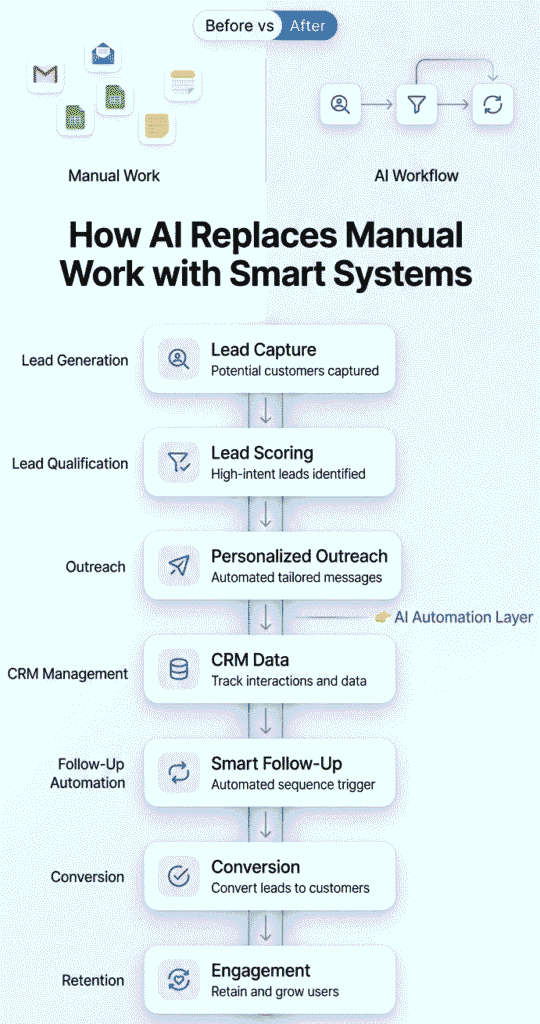
Lead Generation → Outreach → CRM → Follow-Up → Conversion → Retention
Each step is linked, and every action triggers the next automatically.
Step-by-Step Breakdown
Lead Generation
You capture leads through forms, tools, or databases.
Outreach
The system sends automated emails or messages to engage the lead.
CRM Management
All lead data and interactions are stored and updated automatically.
Follow-Ups
If there is no response, the system continues communication without manual effort.
Conversion
Qualified leads are converted into customers through structured interaction.
Retention
After conversion, follow-ups, support, and engagement continue to maintain the relationship.
How the System Actually Works
Instead of handling each step manually, the entire process runs as a connected flow:
User Action → Trigger → Automated Response → Data Update → Next Action
This ensures:
• No missed steps
• No manual tracking
• Consistent execution
• Continuous engagement
Practical Example
A user signs up on your website.
The system automatically:
• Sends a welcome email
• Adds the lead to your CRM
• Starts a follow-up sequence
• Notifies the sales team
• Tracks engagement
• Moves the lead through the pipeline
All of this happens without manual input.
Why This Matters
Most beginners focus on automating individual tasks.
But real growth happens when you connect those tasks into a system.
This approach:
• Removes confusion between tools and processes
• Helps you see the full customer journey
• Improves efficiency across all stages
• Makes your business scalable
What Changes for You
Instead of thinking:
“I need to send emails, track leads, and follow up”
You start thinking:
“I have a system that handles my entire workflow automatically”
Key Insight :
Individual automations save time.
Connected workflows build systems.
When you link everything together, your business moves from manual execution to a fully automated growth engine.
Time & Cost Savings with AI Workflows
Understanding AI is useful—but seeing how it saves time and cost makes it practical. This section helps you clearly see the difference between manual work and automated workflows in real business scenarios.
💠Time Saved Across Key Workflows
Manual processes often require repeated effort throughout the day. AI reduces or eliminates that effort by automating execution.
Typical improvements:
• Lead research → From hours to minutes
• Email follow-ups → From manual tracking to automatic sequences
• Data entry → From continuous updates to auto-sync
• Reporting → From hours of analysis to real-time dashboards
This allows you to recover several hours daily that can be used for growth-focused work.
💠Manual Effort vs Automated Systems
Manual work depends on consistency and memory. AI workflows rely on predefined rules and triggers.
Manual approach:
• Repetitive execution
• High involvement in every step
• Requires constant monitoring
AI-powered approach:
• Runs in the background
• Executes tasks automatically
• Requires minimal intervention
The result is a shift from “doing work” to “managing systems.”
💠Cost vs Hiring Comparison
As workload increases, manual systems require more people.
Manual scaling:
• Hiring for outreach, support, and data tasks
• Increased operational costs
• More coordination required
AI workflow scaling:
• One-time setup effort
• Handles multiple tasks simultaneously
• Scales without proportional cost increase
For small businesses, this makes growth more efficient and sustainable.
What This Means for Your Business
By combining time savings and reduced costs:
• You operate faster without increasing workload
• You reduce dependency on manual processes
• You improve consistency across all operations
• You create a scalable system for long-term growth
Key Insight :
AI workflows don’t just save time—they change how your business uses time and resources.
Instead of adding more effort or hiring early, you build systems that grow with you.
How AI Changes Everyday Work
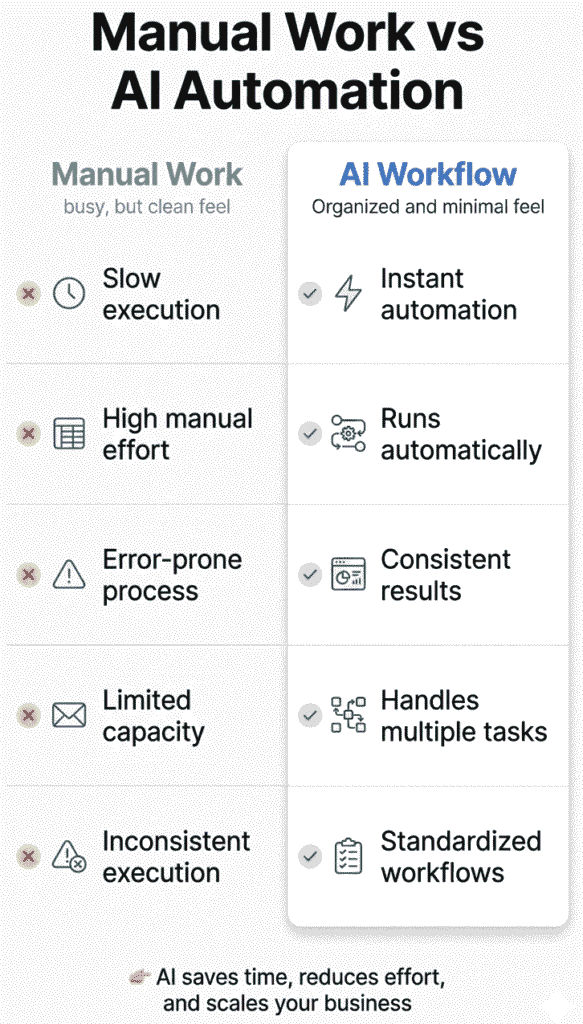
Instead of a basic comparison, it’s more useful to understand how your day-to-day work actually changes when you move from manual processes to AI-powered workflows.
🔹Daily Work Experience
Manual approach
You spend time switching between tasks—sending emails, updating data, checking responses, and managing follow-ups manually. Most of your time goes into execution.
AI-powered approach
Tasks run automatically in the background. You monitor systems, review results, and focus on improving performance instead of doing repetitive work.
🔹Time and Productivity
Manual approach
Work is limited by how much you can do in a day. Repetitive tasks slow down progress and reduce overall productivity.
AI-powered approach
Multiple tasks run simultaneously without extra effort. What used to take hours can now be completed in minutes or handled automatically.
🔹Consistency and Accuracy
Manual approach
Human errors, missed follow-ups, and inconsistent execution are common, especially as workload increases.
AI-powered approach
Processes run based on predefined rules, ensuring consistency. Every lead is followed up, every task is completed as planned.
🔹Ability to Scale
Manual approach
To grow, you need more time or more people. Scaling becomes expensive and difficult to manage.
AI-powered approach
You can handle more leads, customers, and tasks without increasing workload. Systems scale with minimal additional effort.
🔹Decision-Making
Manual approach
Decisions are often based on limited or delayed data.
AI-powered approach
Real-time insights and automated tracking help you make faster and more informed decisions.
What This Means for You
Instead of working more, you start working smarter.
You move from:
• Doing tasks → Managing systems
• Reacting → Automating
• Guessing → Using data
Key Insight :
The real shift is not just speed or efficiency—it’s how your work evolves.
AI workflows turn daily operations into structured systems, allowing you to focus on growth while automation handles execution.
How AI Workflows Actually Replace Manual Tasks
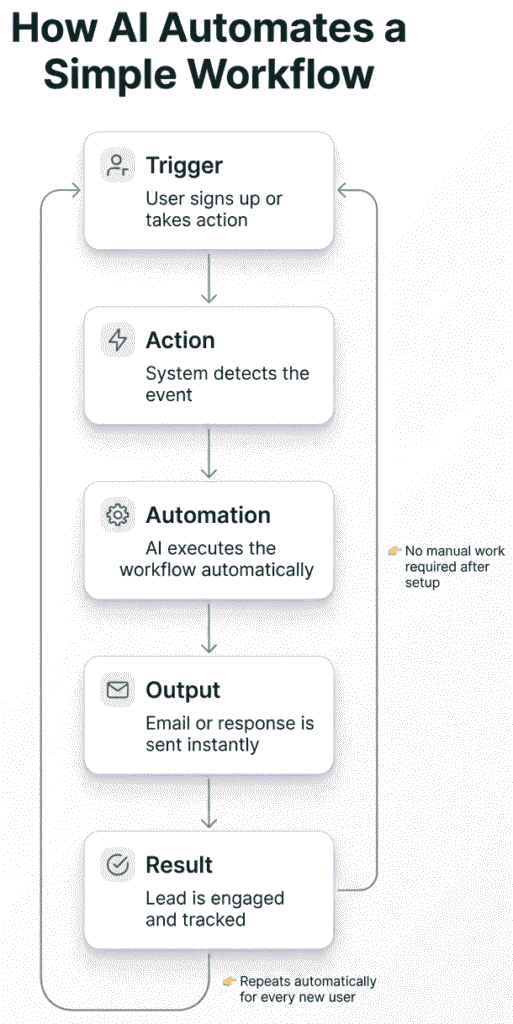
AI doesn’t just automate isolated tasks—it connects multiple steps into one continuous system that runs automatically based on triggers and user behavior.
This is the real shift from “doing tasks” to “running workflows.”
The Core Idea Behind AI Workflows
Instead of handling each action manually, AI workflows follow a structured sequence where one step automatically leads to the next.
This removes the need for constant human input and ensures the entire process runs smoothly in the background.
Simple Workflow Structure
Trigger → Action → Automation → Result
Each part plays a specific role:
• Trigger → Something happens (user action, time delay, or behavior)
• Action → The system responds automatically
• Automation → Multiple steps are executed without manual effort
• Result → Final outcome is achieved (lead, conversion, support resolution, etc.)
Practical Example
User signs up → Welcome email sent → Follow-up sequence triggered → Lead added to CRM → Engagement tracked automatically
In a manual system, each of these steps would require human action. With AI workflows, everything runs automatically once the first trigger happens.
Why This System Is Powerful
The real value of AI workflows is not in individual automation—it’s in how tasks are connected into a complete system.
This leads to:
• No missed steps in the process
• Consistent execution every time
• Faster response to user actions
• Reduced manual tracking and coordination
What Changes for Your Business
Instead of managing separate tasks, you manage complete systems:
Manual approach → “Send email, update sheet, follow up later”
AI workflow approach → “Set system once, let it run continuously”
This shift reduces workload while improving reliability and scalability.
Why This Matters for Beginners
For beginners, this is the most important concept to understand:
👉 AI is not about doing tasks faster
👉 It’s about building systems that run tasks automatically
Once you understand this, every workflow becomes easier to design and implement.
Key Insight :
AI workflows replace manual work by connecting actions into automated systems.
Instead of thinking in tasks, you start thinking in flows that run on their own and deliver consistent results.
Real-World Example
A business generates leads through a website form. In a traditional setup, this would require manual follow-ups, data entry, and coordination between teams.
With AI workflows, the entire process becomes automated and connected from start to finish.
What Happens Automatically
Once a user submits the form:
• The system instantly sends a personalized welcome email
• A follow-up sequence is scheduled based on user behavior
• Lead details are automatically stored and organized in the CRM
• The sales team receives an instant notification for high-intent leads
• Engagement is tracked automatically for future actions
How the Workflow Connects
Form Submission → Instant Email → Automated Follow-ups → CRM Update → Sales Notification → Activity Tracking
Each step triggers the next one without manual input, creating a fully connected system.
What Changes in Real Business Use
Instead of reacting manually to each lead, the system responds instantly and consistently.
This removes delays, reduces human effort, and ensures every lead is properly tracked and followed up.
Business Impact
• Faster response time (instant engagement instead of hours/days)
• Higher conversion rates (no missed follow-ups)
• Better lead tracking (everything stored in one system)
• Reduced manual workload for sales teams
Results
- Response time: Days → Seconds
- Conversions: +25% average
- Manual work: -80%
Key Insight :
The real power is not just automation—it’s end-to-end system execution.
Once the workflow is set, it continuously runs in the background, turning every new lead into a structured opportunity.
Benefits of Replacing Manual Work with AI (Real Business Impact)
AI doesn’t just improve efficiency—it directly impacts time, revenue, and business consistency. Here are the real-world benefits small businesses experience when they shift from manual work to AI-powered workflows.
✅️ Save Hours Every Day
Manual admin tasks like emails, data entry, and follow-ups can take 3–4 hours daily.
With AI automation, these tasks are handled instantly, giving you more time to focus on clients, strategy, and growth.
Even simple tasks like responding to leads can go from minutes to seconds.
✅️ Faster Customer Response (Higher Conversions)
Speed matters in business. Most leads are lost due to slow replies.
AI enables instant responses—often within seconds—ensuring you never miss an opportunity, even outside working hours.
This alone can significantly improve conversion rates.
✅️ Fewer Human Errors
Manual work often leads to mistakes like:
- Missed follow-ups
- Wrong data entries
- Forgotten leads
- Inconsistent communication
AI systems reduce these errors by following predefined workflows every time without deviation.
✅️ Consistent Customer Experience
Every lead receives the same level of follow-up and communication.
This builds trust and creates a more professional and reliable brand image, even for solo founders or small teams.
✅️ Better Revenue Performance
Faster response times and structured follow-ups directly improve conversions.
Businesses using automation often see higher deal closure rates because no lead is left unattended or forgotten.
✅️ Easy Scaling Without Hiring
Instead of hiring more staff to manage repetitive tasks, AI workflows allow you to scale operations with the same team.
This makes growth more efficient and cost-effective, especially for small businesses and solo founders.
Final Insight :
AI doesn’t just save time—it builds systems that help small businesses operate like larger companies.
The result is simple:
More speed, more consistency, and more growth without increasing workload.
What AI Cannot Replace
While AI tools are powerful, they are not designed to replace everything. Understanding their limitations is important for building realistic expectations and using them effectively in your business.
AI works best with structured, repetitive tasks—but there are areas where human input remains essential.
🔸Strategic Thinking
AI can analyze data and suggest patterns, but it cannot define long-term vision or business direction.
Planning growth strategies, positioning your brand, and making high-level decisions require human judgment and experience.
AI can support strategy—but it cannot replace the thinking behind it.
🔸Creativity and Original Ideas
AI can assist in generating content, but true creativity comes from human insight, experience, and unique perspectives.
Creating original ideas, storytelling, branding, and emotional connection with your audience still depend on human creativity.
AI helps speed up execution, but the core idea should come from you.
🔸Relationship Building
Building trust with customers, clients, or partners requires human interaction.
Conversations, understanding emotions, and creating meaningful connections go beyond automation.
AI can assist with communication, but strong relationships are built through genuine human engagement.
🔸Decision-Making
AI can provide insights and recommendations based on data, but final decisions should always be made by humans.
Business decisions often involve context, risk, and judgment that AI cannot fully understand.
Using AI as a support tool ensures better decisions—but not independent decision-making.
What This Means for Your Business
AI should be seen as a support system, not a replacement.
It handles execution, data processing, and repetitive work, allowing you to focus on areas that require thinking, creativity, and human connection.
Simple Way to Understand
AI = Execution and efficiency
Human = Strategy and direction
Final Insight :
The goal is not to replace human work—it’s to enhance it.
When you combine AI automation with human thinking, you create a balanced system that is both efficient and effective for long-term growth.
When Should You Start Using AI Tools?
Many businesses delay using AI because they think they need to be “ready” or more advanced. In reality, the best time to start is when manual work begins slowing you down.
AI tools are most effective when they solve real bottlenecks—not when they are added without purpose.
✔ When Repetitive Tasks Consume Your Time
If a large part of your day is spent on tasks like sending emails, updating data, or managing follow-ups, it’s a clear signal to start using AI.
These tasks don’t require deep thinking, yet they take up valuable time that could be used for growth-focused activities.
AI helps you reduce this workload by automating routine execution.
✔ When You’re Missing Leads or Follow-Ups
Missed follow-ups are one of the biggest reasons businesses lose opportunities.
If you often forget to reply, delay responses, or lose track of leads, AI workflows can ensure every interaction is handled on time.
This is especially important in sales and customer communication, where speed directly impacts conversions.
✔ When Your Processes Are Inconsistent
Manual systems often lead to inconsistent execution.
Some leads get followed up, others don’t. Some tasks are completed on time, others are delayed.
AI brings structure by ensuring every process runs the same way every time, improving reliability and performance.
✔ When You Want to Scale Without Hiring
As your business grows, manual work becomes harder to manage.
Instead of immediately hiring more people, AI allows you to handle more tasks, leads, and customers with the same resources.
This makes scaling more efficient and cost-effective.
✔ When You Start Repeating the Same Process
If you find yourself doing the same steps again and again—whether it’s outreach, reporting, or support—it’s a strong indicator that the process can be automated.
Repetition is one of the clearest signals that a workflow can be converted into an AI system.
✔ When Speed Starts Affecting Results
In many cases, delays in response or execution lead to lost opportunities.
If your response time is slow or your processes take too long, AI can significantly improve speed by automating actions instantly.
Simple Rule to Decide
If a task is:
• Repetitive
• Time-consuming
• Rule-based
• Done frequently
👉 It is a strong candidate for AI automation
What This Means for You
You don’t need a perfect system to start using AI.
Start when you notice inefficiencies. Even automating one small process can create immediate improvements in time, consistency, and results.
Final Insight :
The best time to start using AI tools is not later—it’s when manual work starts limiting your growth.
By identifying bottlenecks early and automating them, you build systems that scale with your business instead of slowing it down.
Who Should Use AI Workflows?
AI workflows are not just for large companies or tech teams. They are especially useful for individuals and small teams who want to save time, stay organized, and scale without complexity.
This section helps you quickly identify if this approach fits your current situation.
👤 Freelancers
If you handle multiple clients and tasks alone, AI workflows can reduce your daily workload significantly.
You can automate:
• Lead follow-ups
• Client communication
• Scheduling and reminders
• Basic reporting
Why it matters:
You spend less time on repetitive tasks and more time on delivering quality work and growing your income.
🏢 Small Businesses
Small businesses often struggle with limited time and resources. AI helps create systems without needing a large team.
You can automate:
• Lead generation and outreach
• Customer support responses
• Data tracking and organization
Why it matters:
You improve efficiency and consistency without increasing costs or hiring early.
📈 Agencies
Agencies manage multiple clients, campaigns, and workflows at the same time. Manual processes quickly become difficult to scale.
You can automate:
• Client onboarding workflows
• Campaign execution and follow-ups
• Reporting and performance tracking
Why it matters:
You can handle more clients with the same team while maintaining quality and speed.
💻 SaaS Beginners
If you’re building or promoting a product, AI workflows help manage user engagement and growth.
You can automate:
• User onboarding emails
• Product updates and notifications
• Lead nurturing sequences
Why it matters:
You create a structured system that improves user experience and retention from the beginning.
Simple Self-Check
This approach is right for you if:
• You repeat the same tasks regularly
• You struggle to manage leads or follow-ups
• Your processes feel unorganized
• You want to grow without increasing workload
Key Takeaway :
AI workflows are not about business size—they’re about solving repetitive problems.
If your work involves repeated tasks and growing complexity, this approach can help you build systems that scale with you.
Beginner Execution Plan (Start Using AI in 7 Days)
Getting started with AI doesn’t require a complex setup. The key is to begin with one simple workflow and build gradually. This 7-day plan is designed to help you move from manual work to a basic automated system without feeling overwhelmed.
Day 1–2: Set Up Lead Capture
Start by creating a simple way to collect leads.
• Add a basic form on your website or landing page
• Define what information you need (name, email, business type)
• Ensure all leads are stored in one place
Goal: Create a consistent entry point for potential customers
Day 3–4: Set Up Outreach System
Once leads are coming in, focus on communication.
• Create a simple email sequence (welcome + follow-up)
• Add personalization (name, basic context)
• Set timing between emails
Goal: Ensure every lead receives a response without manual effort
Day 5–6: Add Follow-Ups & CRM Tracking
Now connect your system for better tracking.
• Store leads in a CRM
• Track interactions automatically
• Set reminders or automated follow-ups
Goal: Organize your pipeline and avoid missed opportunities
Day 7: Review and Optimize
After your system is running, take time to review.
• Check response rates and engagement
• Identify what’s working and what needs improvement
• Make small adjustments to messages or timing
Goal: Improve performance without adding complexity
What You Achieve in 7 Days
By the end of this plan, you will have:
• A working lead capture system
• Automated email outreach
• Structured follow-up process
• Basic CRM tracking
This is your first complete AI workflow.
Key Principle
Start small and build step by step.
Trying to automate everything at once creates confusion. Focusing on one simple system makes implementation easier and more effective.
Final Insight :
Execution matters more than information.
This plan helps you move from understanding AI workflows to actually using them—one step at a time.
AI Tools by Workflow (Beginner Stack After Your 7-Day Setup)
Once you complete your initial setup, the next step is choosing the right tools to support and scale your workflow.
At this stage, your goal is not to add complexity—but to strengthen the system you already built using the right tools for each step.
🔹 Lead Generation → Apollo.io
This is where your workflow starts. After setting up lead capture, you can use Apollo to consistently find and filter high-quality prospects.
What it helps you do:
• Build targeted lead lists based on industry, role, and company size
• Access verified contact details for outreach
• Reduce manual research time significantly
Why it matters:
You move from random lead collection to a predictable and scalable lead pipeline.
👉 To understand how this tool works in detail, explore this complete guide on Apollo.io for lead generation and prospecting automation.
🔹 Outreach & Follow-Ups → Reply.io
After capturing leads, communication becomes your focus. Reply helps you automate outreach and follow-ups without manual effort.
What it helps you do:
• Send personalized email sequences automatically
• Schedule follow-ups based on time or user actions
• Track engagement like opens, clicks, and replies
Why it matters:
It ensures consistent communication, which is critical for improving response rates and conversions.
👉 If you want to set up automated outreach step by step, check this detailed guide on Reply.io for email automation and follow-up sequences.
🔹 CRM & Pipeline Management → HubSpot
As your outreach runs, you need a system to organize and track everything. HubSpot acts as your central dashboard.
What it helps you do:
• Store and manage all lead data in one place
• Track interactions and deal stages automatically
• Monitor your pipeline and progress clearly
Why it matters:
You gain full visibility and control over your sales process without relying on spreadsheets.
👉 To learn how to organize and manage your entire sales pipeline, read this beginner-friendly guide on HubSpot CRM setup and lead management system.
How These Tools Fit Into Your Workflow
Now, instead of separate tools, you have a connected system:
Lead sourced → Outreach automated → Data stored → Progress tracked
Each step supports the next, turning your setup into a continuous workflow rather than isolated tasks.
✅ Why This Stack Works After Your 7-Day Plan
At this point, you’ve already:
• Set up lead capture
• Created outreach sequences
• Added basic tracking
These tools now help you:
• Scale what you’ve built
• Improve efficiency
• Reduce manual effort further
This makes your system more reliable and easier to manage as you grow.
When You Should Expand Further
Only after this system is stable, consider adding:
• Customer support automation (chatbots, live chat)
• Marketing automation (campaigns, social media scheduling)
• Advanced analytics and reporting tools
Avoid adding too many tools early—focus on making this core system work first.
👉 If you’re choosing between outreach tools, refer to your detailed comparison of Apollo vs Reply to pick the right fit for your workflow.
Final Insight :
Tools don’t create results—systems do.
This stack simply strengthens the workflow you’ve already built, helping you move from a basic setup to a more scalable and efficient process.
Conclusion
AI tools are no longer just productivity enhancers—they are becoming the foundation of how modern businesses operate.
The real shift is simple but powerful:
from handling tasks manually to building systems that run automatically.
Businesses that adopt this early gain a clear advantage—they respond faster, operate more efficiently, and scale without increasing workload.
You don’t need to automate everything at once. Start with one process, improve it, and gradually build connected workflows that support your growth.
In the end, it’s not about using AI tools—it’s about creating smarter systems that help you work better, not harder.
Frequently Asked Questions (FAQs)
-
What are AI tools for automating manual tasks?
AI tools are software applications that automate repetitive business tasks like email follow-ups, lead tracking, customer support, and reporting. They use workflows, triggers, and data to execute tasks automatically without manual effort.
-
How do AI tools replace manual work in business?
AI tools replace manual work by automating routine processes. For example, instead of sending emails manually, AI can trigger and send personalized sequences automatically based on user actions, saving time and improving consistency.
-
Which tasks can be automated using AI?
Common tasks that can be automated include:
• Lead generation and prospecting
• Email outreach and follow-ups
• CRM data management
• Customer support responses
• Content creation and publishing
• Reporting and analytics -
Are AI tools suitable for small businesses and beginners?
Yes, AI tools are especially useful for small businesses and beginners. They help reduce workload, improve efficiency, and allow you to scale operations without hiring more staff or having technical expertise.
-
Will AI tools replace jobs completely?
No, AI tools do not replace jobs—they replace repetitive tasks. Human roles like strategy, creativity, relationship building, and decision-making still require human input.
-
How much time can AI save in daily work?
AI can save several hours per day depending on the workflow. Tasks like sending emails, managing data, and responding to queries can be reduced from hours to minutes or automated completely.
-
What is an AI workflow?
An AI workflow is a system where multiple tasks are connected and automated. For example, when a lead signs up, the system automatically sends emails, updates CRM data, and triggers follow-ups without manual input.
-
When should I start using AI tools in my business?
You should start when:
• You spend too much time on repetitive tasks
• You miss follow-ups or leads
• Your processes are inconsistent
• You want to scale without hiring -
Do I need technical skills to use AI tools?
No, most modern AI tools are beginner-friendly and require little to no coding knowledge. Many tools offer simple interfaces and pre-built workflows to help you get started easily.
-
What are the best AI tools to start with?
A simple starter stack includes:
• Lead generation tools (like Apollo)
• Outreach tools (like Reply)
• CRM tools (like HubSpot)
These tools cover the core workflow from lead generation to conversion. -
Can AI improve conversion rates?
Yes, AI can improve conversions by ensuring faster responses, consistent follow-ups, and better lead tracking. These factors directly impact how many leads turn into customers.
-
Is AI automation expensive for small businesses?
Many AI tools offer free plans or affordable pricing. Compared to hiring additional staff, AI automation is often more cost-effective and scalable.