
Table of Contents
Reply.io Review (2026): Powerful Cold Outreach & Sales Automation Platform

Automate. Connect. Convert
In today’s competitive B2B landscape, relying on manual outreach is no longer sustainable. Sales teams and business owners need faster, smarter ways to connect with prospects—and that’s exactly where Reply.io comes in.
Reply.io is a powerful sales engagement and cold outreach automation platform designed to help you streamline prospecting, automate follow-ups, and scale personalized communication across multiple channels.
Whether you’re:
- A solo founder building your pipeline
- A marketer running outbound campaigns
- A sales professional aiming to close more deals
- Or a B2B agency managing client outreach
👉 Mastering cold email and multichannel outreach can be the difference between inconsistent results and predictable growth.
🚀 What You’ll Learn in This Reply.io Review
This in-depth guide is designed to give you real, actionable insights—not just surface-level features.
By the end of this article, you’ll clearly understand:
- What Reply.io is and how it works
- Key features and automation capabilities
- Real-world use cases and workflows
- Pricing, pros & cons
- Best alternatives and comparisons
👉 Most importantly, you’ll know whether Reply.io is the right tool for your outreach strategy in 2026.
💡 Why This Tool Matters in 2026
Cold outreach has evolved.
It’s no longer just about sending emails—it’s about:
- Personalization at scale
- Multi-channel communication (email, LinkedIn, calls)
- Automation without losing the human touch
👉 Tools like Reply.io help you build a repeatable outreach system that saves time, improves response rates, and drives consistent results.
🎯 Final Thought Before You Dive In
If your current outreach process feels:
- Time-consuming
- Inconsistent
- Hard to scale
👉 Then this review will show you how to turn it into a structured, automated growth engine.
What is Reply.io?
Reply.io is a powerful sales engagement and outreach automation platform designed to help sales teams, SDRs (Sales Development Representatives), and marketers connect with prospects more efficiently across multiple channels.
It enables you to automate and scale personalized outreach through cold emails, LinkedIn messages, SMS, and calls—all from a single dashboard.
Key Features Summary
- Multi-Channel Outreach Automation
Build smart sequences that combine email, LinkedIn, SMS, and calls to increase response rates and engagement. - AI-Powered Personalization
Use built-in AI to craft highly personalized messages at scale—helping you stand out in crowded inboxes. - Automated Email Sequences
Create and schedule cold email campaigns with follow-ups, ensuring no lead slips through the cracks. - Lead Management & CRM Integration
Seamlessly manage prospects and sync data with popular CRM tools for a smooth workflow. - Advanced Analytics & Optimization
Track open rates, replies, and conversions to continuously improve your outreach performance.
Why Use Reply.io?
Instead of manually reaching out to each prospect, Reply.io helps you:
- Save hours of repetitive work
- Scale outreach without losing personalization
- Improve response and conversion rates
- Manage all communication channels in one place
In Simple Terms
Reply.io helps you reach more prospects, build meaningful conversations, and close deals faster—without the usual manual effort.
Editor’s Tip 💡
Think of Reply.io as an all-in-one sales outreach dashboard that combines the power of email, LinkedIn, task management, and AI-driven suggestions into a single platform.
It helps you send cold emails, automate follow-ups, and manage conversations effortlessly—so you never miss an opportunity to engage with potential clients.
Who Should Use Reply.io?
Reply.io is ideal for:
- Sales professionals and SDRs handling high-volume outreach
- Freelancers looking to land more clients through cold emailing
- B2B marketers running lead generation campaigns
- Agencies managing outreach for multiple clients
Why It Matters
If you’re reaching out to new leads regularly, Reply.io helps you:
- Stay organized with all conversations in one place
- Automate repetitive follow-ups
- Increase reply rates with AI-powered suggestions
- Scale outreach without losing personalization
In short: It’s a smart, time-saving tool that turns manual outreach into a scalable, automated lead generation system.
Key Features of Reply.io
Reply.io is built to simplify and scale modern sales outreach. Below are its most powerful features—explained with real-world context so beginners can understand exactly how to use them.
1. Cold Email Sequences (Automated Outreach Engine)
This is the core feature of Reply.io.
Instead of sending emails manually one by one (like in Gmail), you can:
- Write one email template
- Add a list of prospects
- Automatically send emails at scale
- Set smart follow-ups based on behavior
Example Workflow:
- Day 1 → Send initial cold email
- Day 3 → If no reply → send follow-up #1
- Day 7 → Send another follow-up with a different angle
💡 Real Value:
You stay consistent with follow-ups (which is where most replies actually happen) without doing manual work.
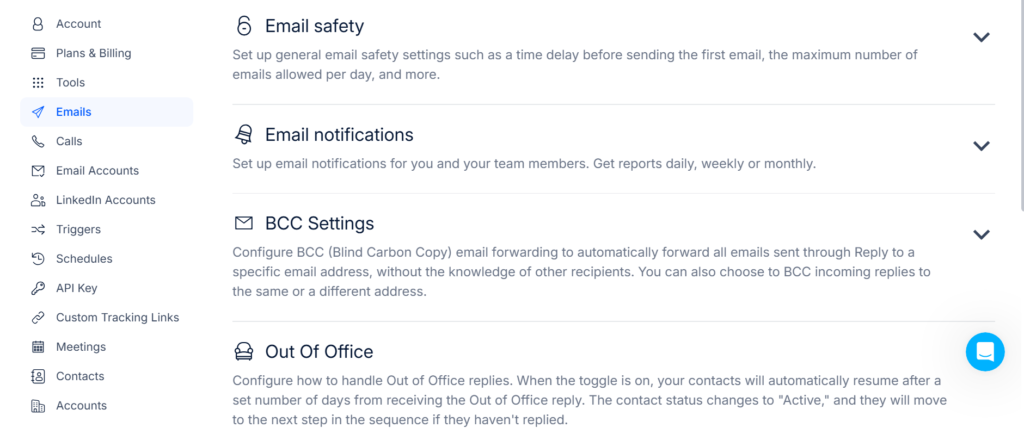
2. Multichannel Outreach (Be Everywhere Your Leads Are)
Modern outreach isn’t just email—and Reply.io knows that.
You can combine multiple touchpoints in a single sequence:
- 💬 LinkedIn messages
- 📞 Call reminders/tasks
- 📱 SMS
Example Flow:
- Day 1 → Send email
- Day 2 → View LinkedIn profile
- Day 3 → Send LinkedIn message
- Day 5 → Follow-up email
💡 Real Value:
You increase visibility and trust by reaching prospects across platforms—not just their inbox.
3. Email Finder & Verification (Clean Lead Generation)
Forget buying outdated or risky email lists.
With Reply.io, you can:
- Find prospects based on:
- Job title
- Company
- Industry
- Location
- Verify emails instantly to avoid bounce rates
💡 Real Value:
- Protects your sender reputation
- Improves deliverability
- Saves money on bad leads
4. AI-Powered Suggestions (Smart Optimization Engine)
This is where automation meets intelligence.
Reply.io uses AI to:
- Suggest better subject lines
- Optimize email content for replies
- Recommend best send times
- Provide performance tips
💡 Think of it as Gmail + AI writing assistant + optimization coach in one.
💡 Real Value:
Even beginners can write high-converting outreach messages without copywriting experience.
5. Reporting & Analytics (Performance Tracking Dashboard)
You can’t improve what you don’t measure—and this feature solves that.
Track key outreach metrics like:
- Open rates
- Reply rates
- Click-through rates
- Best-performing messages
💡 Real Value:
It’s like having Google Analytics—but for your outreach campaigns, helping you refine and scale what works.
6. Bonus Feature : Reply.io Chrome Extension (Find & Add Leads Directly from LinkedIn)
One of the most powerful features of Reply.io is its Chrome extension, which allows you to find, capture, and add leads directly from platforms like LinkedIn—without switching tabs.
🚀 What Does the Chrome Extension Do?
With the Reply.io Chrome Extension, you can:
- Extract prospect data from LinkedIn profiles
- Add leads instantly to your outreach campaigns
- Capture key details like name, company, and role
- Build targeted lists in real time
👉 This eliminates the need for manual data entry or copying information into spreadsheets.
🔄 How It Fits into Your Workflow
Here’s a simple real-world flow:
- Search for prospects on LinkedIn
- Use the extension to capture lead details
- Add them directly to Reply.io
- Launch your outreach sequence
👉 You go from lead discovery → outreach in minutes.
💡 Why This Feature Matters
Without the extension:
- You manually copy data
- You switch between tabs
- You waste time organizing leads
With the extension:
- Everything happens in one flow
- Faster prospecting
- Better productivity
💡 It’s especially useful for freelancers, SDRs, and agencies doing daily outreach.
⚡ Pro Tip for Better Results
Don’t just collect leads—filter them smartly:
- Target specific roles (Founder, Marketing Head, etc.)
- Focus on relevant industries
- Personalize your outreach based on profile insights
👉 Better targeting = higher reply rates
🧠 Quick Insight
The Reply.io Chrome Extension turns Reply.io from just an outreach tool into a complete lead generation + outreach system.
🔗 Want a Full Walkthrough?
👉 For step-by-step setup, real examples, and advanced tips, check this Reply.io Chrome extension guide.
So, What Does This Mean for You?
Without Reply.io:
- You send emails manually
- You forget follow-ups
- You track leads in messy spreadsheets
- You lose potential deals
With it:
- ✅ Outreach is automated
- ✅ Follow-ups happen on time
- ✅ Leads are organized
- ✅ Campaigns improve with data
👉 Bottom line: It turns a slow, manual process into a scalable, predictable lead generation system.
Real-Life Use Case: How Freelancers & Small Businesses Use Reply.io
Imagine you’re a freelancer or small business owner offering marketing services and trying to get new clients consistently.
Instead of manually reaching out to each prospect, Reply.io lets you automate and manage your entire outreach process in one place.
Quick Workflow Overview
Here’s how a typical outreach campaign works:
- Upload Your Prospect List
Import a list of business owners or leads (via spreadsheet or CRM). - Create One High-Converting Email
Write a personalized cold email introducing your service. - Set Automated Follow-Ups
Schedule 2–3 follow-up emails that are sent automatically if there’s no response. - Add Multichannel Touchpoints
Include a LinkedIn message or profile visit between emails to increase visibility. - Get Real-Time Reply Alerts
Receive instant notifications when someone opens or replies to your message. - Track Everything in One Dashboard
Monitor performance, conversations, and lead status without using spreadsheets.
What You Achieve
By using Reply.io:
- You reach more potential clients in less time
- You never forget to follow up
- You maintain consistent communication
- You improve your chances of closing deals
In Simple Terms
Reply.io helps you turn manual client hunting into an automated lead generation system—so you can focus more on closing deals instead of chasing leads.
🧩 Reply.io Integrations: Tools You Can Connect
One of the biggest advantages of Reply.io is its ability to connect with other tools you already use.
Instead of working in isolation, you can build a complete outreach system by integrating CRM, lead generation, and automation tools.
🔗 CRM Integrations (Manage Leads & Deals)
You can connect Reply.io with popular CRM platforms like:
- HubSpot
- Salesforce
What this helps you do:
- Sync leads automatically
- Track conversations in one place
- Manage your sales pipeline efficiently
💡 No more manual data entry—everything stays organized.
🔍 Lead Generation Tools (Find Better Prospects)
To improve targeting, you can combine Reply.io with tools like:
- Apollo.io
Benefits:
- Find high-quality leads
- Export verified contact data
- Import directly into your campaigns
💡 Better leads = higher reply rates
⚙️ Automation with Zapier
Zapier allows you to connect Reply.io with hundreds of other apps.
Example automations:
- Add new leads from a form → into Reply.io
- Send Slack notification → when someone replies
- Sync campaign data → to Google Sheets
💡 This turns your outreach into a fully automated workflow
🧠 Why Integrations Matter
Without integrations:
- You switch between tools
- You manually update data
- You lose efficiency
With integrations:
👉 Everything works together as one system
🔄 Example Workflow (Real Use Case)
- Find leads using Apollo.io
- Import into Reply.io
- Run outreach campaigns
- Sync replies to HubSpot
- Automate tasks using Zapier
👉 This creates a complete lead generation → outreach → conversion pipeline
💡 In Simple Terms
Reply.io becomes much more powerful when connected with other tools.
👉 It’s not just a tool—it’s part of a full sales ecosystem
Step-by-Step Guide: How to Use Reply.io (With Real Campaign Setup)
Getting started with Reply.io is easier than it looks. This guide walks you through both the strategy and the exact execution, so you can launch your first outreach campaign with confidence.
Step 1: Build & Upload Your Lead List
Start by preparing a simple spreadsheet (Google Sheets or Excel).
Recommended Columns:
- First Name
- Email Address
- Company Name
- Website
- Job Title
- Personalization field (optional but powerful)
👉 Upload this file into Reply.io as your prospect list.
Where to Get Leads:
- LinkedIn (manual search or Sales Navigator)
- Business directories
- Tools like Apollo.io
💡 Pro Tip:
Clean, targeted data = higher open and reply rates.
Step 2: Write Your First Cold Email (Proven Framework + Template)
Instead of guessing what to write, follow this simple structure:
🧠 Email Framework:
- Line 1 → Personalized opener
- Line 2 → Problem you solve
- Line 3 → Simple offer
- Line 4 → Soft CTA
📩 Example Template:
Subject: Quick idea for {{Company}}
Hi {{FirstName}},
I came across {{Company}} and really liked what you’re doing in the [industry] space.
I help small businesses generate more leads using simple digital strategies (SEO, email outreach, and automation).
Would you be open to a quick call next week? Even if it’s not a fit, I can share a quick audit of your website.
Best,
[Your Name]
✅ Use personalization tags like:
- {{FirstName}}
- {{Company}}
💡 Why this works:
It feels natural, relevant, and not overly sales-driven.
Step 3: Set Smart Follow-Ups (Where Most Replies Come From)
This is the most important step most beginners ignore.
Inside Reply.io, set automated follow-ups:
- Day 3:
“Just checking in—wanted to make sure this didn’t get lost in your inbox.” - Day 6:
“Happy to share a quick suggestion for your site if you’re open—just trying to help.”
💡 Reality Check:
70–80% of replies come from follow-ups—not the first email.
Step 4: Add Multichannel Touchpoints (Boost Visibility)
To improve response rates, don’t rely on email alone.
Add simple actions like:
- Visit LinkedIn profile
- Like a recent post
- Send a connection request
Example:
“Hi {{FirstName}}, really like what you’re building at {{Company}}—would love to connect!”
💡 This builds familiarity before your next follow-up email.
Step 5: Launch Your Campaign
Once your sequence is ready:
👉 Click “Launch”
From here, Reply.io handles:
- Email sending
- Follow-ups
- Task reminders
👉 Your outreach now runs on autopilot.
Step 6: Monitor Replies & Take Action
As responses come in:
- Interested → Reply quickly and book a call
- Not now → Keep them in your pipeline
- No response → Let automation continue
💡 Speed matters—faster replies = higher conversion chances.
Step 7: Optimize Using Data (Improve Results Over Time)
Track key metrics inside Reply.io:
- Open rates
- Reply rates
- Bounce rates
What to Fix:
- Low opens → Improve subject line
- Low replies → Improve message clarity
- High bounce → Fix email quality
💡 Small improvements = big results over time.
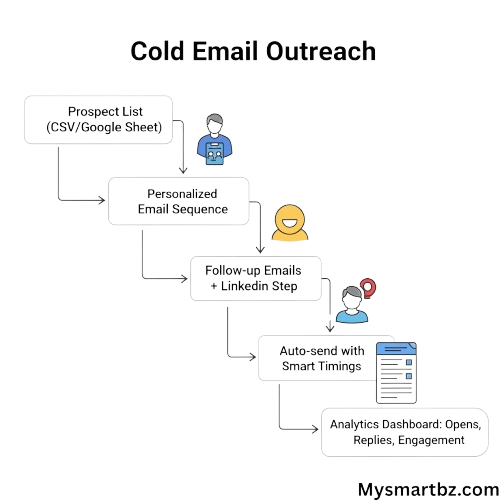
Simple Campaign Flow
Upload Leads → Write Email → Add Follow-Ups → Add LinkedIn Step → Launch → Track & Optimize
📌 Reply.io Quick Setup Checklist (Beginner Friendly)
If you want a quick recap before launching your first campaign in Reply.io, use this simple checklist.
👉 It ensures you don’t miss any critical steps.
✅ Pre-Launch Checklist
- ✅ Create your Reply.io account
- ✅ Prepare and upload your lead list
- ✅ Write your first cold email (with personalization)
- ✅ Set up 2–3 follow-up emails
- ✅ Add LinkedIn or multichannel steps (optional but recommended)
- ✅ Review your email for clarity and tone
- ✅ Check deliverability setup (SPF, DKIM, warm-up)
- ✅ Set safe daily sending limits
- ✅ Launch your campaign
🚀 Quick Tip for Better Results
Before hitting launch, ask yourself:
👉 “Would I reply to this email if I received it?”
If the answer is yes—you’re ready to go.
🧠 Why This Checklist Matters
Using Reply.io is simple, but missing small steps can impact results.
This checklist helps you:
- Avoid beginner mistakes
- Launch faster with confidence
- Improve response rates from day one
Is Reply.io Easy to Use for Beginners?
If you can already:
- Send an email using Gmail
- Use a spreadsheet
- Write a basic LinkedIn message
👉 Then you can use Reply.io without any technical background.
Why This Works
Reply.io doesn’t require you to learn something completely new.
👉 It simply combines email, LinkedIn, and task management into one automated system—so you can scale what you already know.
Final Insight
By following this process in Reply.io, you’re not just sending emails—
👉 You’re building a repeatable, scalable client acquisition system that works even when you’re not actively sending messages.
Email Deliverability & Setup: How to Avoid Spam in Reply.io
Before running campaigns, you need to ensure your emails reach the inbox—not spam.
Even the best outreach fails without proper setup.
Step 1: Warm Up Your Email Account
If your email is new:
- Start with 10–20 emails/day
- Gradually increase over 1–2 weeks
💡 This builds trust with Gmail and Outlook.
Step 2: Set Up SPF, DKIM & DMARC
These are email authentication settings:
- SPF → verifies sender
- DKIM → adds secure signature
- DMARC → protects your domain
👉 Most platforms (including Reply.io) guide you through setup.
💡 Without this → high chance of spam.
Step 3: Use a Separate Outreach Domain
Avoid using your main business email.
Example:
- Main → yourbrand.com
- Outreach → yourbrand.co
💡 Protects your primary domain reputation.
Step 4: Keep Sending Volume Safe
Recommended limits:
- New accounts → 20–50 emails/day
- Warm accounts → 50–150 emails/day
💡 Sending too fast = spam risk.
Step 5: Avoid Spam Triggers
❌ Avoid:
- “Free money”
- “Guaranteed results”
- “Act now”
❌ Don’t send identical emails to everyone
✅ Always personalize:
- {{FirstName}}
- {{Company}}
Step 6: Focus on Engagement (Very Important)
Email providers track:
- Opens
- Replies
👉 More engagement = better deliverability
💡 This is why follow-ups + personalization matter.
Quick Checklist Before Launch
- ✅ Email warmed up
- ✅ SPF, DKIM, DMARC configured
- ✅ Sending limits set
- ✅ Emails personalized
- ✅ Follow-ups added
Final Insight
Deliverability is the foundation of cold outreach success.
👉 Inbox = results
👉 Spam = failure
Want Full Setup Guide?
For a complete setup tutorial, read this cold email deliverability guide (SPF, DKIM, DMARC explained).
What Results Can You Expect from Reply.io?
Before you start using Reply.io, it’s important to understand what kind of results are realistic—so you don’t have false expectations.
📊 Typical Outreach Performance Benchmarks
If your setup is done correctly (good leads + proper messaging), here’s what you can expect:
- Open Rate: 40% – 70%
- Reply Rate: 5% – 20%
- Positive Replies (Interested Leads): 1% – 5%
💡 These numbers can vary based on your industry, targeting, and email quality.
⏱️ How Long Does It Take to See Results?
- First opens: Within hours of sending
- Replies: Usually within 1–3 days
- Consistent results: 1–2 weeks of running campaigns
💡 Cold outreach is not instant—but it becomes predictable over time.
🧠 What Actually Impacts Your Results?
Your success with Reply.io depends on 3 key factors:
1. Lead Quality
- Targeting the right audience = higher replies
- Random lists = poor performance
2. Message Quality
- Personalized emails perform better
- Clear, simple offers increase response rates
3. Deliverability Setup
- Emails landing in inbox = results
- Emails going to spam = zero results
👉 This is why proper setup (SPF, DKIM, warm-up) is critical.
⚠️ Honest Reality Check
Not every campaign will perform perfectly.
You may see:
- Low replies initially
- Need to test different messages
- Adjust targeting
👉 This is normal.
💡 Outreach improves with testing and optimization, not perfection.
📈 What Success Looks Like (Real Scenario)
Example:
- Sent: 200 emails
- Opens: 100 (50%)
- Replies: 15 (7.5%)
- Interested leads: 3–5
👉 That’s enough to book calls and close clients.
💡 In Simple Terms
With Reply.io:
- You won’t get 100% replies
- But you will get consistent opportunities
👉 And that’s what matters in outbound sales.
⏱️ How Much Time Can Reply.io Save You?
One of the biggest advantages of using Reply.io is how much time it saves on daily outreach tasks.
Instead of spending hours manually sending emails and tracking follow-ups, you can automate the entire process.
🆚 Manual Outreach vs Automated Outreach
Let’s break it down:
❌ Manual Outreach (Without Automation)
- Finding leads
- Writing and sending emails one by one
- Remembering who to follow up with
- Tracking replies in spreadsheets
⏱️ Time spent: 2–3 hours per day
✅ With Reply.io
- Upload leads once
- Create one email sequence
- Set automated follow-ups
- Track everything in one dashboard
⏱️ Time spent: 20–30 minutes per day
📊 What This Means for Your Business
By using Reply.io:
- You save 1.5 to 2.5 hours daily
- You can reach 5–10x more prospects
- You eliminate repetitive manual work
💡 Over a month, that’s 40–60+ hours saved
💰 ROI Perspective (Why It Matters)
Time saved = more time to:
- Close deals
- Talk to qualified leads
- Improve your strategy
👉 Instead of doing repetitive tasks, you focus on high-value activities
🧠 In Simple Terms
Without Reply.io:
👉 You work harder
With Reply.io:
👉 You work smarter and faster
🔄 Example Campaign Results Using Reply.io (Simple Case Study)
To understand how Reply.io performs in real-world scenarios, let’s look at a simple outreach campaign example.
This is a realistic simulation based on typical cold email performance benchmarks.
📊 Campaign Overview
- Target Audience: Small business owners (marketing services niche)
- Total Emails Sent: 200
- Campaign Duration: 7–10 days
- Channels Used: Email + LinkedIn touchpoints
📈 Results Breakdown
- Open Rate: 55% → ~110 people opened the email
- Replies Received: 18 → ~9% reply rate
- Interested Leads: 5–7 prospects
- Calls Booked: 4–5 meetings
🧠 What Made This Campaign Work?
✅ Targeted Lead List
Focused on a specific audience → better relevance
✅ Simple, Personalized Messaging
Used {{FirstName}} + company context
✅ Follow-Up Sequence
2–3 follow-ups captured most replies
✅ Multichannel Touchpoints
LinkedIn connection increased familiarity
💡 What This Means for You
Even with a small campaign:
👉 200 emails → 4–5 real sales conversations
That’s enough to:
- Close clients
- Generate revenue
- Validate your outreach strategy
⚠️ Important Note (Honest Insight)
Results are not guaranteed.
Your performance depends on:
- Lead quality
- Messaging
- Deliverability setup
👉 But with proper setup, these results are achievable and repeatable
🎯 In Simple Terms
With Reply.io:
👉 You don’t need thousands of emails
👉 You just need the right system and consistency
⚠️ Common Mistakes Beginners Make with Reply.io (And How to Avoid Them)
Even with a powerful tool like Reply.io, many beginners struggle—not because the tool is complex, but because of avoidable mistakes.
Understanding these early can save you time, protect your domain, and significantly improve your results.
🚫 1. Sending Too Many Emails Too Fast
One of the biggest mistakes is launching campaigns with high volume right away.
What happens:
- Emails land in spam
- Domain reputation gets damaged
- Campaign performance drops
What to do instead:
- Start with 20–50 emails/day
- Gradually increase as your account warms up
💡 Rule: Slow start = better long-term deliverability
🚫 2. Skipping Follow-Ups (Missing Most Replies)
Many beginners send one email and stop.
Reality:
- 70–80% of replies come from follow-ups
What to do instead:
- Add at least 2–3 follow-ups
- Space them over a few days
💡 Follow-ups are not spam—they are reminders.
🚫 3. Poor Personalization
Sending generic emails reduces trust and response rates.
Common mistake:
“Hi there, we help businesses grow…”
What to do instead:
- Use {{FirstName}} and {{Company}}
- Reference something specific about the prospect
💡 Personalized emails feel human—not automated.
🚫 4. Using Low-Quality or Irrelevant Lead Lists
Bad targeting = poor results.
What happens:
- Low open rates
- Low replies
- High bounce rates
What to do instead:
- Target specific roles, industries, or problems
- Use verified data sources
- Clean your list before uploading
💡 Right audience > bigger list
🚫 5. Ignoring Email Deliverability Setup
Many users skip technical setup and jump straight to sending emails.
What happens:
- Emails go to spam
- Campaign fails even with good messaging
What to do instead:
- Set up SPF, DKIM, DMARC
- Warm up your email account
- Use a separate outreach domain
👉 This is the foundation of successful outreach.
🚫 6. Not Tracking or Optimizing Campaigns
Some users launch campaigns and never review performance.
What happens:
- Missed improvement opportunities
- Repeating the same mistakes
What to do instead:
- Monitor open rates, replies, and bounce rates
- Adjust subject lines and messaging
💡 Outreach success comes from testing and improving.
🧠 Quick Summary
Most failures with Reply.io are not due to the tool—but due to how it’s used.
Avoid these mistakes, and you’ll:
- Improve deliverability
- Increase reply rates
- Get better results faster
🚀 Reply.io Best Practices: How to Get Better Results from Your Outreach
Using Reply.io effectively isn’t just about sending emails—it’s about doing it the right way.
These proven best practices will help you increase open rates, get more replies, and convert leads faster.
🎯 1. Focus on Quality Over Quantity
Sending more emails doesn’t guarantee better results.
Do this:
- Target a specific audience
- Send fewer, highly relevant emails
💡 100 targeted emails > 1,000 random emails
✍️ 2. Keep Your Emails Short & Human
Long, sales-heavy emails don’t work in cold outreach.
Best approach:
- 2–4 short paragraphs
- Simple, conversational tone
- Clear purpose
💡 Write like a human, not a marketer.
🔁 3. Always Use Follow-Ups (Non-Negotiable)
Most conversions happen after multiple touchpoints.
Ideal setup:
- 2–3 follow-ups
- Spread over 3–7 days
💡 Persistence (without being pushy) wins.
🎯 4. Personalize Beyond Just First Name
Basic personalization is not enough anymore.
Go deeper:
- Mention their company
- Reference their work or industry
- Highlight a relevant problem
💡 The more relevant it feels, the higher the reply rate.
📊 5. Test and Optimize Continuously
Don’t rely on one version of your campaign.
Improve performance by:
- Testing subject lines
- Trying different CTAs
- Adjusting messaging
💡 Small tweaks can double your results.
🔗 6. Combine Email with LinkedIn Outreach
Multichannel outreach performs significantly better.
Simple flow:
- Send email
- Connect on LinkedIn
- Follow up via email
💡 Familiarity increases trust and response rates.
⏱️ 7. Follow Up Quickly on Replies
Speed matters more than most people think.
When someone replies:
- Respond within a few hours
- Keep the conversation natural
💡 Fast response = higher chance of conversion
🧠 8. Keep Your Offer Simple and Clear
Avoid complex or confusing pitches.
Instead:
- Offer one clear value
- Ask for a simple action (call, reply, feedback)
💡 Clarity drives action.
⚙️ 9. Maintain Deliverability Health
Even great campaigns fail without proper deliverability.
Always:
- Warm up your email
- Monitor sending limits
- Avoid spam triggers
👉 Strong deliverability = consistent results
📈 10. Think in Systems, Not Campaigns
Don’t treat outreach as a one-time task.
👉 Build a repeatable system using Reply.io:
- Lead sourcing
- Outreach
- Follow-ups
- Optimization
💡 This is how you create predictable growth.
💡 In Simple Terms
Success with Reply.io comes down to:
👉 Target the right people
👉 Send the right message
👉 Follow up consistently
👉 Improve over time
Reply.io Review (2026): Powerful Cold Outreach & Sales Automation Platform
-
- What Results Can You Expect from Reply.io?
- ⏱️ How Much Time Can Reply.io Save You?
- 🔄 Example Campaign Results Using Reply.io (Simple Case Study)
- ⚠️ Common Mistakes Beginners Make with Reply.io (And How to Avoid Them)
- 🚫 1. Sending Too Many Emails Too Fast
- What happens:
- What to do instead:
- 🚫 2. Skipping Follow-Ups (Missing Most Replies)
- Reality:
- What to do instead:
- 🚫 3. Poor Personalization
- Common mistake:
- What to do instead:
- 🚫 4. Using Low-Quality or Irrelevant Lead Lists
- What happens:
- What to do instead:
- 🚫 5. Ignoring Email Deliverability Setup
- What happens:
- What to do instead:
- 🚫 6. Not Tracking or Optimizing Campaigns
- What happens:
- What to do instead:
- 🧠 Quick Summary
- 🚀 Reply.io Best Practices: How to Get Better Results from Your Outreach
- 🎯 1. Focus on Quality Over Quantity
- Do this:
- ✍️ 2. Keep Your Emails Short & Human
- Best approach:
- 🔁 3. Always Use Follow-Ups (Non-Negotiable)
- Ideal setup:
- 🎯 4. Personalize Beyond Just First Name
- Go deeper:
- 📊 5. Test and Optimize Continuously
- Improve performance by:
- 🔗 6. Combine Email with LinkedIn Outreach
- Simple flow:
- ⏱️ 7. Follow Up Quickly on Replies
- When someone replies:
- 🧠 8. Keep Your Offer Simple and Clear
- Instead:
- ⚙️ 9. Maintain Deliverability Health
- Always:
- 📈 10. Think in Systems, Not Campaigns
- 💡 In Simple Terms
- Why Use Reply.io? Key Benefits Explained
- Reply.io Pricing Plans (Which One Should You Choose?)
- How to Choose the Right Plan
- Is Reply.io Worth It? (Honest Review for Beginners & Teams)
- ❌ When Reply.io Might NOT Be Worth It
- 🎯 Real Verdict (Based on Use Case)
- 💡 ROI Perspective (What You’re Really Paying For)
- Reply.io Pros vs Cons (Honest Breakdown)
- ✅ Pros of Using Reply.io (What Makes It Powerful)
- ❌ Cons of Reply.io (What You Should Know)
- Who Should Use Reply.io? (Best Use Cases)
- Reply.io vs Apollo.io (Quick Comparison Guide)
- Final Verdict: Is Reply.io Worth It in 2026?
- Frequently Asked Questions About Reply.io
Reply.io Review (2026): Powerful Cold Outreach & Sales Automation Platform
Automate. Connect. Convert
In today’s competitive B2B landscape, relying on manual outreach is no longer sustainable. Sales teams and business owners need faster, smarter ways to connect with prospects—and that’s exactly where Reply.io comes in.
Reply.io is a powerful sales engagement and cold outreach automation platform designed to help you streamline prospecting, automate follow-ups, and scale personalized communication across multiple channels.
Whether you’re:
👉 Mastering cold email and multichannel outreach can be the difference between inconsistent results and predictable growth.
🚀 What You’ll Learn in This Reply.io Review
This in-depth guide is designed to give you real, actionable insights—not just surface-level features.
By the end of this article, you’ll clearly understand:
👉 Most importantly, you’ll know whether Reply.io is the right tool for your outreach strategy in 2026.
💡 Why This Tool Matters in 2026
Cold outreach has evolved.
It’s no longer just about sending emails—it’s about:
👉 Tools like Reply.io help you build a repeatable outreach system that saves time, improves response rates, and drives consistent results.
🎯 Final Thought Before You Dive In
If your current outreach process feels:
👉 Then this review will show you how to turn it into a structured, automated growth engine.
What is Reply.io?
Reply.io is a powerful sales engagement and outreach automation platform designed to help sales teams, SDRs (Sales Development Representatives), and marketers connect with prospects more efficiently across multiple channels.
It enables you to automate and scale personalized outreach through cold emails, LinkedIn messages, SMS, and calls—all from a single dashboard.
Key Features Summary
Why Use Reply.io?
Instead of manually reaching out to each prospect, Reply.io helps you:
In Simple Terms
Reply.io helps you reach more prospects, build meaningful conversations, and close deals faster—without the usual manual effort.
Editor’s Tip 💡
Think of Reply.io as an all-in-one sales outreach dashboard that combines the power of email, LinkedIn, task management, and AI-driven suggestions into a single platform.
It helps you send cold emails, automate follow-ups, and manage conversations effortlessly—so you never miss an opportunity to engage with potential clients.
Who Should Use Reply.io?
Reply.io is ideal for:
Why It Matters
If you’re reaching out to new leads regularly, Reply.io helps you:
In short: It’s a smart, time-saving tool that turns manual outreach into a scalable, automated lead generation system.
Key Features of Reply.io
Reply.io is built to simplify and scale modern sales outreach. Below are its most powerful features—explained with real-world context so beginners can understand exactly how to use them.
1. Cold Email Sequences (Automated Outreach Engine)
This is the core feature of Reply.io.
Instead of sending emails manually one by one (like in Gmail), you can:
Example Workflow:
💡 Real Value:
You stay consistent with follow-ups (which is where most replies actually happen) without doing manual work.
2. Multichannel Outreach (Be Everywhere Your Leads Are)
Modern outreach isn’t just email—and Reply.io knows that.
You can combine multiple touchpoints in a single sequence:
Example Flow:
💡 Real Value:
You increase visibility and trust by reaching prospects across platforms—not just their inbox.
3. Email Finder & Verification (Clean Lead Generation)
Forget buying outdated or risky email lists.
With Reply.io, you can:
💡 Real Value:
4. AI-Powered Suggestions (Smart Optimization Engine)
This is where automation meets intelligence.
Reply.io uses AI to:
💡 Think of it as Gmail + AI writing assistant + optimization coach in one.
💡 Real Value:
Even beginners can write high-converting outreach messages without copywriting experience.
5. Reporting & Analytics (Performance Tracking Dashboard)
You can’t improve what you don’t measure—and this feature solves that.
Track key outreach metrics like:
💡 Real Value:
It’s like having Google Analytics—but for your outreach campaigns, helping you refine and scale what works.
So, What Does This Mean for You?
Without Reply.io:
With it:
👉 Bottom line: It turns a slow, manual process into a scalable, predictable lead generation system.
Real-Life Use Case: How Freelancers & Small Businesses Use Reply.io
Imagine you’re a freelancer or small business owner offering marketing services and trying to get new clients consistently.
Instead of manually reaching out to each prospect, Reply.io lets you automate and manage your entire outreach process in one place.
Quick Workflow Overview
Here’s how a typical outreach campaign works:
What You Achieve
By using Reply.io:
In Simple Terms
Reply.io helps you turn manual client hunting into an automated lead generation system—so you can focus more on closing deals instead of chasing leads.
🧩 Reply.io Integrations: Tools You Can Connect
One of the biggest advantages of Reply.io is its ability to connect with other tools you already use.
Instead of working in isolation, you can build a complete outreach system by integrating CRM, lead generation, and automation tools.
🔗 CRM Integrations (Manage Leads & Deals)
You can connect Reply.io with popular CRM platforms like:
What this helps you do:
💡 No more manual data entry—everything stays organized.
🔍 Lead Generation Tools (Find Better Prospects)
To improve targeting, you can combine Reply.io with tools like:
Benefits:
💡 Better leads = higher reply rates
⚙️ Automation with Zapier
Zapier allows you to connect Reply.io with hundreds of other apps.
Example automations:
💡 This turns your outreach into a fully automated workflow
🧠 Why Integrations Matter
Without integrations:
With integrations:
👉 Everything works together as one system
🔄 Example Workflow (Real Use Case)
👉 This creates a complete lead generation → outreach → conversion pipeline
💡 In Simple Terms
Reply.io becomes much more powerful when connected with other tools.
👉 It’s not just a tool—it’s part of a full sales ecosystem
Step-by-Step Guide: How to Use Reply.io (With Real Campaign Setup)
Getting started with Reply.io is easier than it looks. This guide walks you through both the strategy and the exact execution, so you can launch your first outreach campaign with confidence.
Step 1: Build & Upload Your Lead List
Start by preparing a simple spreadsheet (Google Sheets or Excel).
Recommended Columns:
👉 Upload this file into Reply.io as your prospect list.
Where to Get Leads:
💡 Pro Tip:
Clean, targeted data = higher open and reply rates.
Step 2: Write Your First Cold Email (Proven Framework + Template)
Instead of guessing what to write, follow this simple structure:
🧠 Email Framework:
📩 Example Template:
Subject: Quick idea for {{Company}}
Hi {{FirstName}},
I came across {{Company}} and really liked what you’re doing in the [industry] space.
I help small businesses generate more leads using simple digital strategies (SEO, email outreach, and automation).
Would you be open to a quick call next week? Even if it’s not a fit, I can share a quick audit of your website.
Best,
[Your Name]
✅ Use personalization tags like:
💡 Why this works:
It feels natural, relevant, and not overly sales-driven.
Step 3: Set Smart Follow-Ups (Where Most Replies Come From)
This is the most important step most beginners ignore.
Inside Reply.io, set automated follow-ups:
💡 Reality Check:
70–80% of replies come from follow-ups—not the first email.
Step 4: Add Multichannel Touchpoints (Boost Visibility)
To improve response rates, don’t rely on email alone.
Add simple actions like:
Example:
“Hi {{FirstName}}, really like what you’re building at {{Company}}—would love to connect!”
💡 This builds familiarity before your next follow-up email.
Step 5: Launch Your Campaign
Once your sequence is ready:
👉 Click “Launch”
From here, Reply.io handles:
👉 Your outreach now runs on autopilot.
Step 6: Monitor Replies & Take Action
As responses come in:
💡 Speed matters—faster replies = higher conversion chances.
Step 7: Optimize Using Data (Improve Results Over Time)
Track key metrics inside Reply.io:
What to Fix:
💡 Small improvements = big results over time.
Simple Campaign Flow
Upload Leads → Write Email → Add Follow-Ups → Add LinkedIn Step → Launch → Track & Optimize
📌 Reply.io Quick Setup Checklist (Beginner Friendly)
If you want a quick recap before launching your first campaign in Reply.io, use this simple checklist.
👉 It ensures you don’t miss any critical steps.
✅ Pre-Launch Checklist
🚀 Quick Tip for Better Results
Before hitting launch, ask yourself:
👉 “Would I reply to this email if I received it?”
If the answer is yes—you’re ready to go.
🧠 Why This Checklist Matters
Using Reply.io is simple, but missing small steps can impact results.
This checklist helps you:
Is Reply.io Easy to Use for Beginners?
If you can already:
👉 Then you can use Reply.io without any technical background.
Why This Works
Reply.io doesn’t require you to learn something completely new.
👉 It simply combines email, LinkedIn, and task management into one automated system—so you can scale what you already know.
Final Insight
By following this process in Reply.io, you’re not just sending emails—
👉 You’re building a repeatable, scalable client acquisition system that works even when you’re not actively sending messages.
Email Deliverability & Setup: How to Avoid Spam in Reply.io
Before running campaigns, you need to ensure your emails reach the inbox—not spam.
Even the best outreach fails without proper setup.
Step 1: Warm Up Your Email Account
If your email is new:
💡 This builds trust with Gmail and Outlook.
Step 2: Set Up SPF, DKIM & DMARC
These are email authentication settings:
👉 Most platforms (including Reply.io) guide you through setup.
💡 Without this → high chance of spam.
Step 3: Use a Separate Outreach Domain
Avoid using your main business email.
Example:
💡 Protects your primary domain reputation.
Step 4: Keep Sending Volume Safe
Recommended limits:
💡 Sending too fast = spam risk.
Step 5: Avoid Spam Triggers
❌ Avoid:
❌ Don’t send identical emails to everyone
✅ Always personalize:
Step 6: Focus on Engagement (Very Important)
Email providers track:
👉 More engagement = better deliverability
💡 This is why follow-ups + personalization matter.
Quick Checklist Before Launch
Final Insight
Deliverability is the foundation of cold outreach success.
👉 Inbox = results
👉 Spam = failure
Want Full Setup Guide?
For a complete setup tutorial, read this cold email deliverability guide (SPF, DKIM, DMARC explained).
What Results Can You Expect from Reply.io?
Before you start using Reply.io, it’s important to understand what kind of results are realistic—so you don’t have false expectations.
📊 Typical Outreach Performance Benchmarks
If your setup is done correctly (good leads + proper messaging), here’s what you can expect:
💡 These numbers can vary based on your industry, targeting, and email quality.
⏱️ How Long Does It Take to See Results?
💡 Cold outreach is not instant—but it becomes predictable over time.
🧠 What Actually Impacts Your Results?
Your success with Reply.io depends on 3 key factors:
1. Lead Quality
2. Message Quality
3. Deliverability Setup
👉 This is why proper setup (SPF, DKIM, warm-up) is critical.
⚠️ Honest Reality Check
Not every campaign will perform perfectly.
You may see:
👉 This is normal.
💡 Outreach improves with testing and optimization, not perfection.
📈 What Success Looks Like (Real Scenario)
Example:
👉 That’s enough to book calls and close clients.
💡 In Simple Terms
With Reply.io:
👉 And that’s what matters in outbound sales.
⏱️ How Much Time Can Reply.io Save You?
One of the biggest advantages of using Reply.io is how much time it saves on daily outreach tasks.
Instead of spending hours manually sending emails and tracking follow-ups, you can automate the entire process.
🆚 Manual Outreach vs Automated Outreach
Let’s break it down:
❌ Manual Outreach (Without Automation)
⏱️ Time spent: 2–3 hours per day
✅ With Reply.io
⏱️ Time spent: 20–30 minutes per day
📊 What This Means for Your Business
By using Reply.io:
💡 Over a month, that’s 40–60+ hours saved
💰 ROI Perspective (Why It Matters)
Time saved = more time to:
👉 Instead of doing repetitive tasks, you focus on high-value activities
🧠 In Simple Terms
Without Reply.io:
👉 You work harder
With Reply.io:
👉 You work smarter and faster
🔄 Example Campaign Results Using Reply.io (Simple Case Study)
To understand how Reply.io performs in real-world scenarios, let’s look at a simple outreach campaign example.
This is a realistic simulation based on typical cold email performance benchmarks.
📊 Campaign Overview
📈 Results Breakdown
🧠 What Made This Campaign Work?
✅ Targeted Lead List
Focused on a specific audience → better relevance
✅ Simple, Personalized Messaging
Used {{FirstName}} + company context
✅ Follow-Up Sequence
2–3 follow-ups captured most replies
✅ Multichannel Touchpoints
LinkedIn connection increased familiarity
💡 What This Means for You
Even with a small campaign:
👉 200 emails → 4–5 real sales conversations
That’s enough to:
⚠️ Important Note (Honest Insight)
Results are not guaranteed.
Your performance depends on:
👉 But with proper setup, these results are achievable and repeatable
🎯 In Simple Terms
With Reply.io:
👉 You don’t need thousands of emails
👉 You just need the right system and consistency
⚠️ Common Mistakes Beginners Make with Reply.io (And How to Avoid Them)
Even with a powerful tool like Reply.io, many beginners struggle—not because the tool is complex, but because of avoidable mistakes.
Understanding these early can save you time, protect your domain, and significantly improve your results.
🚫 1. Sending Too Many Emails Too Fast
One of the biggest mistakes is launching campaigns with high volume right away.
What happens:
What to do instead:
💡 Rule: Slow start = better long-term deliverability
🚫 2. Skipping Follow-Ups (Missing Most Replies)
Many beginners send one email and stop.
Reality:
What to do instead:
💡 Follow-ups are not spam—they are reminders.
🚫 3. Poor Personalization
Sending generic emails reduces trust and response rates.
Common mistake:
“Hi there, we help businesses grow…”
What to do instead:
💡 Personalized emails feel human—not automated.
🚫 4. Using Low-Quality or Irrelevant Lead Lists
Bad targeting = poor results.
What happens:
What to do instead:
💡 Right audience > bigger list
🚫 5. Ignoring Email Deliverability Setup
Many users skip technical setup and jump straight to sending emails.
What happens:
What to do instead:
👉 This is the foundation of successful outreach.
🚫 6. Not Tracking or Optimizing Campaigns
Some users launch campaigns and never review performance.
What happens:
What to do instead:
💡 Outreach success comes from testing and improving.
🧠 Quick Summary
Most failures with Reply.io are not due to the tool—but due to how it’s used.
Avoid these mistakes, and you’ll:
🚀 Reply.io Best Practices: How to Get Better Results from Your Outreach
Using Reply.io effectively isn’t just about sending emails—it’s about doing it the right way.
These proven best practices will help you increase open rates, get more replies, and convert leads faster.
🎯 1. Focus on Quality Over Quantity
Sending more emails doesn’t guarantee better results.
Do this:
💡 100 targeted emails > 1,000 random emails
✍️ 2. Keep Your Emails Short & Human
Long, sales-heavy emails don’t work in cold outreach.
Best approach:
💡 Write like a human, not a marketer.
🔁 3. Always Use Follow-Ups (Non-Negotiable)
Most conversions happen after multiple touchpoints.
Ideal setup:
💡 Persistence (without being pushy) wins.
🎯 4. Personalize Beyond Just First Name
Basic personalization is not enough anymore.
Go deeper:
💡 The more relevant it feels, the higher the reply rate.
📊 5. Test and Optimize Continuously
Don’t rely on one version of your campaign.
Improve performance by:
💡 Small tweaks can double your results.
🔗 6. Combine Email with LinkedIn Outreach
Multichannel outreach performs significantly better.
Simple flow:
💡 Familiarity increases trust and response rates.
⏱️ 7. Follow Up Quickly on Replies
Speed matters more than most people think.
When someone replies:
💡 Fast response = higher chance of conversion
🧠 8. Keep Your Offer Simple and Clear
Avoid complex or confusing pitches.
Instead:
💡 Clarity drives action.
⚙️ 9. Maintain Deliverability Health
Even great campaigns fail without proper deliverability.
Always:
👉 Strong deliverability = consistent results
📈 10. Think in Systems, Not Campaigns
Don’t treat outreach as a one-time task.
👉 Want to build a complete outreach system? Check this Apollo.io + Reply.io workflow guide for lead generation and automation.
Why Use Reply.io? Key Benefits Explained
Reply.io is designed to simplify outreach while helping you scale faster—without increasing your workload.
What You Gain
- No More Manual Emailing
Stop copying and pasting the same message repeatedly—automate outreach at scale with personalized emails. - Never Miss a Follow-Up Again
Automated sequences ensure every prospect is followed up on at the right time, increasing your chances of getting replies. - Your Virtual Sales Assistant
Think of it as a 24/7 assistant that sends emails, tracks responses, and manages outreach while you focus on closing deals. - Perfect for Lean Teams & Solo Professionals
Ideal for freelancers, founders, and small teams who want to generate leads consistently without hiring a full sales team.
In Simple Terms
Reply.io helps you do more outreach in less time—while staying organized, consistent, and professional.
Reply.io Pricing Plans (Which One Should You Choose?)
Reply.io offers flexible pricing designed for individuals, small teams, and growing businesses. Here’s a simplified breakdown to help you choose the right plan.
Pricing Plans Overview
| Plan | Price | Best For | What You Get |
|---|---|---|---|
| Free | $0/month | Beginners & testing | 1 user, basic email automation |
| Starter | $60/user/month | Freelancers & solo founders | Email sequences, email finder |
| Professional | $90/user/month | Small sales teams | Multichannel outreach, analytics, AI tools |
| Custom (Agency) | Custom pricing | Agencies & enterprises | Full access, API, dedicated support |
How to Choose the Right Plan
👉 If You’re a Beginner or Just Testing
Start with the Free plan.
- Learn how campaigns work
- Test email sequences
- No upfront investment
💡 Best for: First-time users exploring Reply.io
👉 If You’re a Freelancer or Solo Founder
Go with the Starter plan.
- Run real outreach campaigns
- Access email finder tools
- Start getting clients consistently
💡 Best for: Lead generation without a team
👉 If You’re Running a Small Team
Choose the Professional plan (Best Value ⭐)
- Multichannel outreach (email + LinkedIn + more)
- Advanced analytics
- AI-powered optimization
💡 Best for: Scaling outreach and improving conversion rates
👉 If You’re an Agency or Scaling Business
Opt for the Custom plan.
- API access for automation
- Dedicated support
- Advanced integrations
💡 Best for: Managing multiple clients and large campaigns
Pro Tip (Before You Buy)
Start small, then scale.
Most users should:
- Begin with Free or Starter
- Validate their outreach strategy
- Upgrade to Professional once they see results
In Simple Terms
Reply.io pricing is designed to grow with you—from testing your first campaign to scaling a full outreach system.
👉 Want to know which plan is right for you? See this in-depth Reply.io pricing comparison.
Is Reply.io Worth It? (Honest Review for Beginners & Teams)
The short answer: Yes—if you’re serious about outreach and lead generation.
But like any tool, it depends on how you plan to use it and your business stage.
Let’s break it down in a practical, no-hype way 👇
✅ When Reply.io is 100% Worth It
Reply.io is worth it if you:
1. Want an All-in-One Outreach System
Instead of using:
- Gmail + spreadsheets
- LinkedIn manually
- Separate tools for tracking
👉 You get everything in one platform:
- Email + LinkedIn + calls
- AI personalization
- Analytics dashboard
💡 This “all-in-one” approach is one of its biggest strengths.
2. Need to Scale Outreach (Without Hiring a Team)
If you’re:
- A freelancer trying to get clients
- A startup founder doing sales
- A small team with limited resources
👉 It acts like a virtual sales assistant:
- Sends emails automatically
- Follows up consistently
- Tracks responses
💡 Result: More leads without more manual work.
3. Want Better Results with Less Effort
Users consistently highlight:
- AI helps write better emails
- Automation removes repetitive work
- Multichannel outreach improves response rates
👉 This means:
- Higher reply rates
- Faster campaigns
- Better ROI over time
❌ When Reply.io Might NOT Be Worth It
To keep it honest, it’s not perfect.
1. If You’re Just Sending a Few Emails
If you:
- Send <20 emails/day
- Don’t need automation
👉 It may feel overkill.
2. If You Want “Plug-and-Play” Simplicity
- There is a learning curve due to multiple features
- Beginners may feel overwhelmed initially
3. If Deliverability & Budget Are Critical
Some users report:
- Pricing can increase as you scale
- Occasional technical or integration issues
From real user discussions:
“Solid for basic outreach… but deliverability needs tweaking”
👉 Meaning: It works well—but needs proper setup.
🎯 Real Verdict (Based on Use Case)
👉 For Freelancers & Beginners
✅ Worth it (especially Starter plan)
→ Helps you get clients faster with automation
👉 For Small Teams & Startups
✅ Highly worth it
→ Scales outreach without hiring SDRs
👉 For Agencies
✅ Worth it if you want everything in one tool
→ But compare pricing vs specialized tools
👉 For Advanced Cold Email Experts
⚠️ Depends
→ You may prefer specialized tools for deliverability control
💡 ROI Perspective (What You’re Really Paying For)
You’re not just paying for software—you’re paying for:
- Time saved (automation)
- More replies (follow-ups + AI)
- More leads (multichannel outreach)
👉 If it helps you close even 1–2 clients/month, it easily pays for itself.
Final Verdict
Reply.io is worth it if you want to turn outreach into a system instead of a manual task.
👉 It’s best for:
- Freelancers
- Founders
- Small teams
👉 Not ideal for:
- Ultra-simple use cases
- Advanced users needing deep technical control
In Simple Terms
If you’re serious about getting clients through cold outreach,
Reply.io is a smart investment—not just a tool.
Reply.io Pros vs Cons (Honest Breakdown)
Before choosing Reply.io, it’s important to understand both its strengths and limitations—so you can decide if it fits your workflow.
⚖️ Quick Comparison Table
| Pros (Advantages) | Cons (Limitations) |
|---|---|
| All-in-one outreach platform (email, LinkedIn, calls, SMS) | Steeper learning curve for beginners |
| AI-powered personalization & automation | Pricing can increase as you scale |
| Automated follow-ups (saves time) | Some UI/workflow complexity |
| Built-in lead database & email finder | List management can feel complex |
| Strong analytics & reporting | No dedicated mobile app |
| CRM integrations reduce manual work | Requires proper setup for best deliverability |
✅ Pros of Using Reply.io (What Makes It Powerful)
1. All-in-One Sales Engagement Platform
You don’t need multiple tools—Reply.io combines:
- Lead generation
- Email automation
- LinkedIn outreach
- Analytics
💡 This reduces tool-switching and simplifies your workflow.
2. Multichannel Outreach = Higher Response Rates
You can reach prospects via:
- Calls
- SMS
💡 This increases visibility and engagement compared to email-only tools.
3. AI-Powered Automation Saves Time
- Suggests email improvements
- Personalizes messages
- Automates follow-ups
💡 Result: Less manual work, better outreach quality.
4. Built-in Data & Lead Management
- Find verified contacts
- Filter by job, company, industry
- Sync with CRM
💡 You can go from “finding leads” → “contacting them” in one tool.
5. Strong Analytics & Optimization
Track:
- Open rates
- Replies
- Conversions
💡 Helps you continuously improve campaigns based on real data.
❌ Cons of Reply.io (What You Should Know)
1. Learning Curve for Beginners
Because it includes many features (AI, sequences, multichannel), it can feel overwhelming at first.
2. Pricing Can Scale Up
- Per-user pricing
- Additional costs as you grow
💡 Can become expensive for larger teams.
3. UI & Workflow Complexity
Some users report:
- Extra steps for certain actions
- Slightly complex sequence setup
4. Deliverability Requires Proper Setup
From real user discussions:
“Good for basic outreach… but needs tweaking for deliverability”
💡 Meaning: Works well—but requires setup knowledge for best results.
5. Limited Mobile Experience
- No strong mobile app
- Best used on desktop
🎯 Final Verdict
Reply.io is:
✅ Great for:
- Freelancers
- Founders
- Small to mid-sized sales teams
- Agencies managing outreach
❌ Less ideal for:
- Complete beginners who want “plug-and-play” simplicity
- Advanced users needing deep technical deliverability control
In Simple Terms
👉 Pros: Saves time, automates outreach, improves results
👉 Cons: Takes time to learn and optimize
Looking for other options? Explore this best Reply.io alternatives guide to compare similar tools.
Who Should Use Reply.io? (Best Use Cases)
Reply.io is not for everyone—but it’s extremely powerful for the right use cases.
Here’s who will benefit the most:
🚀 Startups Doing Outbound Prospecting
If you’re an early-stage startup trying to get your first customers:
- Reach hundreds of prospects quickly
- Automate follow-ups without missing leads
- Build a predictable outreach system
💡 Perfect for founders handling sales themselves.
📈 B2B Marketing & Lead Generation Agencies
Agencies can use Reply.io to:
- Manage outreach for multiple clients
- Run scalable lead generation campaigns
- Track performance across campaigns
💡 Helps standardize and scale client acquisition systems.
👥 Sales Teams Scaling Personalized Outreach
For growing sales teams:
- Maintain personalization at scale
- Coordinate outreach across team members
- Use analytics to improve performance
💡 Ideal for SDR teams and outbound sales reps.
🔄 Teams Focused on Multichannel Automation
If your strategy includes:
- Email + LinkedIn + calls
- Structured follow-ups
- Data-driven optimization
👉 Then Reply.io becomes a central system for all outreach activities.
❗ Who Should NOT Use It
- Individuals sending very low-volume emails
- Users looking for ultra-simple tools
- Those not ready to invest time in setup
If you’re exploring cold outreach tools, you might also compare it to:
- Apollo.io – all-in-one sales intelligence and outreach (check our full review).
- Instantly.ai – great for sending volume emails with multiple accounts.
- Smartlead.ai – advanced deliverability with a smart inbox rotation system.
Reply.io vs Apollo.io (Quick Comparison Guide)
If you’re choosing between Reply.io and Apollo.io, the right option depends on your goal:
👉 Outreach automation vs lead generation + CRM
Here’s a clear side-by-side breakdown:
⚖️ Feature Comparison Table
| Feature | Reply.io | Apollo.io |
|---|---|---|
| Email Automation | ✅ Advanced sequences | ✅ Available |
| Multichannel Outreach | ✅ Email, LinkedIn, SMS, Calls | ⚠️ Limited (mainly email + LinkedIn) |
| Email Finder | ✅ Built-in | ✅ More extensive database ⭐ |
| AI Tools | ✅ Yes (email optimization, timing) | ❌ Limited |
| CRM / Lead Database | ❌ Not a full CRM | ✅ Strong built-in CRM ⭐ |
| Best For | SDR teams, agencies, outreach automation | Prospecting + lead database management |
| Starting Price | ~$60/month | ~$49/month |
🧠 Key Difference
- Reply.io = Execution tool
→ Best for sending emails, follow-ups, and automating outreach - Apollo.io = Data + Prospecting tool
→ Best for finding leads and managing contact data
🎯 Which One Should You Choose?
👉 Choose Reply.io if you:
- Want advanced automation & follow-ups
- Focus on cold outreach campaigns
- Need multichannel sequences (email + LinkedIn + SMS)
- Care about AI optimization for replies
💡 Best for: Freelancers, SDRs, outreach-focused teams
👉 Choose Apollo.io if you:
- Need a large B2B lead database
- Want a built-in CRM system
- Focus on prospecting and contact management
- Prefer an all-in-one lead generation platform
💡 Best for: Founders, recruiters, lead researchers
🔥 Pro Tip (Best Strategy Used by Experts)
Top-performing teams don’t choose one—they combine both:
- Use Apollo.io → to find high-quality leads
- Use Reply.io → to automate outreach and follow-ups
👉 This creates a complete lead generation + outreach system
Final Verdict
- 👉 Want better outreach & automation? → Go with Reply.io
- 👉 Want better data & prospecting? → Go with Apollo.io
- 👉 Want the best results? → Use both together
👉 If you’re deciding between tools, this Apollo.io vs Reply.io comparison guide will help you pick the best option.
Final Verdict: Is Reply.io Worth It in 2026?
If your goal is to consistently generate leads and automate outreach without losing personalization, then Reply.io is absolutely worth considering in 2026.
It’s not just another email tool—it’s a complete outreach system that helps you scale conversations across email, LinkedIn, SMS, and calls from one place.
🎯 Who Will Benefit the Most?
Reply.io is a strong fit if you are:
- A solo founder or startup looking to land clients faster
- A sales team aiming to scale multichannel outreach efficiently
- An agency managing outreach campaigns for multiple clients
🚀 What You Actually Gain
With Reply.io, you’re not just saving time—you’re building a repeatable growth system:
- Automate cold emails and follow-ups
- Manage outreach across multiple channels
- Use AI to improve messaging and timing
- Track performance and optimize campaigns
⚖️ The Real Bottom Line
If you’re serious about outbound prospecting, Reply.io gives you:
👉 More reach (multichannel outreach)
👉 More efficiency (automation)
👉 Better results (AI + analytics)
💡 Final Take
Instead of manually chasing leads, Reply.io helps you build a scalable, automated client acquisition engine.
👉 Worth it? Yes—especially if you want to turn outreach into a predictable, growth-driving system.
✅ Try Reply Free → reply.io
Frequently Asked Questions About Reply.io
-
What is Reply.io used for?
Reply.io is used for automating sales outreach and lead generation. It helps businesses send cold emails, follow-ups, and multichannel messages (LinkedIn, SMS, calls) from one platform.
-
Is Reply.io good for beginners?
Yes, Reply.io is beginner-friendly if you understand basic tools like email and spreadsheets. While there is a slight learning curve, its automation and AI features make it easier to manage outreach once set up.
-
Does Reply.io support multichannel outreach?
Yes, Reply.io supports multichannel outreach, including:
Email
LinkedIn
SMS
Call tasks
This helps improve response rates compared to email-only campaigns. -
Can Reply.io find email addresses?
Yes, Reply.io includes an email finder and verification tool, allowing you to:
Discover new leads
Verify email accuracy
Reduce bounce rates -
How much does Reply.io cost?
Reply.io offers multiple pricing plans, starting from a free plan and paid plans beginning at around $60/month per user, depending on features and usage.
-
Is Reply.io better than Apollo.io?
It depends on your needs:
Reply.io → Best for outreach automation
Apollo.io → Best for lead generation and CRM
Many businesses use both together for better results. -
Does Reply.io improve email response rates?
Yes, Reply.io can improve response rates by:
Automating follow-ups
Personalizing messages with AI
Using multichannel outreach -
Is Reply.io worth it for freelancers?
Yes, Reply.io is highly useful for freelancers who want to get more clients through cold outreach without spending hours sending emails manually.
-
Do I need technical skills to use Reply.io?
No, Reply.io does not require advanced technical skills. Basic knowledge of email, spreadsheets, and messaging is enough to get started.
-
What are the main alternatives to Reply.io?
Some popular alternatives include:
Apollo.io
Lemlist
Mailshake
Each tool has different strengths depending on your needs.