

LinkedIn Lead Generation Workflow for Small Businesses
Table of Contents
LinkedIn has become one of the most powerful platforms for B2B lead generation, especially for small businesses trying to connect with decision-makers. Unlike many social media platforms that focus on entertainment or personal connections, LinkedIn is designed specifically for professional networking and business relationships.
For small businesses, this creates a valuable opportunity. You can directly connect with Decision-makers, Founders, Executives, and Managers who may need your products or services.
With over 900 million professionals, LinkedIn allows businesses to Identify potential customers, Build relationships, and Generate sales opportunities.
However, many businesses fail to generate results because they approach LinkedIn randomly. They send connection requests without research, message prospects without personalization, or attempt to sell immediately. These approaches rarely work.
Successful lead generation requires a structured workflow that helps businesses move prospects through a clear process:
- Finding potential leads
- Researching and qualifying prospects
- Discovering contact information
- Organizing leads in a database
- Running personalized outreach campaigns
This guide explains a complete LinkedIn lead generation workflow that small businesses can implement to build a consistent pipeline of potential customers.

Why LinkedIn Is Ideal for Small Business Lead Generation
Why LinkedIn Is Ideal for Small Business Lead Generation
LinkedIn is often considered the best platform for B2B prospecting because it contains detailed professional information about millions of companies and professionals.
Small businesses can benefit from LinkedIn in several ways.
➣ Direct Access to Decision-Makers
On many marketing channels, it can be difficult to reach people who actually make purchasing decisions. LinkedIn allows you to directly identify professionals such as founders, CEOs, marketing managers, and sales leaders.
These individuals often control budgets and make strategic decisions for their organizations.
➣ Advanced targeting capabilities
LinkedIn’s search filters make it easy to narrow down prospects based on multiple criteria. Businesses can target prospects based on:
- Industry
- Company size
- Job title
- Geographic location
- Seniority level
This allows businesses to focus only on prospects that match their ideal customer profile.
➣ Higher-quality B2B leads
Compared to many other platforms, LinkedIn users are typically professionals looking to build business relationships. This means outreach messages are more likely to be welcomed when they are relevant and personalized.
➣ Opportunity to build relationships
Lead generation on LinkedIn is not just about sending sales messages. It also involves building credibility through content, engagement, and thoughtful conversations.
For small businesses, this can help establish trust and authority within their industry.
After identifying potential prospects, the next step is finding their contact details. Our guide on How to Find Business Emails From LinkedIn explains several proven methods to discover professional email addresses safely and efficiently.
The Complete LinkedIn Lead Generation Workflow
A structured workflow helps businesses move prospects through a repeatable and scalable process.
Instead of randomly contacting people, the workflow organizes prospecting into clear stages.
The typical LinkedIn lead generation workflow includes:
- Prospect discovery
- Lead qualification
- Email discovery
- Lead management
- Outreach campaigns
Each stage builds on the previous one, allowing businesses to gradually convert prospects into potential customers.
Step 1: Identify Target Prospects on LinkedIn
The first step in LinkedIn lead generation is identifying the right prospects to contact.
Before starting prospect searches, businesses should define their ideal customer profile (ICP). This profile describes the type of companies or professionals most likely to benefit from the product or service.
Step 1.1 : Define Targeting Criteria
Common criteria include:
- Industry or Niche
- Company size
- Business type
- Job Roles or Titles
- Geographic Location
For example, a digital marketing agency might target:
- Marketing Managers
- Startup Founders
- SaaS Companies with fewer than 200 Employees
Defining these criteria helps focus prospecting efforts on the most relevant audience.
Step 1.2 : Use LinkedIn search filters
LinkedIn offers powerful filtering options to help identify prospects.
Users can search by:
- Job Title
- Company Name
- Location
- Industry
- Company Size
Using these filters helps create a list of qualified prospects who are more likely to respond to outreach messages.

Step 2: Research and Qualify Prospects
Once a list of potential prospects is created, the next step is qualifying them.
Not every person who appears in search results is a good fit for your business. Prospect research helps determine whether they match your ideal customer profile.
Step 2.1 : Analyze LinkedIn profiles
Important details to review include:
- Current Job Role
- Company Size and Industry
- Professional Experience
- Recent Activity on LinkedIn
These details can reveal whether the prospect is likely to be interested in your product or service.
Step 2.2 : Identify Potential Needs
Understanding a prospect’s responsibilities and company goals helps create more relevant outreach messages.
For example:
- A Marketing Manager may need tools for lead generation
- A Sales Director may be interested in sales automation tools
- A Founder may be looking for solutions that improve efficiency
The more you understand your prospects, the easier it becomes to craft personalized outreach messages.
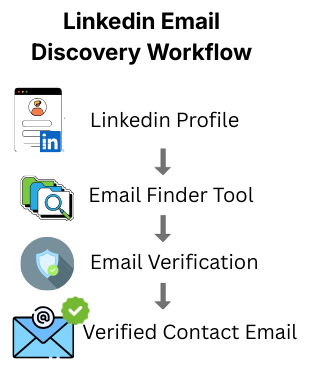
Step 3: Find Business Emails
Although LinkedIn messaging is useful, many sales teams prefer email outreach because it allows more automation, tracking, and follow-up management.
To contact prospects via email, businesses often need to discover their professional email addresses.
Step 3.1 : Use email finder tools
Email finder tools analyze various data sources to discover professional email addresses.
These tools typically use:
- Company Domains
- Public Data Sources
- Email Pattern recognition
For example, if a company domain is:
company.com
Possible email formats might include:
Email finder tools help automate this process, making it easier to collect contact information for outreach campaigns.
Step 3.2 : Verify Email Addresses
After discovering an email, it is important to verify that it is valid.
Email verification tools check whether an address is active and deliverable. This helps reduce bounce rates and improves overall email campaign performance.
Step 4: Organize Leads in a CRM or Lead Database
Once you collect prospect information, it is important to organize it properly.
Without a structured system, it becomes difficult to track conversations, follow-ups, and campaign results.
Step 4.1 : Use a lead database or CRM
A customer relationship management system helps store and manage prospect information.
Typical data stored includes:
- Prospect Name
- Company Name
- Job Title
- Email Address
- LinkedIn Profile
- Outreach Status
This information allows businesses to monitor the progress of each prospect within the sales pipeline.
Step 4.2 : Track outreach progress
Lead management systems often include stages such as:
- New Lead
- Contacted
- Replied
- Qualified
- Opportunity
Tracking these stages helps businesses understand which prospects are moving closer to becoming customers.

Step 5: Start Personalized Outreach
The final stage of the workflow involves contacting prospects through personalized outreach messages.
Successful outreach focuses on building relationships rather than immediately selling products or services.
Step 5.1 : Personalize Every Message
Personalization significantly improves response rates.
Effective outreach messages often reference:
- The Prospect’s Company
- Their Role or Responsibilities
- A Shared Industry Challenge
This demonstrates that the message was written specifically for them.
Step 5.2 : Keep Messages Short and Clear
Busy professionals prefer short messages that quickly explain the value of the conversation.
A simple outreach structure might include:
- Introduction
- Brief explanation of value
- Clear call to action
Step 5.3 : Follow up Consistently
Many prospects do not reply to the first message. Follow-up messages are often necessary.
Most responses occur after the second or third follow-up message, making persistence an important part of successful outreach.
Best Tools for LinkedIn Lead Generation
LinkedIn lead generation becomes much more effective when businesses use the right set of tools to automate repetitive tasks and manage prospects efficiently. Instead of manually searching profiles, collecting contact details, and sending emails, specialized tools can streamline the entire workflow from prospect discovery to outreach and follow-ups.
Most LinkedIn lead generation workflows rely on four major categories of tools. Each category plays a different role in helping businesses identify, verify, and engage potential customers.
Tool Category 1 : Prospecting Tools
Prospecting tools help businesses identify potential leads and collect professional information from LinkedIn profiles and company databases. These tools simplify the process of finding decision-makers and qualified prospects.
1.1 : What Prospecting Tools Help You Do
✔ Identify potential B2B prospects
✔ Find decision-makers within companies
✔ Build targeted lead lists for outreach
✔ Gather professional contact information
✔ Discover company insights and profiles
1.2 : Common Prospecting Filters Used
| Filter Type | What It Helps You Find |
|---|---|
| Job Title | Founders, CEOs, Marketing Managers, Sales Directors |
| Company Size | Small businesses, mid-size companies, enterprises |
| Industry | SaaS, eCommerce, Healthcare, Marketing agencies |
| Location | Country, city, or regional markets |
| Company Revenue | Businesses within a specific revenue range |
1.3 : Example Prospecting Scenario
A sales team targeting small businesses could use prospecting filters like:
- Industry: SaaS or Marketing
- Company Size: 10–50 employees
- Job Title: Founder or Marketing Manager
- Location: United States
This allows them to quickly generate a highly targeted list of potential customers.
1.4 : What Data Prospecting Tools Can Provide
Many prospecting platforms offer additional business intelligence such as:
• Company information
• Social media profiles
• Technology stack insights
• Employee count and growth data
• Business contact details
This information helps sales teams understand prospects before outreach.
1.5 : Why Prospecting Tools Are Important
Using prospecting tools helps businesses:
✔ Target the right audience
✔ Save time on manual research
✔ Build qualified lead lists
✔ Improve outreach efficiency
✔ Increase conversion opportunities
Many sales teams use browser extensions to simplify prospecting. In our Apollo.io Chrome Extension for Linkeding Prospecting, we explain how this tool helps extract LinkedIn contact data directly from profiles.
Tool Category 2 : Email Finder Tools
Email finder tools help businesses discover professional email addresses linked to LinkedIn profiles or company domains. These tools automate the process of finding business contact details using multiple data sources.
2.1 What Email Finder Tools Help You Do
✔ Discover business email addresses from LinkedIn profiles
✔ Identify company email patterns automatically
✔ Find decision-maker contact details faster
✔ Build email outreach lists for sales campaigns
✔ Reduce time spent on manual research
2.2 How Email Finder Tools Work
Most email finder tools combine several techniques to discover emails:
| Method | Description |
|---|---|
| Public Databases | Uses large datasets of previously discovered professional emails |
| Company Domain Patterns | Predicts email format based on company domain structure |
| AI Data Enrichment | Uses AI to connect LinkedIn profiles with verified contact data |
| Web Crawling | Extracts publicly available email data from websites |
2.3 Example Use Case
When a sales professional opens a LinkedIn profile, an email finder tool can:
- Scan the LinkedIn profile
- Identify the company domain
- Detect the likely email pattern
- Reveal the professional email address
This process takes seconds instead of hours of manual research.
2.4 : Why Email Finder Tools Are Important
Email finder tools play a major role in B2B lead generation because:
✔ Most business conversations happen via email
✔ Emails allow longer and personalized outreach messages
✔ Email campaigns are easier to automate than LinkedIn messages
If you want to automate the email discovery process, you can explore our detailed comparison of the Best LinkedIn Email Finder Tools that help businesses quickly find verified professional email addresses.
Tool Category 3 : Email Verification Tools
Email verification tools help businesses confirm whether discovered email addresses are valid and deliverable before sending outreach campaigns.
These tools analyze multiple technical signals to determine whether an email address actually exists.
3.1 : What Email Verification Tools Check
Email verification tools typically analyze several important factors:our email sender reputation, which can reduce deliverability and cause future campaigns to land in spam folders.
Email verification tools typically analyze several important factors:
| Verification Check | What It Confirms |
|---|---|
| Email Syntax | Ensures the email format follows proper structure |
| Domain Validity | Confirms the company domain exists |
| DNS Records | Checks if the domain supports email servers |
| Mail Server Response | Confirms whether the inbox is active |
| Spam Trap Detection | Identifies risky or disposable email addresses |
3.2 : Why Email Verification Is Important
Sending emails without verification can create several problems.
✔ High bounce rates
✔ Damaged sender reputation
✔ Reduced email deliverability
✔ Increased spam filtering
Too many bounced emails may cause future campaigns to land in spam folders.
3.3 : Benefits of Email Verification
Businesses that verify emails before outreach can:
✔ Improve email deliverability
✔ Reduce bounce rates
✔ Protect domain reputation
✔ Increase response rates
Some businesses prefer domain-based email discovery. Our Hunter.io vs Apollo.io comparison explains the differences between these two tools for email searching and lead generation.
Tool Category 4 : Outreach Automation Tools
Outreach automation tools help businesses send personalized email campaigns and follow-ups at scale without manually sending every message.
These tools allow sales teams to automate multi-step outreach sequences.
4.1 : What Outreach Automation Tools Help You Do
✔ Send automated cold email campaigns
✔ Schedule follow-up messages automatically
✔ Personalize emails using dynamic variables
✔ Track replies and open rates
✔ Manage outreach campaigns efficiently
4.2 : Example Outreach Sequence
A typical automated email campaign may include:
| Sequence Step | Purpose |
|---|---|
| Initial Email | Introduces your product or service |
| Follow-Up Email (3 days) | Reminds the prospect and adds value |
| Follow-Up Email (7 days) | Re-engages prospects who didn’t reply |
| Final Reminder | Last attempt before closing the conversation |
4.3 : Key Features of Outreach Automation Tools
Most modern outreach platforms include:
• Email personalization tokens
• Open rate tracking
• Reply detection
• Campaign analytics
• CRM integration
• Automated follow-up sequences
These features help businesses monitor campaign performance and optimize outreach strategies.
4.4 : Why Outreach Automation Matters
Outreach automation tools are especially valuable for:
✔ Startups
✔ Small businesses
✔ Sales teams
✔ Marketing agencies
They allow businesses to scale lead generation without increasing manual workload.
Why Combining Multiple Tools Works Best
No single tool can handle the entire LinkedIn lead generation process perfectly. Successful sales teams often combine multiple tools to create a complete prospecting system.
A typical LinkedIn lead generation stack might look like this:
LinkedIn search → Prospecting tool → Email finder → Email verification → CRM → Outreach automation
This integrated workflow allows businesses to move prospects smoothly from lead discovery to conversation and conversion.
When used correctly, LinkedIn lead generation tools can help businesses save time, build accurate prospect lists, and run more effective outreach campaigns.
Businesses that plan to scale cold email campaigns our detailed Smartlead.ai Review : The Most Beginner-Friendly Cold Email Automation Tool explains the platform is better for prospecting and automated email outreach.
Best Practices for LinkedIn Lead Generation
➣ Focus on Quality Leads
Sending messages to thousands of random professionals rarely produces meaningful results. Instead, focus on identifying highly relevant prospects who are more likely to benefit from your product or service. Targeting the right audience — such as Decision-makers, Founders, or Department heads—significantly improves response rates and conversion potential.
Using LinkedIn filters like :
- Industry
- Company size
- Job title
- Location
These filters can help narrow down prospects and create a more qualified lead list.
➣ Personalize Communication
Generic outreach messages are often ignored or marked as spam. Personalizing your communication shows that you have researched the prospect and understand their role or business challenges.
Simple personalization techniques include:
- Mentioning the prospect’s company or recent achievement
- Referring to a shared industry or connection
- Highlighting a specific problem your solution can solve
Personalized outreach typically leads to higher open rates, better engagement, and more replies.
Once you start contacting prospects, writing compelling email subject lines becomes critical. Our guide on Cold Email Subject Lines That Get Replies shares proven examples that increase open rates.
➣ Maintain Consistent Outreach
LinkedIn lead generation is not a one-time activity. Consistent prospecting and outreach help maintain a steady pipeline of new opportunities.
Instead of sending a large batch of messages once a month, it is more effective to run smaller campaigns regularly, such as reaching out to a few new prospects each day or week. This approach keeps your lead generation efforts sustainable and manageable.
➣ Monitor Results
Tracking campaign performance helps you understand what works and what needs improvement. Key metrics to monitor include:
- Email open rate
- Reply rate
- Positive response rate
- Conversion rate from lead to meeting
Analyzing these metrics allows businesses to refine messaging, targeting strategies, and outreach timing, ultimately improving overall lead generation performance.
➣ Use a Structured Lead Management System
Managing leads manually can quickly become overwhelming as your prospect list grows. Using a CRM or lead management system helps organize contacts, track interactions, and manage follow-ups effectively.
A structured system ensures that no potential lead is forgotten, and it helps maintain a clear overview of the entire lead generation pipeline.
Managing your leads efficiently is equally important. Our guide on AI CRM Tools for Small Businesses explains how businesses can organize prospects and track outreach performance.
Common Mistakes to Avoid
➣ Targeting Too Broad an Audience
Contacting people outside your ideal customer profile (ICP) reduces response rates and wastes time. When outreach is not focused, many prospects may have no real need for your product or service, which leads to low engagement.
Instead, clearly define your target audience based on industry, company size, job title, and decision-making authority. LinkedIn filters and Sales Navigator can help narrow down prospects and ensure your outreach efforts are focused on high-quality leads that are more likely to respond.
➣ Sending Spam-Like Messages
Messages that appear automated, overly promotional, or generic can quickly damage your reputation. Many LinkedIn users receive dozens of outreach messages daily, so spam-like communication is often ignored or even reported.
To improve results, focus on short, personalized messages that show genuine interest in the prospect’s role or business. Mentioning something specific—such as their company, industry, or recent activity—can make your message feel more authentic and increase the chances of getting a reply.
➣ Ignoring Email Verification
Sending emails to invalid or outdated addresses increases bounce rates and negatively affects your sender reputation. High bounce rates can cause email providers to flag your domain as suspicious, which may reduce your overall email deliverability.
Using email verification tools before sending outreach messages helps ensure that the email addresses in your lead list are valid and active, improving the success rate of your campaigns.
➣ Failing to Follow Up
Many opportunities are lost simply because businesses fail to send follow-up messages. Prospects are often busy and may not respond to the first message, even if they are interested.
Sending polite and well-timed follow-ups can significantly improve response rates. A simple follow-up message after a few days can remind the prospect about your outreach and reopen the conversation without being intrusive.
LinkedIn Lead Generation Metrics & Benchmarks
Tracking the right metrics helps businesses understand whether their LinkedIn lead generation strategy is working effectively. Monitoring performance allows you to identify what is working well and where improvements are needed.
Below are some important metrics that sales teams and marketers commonly track.
➣ Connection Acceptance Rate
This metric measures how many people accept your LinkedIn connection requests.
Formula
Connection Acceptance Rate = (Number of accepted requests ÷ Total connection requests sent) × 100
Typical benchmark
A healthy connection acceptance rate usually falls between 30% and 50%.
To improve this metric:
- Personalize connection requests
- Target relevant professionals
- Avoid sending too many requests to unrelated prospects
When your targeting is accurate and messages are relevant, more professionals are likely to accept your connection request.
➣ Reply Rate
Reply rate measures how many prospects respond to your LinkedIn message or outreach email.
Formula
Reply Rate = (Number of replies ÷ Total messages sent) × 100
Typical benchmark
A good reply rate for B2B outreach usually ranges between 8% and 20%.
You can improve reply rates by:
- Personalizing your messages
- Keeping the message short and clear
- Focusing on the prospect’s problem rather than selling immediately
Prospects are more likely to respond when the message feels relevant and conversational.
➣ Email Deliverability Rate
Email deliverability measures how many of your outreach emails successfully reach the recipient’s inbox.
Poor deliverability can happen when emails bounce or land in spam folders.
Typical benchmark
A healthy deliverability rate is usually above 95%.
To maintain good deliverability:
- Verify email addresses before sending
- Avoid sending large volumes from new domains
- Maintain good email sender reputation
Strong deliverability ensures that your outreach messages actually reach potential prospects.
➣ Conversion Rate
Conversion rate measures how many leads take the desired action after receiving your outreach message.
Examples of conversions include:
- Booking a meeting
- Requesting a demo
- Signing up for a trial
Formula
Conversion Rate = (Number of conversions ÷ Total leads contacted) × 100
Typical benchmark
Conversion rates for cold outreach campaigns typically range between 1% and 5%, depending on the industry and offer.
Improving targeting, personalization, and follow-up strategies can significantly increase conversion rates.
➣ Why Tracking These Metrics Matters
Monitoring LinkedIn lead generation metrics helps businesses optimize their outreach strategy over time. By analyzing connection acceptance rates, reply rates, and conversion rates, companies can refine their targeting and messaging to generate higher-quality leads and better sales opportunities.

Complete LinkedIn Lead Generation Tool Stack
Modern LinkedIn lead generation usually involves multiple tools working together in a structured workflow. Instead of relying on a single platform, sales teams combine prospecting, email discovery, verification, and outreach tools to build an efficient pipeline.
This structured tool stack helps businesses move prospects smoothly from initial discovery to outreach and conversion.

Stage 1: LinkedIn Prospecting
The first stage focuses on finding the right prospects.
Businesses search LinkedIn using filters such as:
- Industry
- Job title
- Company size
- Location
Prospecting tools help generate a targeted list of decision-makers such as founders, CEOs, marketing managers, and sales directors.
Example tools used in this stage:
- Apollo
- LinkedIn Sales Navigator
- Skrapp
Stage 2: Email Discovery
After identifying potential prospects, the next step is finding their professional email addresses.
Email finder tools analyze:
- LinkedIn profiles
- Company domains
- Public databases
- Historical email patterns
This allows sales teams to quickly gather business contact details for outreach campaigns.
Example tools used in this stage:
- Apollo
- Hunter
- Snov
- Skrapp
Stage 3: Email Verification
Before sending emails, businesses must verify that email addresses are valid.
Verification tools check:
- Email format
- Domain configuration
- Mail server response
- Risk of spam traps
This step helps reduce bounce rates and improves email deliverability.
Example tools used in this stage:
- NeverBounce
- ZeroBounce
- Snov verification
Stage 4: Lead Management (CRM)
Once emails are verified, the leads are stored in a CRM system or lead database.
A CRM helps businesses:
- Organize lead lists
- Track prospect interactions
- Manage follow-ups
- Monitor pipeline progress
Example CRM platforms include:
- HubSpot
- Pipedrive
- Apollo CRM
Stage 5: Outreach Automation
The final stage is starting personalized outreach campaigns.
Outreach automation tools allow businesses to:
- Send cold email campaigns
- Schedule follow-up sequences
- Track open and reply rates
- Analyze campaign performance
Example outreach tools include:
- Snov
- Smartlead
- Instantly
- Reply.io
Why This Tool Stack Works
Using a structured tool stack improves lead generation efficiency and campaign performance.
Key benefits include:
✔ Faster prospect discovery
✔ Accurate contact information
✔ Improved email deliverability
✔ Organized lead management
✔ Scalable outreach campaigns
This workflow allows businesses to convert LinkedIn prospects into real sales opportunities.
Final Thoughts
LinkedIn offers powerful opportunities for small businesses to connect with potential customers and build meaningful business relationships.
By following a structured lead generation workflow, businesses can move prospects through a clear process that includes:
- Discovering prospects
- Qualifying leads
- Collecting contact information
- Organizing leads
- Running personalized outreach campaigns
When implemented consistently, this workflow can help small businesses create a scalable system for generating high-quality B2B leads and sales opportunities.
FAQs
-
What is LinkedIn lead generation?
LinkedIn lead generation is the process of identifying potential business prospects on LinkedIn and converting them into leads through networking, email outreach, and sales conversations.
-
How do small businesses generate leads on LinkedIn?
Small businesses generate leads on LinkedIn by targeting decision-makers, collecting contact details, building lead lists, and running personalized outreach campaigns.
-
Is LinkedIn good for B2B lead generation?
Yes. LinkedIn is one of the best platforms for B2B lead generation because it provides access to professional profiles and company data.
-
What tools help with LinkedIn lead generation?
Common tools include LinkedIn prospecting tools, email finder tools, email verification platforms, and outreach automation software.
-
Can LinkedIn lead generation be automated?
Yes. Many tools allow automation for prospect discovery, email extraction, verification, and outreach sequences.