
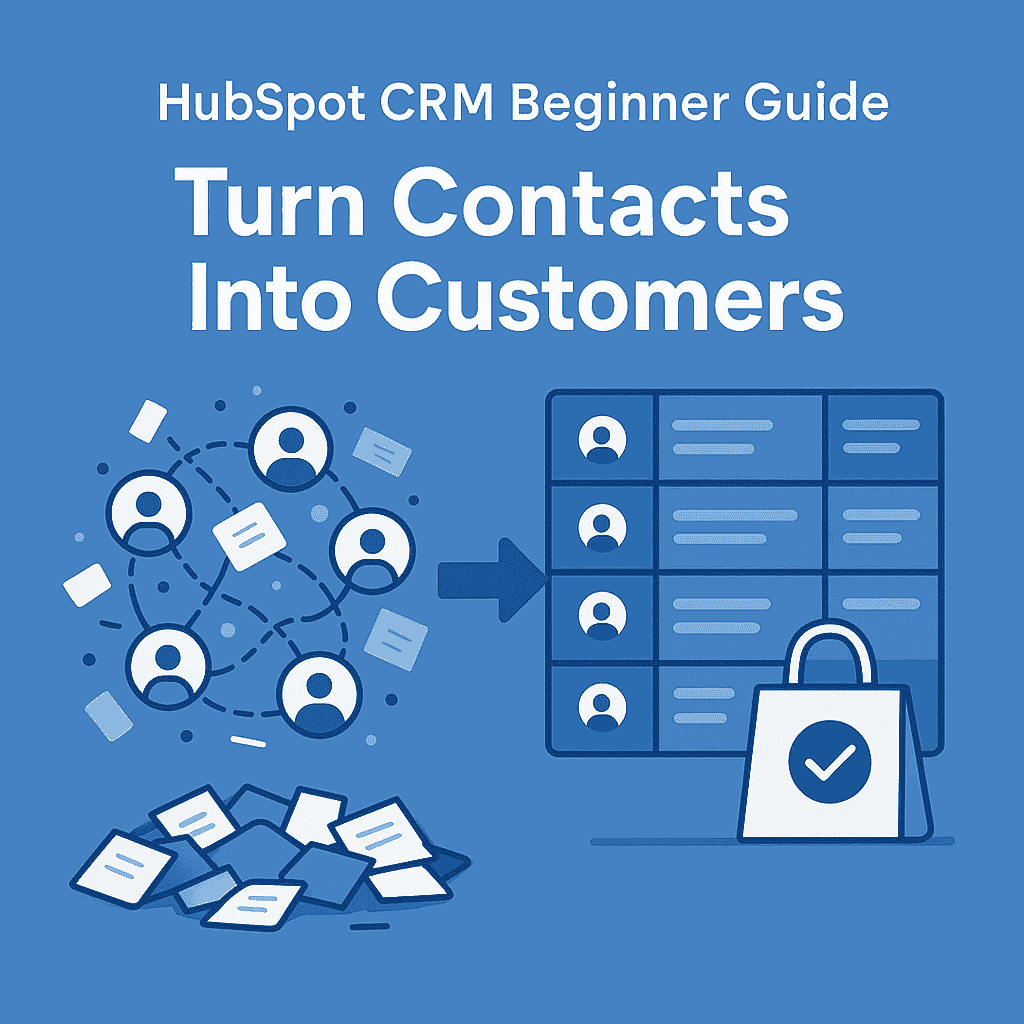
HubSpot CRM Beginner Guide — How to Get Started & Grow Your Small Business
HubSpot CRM is a powerful, beginner-friendly customer relationship management (CRM) platform that helps you organize, track, and grow your business relationships—all in one place.
Instead of managing leads across spreadsheets, emails, and scattered notes, HubSpot gives you a centralized system to handle your entire sales process from first contact to deal closure.
🚀 What You Can Do with HubSpot CRM
📇 Store & Organize All Contacts in One Place
- Save leads, customers, and companies in a structured database
- View complete contact profiles (emails, calls, activity history)
- Segment contacts using tags, lists, and filters
👉 No more messy spreadsheets or lost leads.
💬 Track Every Conversation Automatically
- Log emails, calls, meetings, and notes
- Sync with Gmail or Outlook for real-time tracking
- See the full communication history with each contact
👉 Gives you full visibility into every interaction.
📊 Manage Your Sales Pipeline Visually
- Use a drag-and-drop pipeline to track deals
- Move leads through stages (New → Contacted → Qualified → Closed)
- Forecast revenue and track deal progress
👉 Helps you understand exactly where each opportunity stands.
⚡ Automate Follow-Ups & Reminders
- Set automated email sequences
- Create task reminders for follow-ups
- Trigger actions based on user behavior
👉 Ensures no lead is forgotten or missed.
📈 Understand Where Your Leads Come From
- Track sources like:
- Website forms
- Email campaigns
- Social media
- Measure which channels bring the best leads
👉 Helps you focus on what’s actually working.
🧠 Why HubSpot CRM Is So Popular
- ✔ Free plan available (very generous)
- ✔ Easy to use (perfect for beginners)
- ✔ Scales from small businesses to enterprises
- ✔ Integrates with marketing, sales, and support tools
👉 It’s not just a CRM—it’s a complete growth platform.
🎯 Simple Explanation
Think of HubSpot CRM as your business control center:
- All your contacts → organized
- All your deals → tracked
- All your communication → recorded
👉 Everything you need to manage and grow relationships in one place.
💡 Real-World Use Case
- A freelancer tracks leads and follow-ups
- A sales team manages deals and pipelines
- A startup monitors where leads come from
👉 Everyone uses the same system—no confusion, no data loss.
🚀 Bottom Line
If you want to move from manual tracking → structured growth, HubSpot CRM is one of the best tools to start with—especially for beginners building a scalable sales system.
👉 If you’re building a complete system, explore this guide on AI tools for B2B lead generation and workflow setup to understand how CRM fits into the bigger picture.
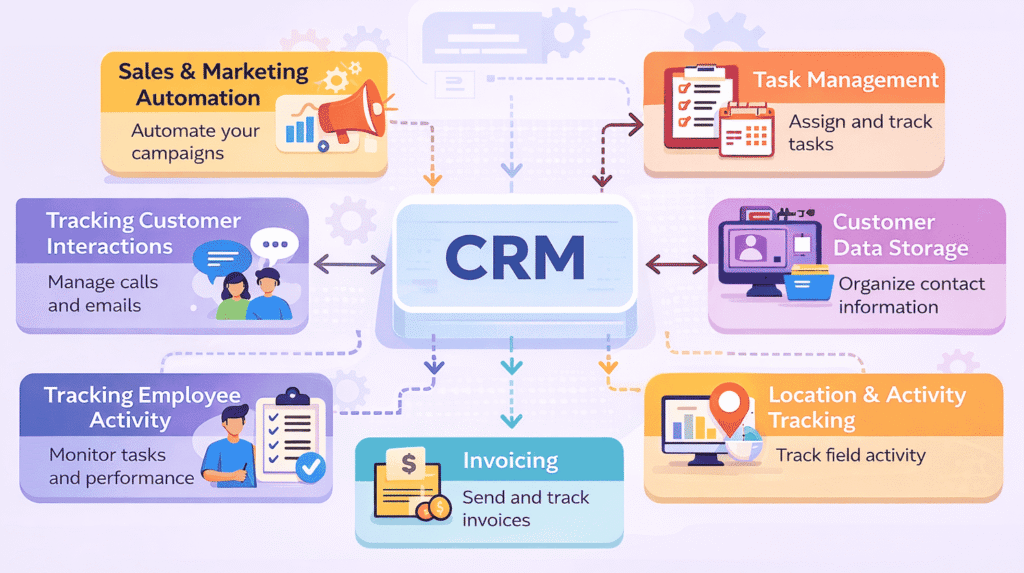
🚀 Core Features Beginners Should Use First in HubSpot CRM
If you’re just getting started, don’t try to use everything at once. Focus on these core features first to build a strong foundation and start seeing real results quickly.
📇 1️⃣ Contact Management — Your Central Lead Database
This is the heart of your CRM.
What you can store:
- Email conversations (auto-logged)
- Call history
- Notes & meeting details
- Deals linked to each contact
- Company information
How to use it effectively:
- Add every new lead immediately
- Update notes after every interaction
- Use tags (e.g., “Hot Lead”, “Follow-up”)
👉 This ensures:
- No lost leads
- Full visibility of every contact
- Better personalization
📊 2️⃣ Deal Tracking — Visual Sales Pipeline
This feature helps you track and manage your entire sales process.
What you’ll see:
- Deals organized in stages (New → Contacted → Closed)
- Deal value and progress
- Pipeline overview
How to use it:
- Move deals as conversations progress
- Assign value to each deal
- Identify stuck leads
👉 This helps you:
- Forecast revenue
- Stay organized
- Close deals faster
📧 3️⃣ Email Tracking — Know When Leads Are Interested
Once you connect your email, HubSpot tracks engagement automatically.
What you can track:
- Email opens
- Link clicks
- Replies
How to use it:
- Follow up when a lead opens your email
- Re-engage leads who clicked but didn’t reply
- Improve subject lines based on open rates
👉 This gives you a timing advantage in outreach
⚡ 4️⃣ Basic Automation — Save Time on Repetitive Work
Start with simple automation to improve consistency.
What to automate:
- Welcome emails for new leads
- Lead assignment (to yourself or team)
- Task creation for follow-ups
Example:
- New lead added → Auto-create task → “Follow up in 2 days”
👉 This ensures:
- No missed actions
- Faster workflow
- Less manual effort
🎯 How These Features Work Together (Simple Workflow)
- Add a new contact → stored in CRM
- Send email → tracked automatically
- Create deal → added to pipeline
- Set follow-up → automated task
👉 This creates a complete beginner-friendly sales system
💡 Pro Tip
👉 Master these 4 features before moving to advanced tools
Because:
- 80% of results come from these basics
- Advanced features only work if your foundation is strong
👉 To find high-quality leads before adding them into your CRM, here’s a detailed guide on using Apollo.io for prospecting and list building.
Why SMBs Need a CRM (And How HubSpot CRM Solves It)
Most small and medium-sized businesses (SMBs) don’t fail because of a lack of leads—they struggle because of poor lead management and inconsistent follow-up systems.
Without a proper CRM, sales processes become chaotic and opportunities slip through the cracks.
🚫 Common Problems SMBs Face Without a CRM
❌ Lost Leads & Missed Opportunities
- Leads come from multiple sources (website, email, social media)
- No centralized system to track them
- High chances of forgetting or losing valuable prospects
👉 Result: Revenue loss without even realizing it
⏳ No Structured Follow-Up System
- No reminders or tracking for follow-ups
- Leads go cold due to delayed responses
- Inconsistent communication
👉 Result: Low conversion rates
🧠 Sales Relying on Memory
- Important details stored in personal notes or memory
- No visibility for team members
- Difficult to scale or delegate
👉 Result: Unreliable and non-repeatable sales process
🔄 Scattered Communication
- Conversations spread across:
- Emails
- Calls
- WhatsApp / LinkedIn
- No single view of customer interaction
👉 Result: Confusion and poor customer experience
✅ How HubSpot CRM Fixes These Problems
HubSpot CRM creates a centralized, structured system where every lead, conversation, and deal is tracked automatically.
- All contacts stored in one place
- Every interaction logged and visible
- Automated follow-ups and reminders
- Clear pipeline to track progress
👉 This turns a messy process into a repeatable, scalable sales workflow
🚀 Key Benefits of HubSpot CRM
✔ Free Plan Available (Perfect for Startups)
- Start without any upfront cost
- Access core CRM features immediately
- Ideal for testing and early-stage businesses
✔ Easy to Learn — No Technical Setup
- Clean, intuitive interface
- No coding or complex configuration required
- Can be set up in minutes
👉 Perfect for beginners and non-technical users
✔ Combines Marketing + Sales Visibility
- Track where leads come from
- Connect marketing campaigns to sales outcomes
- Understand what’s driving conversions
👉 Helps you make data-driven decisions
✔ Scales as Your Business Grows
- Start simple → add advanced features later
- Supports growing teams and larger pipelines
- Integrates with multiple tools
👉 No need to switch platforms as you grow
🎯 Real Impact for SMBs
With HubSpot CRM, you move from:
- ❌ Random, unstructured sales
➡️ ✅ Organized, trackable pipeline - ❌ Missed follow-ups
➡️ ✅ Automated reminders & workflows - ❌ Guesswork decisions
➡️ ✅ Data-driven growth
💡 Simple Takeaway
👉 HubSpot CRM doesn’t just store contacts—it builds a system for consistent sales growth
🚀 Bottom Line
If you’re running a small or growing business, implementing a CRM like HubSpot is one of the highest ROI decisions you can make.
👉 It helps you:
Close more deals with less effort
Capture every lead
Follow up consistently
👉 You can also capture leads directly from LinkedIn using the Apollo Chrome extension for real-time prospecting.
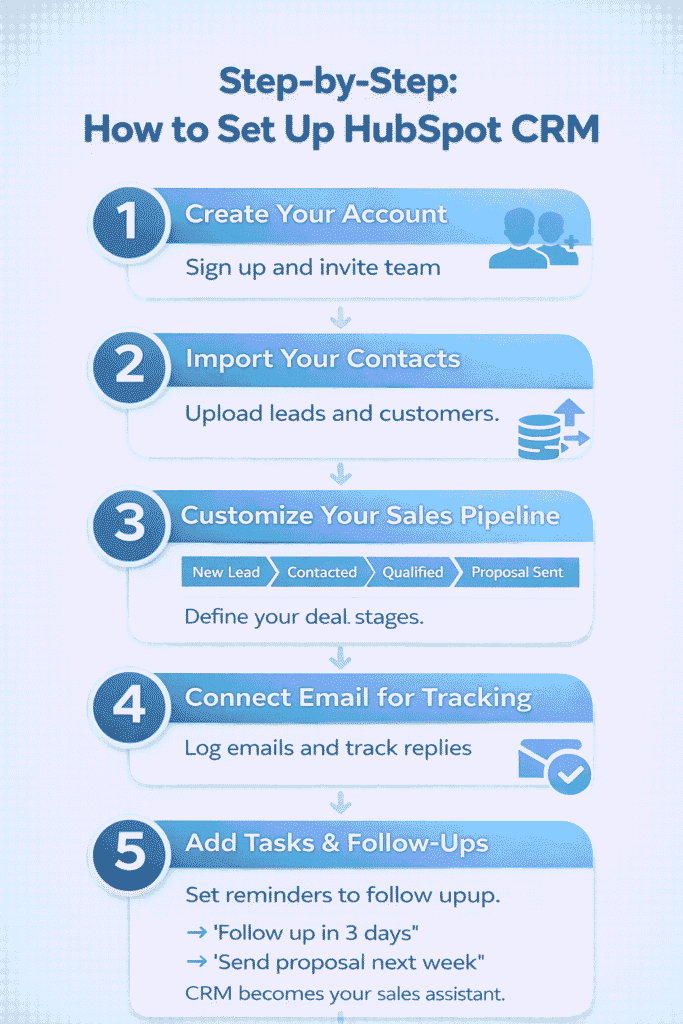
🚀 Step-by-Step: How to Set Up HubSpot CRM (Detailed Beginner Walkthrough)
Follow this exact process to build a fully functional CRM system from scratch.
⚡ Step 1 — Create Your HubSpot Account & Set Up Workspace
What to do:
- Go to HubSpot and sign up (Free plan is enough to start)
- Enter:
- Company name
- Business type
- Website URL
- Choose your primary goal:
- Sales
- Marketing
- CRM setup
- Invite team members (optional for now)
🎯 What happens after setup:
- HubSpot creates your default dashboard
- You’ll see sections like:
- Contacts
- Companies
- Deals
- Tasks
👉 This becomes your central command center
💡 Pro Tip:
Don’t overconfigure at this stage—just get access and move forward.
📥 Step 2 — Import & Clean Your Contact Data
What to do:
- Go to Contacts → Import
- Upload your file (CSV or Excel)
Your file should include:
- Name
- Company
- Phone (optional)
🧠 What HubSpot does automatically:
- Creates individual contact records
- Maps columns (you can adjust if needed)
- Detects duplicates
- Organizes data into structured fields
🎯 Best Practice:
Before importing:
- Remove duplicate entries
- Fix incorrect emails
- Keep data clean
👉 Clean data = better results later
💡 Beginner Mistake to Avoid:
Don’t import messy or random lists—this will break your workflow later.
📊 Step 3 — Create a Simple, Practical Sales Pipeline
What to do:
- Go to Deals → Pipeline Settings
- Create or edit stages
Recommended beginner pipeline:
- New Lead
- Contacted
- Qualified
- Meeting Scheduled
- Proposal Sent
- Closed Won
- Closed Lost
🎯 What this does:
- Tracks where each deal stands
- Helps you visualize revenue
- Shows bottlenecks in your sales process
💡 Pro Tip:
👉 Keep it SIMPLE
Too many stages = confusion
📧 Step 4 — Connect Your Email (Most Important Step)
What to do:
- Go to Settings → Integrations → Email
- Connect:
- Gmail OR
- Outlook
🔥 What unlocks after connecting:
✔ Emails automatically logged in CRM
✔ Track:
- Opens
- Clicks
- Replies
✔ Every email linked to the contact record
🎯 Why this is powerful:
- No need to copy-paste emails
- No need to track manually
- Full history of communication visible
💡 Real Example:
You send an email → HubSpot logs it → You see when the lead opens it
👉 This helps you follow up at the perfect time
⏰ Step 5 — Set Tasks & Build Follow-Up System
What to do:
- Open any contact or deal
- Click “Create Task”
Example tasks:
- Follow up in 2 days
- Send proposal next week
- Call lead tomorrow
🎯 What this solves:
- No missed follow-ups
- Better response rates
- Structured daily workflow
💡 Golden Rule:
👉 Every lead should have a “next action”
🔄 Step 6 — Start Using CRM Daily (Real Workflow)
Now your CRM is ready—this is how you actually use it:
🧠 Daily workflow:
- Add new leads (from website or outreach tools)
- Contact them (email tracked automatically)
- Move them in pipeline (Contacted → Qualified)
- Set follow-up tasks
- Close deals
🎯 Result:
You now have a repeatable sales system
🔗 Pro Workflow (Advanced Setup)
Combine HubSpot with:
- Email finding tools → for lead data
- Outreach tools → for sending campaigns
👉 HubSpot becomes your tracking + management system
👉 For automating outreach after managing leads in CRM, check out this Instantly.ai cold email automation guide.
🔄 Real Workflow Example: How to Manage 20 Leads Using HubSpot CRM
To understand how HubSpot CRM works in real life, let’s walk through a simple, practical example of how a freelancer or small business owner can manage and convert leads efficiently.
🎯 Scenario
You have 20 new leads from:
- LinkedIn outreach
- Website inquiries
- Cold emails
👉 Your goal: Organize, follow up, and convert them into clients
⚡ Step-by-Step Workflow
📇 Step 1: Add & Organize Leads
- Import leads manually or via CSV
- Each contact gets a dedicated profile
- Add basic details (name, company, role)
👉 Now all your leads are centralized in one place
📧 Step 2: Start Conversations & Track Emails
- Send initial outreach emails
- HubSpot automatically logs conversations
- Track opens, clicks, and replies
👉 You instantly know who is engaging and who is not
📊 Step 3: Create Deals & Move Through Pipeline
- Create a deal for each interested lead
- Move them through stages:
- New Lead → Contacted → Qualified → Proposal
👉 This gives you a visual view of your sales progress
⏰ Step 4: Set Follow-Ups (Critical Step)
- Add tasks like:
- “Follow up in 2 days”
- “Send proposal tomorrow”
👉 Ensures:
- No missed opportunities
- Consistent communication
💬 Step 5: Add Notes & Context
- Record key details:
- Budget discussions
- Requirements
- Timeline
👉 Makes your follow-ups more personalized and effective
✅ Step 6: Close Deals & Track Outcomes
- Move successful leads to Closed Won
- Track deal value and revenue
👉 Now you have a measurable sales system
📈 Final Outcome
With this simple workflow:
- ✔ All 20 leads are organized
- ✔ Every interaction is tracked
- ✔ Follow-ups are consistent
- ✔ Deals are clearly managed
👉 Result: Higher conversions with less effort
💡 Why This Matters
Without a CRM:
- Leads get lost
- Follow-ups are missed
- Sales feel random
With HubSpot CRM:
- Everything is structured
- Every lead is tracked
- Every opportunity is maximized
🚀 Key Takeaway
👉 HubSpot CRM turns a messy lead list into a clear, repeatable sales process
This is how freelancers and small businesses scale without chaos
👉 You can also generate leads directly from LinkedIn—learn how in this LinkedIn automation tools for lead generation guide.
🚫 Common Beginner Mistakes (Avoid These)
- ❌ Not connecting email
- ❌ No pipeline setup
- ❌ No follow-up tasks
- ❌ Importing poor-quality data
👉 These reduce CRM effectiveness
🧠 Simple Mental Model
Think of HubSpot CRM as:
👉 Your sales memory + tracking system + assistant
- It remembers everything
- It tracks everything
- It reminds you what to do next
🚀 Final Takeaway
Once set up correctly, HubSpot CRM helps you:
- Stay organized
- Follow up consistently
- Close more deals with less effort
👉 This is how you move from random sales → predictable growth
🎯 Beginner Tips to Get Results Faster with HubSpot CRM
Starting with a CRM can feel overwhelming—but the key is to keep things simple and focus on consistency, not complexity.
These beginner tips will help you start seeing results quickly without getting stuck.
✔ Start Simple — Don’t Overcustomize
Avoid setting up too many fields, pipelines, or automation in the beginning.
👉 Focus on:
- Adding contacts
- Tracking deals
- Logging activities
Simple systems are easier to use—and actually get used.
✔ Track Deals First, Automate Later
Many beginners jump into automation too early.
👉 Instead:
- Learn how your sales process works manually
- Then automate repetitive steps
Clarity before automation = better results
✔ Log Every Interaction (Non-Negotiable)
Make it a habit to record:
- Emails
- Calls
- Meeting notes
👉 This ensures:
- Complete context for every lead
- Better follow-ups
- No missed details
✔ Review Your Pipeline Weekly
Set a fixed time (weekly) to check:
- Stuck deals
- Pending follow-ups
- High-priority leads
👉 This helps you stay proactive instead of reactive.
✔ Use Notes for Context (Underrated Tip)
Always add quick notes like:
- “Interested but budget next month”
- “Asked for demo”
- “Follow up after 3 days”
👉 This makes future conversations more personalized and effective
💡 The Most Important Rule
👉 CRM success doesn’t come from features—it comes from consistent usage
- A simple CRM used daily = results
- A complex CRM ignored = failure
🚀 Final Takeaway
If you follow these basics with HubSpot CRM, you’ll:
- Stay organized
- Follow up consistently
- Build a reliable sales process
👉 That’s what drives real growth.
📊 Daily CRM Workflow: Simple Routine to Stay Consistent with HubSpot CRM
One of the biggest reasons people fail with CRM tools is inconsistent usage.
This simple daily workflow helps you stay organized, follow up on time, and move deals forward—without feeling overwhelmed.
🌅 Morning (10–15 Minutes) — Plan Your Day
Start your day inside HubSpot CRM.
What to do:
- Check your task list
- Review upcoming follow-ups
- Identify high-priority leads
👉 This gives you a clear action plan for the day
👉 No guessing, no missed opportunities
☀️ Midday (30–60 Minutes) — Execute Follow-Ups
This is your core sales activity time
What to do:
- Send follow-up emails
- Reply to interested leads
- Reach out to new prospects
👉 Focus on:
- Leads who opened your emails
- Leads who replied or showed interest
👉 This is where most conversions happen
🌙 Evening (10–15 Minutes) — Update & Organize
End your day by updating your CRM.
What to do:
- Move deals to the correct stage
- Add notes from conversations
- Set next follow-up tasks
👉 This ensures:
- Your pipeline stays accurate
- Tomorrow starts with clarity
🔄 Simple Daily System (Quick Recap)
- Morning → Plan
- Midday → Execute
- Evening → Update
👉 Just 30–60 minutes daily can completely transform your results
💡 Why This Workflow Works
- Builds consistency
- Prevents missed follow-ups
- Keeps your pipeline clean and actionable
👉 Turns your CRM into a daily productivity system—not just a tool
🚀 Pro Tip
👉 Block this time on your calendar every day
Consistency with HubSpot CRM is what drives:
- More replies
- Better relationships
- Higher conversions
⚠️ Common Beginner Mistakes to Avoid in HubSpot CRM
Getting started with a CRM is easy—but using it the wrong way can limit results or even make your workflow worse.
Avoid these common beginner mistakes to get real value from day one:
🚫 Treating CRM Like a Spreadsheet
Many beginners just store data without using CRM features.
👉 What happens:
- No deal tracking
- No follow-up system
- No real insights
✔ Fix:
Use it actively:
- Move deals through pipeline
- Track interactions
- Set follow-ups
👉 CRM is a working system, not just storage.
🚫 Over-Customizing Too Early
Trying to build a “perfect system” from day one leads to confusion.
👉 What happens:
- Too many fields and stages
- Hard to use daily
- Low adoption
✔ Fix:
Start simple:
- Basic pipeline
- Essential fields only
- Add complexity later
🚫 Not Training Team Members
If your team doesn’t use the CRM properly, it becomes useless.
👉 What happens:
- Incomplete data
- Miscommunication
- Broken workflows
✔ Fix:
- Train everyone on basics
- Set clear usage rules
- Make CRM usage mandatory
🚫 Ignoring Pipeline Updates
If deals are not updated, your pipeline becomes inaccurate.
👉 What happens:
- Wrong forecasts
- Missed follow-ups
- Confusion about deal status
✔ Fix:
- Update deals regularly
- Move leads after every interaction
- Review pipeline weekly
🚫 Expecting Automation Without Clean Data
Automation only works if your data is accurate.
👉 What happens:
- Wrong emails sent
- Missed triggers
- Poor results
✔ Fix:
- Keep data clean
- Update contact details
- Verify information regularly
💡 Key Insight
👉 A CRM is only as powerful as the way you use it
- Inconsistent usage = poor results
- Consistent usage = predictable growth
🚀 Final Takeaway
To succeed with HubSpot CRM:
- Keep your system simple
- Use it daily
- Keep your data updated
👉 That’s what turns a CRM from a tool into a growth engine
👉 Before importing leads into your CRM, make sure your data is clean—here’s how to do it using Hunter.io for email verification and accuracy.
📍 Before You Move to Advanced Tips (Important Setup Step)
Before exploring advanced strategies, tools, or automation, it’s important to make sure your **HubSpot CRM setup is fully ready and working correctly.
Most beginners skip this part and jump directly into tools or outreach—which leads to:
- Disorganized lead data
- Missed follow-ups
- Poor tracking of conversations
- Low conversion rates
👉 A properly set up CRM is what makes everything else work.
🚀 What You Should Have Ready Before Moving Ahead
Make sure you’ve completed these basics:
✔ Created your HubSpot CRM account
✔ Imported or added your contacts
✔ Set up a simple sales pipeline
✔ Connected your email for tracking
✔ Created at least a few follow-up tasks
👉 If these are done, your system is ready for real use.
🎯 Why This Step Matters
Without a proper setup:
- Tools won’t sync correctly
- Outreach becomes inconsistent
- Leads get lost in the process
With a proper setup:
- Every lead is tracked
- Every interaction is recorded
- Every follow-up is scheduled
👉 This is the foundation of a scalable sales system
⚡ Simple Rule to Remember
👉 Tools don’t fix your system — structure does
Once your CRM is structured properly, you can:
- Add automation
- Use outreach tools
- Scale your lead generation
💡 Transition to Next Section
👉 “Now that your HubSpot CRM setup is complete, let’s explore advanced tips and tools to improve your sales process and scale your results.”
🚀 Advanced HubSpot CRM Tips to Maximize Results (2026 Guide)
Once your CRM is set up, these advanced tips will help you work faster, stay organized, and close more deals consistently. This is where you move from basic usage to a high-performance sales system.
⚡ 1. Use Deal Stages Strategically (Not Just Visually)
Most users create a pipeline—but don’t use it effectively.
What to do:
- Assign a clear action for each stage
Example:
- New Lead → Research the contact
- Contacted → Send first email
- Qualified → Book a call
- Proposal Sent → Follow up within 48 hours
👉 This turns your pipeline into a guided workflow, not just a tracker.
🎯 2. Always Assign a “Next Action” to Every Lead
Never leave a contact without a follow-up step.
Best practice:
- Every deal must have:
- A task
- A deadline
Example:
- “Follow up in 2 days”
- “Send proposal tomorrow”
👉 This ensures:
- No missed opportunities
- Consistent follow-up
- Better conversion rates
🏷️ 3. Use Tags & Lists for Smart Segmentation
Segment your contacts to improve targeting and personalization.
Example segments:
- “Hot Leads”
- “Marketing – USA”
- “SaaS Founders”
- “Follow-up Pending”
👉 Benefits:
- Better email targeting
- Easier list management
- More personalized outreach
📧 4. Track Email Engagement for Smarter Follow-Ups
Once your email is connected, use engagement data to your advantage.
What to monitor:
- Email opens
- Clicks
- Replies
How to use it:
- Opened but no reply → Follow up quickly
- No open → Change subject line
- Clicked link → High-intent lead
👉 This helps you time your follow-ups perfectly
🔄 5. Automate Repetitive Tasks (Start Simple)
You don’t need complex automation—start with basics.
Automate:
- Follow-up emails
- Task creation
- Lead assignment
👉 This saves time and ensures consistency.
📊 6. Use Notes & Activity Timeline Properly
Every contact has a timeline—use it fully.
Add:
- Call summaries
- Meeting notes
- Important context
👉 Why this matters:
- Better personalization
- Easy handover to team members
- Complete visibility of every lead
🔗 7. Integrate with Your Outreach & Lead Tools
To build a complete system, connect HubSpot with tools like:
- Hunter.io → Email finding & verification
- Instantly.ai → Cold email automation
- Apollo.io → LinkedIn prospecting
👉 This creates a full workflow:
Lead generation → CRM tracking → Outreach → Follow-up
📈 8. Review Your Pipeline Weekly (Critical Habit)
Set a weekly review routine.
Check:
- Stuck deals
- Leads without follow-ups
- Conversion rates
👉 This helps you:
- Identify problems early
- Improve your process
- Close deals faster
🧠 9. Keep Your CRM Clean (Underrated Tip)
Bad data = bad results.
Do this regularly:
- Remove duplicates
- Update contact details
- Archive inactive leads
👉 Clean data improves:
- Reporting accuracy
- Outreach performance
- Overall efficiency
⚡ 10. Focus on Consistency Over Complexity
Many users overcomplicate CRM usage.
👉 Instead:
- Keep pipeline simple
- Follow up daily
- Use basic automation first
👉 Consistency beats complexity every time.
🎯 Real Workflow (Advanced Level)
- Find leads using external tools
- Add them into HubSpot
- Segment using tags
- Send outreach (tracked automatically)
- Monitor engagement
- Follow up based on behavior
- Move deals through pipeline
- Close and track revenue
👉 This is how professionals use CRM systems effectively.
💡 Final Takeaway
Advanced usage of HubSpot CRM is not about using every feature—it’s about:
- Staying organized
- Following up consistently
- Using data to make better decisions
🚀 Bottom Line
If you apply these tips, your CRM becomes more than a tool—it becomes a predictable growth system that helps you:
- Capture every opportunity
- Improve conversions
- Scale your sales process
👉 If you want to scale outreach campaigns further, this Smartlead.ai automation guide explains advanced workflows in detail.
🔗 Recommended Integrations to Power Up HubSpot CRM
HubSpot CRM becomes significantly more powerful when you connect it with the right tools. These integrations help you build a complete lead generation → outreach → conversion system.
🚀 Essential Tools to Connect
📧 Hunter.io — Email Finding & Verification
Use Hunter to:
- Find professional email addresses
- Verify email accuracy before outreach
👉 Perfect for building clean, high-quality lead lists
⚡ Instantly.ai — Cold Email Automation
Use Instantly to:
- Send bulk cold email campaigns
- Automate follow-ups
- Scale outreach without manual effort
👉 Ideal for high-volume outreach and campaign scaling
🔍 Apollo.io — LinkedIn Prospecting & Lead Sourcing
Use Apollo to:
- Find leads directly from LinkedIn
- Access verified emails and company data
- Build targeted prospect lists
👉 Great for B2B lead generation and prospect research
🔄 How This System Works Together
👉 Combine these tools into one workflow:
- Find leads → (Apollo / Hunter)
- Store & manage → HubSpot CRM
- Send outreach → Instantly.ai
- Track conversations → HubSpot
👉 This creates a complete, scalable sales system
🚀 Quick Takeaway
HubSpot CRM works best when combined with the right tools.
👉 Instead of using tools separately, connect them into one streamlined process for better results.
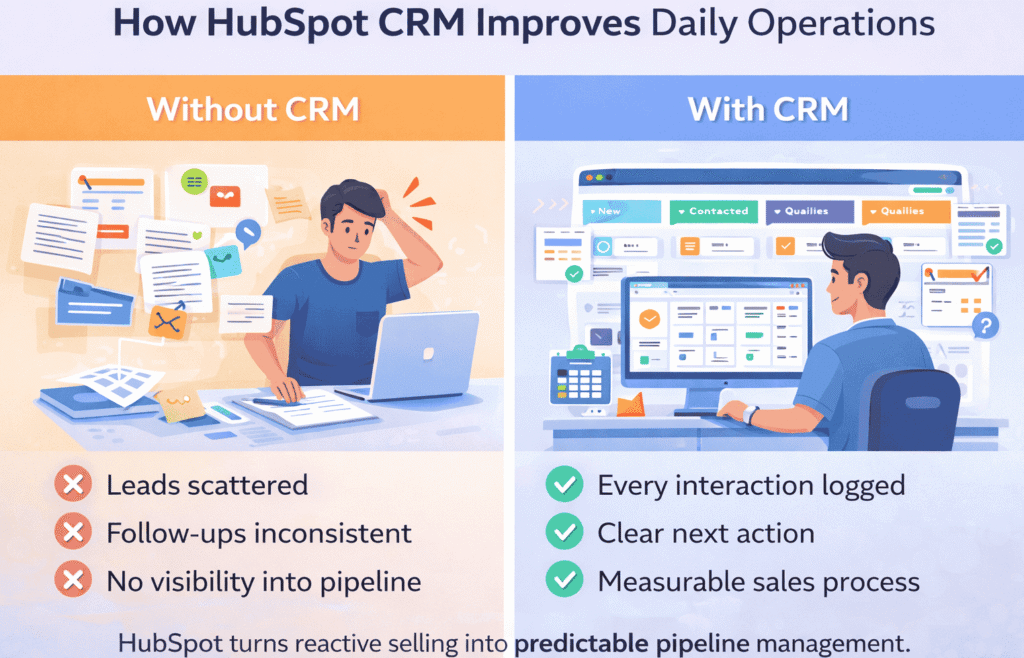
🚀 How HubSpot CRM Improves Your Daily Sales Operations
Most businesses don’t struggle with getting leads—they struggle with managing them consistently. That’s where a CRM like HubSpot makes a real difference.
❌ Without a CRM (Common Daily Challenges)
When you don’t have a structured system in place:
- Leads are scattered across emails, spreadsheets, and notes
- Follow-ups are inconsistent or completely missed
- No clear visibility into deal status or pipeline progress
- Sales decisions are based on guesswork, not data
- Team collaboration becomes difficult (or impossible)
👉 Result: Missed opportunities, slow growth, and unpredictable revenue
✅ With HubSpot CRM (Structured Daily Workflow)
Once you start using HubSpot CRM, your daily operations become organized and predictable:
- ✔ Every interaction (emails, calls, notes) is automatically logged
- ✔ Each lead has a clear “next action” and follow-up timeline
- ✔ Your entire sales pipeline is visible in one dashboard
- ✔ Tasks and reminders keep your workflow consistent
- ✔ You can track performance and improve based on real data
👉 Result: More control, better follow-ups, and higher conversions
🔄 Before vs After (Simple View)
Without CRM:
- ❌ Disorganized leads
- ❌ Missed follow-ups
- ❌ No tracking or clarity
With HubSpot CRM:
- ✅ Centralized lead management
- ✅ Consistent follow-up system
- ✅ Clear, trackable sales pipeline
🎯 What Actually Changes in Your Day-to-Day Work
Instead of:
- Searching for old emails
- Forgetting to follow up
- Guessing deal status
You now:
- Open your dashboard → see all leads instantly
- Check tasks → know exactly what to do next
- Move deals → track progress visually
👉 Your workflow becomes clear, repeatable, and efficient
💡 Simple Explanation
HubSpot CRM transforms your process from:
👉 Reactive selling (random actions)
➡️ Predictable pipeline management (structured system)
🚀 Final Takeaway
Using HubSpot CRM doesn’t just organize your data—it changes how you work every day.
👉 You go from:
Unpredictable sales → Measurable growth
Chaos → Clarity
Missed follow-ups → Consistent actions
🎯 Best Use Cases: When to Use HubSpot CRM
Not every tool fits every situation. Here’s when HubSpot CRM delivers the most value, so you can quickly decide if it’s the right fit for your workflow.
📇 Lead Management (Organize & Never Lose a Prospect)
Use HubSpot CRM when you’re collecting leads from:
- Website forms
- Cold outreach
- Social media or LinkedIn
👉 Store everything in one place, track activity, and never lose a lead again
📊 Sales Tracking (Know Exactly Where Deals Stand)
Perfect if you want a clear view of your sales pipeline:
- Track deals from first contact → closing
- Assign deal value and priority
- Identify stuck opportunities
👉 Gives you predictable revenue visibility, not guesswork
📧 Client Follow-Ups (Stay Consistent & Close More Deals)
If you often forget to follow up or lose track of conversations:
- Set reminders and tasks
- Track email opens and replies
- Maintain full communication history
👉 Ensures timely follow-ups = higher conversion rates
🧑💻 Freelance & Small Client Management
Ideal for freelancers, consultants, and service providers:
- Manage multiple clients in one dashboard
- Track conversations and project stages
- Stay organized without complex tools
👉 Helps you run your business professionally and efficiently
💡 Simple Decision Rule
👉 Use HubSpot CRM if you need:
- Structure in your sales process
- Better follow-ups
- A centralized system for managing relationships
🚀 Quick Takeaway
If you’re dealing with multiple leads, ongoing conversations, or growing sales activity, HubSpot CRM helps you turn that chaos into a clear, manageable system.
🚀 When Should You Upgrade Beyond the Free Plan in HubSpot CRM?
The free plan is powerful enough to get started—but as your business grows, you’ll eventually reach a point where upgrading becomes necessary.
The key is to upgrade based on need, not features.
🎯 Clear Signs It’s Time to Upgrade
✔ You Need Automation to Save Time
If you’re manually:
- Sending follow-ups
- Creating tasks
- Assigning leads
👉 It’s time to use automation workflows to scale efficiently.
✔ You Have Multiple Sales Reps
When your team grows:
- Leads need to be assigned automatically
- Activities need to be tracked across team members
- Collaboration becomes essential
👉 Upgrading helps you manage teams without confusion
✔ You Need Better Reporting & Insights
If you’re asking:
- Which campaigns bring the best leads?
- What’s your conversion rate?
- Where are deals getting stuck?
👉 Advanced reporting gives you data-driven decision making
✔ Your Lead Volume Is Increasing
More leads = more complexity.
- Harder to track manually
- More follow-ups required
- Higher chances of missing opportunities
👉 Upgrade when your system starts feeling overwhelmed
✔ You Want Marketing + Sales Integration
When you start using:
- Email campaigns
- Landing pages
- Lead nurturing workflows
👉 You’ll need deeper integration between marketing and CRM.
⚡ Simple Upgrade Rule
👉 Stay on free plan until it slows you down
Upgrade only when:
- Manual work becomes too much
- You start missing opportunities
- You need better tracking and automation
💡 Beginner-Friendly Strategy
👉 Start with:
- Free plan → Learn the system
👉 Then move to:
- Paid plan → Scale your process
🚀 Real Growth Path
- Start with basic CRM (contacts + deals)
- Add consistent follow-ups
- Grow lead volume
- Introduce automation
- Upgrade when needed
👉 This ensures:
- No wasted cost
- Smooth transition
- Better ROI
🎯 Final Takeaway
HubSpot CRM is designed to grow with you.
👉 Don’t rush to upgrade—
👉 Upgrade when your business actually demands it
Because:
The goal is not to use more features…
The goal is to build a system that scales with your growth.
⚠️ Limitations of HubSpot CRM (Honest Insights)
While HubSpot CRM is excellent for beginners and small businesses, it’s important to understand its limitations so you can make the right long-term decision.
💰 Advanced Features Are Locked Behind Paid Plans
The free version is powerful—but many advanced capabilities require an upgrade.
- Workflow automation
- Advanced reporting
- Deeper marketing tools
👉 If you plan to scale, expect to invest in paid plans later
🏢 Can Feel Limited for Large Teams
As your team grows, you may need:
- More customization
- Complex workflows
- Advanced permissions
👉 HubSpot can handle this—but mostly in higher-tier plans
🤖 Automation Is Limited on Free Plan
Basic automation is available, but:
- Multi-step workflows
- Advanced triggers
- Behavior-based automation
👉 These are only available in paid versions
⚙️ Less Flexible Than Some Advanced CRMs
Compared to tools like enterprise CRMs:
- Customization options are more limited
- Deep technical configurations are restricted
👉 This is actually a benefit for beginners—but a limitation for advanced users
💡 What This Means for You
👉 HubSpot CRM is perfect if you:
- Are just getting started
- Want simplicity and speed
- Need a structured system without complexity
👉 But if you need:
- Deep customization
- Enterprise-level automation
- Highly complex workflows
You may eventually outgrow the free version.
🎯 Honest Takeaway
No CRM is perfect—and HubSpot is no exception.
👉 Its biggest strength (simplicity) can also become a limitation as you scale.
🚀 Final Thought
Start with HubSpot for its ease and structure…
👉 Then upgrade or expand your stack as your business grows
💰 HubSpot CRM Pricing (Beginner Overview)
HubSpot CRM offers a free plan that is powerful enough for most beginners and small businesses.
🆓 Free Plan Includes:
- Contact management
- Deal pipeline
- Email tracking
- Basic automation
👉 Perfect for getting started without any cost.
💼 Paid Plans (When You Scale)
As your business grows, you can upgrade for:
- Advanced automation workflows
- Detailed reporting & analytics
- Team management features
- Marketing tools integration
👉 Pricing varies based on features and business size.
🎯 Simple Recommendation
👉 Start with the free plan
👉 Upgrade only when your workflow becomes more complex
🆚 HubSpot CRM vs Other CRMs
Choosing the right CRM can be confusing, especially with multiple options available. Here’s a simple comparison to help you decide based on your needs.
📊 Quick CRM Comparison Table
| Feature / Tool | HubSpot CRM | Zoho CRM | Salesforce | Freshsales |
|---|---|---|---|---|
| 🧑💻 Ease of Use | ⭐⭐⭐⭐⭐ (Very easy) | ⭐⭐⭐ (Moderate) | ⭐⭐ (Complex) | ⭐⭐⭐⭐ (Easy) |
| 💰 Free Plan | ✅ Yes | ✅ Yes | ❌ No | ✅ Yes |
| ⚡ Setup Time | Very fast | Moderate | Slow | Fast |
| 📊 Sales Pipeline | Visual & simple | Customizable | Advanced | Visual |
| 📧 Email Tracking | Built-in | Available | Available | Built-in |
| 🤖 Automation | Basic (free) / Advanced (paid) | Advanced | Very advanced | Good |
| 🧩 Integrations | Strong | Strong | Very strong | Good |
| 🎯 Best For | Beginners & SMBs | Small–mid businesses | Enterprises | SMB sales teams |
🎯 Which CRM Should You Choose?
👉 Choose HubSpot CRM if:
- You’re a beginner or small business
- You want a free, easy-to-use system
- You need quick setup without technical complexity
👉 Choose Zoho CRM if:
- You want more customization early
- You’re comfortable with a slightly steeper learning curve
👉 Choose Salesforce if:
- You run a large business or enterprise
- You need deep customization and advanced workflows
👉 Choose Freshsales if:
- You want a balance between simplicity and features
- You need built-in communication tools
💡 Simple Recommendation
👉 For most beginners, HubSpot CRM is the best starting point
Because:
- Easy to learn
- Free to start
- Scales as you grow
🚀 Final Takeaway
HubSpot CRM is one of the best choices for small and growing businesses because it perfectly balances:
- Simplicity → Easy to start, no technical barriers
- Structure → Organized system for managing leads and deals
- Scalability → Grows with your business over time
But the real value isn’t just in the features—it’s in how you use it.
👉 When used consistently, HubSpot becomes more than a tool.
It becomes a reliable system for managing relationships, tracking opportunities, and driving predictable growth.
🎯 Final Thought
You don’t need a complex setup to succeed.
👉 Start simple
👉 Stay consistent
👉 Improve gradually
That’s how you turn HubSpot CRM into a long-term growth engine for your business.
FAQs
-
What is HubSpot CRM used for?
HubSpot CRM is used to manage contacts, track sales pipelines, log interactions, and automate follow-ups. It helps businesses organize leads and turn them into customers more efficiently.
-
Is HubSpot CRM really free?
Yes, HubSpot offers a free CRM plan with essential features like contact management, deal tracking, and email tracking. It’s ideal for beginners and small businesses starting out.
-
Is HubSpot CRM good for beginners?
Absolutely. HubSpot CRM is known for its simple interface and easy setup, making it one of the best CRM tools for beginners with no technical background.
-
How long does it take to set up HubSpot CRM?
Basic setup can be completed in 30–60 minutes, including:
Account creation
Contact import
Pipeline setup
Email integration -
Can I use HubSpot CRM for a small business?
Yes, HubSpot CRM is perfect for small businesses because it helps:
Organize leads
Track deals
Manage follow-ups
Scale operations over time -
Does HubSpot CRM track emails?
Yes, once you connect your email, HubSpot can:
Track email opens and replies
Log conversations automatically
Store communication history per contact -
Do I need technical skills to use HubSpot CRM?
No. HubSpot CRM is designed for non-technical users. You can set it up and start using it without coding or advanced knowledge.
-
What is the difference between HubSpot CRM and other CRMs?
HubSpot stands out because it offers:
A free plan
Beginner-friendly interface
Built-in marketing and sales tools
👉 Many other CRMs are more complex or require paid plans to get started. -
When should I upgrade from the free plan?
You should upgrade when:
Your lead volume increases
You need automation workflows
You manage multiple sales reps
You require advanced reporting -
Can HubSpot CRM integrate with other tools?
Yes, HubSpot integrates with tools like:
Email platforms (Gmail, Outlook)
CRM tools
Marketing and automation platforms
👉 This helps you build a complete workflow. -
Is HubSpot CRM suitable for freelancers?
Yes, freelancers can use HubSpot CRM to:
Track client conversations
Manage leads
Schedule follow-ups
Close deals more efficiently -
What are the biggest benefits of using HubSpot CRM?
The main benefits include:
Centralized contact management
Better follow-up tracking
Visual sales pipeline
Improved organization and productivity