
10 Simple AI Workflows Every Small Business Can Automate Today (No Technical Skills Needed)
Small business owners spend 4–6 hours daily on repetitive tasks — emails, follow-ups, admin work, content creation, reporting, and customer communication.
The good news?
You don’t need coding, AI expertise, or technical skills to automate most of these tasks.
Start Automating Without Being “Tech-Savvy”
In this beginner’s guide, you’ll learn 10 simple AI workflows you can activate today, even if you’re new to automation. These workflows help you:
- Save time
- Reduce stress
- Improve customer experience
- Focus on real business growth
What Is an AI Workflow?
An AI workflow is a simple sequence of steps where a tool performs a task automatically without human effort, such as:
- Writing quick replies
- Scheduling meetings
- Extracting lead details
- Generating captions
- Sending follow-up emails
- Updating spreadsheets
- Collecting customer information
Think of AI workflows as digital assistants that run 24/7.
Why These Workflows Are Perfect for Beginners
These automations require:
❌ No coding
❌ No setups longer than 5 minutes
❌ No technical learning curve
They work with simple tools like:
- Zapier
- ChatGPT
- Gmail AI
- Calendly
- Notion AI
- Canva AI
- HubSpot AI
- Tidio
10 Simple AI Workflows You Can Automate Today
Each workflow includes what it does, why it matters, and tools to use.
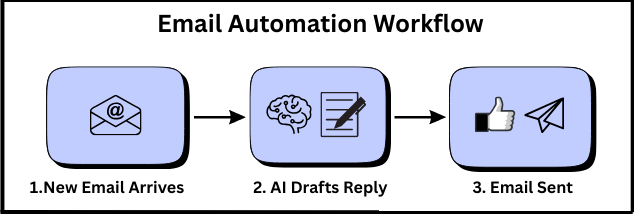
1. AI Email Response Drafting (Instant Replies)
What this workflow does
When a customer emails you, AI drafts a professional reply instantly.
Why it matters
- Saves 2–3 hours daily
- Faster customer response
- No writer’s block
Best tools
- Gmail AI
- ChatGPT
- Tidio
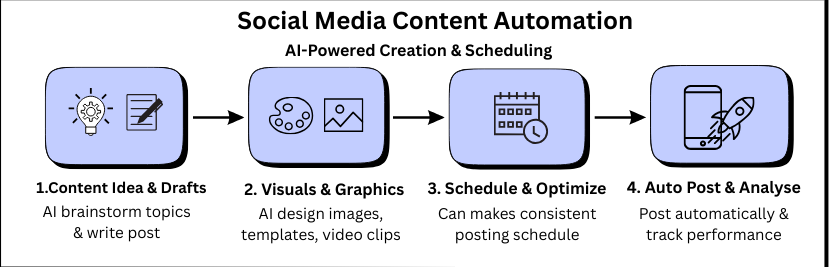
2. Automatic Social Media Content Creation
What this workflow does
AI generates ready-to-post designs, captions, content ideas, and templates.
Why it matters
- Eliminates daily content stress
- Creates consistent posting schedule
- Makes beginners look professional
Tools
- Canva AI
- Jasper
- Notion AI
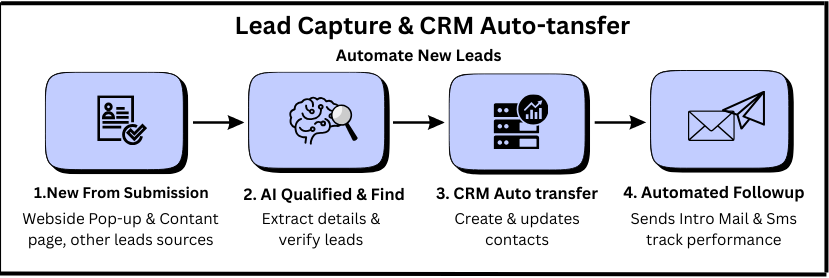
3. Lead Capture → CRM Auto-Transfer
What this workflow does
When someone submits a form or message, AI automatically sends their details to a CRM or spreadsheet.
Why small businesses love it
- No copying/pasting
- No missing leads
- Faster follow-up
Tools
- Zapier
- HubSpot AI
- Notion AI
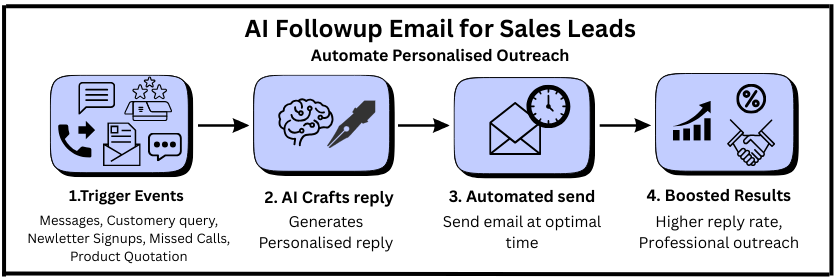
4. AI Follow-Up Emails for Sales Leads
What this workflow does
AI sends personalized follow-ups automatically after:
- Customer inquiry
- Missed call
- Product question
- Newsletter signup
Benefits
- 30–40% higher reply rate
- Professional outreach
- No manual reminders
Tools
- Reply.io AI
- Apollo.io
- Gmail + Zapier
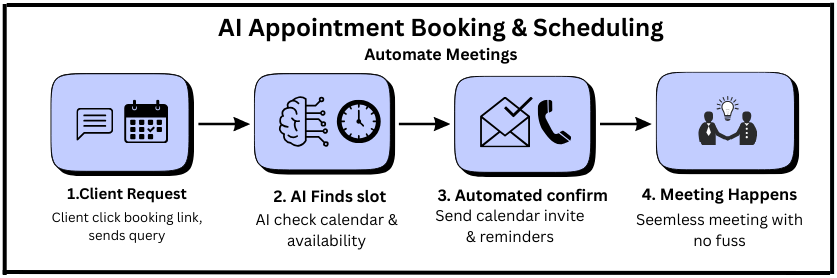
5. AI Appointment Booking & Scheduling
What this workflow does
AI books meetings automatically without back-and-forth messages.
Perfect for
- Coaches
- Consultants
- Agencies
- Local services
- Small business owners
Tools
- Calendly
- Google Calendar AI
- Tidio
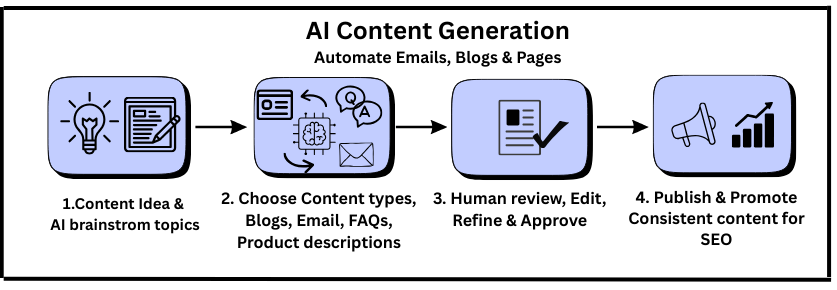
6. AI Content Writing for Blogs, Emails, and Pages
What this workflow does
AI writes:
- Blog drafts
- Newsletters
- FAQs
- Website copy
- Product descriptions
Beginner benefits
- Saves hours
- Removes writing fear
- Helps you publish consistently for SEO
Tools
- ChatGPT
- Jasper
- Notion AI
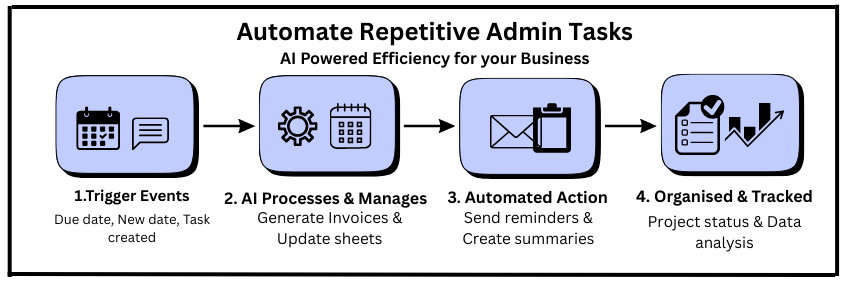
7. Automate Repetitive Admin Tasks
Examples
AI can automatically:
- Generate invoices
- Send reminders
- Update spreadsheets
- Track tasks and projects
- Create summaries
Tools
- Zapier
- ClickUp AI
- Notion AI
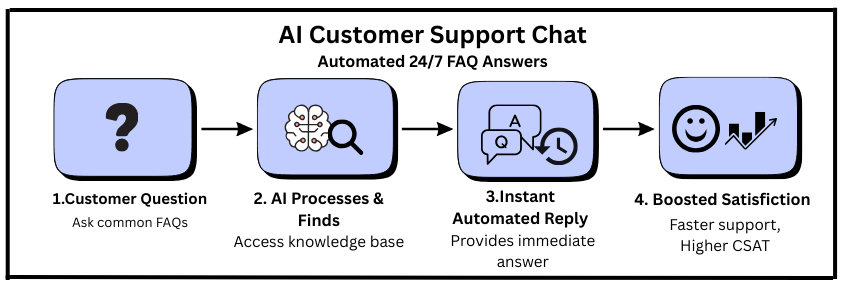
8. AI Customer Support Chat (Answer FAQs Automatically)
What this workflow does
AI answers common customer questions instantly — 24/7.
Benefits
- Faster customer support
- Fewer repetitive questions
- Higher satisfaction
Tool
- Tidio
- Intercom AI
- ChatGPT-based bots
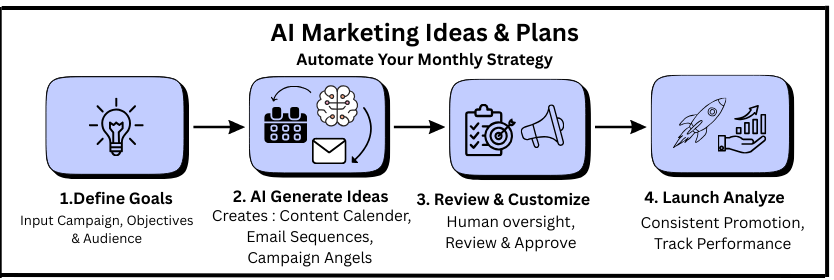
9. Auto-Generate Marketing Ideas & Monthly Plans
What this workflow does
AI creates:
- 30-Day Content calendar
- Email sequences
- Campaign ideas
- Promotion angles
Why it matters
Perfect for business owners who struggle with planning and consistency.
Tools
- ChatGPT
- Jasper
- Notion AI
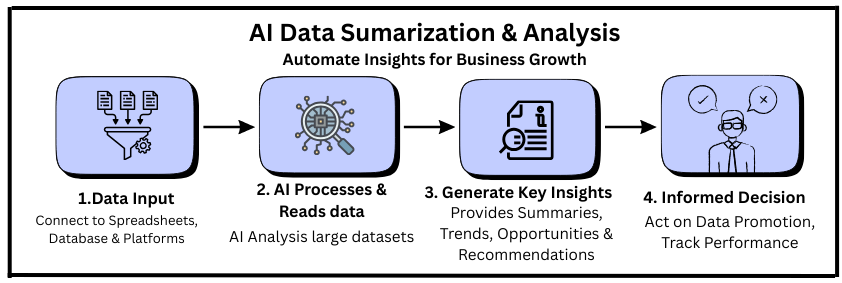
10. Summarize and Analyze Business Data Automatically
What this workflow does
AI reads your data and gives:
- Summaries
- Insights
- Trends
- Opportunities
- Recommendations
Tools
- ChatGPT
- Google Sheets AI
- ClickUp AI
How to Start These Workflows (Beginner 15-Minute Plan)
Step 1: Pick ONE workflow
Choose the task you hate the most — email, leads, content, etc.
Step 2: Choose ONE tool
Prefer a tool that feels easy to you.
Step 3: Automate a simple step
Example: “Gmail drafts replies automatically.”
Step 4: Test it for 3 days
Step 5: Add the next workflow
Stack them slowly — no pressure, no rush.
Benefits of Automating These AI Workflows
✔ Saves 5–10 hours weekly
✔ Reduces daily stress
✔ Helps beginners work like professionals
✔ Improves customer experience
✔ Raises productivity
✔ Frees your time for growth tasks
✔ Requires zero technical skills
Conclusion: You Don’t Need Complex AI — Start With Simple Workflows
AI doesn’t replace small business owners —
it removes the boring work.
With the 10 simple workflows above, you can:
- Save time
- Reduce mistakes
- Run smoother operations
- Grow faster
- Deliver better customer experience
And the best part?
You can start TODAY without any tech skills.
FAQs
1. What are the easiest AI workflows small business owners can automate?
The easiest AI workflows are email drafting, social media content creation, automatic lead capture, appointment scheduling, admin reminders, and customer support replies. These require no technical skills and can be set up in minutes using tools like ChatGPT, Zapier, Calendly, and Canva AI.
2. Do I need technical skills to automate business tasks with AI?
No. Most modern AI tools are built for beginners. You can automate emails, scheduling, content, lead management, and follow-ups without coding or complex setups. Tools like Gmail AI, Tidio, Notion AI, and Jasper are designed for non-technical users.
3. What is an AI workflow in simple words?
An AI workflow is a step-by-step task done automatically by software. For example:
- Email comes in → AI drafts a reply
- New lead submits a form → AI adds them to your CRM
- Customer asks a question → AI bot answers instantly
It saves time by removing daily repetitive work.
4. How much time can AI workflows save for small business owners?
Most small businesses save 5–10 hours per week by automating simple tasks like emails, follow-ups, scheduling, content creation, and admin work. Some save even more depending on their workflow.
5. Which AI tools are best for beginners who want to automate?
The most beginner-friendly AI tools are:
- ChatGPT → writing, emails, planning
- Canva AI → social media content
- Calendly → appointment scheduling
- Tidio → customer support automation
- Zapier → simple app-to-app automation
- Notion AI → admin tasks and organization
All of these require zero technical expertise.
6. Can AI replace manual tasks completely?
AI can automate many repetitive tasks, but it can’t replace tasks that require human judgment, relationship building, or important business decisions. The best approach is AI + human oversight.
7. What are examples of tasks small businesses should NOT automate?
You should not automate:
- High-value client conversations
- Sensitive financial decisions
- Customer complaints requiring empathy
- Custom project scoping
These require human understanding and expertise.
8. How do I choose which AI workflow to automate first?
Start by picking the task you repeat the most or dislike doing — usually emails, social media, lead entry, or scheduling. Choose one workflow, automate it, and then expand gradually.
9. Will using AI tools improve my customer experience?
Yes. AI improves response times, reduces errors, offers 24/7 support, and ensures consistent communication. Many small businesses see better customer satisfaction when simple tasks are automated.
10. Are AI automations expensive for small businesses?
No. Most tools offer free or low-cost plans, such as ChatGPT Free, Calendly Basic, Canva Free, Tidio Free, and Zapier Free Plan. Beginners can start automating without spending money.
11. Can AI help small businesses grow faster?
Absolutely. AI helps business owners focus on growth activities instead of repetitive tasks. Automating 5–6 workflows can free up enough time to improve marketing, sales, and customer service.
12. Which AI workflow gives the fastest results?
The quickest improvements come from automating:
- Email drafting
- Social media posts
- Lead capture → CRM sync
- Appointment scheduling
These workflows deliver immediate time savings with minimal setup.