
How to Find Business Emails From LinkedIn
Table of Contents
LinkedIn is one of the most powerful platforms for B2B lead generation and sales prospecting. Millions of professionals actively use LinkedIn to connect with peers, explore partnerships, and discover business opportunities.
However, one challenge many businesses face is that LinkedIn profiles do not always display email addresses publicly. While the platform allows messaging through LinkedIn, most sales teams prefer to connect through email for outreach campaigns, follow-ups, and sales conversations.
Finding business emails from LinkedIn profiles allows businesses to build targeted prospect lists, organize leads efficiently, and run personalized outreach campaigns.
The process is not about randomly collecting emails. Instead, successful businesses follow a structured workflow that combines LinkedIn prospecting, email discovery tools, and verification techniques.
In this guide, you will learn how to find business emails from LinkedIn step by step and build a reliable prospecting system for lead generation.
If you want to capture leads directly from profiles, check our step-by-step Apollo Chrome extension tutorial for finding business emails from LinkedIn.
Why Businesses Use LinkedIn for Email Prospecting
LinkedIn is particularly valuable for B2B prospecting because it contains detailed professional information about individuals and organizations.
Businesses use LinkedIn for email prospecting for several reasons.
Access to Professional Profiles
LinkedIn profiles provide valuable information such as job titles, company names, industries, and work experience. This information helps businesses identify people who match their ideal customer profile.
Targeting Decision-Makers
Unlike many marketing platforms, LinkedIn allows businesses to directly identify decision-makers such as:
• Founders
• CEOs
• Marketing Managers
• Sales Leaders
These professionals often control budgets and influence purchasing decisions.
Accurate company data
LinkedIn profiles often include company pages, which provide additional details such as company size, industry, and location. This information helps refine prospecting efforts.
Better B2B targeting
Because LinkedIn is designed for professional networking, businesses can focus on high-intent B2B prospects instead of random contacts.
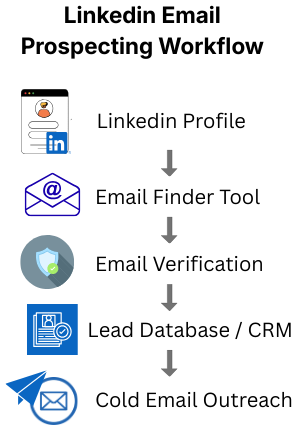
The LinkedIn Email Prospecting Workflow
Finding business emails from LinkedIn works best when following a structured workflow.
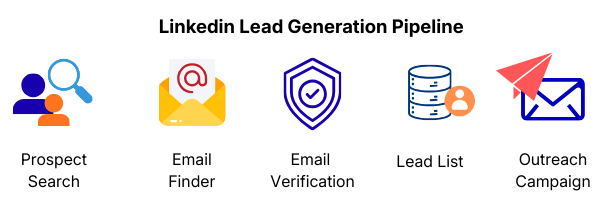
The typical process involves several stages:
- Identify prospects on LinkedIn
- Research and qualify leads
- Use email finder tools
- Verify discovered emails
- Organize leads in a database
- Launch outreach campaigns
Each step ensures that the email list you build contains accurate and relevant prospects, improving response rates and campaign performance.
Method 1: Check the LinkedIn Profile Contact Info
The simplest and most direct way to find someone’s business email is by checking the Contact Info section on their LinkedIn profile. Some professionals choose to make their email address visible so that potential clients, recruiters, or partners can contact them easily.
This method is quick and requires no external tools, making it a good first step before using email finder platforms.
Many professionals—especially consultants, freelancers, founders, and sales professionals—include their email address in their LinkedIn profile to encourage networking opportunities. If the email is publicly available, you can immediately use it for professional communication.
However, it is important to use the information responsibly and send relevant, personalized messages, rather than generic outreach.
1.1 Steps to Check LinkedIn Contact Information
- Open the LinkedIn profile
Search for the person on LinkedIn and open their profile page. - Click the “Contact Info” section
Under the profile header, you will see a button labeled Contact Info. - Review the available details
If the user has shared their email publicly, it will appear in this section along with other contact details such as:- Email Address
- Personal Website
- Company Website
- Social Media Links
- Copy and save the email
If the email address is visible, add it to your prospect list or CRM for future outreach.
1.2 When This Method Works Best
Checking the LinkedIn contact section works best when targeting professionals who actively network online, such as:
- Consultants and Freelancers
- Startup Founders
- Sales professionals
- Recruiters
- Marketing Specialists
These professionals often include contact information to make it easier for people to reach them.
1.3 Limitations of This Method
Although this method is simple, it does not always work because many LinkedIn users choose to keep their contact details private.
Common reasons include:
- Avoiding spam messages
- Maintaining privacy
- Restricting contact to existing connections
Because of these limitations, businesses often combine this approach with email finder tools and domain search techniques to discover professional email addresses.
1.4 Best Practice
Even when an email address is publicly available, always send professional and personalized outreach messages. Referencing the person’s company, role, or recent activity on LinkedIn can significantly increase the chances of receiving a response.
This approach ensures that your communication feels relevant and respectful, rather than appearing like unsolicited spam.
Method 2: Use LinkedIn Email Finder Tools
When LinkedIn profiles do not display an email address publicly, the most effective way to discover business emails is by using LinkedIn email finder tools.
These tools are designed to help businesses and sales teams collect professional contact information quickly. Instead of manually guessing email formats or searching through websites, email finder tools automate the process of identifying potential email addresses associated with a LinkedIn profile.
Many modern prospecting tools integrate directly with LinkedIn through browser extensions or data enrichment systems. When you view a LinkedIn profile, the tool scans available information such as the company name, domain, and employee data to generate possible business email addresses.
This process makes it significantly easier to build accurate prospect lists for outreach campaigns.
2.1 How LinkedIn Email Finder Tools Work
Most email finder tools follow a similar process to discover professional email addresses.
They typically analyze multiple sources of information and combine them to identify the most likely email format used by a company.
Common techniques include:
➤ Company domain analysis
The tool identifies the company website associated with the LinkedIn profile. Every company typically has a domain, such as:
companyname.com
Most business emails are created using this domain.
➤ Public databases
Some email finder tools maintain large databases containing previously discovered professional email addresses. These databases are constantly updated using public sources, company websites, and user-contributed data.
If the email already exists in the database, the tool can retrieve it instantly.
➤ Pattern matching
Many companies use consistent email formats for their employees. For example:
• firstname@company.com
• firstname.lastname@company.com
• firstinitiallastname@company.com
Email finder tools analyze existing email records from the company and determine which pattern is most likely used.
➤ AI-powered data enrichment
Some modern tools also use artificial intelligence to combine data from multiple sources. These systems enrich LinkedIn profiles with additional details such as company domain information, verified contact records, and historical email patterns.
This approach improves accuracy and helps identify emails even when they are not directly available on LinkedIn.
2.2 Benefits of Using Email Finder Tools
Using email finder tools offers several advantages compared to manual research.
➤ Faster prospecting
Instead of spending hours searching for contact information, these tools can identify emails within seconds.
➤ Higher accuracy
Most professional tools include verification features that help ensure the email address is valid before outreach begins.
➤ Scalable lead generation
Email finder tools allow businesses to build large prospect lists efficiently, which is essential for outreach campaigns.
➤ Integration with outreach platforms
Many prospecting tools integrate with CRM systems and email automation platforms, allowing businesses to manage leads and campaigns from a single dashboard.
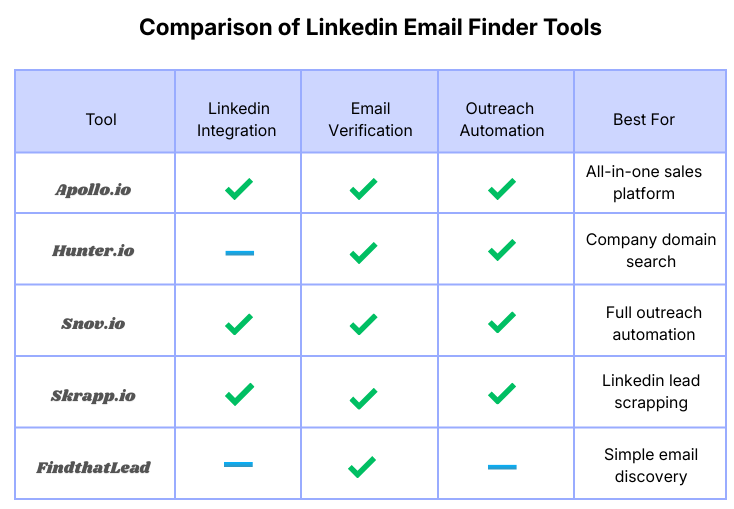
2.3 Popular LinkedIn Email Finder Tools
| Tool | Best For |
|---|---|
| Apollo | Full sales prospecting platform |
| Hunter | Domain email search |
| Snov | Email outreach automation |
| Skrapp | LinkedIn lead extraction |
2.4 Choosing the Right Tool
The best tool depends on your prospecting needs and workflow.
For example:
• Businesses looking for an all-in-one prospecting platform may prefer Apollo.
• Companies that rely on domain-based email discovery may find Hunter useful.
• Teams running cold email outreach campaigns may benefit from Snov.
• LinkedIn-focused prospectors may prefer Skrapp.
Regardless of the tool used, combining LinkedIn prospect research with email finder tools helps businesses build high-quality prospect lists for targeted outreach campaigns.
To see how the process works in practice, explore our guide on the best LinkedIn prospecting tool to find business emails.
Method 3: Use a Chrome Extension
Another efficient way to find business emails from LinkedIn is by using Chrome extensions designed for email prospecting.
Many modern LinkedIn email finder tools provide browser extensions that work directly inside LinkedIn. These extensions integrate with your browser and automatically analyze LinkedIn profiles to identify potential professional email addresses.
Instead of manually copying profile details and searching for company domains, the extension does the work for you. With just one click, it scans the profile and retrieves available contact data such as email addresses, company domains, and additional prospect details.
For businesses that rely heavily on LinkedIn for lead generation, Chrome extensions can significantly speed up the prospecting process and reduce manual research time.
3.1 How Chrome Extensions Work
LinkedIn email finder extensions are designed to operate directly within your browser while you browse LinkedIn profiles.
When activated, the extension collects publicly available information from the profile and combines it with external databases and domain analysis to generate potential email addresses.
Most extensions follow a process like this:
➤ Profile Analysis
The extension scans the LinkedIn profile to identify key details such as the person’s name, company name, and job title.
➤ Company Domain Detection
Next, the tool identifies the company website associated with the LinkedIn profile. This domain is important because most business emails use the company domain.
For example:
Company domain:examplecompany.com
Possible email formats:
• firstname@examplecompany.com
• firstname.lastname@examplecompany.com
• firstinitiallastname@examplecompany.com
➤ Email Pattern Identification
The extension checks existing email patterns used within that company. By analyzing previously discovered employee emails, it can determine the most likely email format.
➤ Email generation and verification
Finally, the tool generates the potential email address and may verify whether it is valid and deliverable.
This automated process allows users to quickly discover business emails while browsing LinkedIn.
3.2 Steps to Use a Chrome Extension for Email Discovery
Using a LinkedIn email finder extension is relatively simple. Most tools follow a similar setup process.
1. Install the extension
Visit the Chrome Web Store and install the extension associated with your email finder tool. Many tools offer free versions that allow limited searches per month.
2. Connect your account
After installing the extension, sign in or connect it to your email finder tool account. This allows the extension to access the tool’s email database and verification features.
3. Open a LinkedIn profile
Navigate to LinkedIn and open the profile of a professional you want to contact.
Make sure the profile contains relevant information such as company name and job role, as this helps the extension generate accurate results.
4. Click the extension icon
Click the extension icon in your browser toolbar. The tool will begin scanning the profile and retrieving associated data.
5. View the discovered email
Within seconds, the extension may display the professional email address or suggest possible email formats based on the company domain.
You can then copy the email and add it to your prospect list or CRM system.
3.3 Benefits of Using Chrome Extensions
Chrome extensions offer several advantages for businesses running LinkedIn prospecting campaigns.
➤ Faster lead generation
Manual prospecting can take hours when searching for contact details individually. Chrome extensions automate much of this process, allowing users to discover emails instantly.
This makes it easier to build large prospect lists quickly.
➤ Works directly inside LinkedIn
Unlike some email finder tools that require switching between platforms, browser extensions work directly within the LinkedIn interface.
This allows you to browse profiles and collect contact information without leaving the page.
➤ One-click email discovery
Most extensions provide a simple one-click process to retrieve emails. Instead of copying data manually, the tool automatically extracts profile details and generates the email address.
➤ Integration with prospecting tools
Many Chrome extensions integrate with CRM platforms and sales automation tools. This allows users to:
• export leads to CRM systems
• add prospects to outreach campaigns
• organize lead lists automatically
These integrations help businesses create a more efficient sales prospecting workflow.
3.4 Best Practices When Using Chrome Extensions
While Chrome extensions are powerful prospecting tools, it is important to use them strategically.
➤ Verify emails before sending
Some extensions provide estimated email addresses based on company patterns. Always verify emails using a verification tool before launching outreach campaigns.
➤ Focus on targeted prospects
Instead of collecting random emails, focus on professionals who match your ideal customer profile. This increases the chances of successful outreach.
➤ Avoid excessive scraping
LinkedIn monitors unusual automation activity. Using tools responsibly and at reasonable limits helps maintain account safety.
➤ Organize leads properly
After collecting emails, store them in a CRM or lead management system so you can track conversations and follow-ups effectively.
3.5 When to Use Chrome Extensions in Your Workflow
Chrome extensions work best during the prospecting phase of your lead generation workflow.
They are particularly useful when:
• Researching Individual LinkedIn Profiles
• Building Targeted Prospect Lists
• Collecting Emails from Company Employee Lists
• Exporting Leads to Outreach Platforms
By combining Chrome extensions with email verification tools and outreach automation platforms, businesses can build a complete LinkedIn prospecting system.
3.6 Why Chrome Extensions Are Popular Among Sales Teams
Sales teams and growth marketers rely heavily on Chrome extensions because they allow them to prospect and collect leads directly from LinkedIn without switching tools.
This streamlined workflow reduces friction in the prospecting process and allows teams to focus on building relationships with potential customers instead of performing repetitive research tasks.
When used alongside email verification and outreach tools, Chrome extensions become an essential component of modern LinkedIn lead generation strategies.
Method 4: Use Company Domain Search
Another effective way to find business emails from LinkedIn is by using a company domain search method. This technique involves identifying the company’s website domain and then determining the email format commonly used by employees in that organization.
Most companies follow a consistent email naming pattern for their employees. Once you understand this pattern, you can often predict the email address of a specific employee, even if the email is not publicly listed on LinkedIn.
This method is widely used by sales professionals, recruiters, and marketers when they already know the prospect’s company but cannot find their direct contact information.
Because many organizations follow predictable email structures, this technique can help you discover accurate business emails with a high success rate.
4.1 Steps to find Domain-Based Email Discovery
Step 1: Identify the Company Domain
The first step is to identify the Company website domain associated with the LinkedIn profile.
You can usually find this information in several places:
• The LinkedIn Company Page
• The Person’s LinkedIn Profile Description
• The Company’s Official Website
• Google Search Results
For example, if a LinkedIn prospect works at a company called ExampleTech, the domain may be:
exampletech.com
This domain is important because most business email addresses are created using the company domain.
For instance:
john@exampletech.com (or) john.smith@exampletech.com
Step 2: Identify Common Email Patterns
Most companies use standardized email patterns when creating employee email accounts. Once you know the company domain, the next step is identifying which email format the organization uses.
Some of the most common email patterns include:
| Email Pattern Type | Format | Example |
|---|---|---|
| First Name | firstname@company.com | sarah@company.com |
| First Name + Last Name | firstname.lastname@company.com | sarah.johnson@company.com |
| First Initial + Last Name | firstinitiallastname@company.com | sjohnson@company.com |
| First Name + Last Initial | firstnamelastinitial@company.com | sarahj@company.com |
Companies typically use one consistent format for all employees, which makes it easier to predict email addresses once the pattern is known.
Step 3: Use Email Pattern Discovery Tools
Instead of guessing manually, you can use email pattern discovery tools that analyze company domains and identify common employee email formats.
These tools work by scanning previously discovered email addresses from the same company domain. If multiple employees use the format:
firstname.lastname@company.com
the tool will identify that as the most likely pattern used by the company.
By combining the pattern with the prospect’s name, you can generate the probable email address.
For example:
Prospect name: John Smith
Company domain: exampletech.com
Generated email:
Step 4: Verify the Email Address
After generating a potential email address, it is important to verify whether it is valid and deliverable.
Email verification tools analyze the email server to check whether the address exists and can receive messages.
Verification tools typically check:
• Domain Validity
• Email Server Configuration
• Mailbox Availability
This process helps prevent sending emails to invalid addresses, which can increase bounce rates and harm your sender reputation.
By verifying the email before outreach, you can improve the overall success rate of your email campaigns.
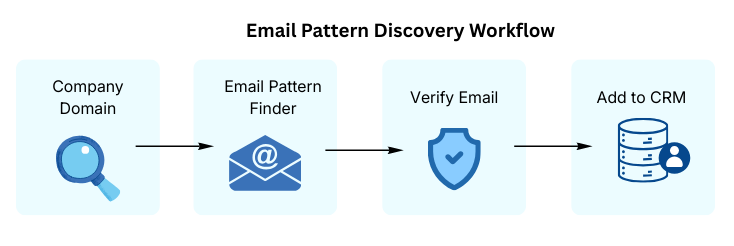
4.2 Example Workflow for Domain-Based Email Discovery
The domain search method works best when combined with LinkedIn prospect research.
A simple workflow might look like this:
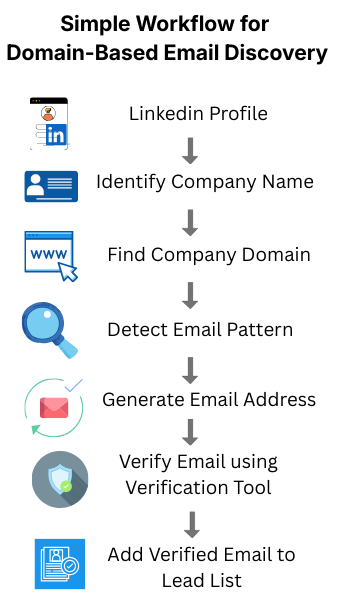
This workflow allows businesses to convert LinkedIn profiles into verified email contacts for outreach campaigns.
4.3 Benefits of Using the Domain Search Method
Using company domain patterns offers several advantages for LinkedIn prospecting.
➤ High accuracy
Many companies follow standardized email formats, making it easier to predict employee email addresses.
➤ No direct data extraction required
Unlike scraping tools, domain search relies on publicly available company information.
➤ Scalable prospecting
Once you identify the email pattern used by a company, you can generate emails for multiple employees within that organization.
➤ Improved outreach efficiency
Combining LinkedIn prospect research with domain-based email discovery helps businesses build targeted lead lists quickly.
4.4 Best Practices for Domain-Based Email Discovery
To improve the effectiveness of this method, follow these best practices.
➤ Always verify generated emails
Even if the pattern appears correct, verification ensures that the email address actually exists.
➤ Cross-check company domains
Some companies operate multiple domains or regional websites. Make sure you use the correct domain.
➤ Avoid sending emails without validation
Sending emails to invalid addresses may negatively affect email deliverability and sender reputation.
➤ Use this method alongside email finder tools
Domain search works best when combined with professional email discovery tools that can confirm patterns and verify addresses.
4.5 When to Use the Domain Search Method
The domain-based email discovery method works best in situations where:
• LinkedIn profiles do not display email addresses
• Email finder tools cannot locate the contact email
• You already know the company website domain
• You need to generate emails for multiple employees within the same company
Because of its flexibility, this method is widely used by sales teams, recruiters, and B2B marketers when building prospect lists.
4.6 Why Domain-Based Email Discovery Is Still Effective
Even though many modern prospecting tools provide automated email discovery, domain-based email search remains an important technique.
It allows businesses to:
• Discover emails when tools cannot find them
• Confirm email patterns used by companies
• Expand prospect lists efficiently
When combined with LinkedIn research and email verification, domain-based discovery becomes a powerful technique for building reliable B2B contact lists.
Before starting outreach campaigns, learn How to find business emails from LinkedIn for cold outreach using Reply.io to build a targeted contact list.
Method 5: Use Email Verification Tools
After discovering a potential business email from LinkedIn using email finder tools or domain pattern methods, the next important step is email verification.
Email verification tools help confirm whether the email address you discovered is valid, active, and capable of receiving messages. Without verification, there is a high risk that some email addresses may be incorrect or inactive, which can negatively affect outreach campaigns.
For businesses running cold email campaigns, sending messages to invalid addresses can lead to high bounce rates, poor deliverability, and damaged sender reputation. This is why professional sales teams and marketers always verify emails before starting outreach.
Email verification tools analyze several technical factors to determine whether an email address is legitimate and safe to use.
5.1 What Email Verification Tools Check
Verification platforms perform multiple checks to ensure that the email address is valid and deliverable. These checks help confirm that the email belongs to a real user and that the domain is capable of receiving messages.
➤ Email format validation
The first step is checking whether the email address follows the correct format.
For example, a valid email address must follow this structure:
username@domain.com
Verification tools check for issues such as:
• missing “@” symbol
• incorrect domain formatting
• invalid characters in the address
If the format is incorrect, the email address is immediately flagged as invalid.
➤ Domain validity
Next, the tool checks whether the domain used in the email address actually exists.
For example, in the email:
john@examplecompany.com
The verification tool confirms that examplecompany.com is a valid domain that is properly registered and active.
If the domain does not exist or is inactive, the email address will be marked as invalid.
➤ Mail server response
One of the most important checks performed by verification tools involves testing the mail server associated with the domain.
The verification system communicates with the company’s email server to determine whether the mailbox exists and whether it is capable of receiving emails.
This process helps identify:
• Active mailboxes
• Inactive mailboxes
• Non-existent users
By checking server responses, verification tools can significantly reduce the chances of sending emails to invalid recipients.
➤ Spam Risk Detection
Some email verification tools also analyze the potential spam risk associated with an email address.
For example, they may identify whether an email is:
• A temporary email address
• Associated with spam traps
• Part of suspicious domains
These checks help protect your outreach campaigns and prevent sending emails to risky addresses that could harm your sender reputation.
5.2 Why Email Verification Is Important
Email verification plays a critical role in the success of outreach campaigns.
Businesses that skip verification often experience problems such as high bounce rates, reduced deliverability, and poor response rates.
Using verified emails offers several important benefits.
➤ Improved email deliverability
When emails are sent to valid and active addresses, email providers are more likely to deliver messages directly to the recipient’s inbox rather than filtering them into spam folders.
➤ Reduced bounce rates
Bounce rates occur when emails are sent to invalid or inactive addresses. High bounce rates signal poor list quality and can negatively impact future campaigns.
Email verification tools help eliminate invalid addresses before emails are sent.
➤ Better sender reputation
Email service providers track sender behavior. If too many emails bounce or appear spam-like, the sender’s domain reputation can suffer.
Verified email lists help maintain a strong sender reputation and improve long-term deliverability.
➤ Higher campaign performance
Outreach campaigns perform better when emails reach real professionals. Verified contact lists increase the likelihood of receiving replies and generating meaningful conversations.
5.3 Example Workflow for Email Verification
Email verification is usually performed after discovering email addresses through LinkedIn prospecting methods.
A typical workflow may look like this:
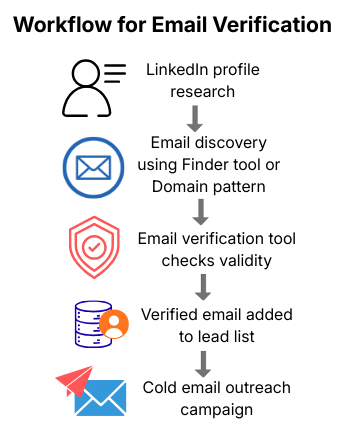
This process ensures that your prospect list contains accurate and deliverable contact information before starting outreach.
5.4 Best Practices for Using Email Verification Tools
To get the best results from email verification tools, businesses should follow several best practices.
➤ Verify emails before outreach
Always verify newly discovered email addresses before sending the first outreach message.
➤ Verify bulk email lists
If you are uploading large prospect lists into outreach platforms, run bulk verification to remove invalid addresses.
➤ Avoid sending to risky emails
Emails flagged as spam traps, disposable addresses, or high-risk domains should not be used for outreach.
➤ Combine verification with prospect research
Email verification confirms whether an address is deliverable, but it does not guarantee the prospect is relevant. Always combine verification with proper prospect qualification.
5.5 When to Use Email Verification in Your Workflow
Email verification should be used whenever you discover email addresses from sources such as:
• LinkedIn prospecting
• Email finder tools
• Domain-based email generation
• Purchased or imported contact lists
By verifying emails at the right stage of your workflow, you ensure that your outreach campaigns focus only on valid, high-quality prospects.
5.6 Why Verification Is Essential for LinkedIn Email Prospecting
LinkedIn email prospecting is a powerful strategy for building B2B contact lists, but the success of this approach depends on the accuracy of the email addresses you collect.
By combining LinkedIn prospect research, email finder tools, domain pattern discovery, and verification tools, businesses can create reliable and scalable lead generation systems.
Using verified email addresses not only improves campaign results but also helps maintain a strong sender reputation and long-term outreach success.nse rates.
Once you build your lead list, you can use an Email outreach automation tool to start scalable cold email campaigns.
Step-by-Step LinkedIn Email Prospecting Workflow
Here is a simple workflow used by many sales teams and marketers.
Step 1: Search for Prospects on LinkedIn Using Filters
Start by using LinkedIn’s search filters to find professionals who match your target audience.
You can filter prospects based on:
- job title
- company name
- industry
- location
- company size
For example, if you are targeting marketing decision-makers, you might search for “Marketing Manager” or “Head of Marketing” in companies within a specific industry.
Using filters helps narrow down your search and ensures that the prospects you collect are relevant to your business goals.
Step 2: Open the Target LinkedIn Profile
Once you identify a potential prospect, open their LinkedIn profile and review their information.
Look for important details such as:
- current company
- role or job title
- company website
- industry relevance
This step helps confirm whether the person is a qualified lead before attempting to find their email address.
Prospect research is important because sending outreach messages to the wrong audience can reduce response rates.
Step 3: Use an Email Finder Tool
After identifying a relevant prospect, use a LinkedIn email finder tool to discover their professional email address.
Many tools can automatically scan the LinkedIn profile and company domain to generate possible email addresses.
These tools typically use:
- public data sources
- company domain analysis
- email pattern matching
- AI-powered data enrichment
Popular tools like Apollo, Hunter, and Snov can often find verified business emails within seconds.
Step 4: Verify the Email Address
Before adding the email to your prospect list, it is important to verify that the address is valid.
Email verification tools check whether the email:
- exists on the company mail server
- has a valid domain
- can receive messages
Verification helps prevent high bounce rates and protects your sender reputation when sending outreach emails.
Step 5: Add the Lead to Your CRM
Once the email address has been verified, the next step is to store the lead in a CRM or lead management system.
Your CRM can include information such as:
- prospect name
- job title
- company
- verified email address
- LinkedIn profile link
Organizing leads inside a CRM helps sales teams track conversations, follow-ups, and outreach campaigns more effectively.
Step 6: Start Cold Email Outreach
After collecting and verifying the email addresses, you can begin your cold email outreach campaign.
Cold emails should be personalized and relevant to the recipient’s role or industry.
Best practices include:
- writing clear subject lines
- keeping emails short and professional
- focusing on the prospect’s problems or needs
- including a simple call-to-action
When done correctly, cold email outreach can help generate new business opportunities, partnerships, and sales conversations.
How This LinkedIn Email Prospecting Workflow Helps Generate Qualified Leads
By following this structured LinkedIn email prospecting workflow, businesses can build accurate lead lists and run more effective outreach campaigns. Combining LinkedIn research, email finder tools, verification platforms, and CRM management creates a reliable system for generating high-quality business leads.
Best Practices for Finding LinkedIn Emails
➤ Focus on decision-makers
When prospecting on LinkedIn, prioritize professionals who have decision-making authority. Roles such as founders, CEOs, marketing managers, and sales directors are more likely to influence purchasing decisions or partnerships.
➤ Always verify emails
Before using any discovered email address, run it through an email verification tool. Verified emails reduce bounce rates and improve the deliverability of your outreach campaigns.
➤ Avoid spam behavior
Cold emails should always be personalized and relevant to the recipient’s role or company. Generic mass emails often get ignored or marked as spam.
➤ Use multiple tools
Different email finder tools rely on different databases and data sources. Using more than one tool can improve your chances of discovering accurate and up-to-date business email addresses.
Common Mistakes to Avoid
➤ Relying on one tool
No single email finder tool has complete data coverage. Using multiple tools can improve your chances of finding accurate and up-to-date email addresses.
➤ Sending mass cold emails without personalization
Generic outreach emails often get ignored or marked as spam. Personalizing your message based on the prospect’s role, company, or recent activity can significantly improve reply rates.
➤ Ignoring email verification
Skipping email verification can lead to high bounce rates. Too many bounced emails may damage your domain reputation and affect the deliverability of future campaigns.
Final Thoughts
Finding business emails from LinkedIn is a powerful strategy for B2B sales, recruitment, and marketing outreach.
By combining LinkedIn prospecting with email finder tools, you can build a high-quality lead list and connect with decision-makers efficiently.
The best approach is to combine:
- LinkedIn search
- Email finder tools
- Email verification
- Personalized outreach
This process helps create a scalable and effective lead generation system.
FAQs
-
Can you find someone’s email from LinkedIn?
Yes, you can find someone’s email from LinkedIn using email finder tools, Chrome extensions, or company domain pattern searches.
-
What is the best LinkedIn email finder tool?
Some of the most popular tools include Apollo, Hunter, Snov, and Skrapp, which help discover and verify business emails.
-
Is it legal to find emails from LinkedIn?
Yes, using publicly available data and verified tools is legal, but outreach should comply with email regulations such as CAN-SPAM and GDPR.
-
How accurate are LinkedIn email finder tools?
Accuracy varies by tool, but many provide verified emails with 70–95% accuracy when combined with email verification.
-
Can I automate LinkedIn email prospecting?
Yes, sales tools allow automation for email discovery, verification, CRM integration, and outreach campaigns.