
Table of Contents
AI Sales Workflow Templates for SMBs: Automate Your Sales Process Step-by-Step
Small and Mid-sized Businesses often face several operational challenges when managing sales processes manually. As the number of leads grows, tasks such as tracking prospects, sending follow-ups, and updating customer information can quickly become time-consuming and inconsistent. Without structured systems in place, many opportunities are lost simply because teams cannot keep up with every interaction.
Some of the most Common Challenges include:
- Manual Lead Tracking – Many businesses rely on spreadsheets or scattered notes to track prospects, which makes it difficult to maintain an organized sales pipeline.
- Missed Follow-ups – When follow-ups are handled manually, it is easy to forget to reconnect with prospects at the right time.
- Slow Response Time – Delayed responses can reduce engagement and cause potential customers to lose interest.
- Poor CRM Updates – Sales data is often not updated regularly, leading to incomplete or inaccurate customer records.
- Inconsistent Lead Nurturing – Without automation, prospects may receive irregular communication, which weakens relationship building.
These problems can significantly slow down business growth and reduce the effectiveness of sales teams.
The Solution: AI-Powered Sales Workflow Automation
AI-powered sales workflow automation helps businesses streamline repetitive tasks and create more efficient sales processes. By using automation tools and AI-driven workflows, businesses can automatically capture leads, send follow-up emails, update CRM records, and prioritize high-value prospects.
Instead of managing every step manually, automation allows teams to focus on building relationships and closing deals while the system handles routine activities in the background.
In this guide, you will discover practical AI sales workflow templates designed specifically for Small and Medium-Sized Businesses (SMBs). These workflows are easy to implement and help create a more structured and scalable sales process.
The templates included in this guide cover essential automation stages such as:
- Lead Capture Automation – Automatically collect and organize incoming leads from websites, forms, or social platforms.
- AI-powered Follow-up Sequences – Send timely follow-up emails and reminders without manual effort.
- CRM Auto-Updates – Automatically update customer data, interaction history, and deal stages.
- Lead Scoring Workflows – Identify and prioritize high-potential leads using AI-driven insights.
- Proposal and Closing Automation – Streamline proposal sending, tracking, and deal closing processes.
These templates are practical, beginner-friendly, and designed for real small business environments, helping entrepreneurs and sales teams implement AI automation without complex technical setups..
1️⃣ What Is an AI Sales Workflow?
An AI sales workflow is a structured process where artificial intelligence and automation tools handle repetitive sales tasks across the lead generation and customer acquisition process.
Instead of relying entirely on manual effort, AI systems automatically manage activities such as:
- Capturing Leads from Websites or Forms
- Verifying and Enriching Lead Data
- Sending Personalized Follow-Up Emails
- Updating CRM Records Automatically
- Moving Prospects through different Sales Pipeline stages
This creates a Consistent and Scalable Sales Process where routine tasks are automated while sales teams focus on relationship building and closing deals.
How AI Sales Workflows Improve Sales Operations
When Businesses implement AI-Powered Workflows, several improvements occur:
✔ Faster responses to New leads – prospects receive immediate replies instead of waiting hours or days.
✔ Higher Conversion Rates – timely follow-ups increase engagement.
✔ Reduced human Error – automated systems ensure data is recorded accurately.
✔ Scalable Sales Process – businesses can handle more leads without increasing team size.
For small and Mid-sized businesses, AI workflows help transform a Manual Sales Process into a Structured, Automated System.
2️⃣ Why SMBs Need AI Sales Workflows
Large Enterprises typically operate with dedicated Sales Teams, CRM Managers, and Automation Specialists. Small and Mid-sized Businesses (SMBs) often do not have these resources.
Because of Limited Staff, many SMBs manage Sales Processes with:
- Spreadsheets
- Manual Reminders
- Scattered Notes
- Inconsistent CRM Updates
This creates operational gaps where leads are forgotten or follow-ups are delayed.
How AI Workflows Help Small Teams
AI-Powered Workflows allow Small Teams to operate more efficiently by Automating Repetitive Tasks.
Benefits for SMBs include:
- Operating like a Larger Sales Department without hiring Additional Staff
- Reducing Administrative Workload related to Data Entry and Lead Tracking
- Maintaining Consistent Follow-ups with Prospects
- Responding to Leads faster, which improves Engagement
- Focusing on Closing Deals instead of Managing Spreadsheets
If your current Sales Process depends on Manual Tracking or Reminders, there is a high chance that Potential Deals are slipping through unnoticed.
AI Sales Automation helps eliminate these gaps and creates a more reliable Sales Pipeline.
3️⃣ Template #1: AI Lead Capture & Qualification Workflow
Goal
Automatically capture incoming leads, verify their information, and prioritize the most valuable prospects.
How the Workflow Works
1. Website form submission
A potential customer submits their information through a website form, landing page, or chatbot.
2. AI verifies contact details
An email verification tool checks whether the email address is valid and deliverable.
3. Lead data enrichment
AI tools enrich the lead profile with additional information such as company size, industry, or job role.
4. AI assigns lead score
Leads are scored based on factors such as:
- Industry Relevance
- Company Size
- Job title or Decision-Making Authority
5. Automatic CRM entry
Verified leads are automatically added to your CRM system without manual data entry.
6. Automated introduction email
A personalized welcome or introduction email is sent to acknowledge the inquiry and start the conversation.

Tools That Can Power This Workflow
Common tools used for this process include:
- CRM platforms with automation features
- Email verification tools
- AI data enrichment tools
- Workflow automation platforms such as Zapier-like connectors
This workflow ensures that every new lead is captured, verified, and organized automatically, preventing lost opportunities.
For a detailed breakdown of features, pricing, pros, cons, and real use cases, read our in-depth Apollo.io review to see if it’s the right sales intelligence and outreach tool for your business.
4️⃣ Template #2: AI Cold Outreach Workflow
Goal
Automate outbound prospecting while maintaining personalization.
Cold outreach is often time-consuming because sales teams must research prospects, write emails, and schedule follow-ups manually. AI automation simplifies this process.
Step-by-Step Workflow
1. Build a Verified Lead List
Use prospecting tools to create a list of potential customers based on:
- Job Role
- Industry
- Company Size
2. Segment Leads
Leads are grouped into segments such as:
- Marketing Managers
- Founders
- Sales Leaders
Segmentation allows more relevant messaging.
3. Insert AI Personalization Tokens
AI tools automatically personalize emails using dynamic fields such as:
- Industry-Specific Challenges
- First Name
- Company Name
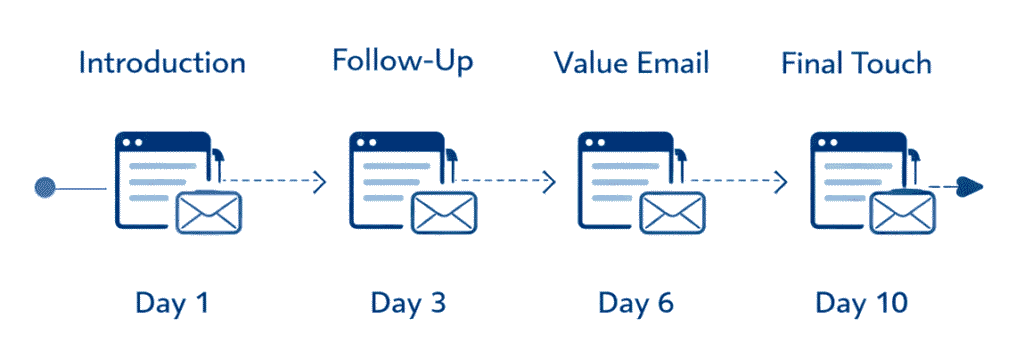
4. Trigger automated email sequence
Example Outreach Cadence:
- Day 1: Introduction email
- Day 3: Reminder follow-up
- Day 6: Value-based email
- Day 10: Final follow-up
5. AI Sentiment Detection
Some advanced tools analyze replies and categorize them as:
- Positive Interest
- Neutral Inquiry
- Negative Response
Why This Workflow Works
✔ Enables personalized outreach at scale
✔ Reduces manual writing effort
✔ Maintains a consistent communication schedule
✔ Improves response rates through timely follow-ups
This type of workflow helps SMBs implement structured outbound sales campaigns without overwhelming their team.
Want a step-by-step setup guide? Read our full guide on AI cold email automation tools for SMBs.
5️⃣ Template #3: AI Follow-Up & Reminder Automation
Many sales opportunities are lost simply because prospects are not contacted again after the first message.
Common Reasons deals are lost include:
- Forgotten Follow-Ups
- Delayed Responses
- Poor Tracking of Previous Conversations
AI-powered Follow-up Automation solves this problem.
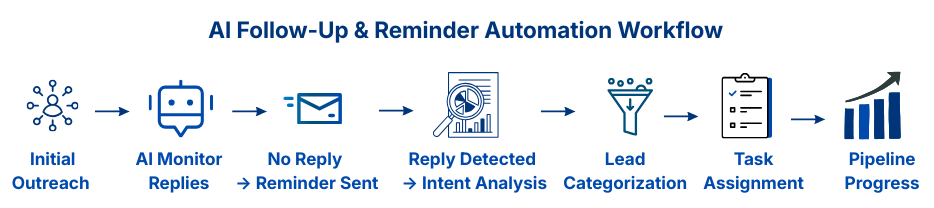
Example Workflow
1. Initial Outreach Email sent
The first cold email is sent to introduce your product or service and start a conversation with the potential prospect.
2. If No Reply after a Defined Period
AI automatically triggers a reminder email.
3. If a Reply is Detected
AI analyzes the response and categorizes the lead based on intent:
- Interested
- Needs More Information
- Not Ready Yet
4. Task assignment
Based on the response type, the system can automatically:
- Assign Tasks to Sales Reps
- Schedule Follow-up Calls
- Move the lead to another Pipeline Stage
Benefits of Follow-Up Automation
✔ Ensures no lead is forgotten
✔ Maintains consistent communication
✔ Reduces manual tracking work
✔ Improves conversion opportunities
6️⃣ Template #4: AI CRM Pipeline Automation
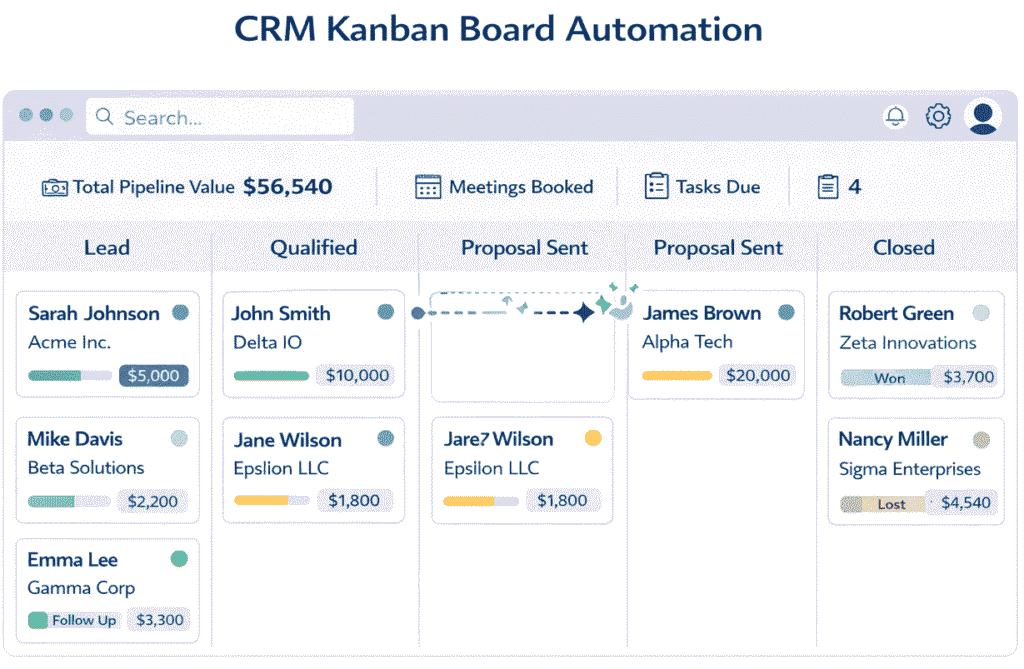
CRM systems are essential for managing sales pipelines, but many teams fail to update them consistently.
AI-powered CRM automation ensures that pipeline stages update automatically based on customer actions.
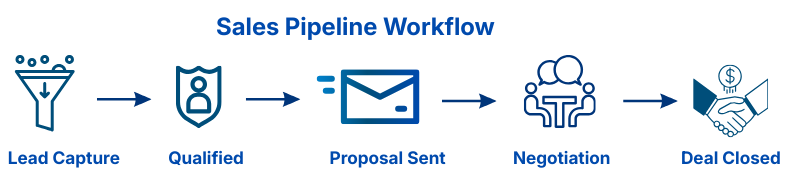
Example Sales Pipeline
Lead Captured
A potential customer’s contact information is collected through forms, outreach, or lead generation tools.
Qualified
The lead is evaluated to confirm they match your ideal customer profile and have potential buying interest.
Proposal Sent
A customized proposal outlining the solution, pricing, and value is sent to the prospect.
Negotiation
Both parties discuss terms, pricing, or requirements before finalizing the agreement.
Closed Deal
The prospect accepts the offer and becomes a paying customer, completing the sales process.
How AI Moves Leads Automatically
AI monitors various signals and updates pipeline stages based on real activity, including:
- Email Responses
- Calendar Meeting Bookings
- Proposal Document Views
- Payment or Contract Events
Instead of manually updating every record, the system automatically moves leads through the pipeline.
Why This Matters
Automated CRM pipelines help businesses:
- Maintain accurate Sales Data
- Track Deals more Effectively
- Forecast Revenue more reliably
- Reduce Administrative workload
This allows sales teams to focus more on closing deals rather than managing software tools.
If you’re comparing platforms, check out our detailed guide on the Best CRM tools for small businesses to find the right solution for managing leads, automating follow-ups, and scaling your sales process efficiently.
7️⃣ Template #5: AI Lead Nurturing Workflow
Not every prospect is ready to buy immediately. Some leads require education and trust-building before making a purchasing decision.
AI nurturing workflows help maintain engagement over time.
Example Nurture Workflow
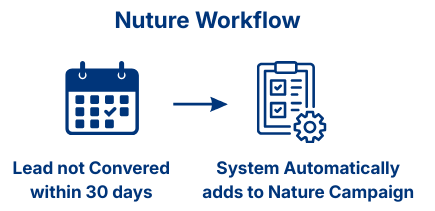
Lead Nurture Trigger
If a lead does not convert within 30 days, the system automatically moves them into a nurture campaign to keep them engaged with helpful content and follow-up communication until they are ready to buy.
Content Sent in Nurture Sequences
AI can send helpful resources such as:
- Educational Blog Articles
- Industry Insights
- Case Studies
- Webinars or Product Demonstrations
These resources keep your brand visible and position your business as a trusted authority.
AI Engagement Tracking
AI Tools monitor how prospects interact with the content, including:
- Email Opens
- Link Clicks
- Content Downloads
When engagement increases, the system can raise the lead’s priority score and notify the sales team to follow up again.
Result
Lead nurturing ensures that potential customers stay engaged until they are ready to make a purchasing decision.
To streamline your entire outreach and pipeline process, explore these powerful Best AI Sales Tools for Small Businesses that help automate lead capture, follow-ups, CRM updates, and performance tracking in one system.
8️⃣ Template #6: AI Proposal & Closing Automation
Goal
Automate the proposal creation, delivery, and follow-up process so that sales teams can move deals toward closing faster without manual document preparation or repeated reminders.
In many small businesses, proposals are often delayed because sales teams must manually create documents, customize pricing, and send follow-up emails. AI-powered proposal automation helps eliminate these delays and ensures every qualified deal receives a timely and professional proposal.
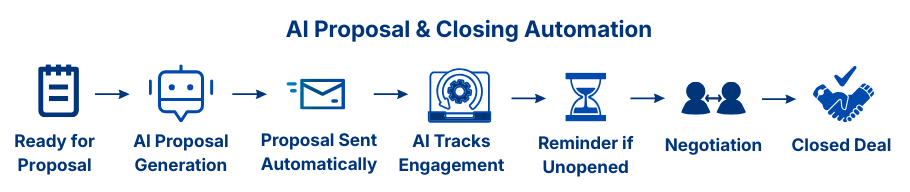
How the Workflow Works
1. Deal marked “Ready for Proposal”
Once a prospect shows strong interest—such as requesting pricing, scheduling a demo, or confirming requirements—the deal stage in the CRM is updated to “Ready for Proposal.”
This stage automatically triggers the proposal automation workflow.
2. AI generates a customized proposal template
AI tools generate a proposal document using pre-built templates and automatically insert relevant information such as:
- Client name
- Company details
- Service or Product package
- Pricing structure
- Implementation timeline
This saves significant time compared to creating proposals manually.
3. Proposal is automatically sent to the prospect
The system sends the proposal via email with a professional message, ensuring the prospect receives it immediately after the sales conversation.
A typical automated message may include:
- A short summary of the offer
- A link to the proposal document
- A call-to-action for review or approval
This quick response helps maintain momentum in the sales conversation.
4. AI tracks proposal engagement
AI-powered document tracking tools monitor how the prospect interacts with the proposal.
They can detect:
- When the document is opened
- How long it is viewed
- Which sections receive the most attention
These insights help sales teams understand how interested the prospect is and when to follow up.
5. Automated reminder if the proposal is unopened
If the prospect does not open the proposal within a specified time (for example, 2–3 days), the system automatically sends a polite reminder email.
Example reminder message:
Hi [Name],
I just wanted to check if you had a chance to review the proposal I shared earlier.
Let me know if you have any questions or if you’d like to discuss the next steps.
This ensures opportunities are not lost due to simple delays.
Optional Automation Enhancements
Businesses can further streamline the closing process by integrating additional tools into the workflow.
E-signature Integration
Integrating electronic signature tools allows prospects to sign contracts directly within the proposal document.
Benefits include:
✔ Faster agreement approvals
✔ Reduced paperwork
✔ Improved closing speed
✔ Secure digital documentation
Why AI Proposal Automation Improves Sales Results
Automating the proposal stage provides several important advantages for small businesses:
- Faster proposal delivery, which keeps prospects engaged
- More professional presentation through standardized templates
- Better visibility into buyer intent using document tracking
- Higher closing rates due to timely follow-ups
- Reduced administrative work for sales teams
By implementing proposal automation, businesses can transform the final stage of the sales process into a smooth, predictable, and scalable closing system.
9️⃣ Complete AI Sales Automation Stack for SMBs (Tool + Workflow Map)
Implementing AI sales automation becomes much easier when businesses understand how different tools and workflows connect across the entire sales process.
Instead of using isolated tools for lead generation, outreach, or CRM management, successful SMBs build a complete automation stack that supports every stage of the sales pipeline.
A well-structured AI sales automation stack typically includes tools for:
- Lead capture
- Data enrichment
- Cold outreach
- Follow-up automation
- CRM management
- Proposal generation
- Sales analytics
When these tools work together through automation workflows, businesses can create a fully automated sales pipeline that operates continuously in the background.
AI Sales Automation Workflow Overview
A structured AI sales automation pipeline that guides prospects from initial lead capture through qualification, outreach, follow-ups, and CRM management until the final proposal and deal closure.
Below is a simplified example of how an AI-powered sales workflow operates across different stages.
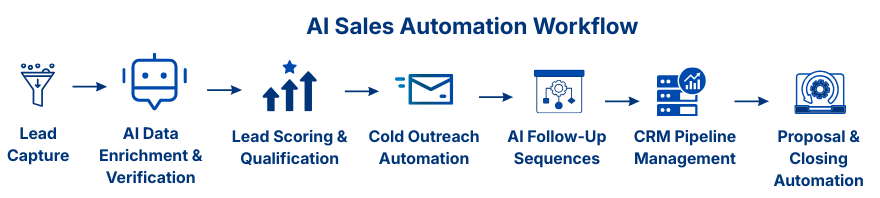
Process ensures that every lead is captured, nurtured, and moved through the sales pipeline efficiently.
Key Components of an AI Sales Automation Stack
To build an effective automation system, SMBs typically combine several categories of tools.
1. Lead Capture & Prospecting Tools
These tools help identify and collect potential customer information.
Common capabilities include:
- Finding decision-makers
- Discovering verified business emails
- Collecting company data
- Identifying LinkedIn prospects
These tools help build targeted lead lists for outreach campaigns.
Example: Apollo, LinkedIn Sales Navigator
2. Data Enrichment & Verification Tools
Once leads are collected, AI enrichment tools add additional information such as:
- Company size
- Industry classification
- Job titles
- Technology stack
Email verification tools also ensure that contact details are valid and deliverable, reducing bounce rates.
This step improves the quality of your lead database.
Example:Clearbit, Apollo.io
3. Outreach & Email Automation Tools
Outreach automation platforms allow businesses to send personalized cold email campaigns at scale.
Typical features include:
- Automated email sequences
- Follow-up scheduling
- Reply detection
- Personalization tokens
- Campaign performance tracking
These tools help maintain consistent communication with prospects.
Example: Apollo, LinkedIn Sales Navigator
Best Tips :
Using Data enrichment and Email verification tools together helps businesses maintain Clean lead databases, Accurate contact information, and more Effective outreach campaigns.
4. CRM & Pipeline Automation Tools
Customer Relationship Management (CRM) systems organize leads and track sales progress.
When integrated with automation tools, CRM platforms can:
- Automatically update lead records
- Move deals through pipeline stages
- Assign tasks to sales team members
- Track communication history
This ensures that the entire sales team always has accurate and up-to-date deal information.
Example: Instantly, Smartlead
5. Proposal & Closing Tools
The final stage of the sales process involves sending proposals and closing deals.
AI-powered proposal automation tools help by:
- Generating proposal templates
- Customizing pricing and services
- Tracking document engagement
- Integrating electronic signatures
These tools help businesses close deals faster while maintaining a professional experience for prospects.
Example: PandaDoc, DocuSign
Why SMBs Benefit From a Unified Sales Automation Stack
When all tools are connected through automation workflows, businesses gain several advantages.
✔ Faster lead response times
✔ Consistent outreach campaigns
✔ Better pipeline visibility
✔ Reduced manual data entry
✔ Higher conversion rates
Most importantly, automation allows small businesses to scale their sales operations without significantly increasing team size.
Instead of spending time on repetitive administrative work, sales teams can focus on building relationships and closing more deals.
🔟 Common Mistakes When Implementing AI Sales Automation (and How to Avoid Them)
AI sales automation can significantly improve efficiency and lead management, but many businesses struggle to achieve the expected results because of poor implementation. Without proper planning, automation may create confusion instead of improving the sales process.
Understanding the most common mistakes can help small and mid-sized businesses implement AI sales workflows more effectively and avoid unnecessary problems.
1. Automating Without a Clear Sales Process
The Mistake
Some businesses try to automate their sales operations before defining a clear sales process. If the workflow itself is unclear, automation tools may simply replicate inefficient processes.
How to Avoid it
Before implementing automation, map your complete sales pipeline, including:
- Lead capture
- Lead qualification
- Outreach communication
- Follow-up stages
- Proposal and closing process
Once the workflow is clearly defined, AI tools can be configured to automate each step effectively.
2. Over-Automating Customer Communication
The Mistake
Automation should support communication, not replace human interaction completely. When every message feels automated, prospects may perceive the outreach as impersonal or spam-like.
How to Avoid it
Use automation primarily for:
- Scheduling follow-ups
- Organizing lead data
- Sending reminders
Keep key interactions such as sales calls, detailed discussions, and negotiations human-driven to maintain trust and authenticity.
3. Using Too Many Disconnected Tools
The Mistake
Many businesses adopt several automation tools that do not integrate well with each other. This creates fragmented workflows where data is stored in multiple systems.
How to Avoid it
Choose tools that integrate easily with your CRM and outreach platforms. A unified system helps ensure that:
- Lead information stays consistent
- Automation workflows operate smoothly
- Sales teams can access accurate data from one place
A smaller number of well-integrated tools is usually more effective than managing many disconnected applications.
4. Ignoring Data Quality
The Mistake
Automation relies heavily on accurate data. If your lead lists contain outdated or incorrect information, automated campaigns may produce poor results.
How to Avoid it
Maintain strong data hygiene by:
- Verifying email addresses before outreach
- Enriching lead profiles with accurate company information
- Removing invalid or inactive contacts
Clean data improves campaign performance and protects your sender reputation.
5. Not Monitoring Automation Performance
The Mistake
Some businesses set up automation workflows and then forget to monitor them. Without tracking performance, it becomes difficult to identify what is working and what needs improvement.
How to Avoid it
Regularly track important metrics such as:
- Email open rates
- Reply rates
- Conversion rates
- Pipeline movement
Analyzing these metrics helps refine your workflows and optimize sales performance over time.
6. Poor Personalization in Automated Outreach
The Mistake
Automation sometimes leads to generic messages that feel mass-produced. This reduces engagement and lowers response rates.
How to Avoid it
Use personalization fields and AI content tools to tailor messages based on:
- Recipient name
- Company details
- Industry challenges
- Previous interactions
Personalized outreach makes automated communication feel more relevant and human.
Why Avoiding These Mistakes Matters
When implemented correctly, AI sales automation can transform how small businesses manage leads and close deals. However, successful automation requires clear workflows, clean data, thoughtful communication, and continuous monitoring.
By avoiding these common mistakes, businesses can build automation systems that are efficient, scalable, and capable of supporting long-term sales growth.
Remember:
Automation Improves Strategy — It does not Replace Strategy.
1️⃣1️⃣. Recommended Beginner Benchmarks
When starting with cold email outreach or AI-powered sales automation, it’s important to track realistic performance benchmarks. These metrics help small businesses understand whether their outreach campaigns are working effectively or need optimization.
For beginners running structured outreach campaigns with proper targeting and AI personalization, the following benchmarks are commonly achievable.
1. Open Rate: 40–60%
The open rate measures how many recipients actually open your email after receiving it.
Example:
If you send 100 emails and 50 people open them, your open rate is 50%.
A 40–60% open rate is considered a strong benchmark for cold outreach, especially when emails are sent to well-targeted prospects.
Several factors influence open rates:
- Clear and relevant subject lines
- Sending emails to the right decision-makers
- Proper domain reputation
- Avoiding spam-triggering words
- Using personalized subject lines
AI tools can improve open rates by helping generate personalized subject lines and optimized email timing, increasing the chances that prospects notice and open the message.
2. Reply Rate: 5–15%
The reply rate measures how many recipients respond to your email after opening it.
Example:
If 100 emails are sent and 10 people reply, your reply rate is 10%.
For most small business outreach campaigns, a 5–15% reply rate is a realistic performance range.
Reply rates depend heavily on:
- Message relevance
- Personalization quality
- Clear value proposition
- Targeting the correct audience
Emails that clearly explain how your product or service solves a specific problem tend to generate higher response rates. AI-powered personalization can also help tailor messaging based on industry, role, or company information.
3. Meeting Booked Rate: 2–8%
The meeting booked rate measures how many recipients agree to schedule a call, demo, or consultation.
Example:
If 100 emails are sent and 5 people book a meeting, your meeting rate is 5%.
For many small businesses, a 2–8% meeting rate is a healthy benchmark for cold outreach campaigns.
This metric usually depends on:
- Quality of leads
- Clarity of the offer
- Strength of follow-up sequences
- Ease of booking meetings (Calendar links, Scheduling tools)
Providing a simple call-to-action, such as scheduling a quick 10–15 minute call, often increases the chances of converting replies into meetings.
Cold Email Performance Benchmarks (Quick Summary)
| Metric | Benchmark | Key Drivers |
|---|---|---|
| Open Rate | 40–60% | Strong subject lines, Targeted prospects |
| Reply Rate | 5–15% | Personalization, Clear value proposition |
| Meeting Rate | 2–8% | Lead quality, Strong follow-ups, Clear CTA |
Why These Benchmarks Matter
Tracking outreach benchmarks helps businesses measure whether their sales workflow is performing efficiently. Instead of guessing campaign performance, these metrics provide clear signals for improvement.
For example:
- Low Open Rates may indicate weak subject lines or poor targeting.
- Low Reply Rates may suggest messaging needs better personalization.
- Low Meeting Rates may indicate the offer or value proposition needs refinement.
By monitoring these metrics regularly, small businesses can continuously improve their AI-powered outreach campaigns, lead generation strategies, and overall sales performance.
FAQs
-
What is an AI sales workflow for small businesses?
An AI sales workflow automates lead capture, qualification, follow-ups, and CRM updates using artificial intelligence tools.
-
Do SMBs really need AI sales automation?
Yes. AI helps small teams scale operations without hiring large sales staff.
-
What tools are best for AI sales workflows?
CRM platforms, AI email automation tools, lead enrichment software, and workflow automation platforms.
-
How do I create an AI sales workflow for my small business?
To create an AI sales workflow, start by mapping your current sales stages (lead capture, qualification, follow-up, closing). Then connect tools like CRM software, email automation platforms, and AI lead scoring tools to automate repetitive tasks such as email sequences, CRM updates, and pipeline movement.
-
What is the best AI tool for sales automation in SMBs?
The best AI sales automation tool depends on your needs. Small businesses typically benefit from platforms that combine lead generation, CRM integration, email automation, and AI personalization in one system to reduce manual workload and improve follow-ups.
-
Can AI replace a sales team?
No. AI does not replace sales teams — it enhances them. AI automates repetitive tasks like follow-ups, data entry, and lead scoring, allowing sales teams to focus on conversations, negotiations, and closing deals.
-
How much does AI sales automation cost for small businesses?
AI sales automation tools typically offer free plans or affordable starter tiers. Costs increase based on the number of users, contacts, and automation features required. Most SMBs can start with entry-level plans and scale gradually.
-
What are the benefits of AI-powered lead scoring?
AI-powered lead scoring helps prioritize high-intent prospects by analyzing behavior, engagement, and demographic data. This ensures sales teams focus on leads most likely to convert, improving close rates and saving time.
-
How long does it take to implement an AI sales workflow?
Basic AI sales workflows can be set up within a few days. More advanced automations involving CRM integrations, custom sequences, and scoring models may take 1–2 weeks depending on system complexity.