
How to Warm Up an Email Domain (Step-by-Step Guide to Improve Deliverability)
Set Up for Success
Launching a new email domain or starting an outreach campaign without proper warm-up is one of the most common—and costly—mistakes in email marketing.
It might seem like a small step, but skipping email domain warm-up can quickly damage your sender reputation before you even get results.
Here’s what typically happens when you don’t warm up your domain:
- Your emails land in spam instead of the inbox
- Open rates drop significantly
- Replies and engagement stay low
- Email providers start flagging your domain as risky
- Recovering your reputation becomes difficult and time-consuming
👉 In short, even a great campaign will fail if your emails never reach your audience.
Why Email Warm-Up Matters More Than Ever
Email providers like Gmail and Outlook use advanced filters to decide whether your emails deserve inbox placement.
If your domain is new—or suddenly starts sending a high volume of emails—it raises red flags.
Without a proper warm-up process:
- Your domain looks suspicious
- Your sending behavior appears unnatural
- Your emails are treated as potential spam
👉 This is why email domain warm-up is not optional—it’s essential.
The Good News
When done correctly, warming up your email domain helps you:
- Build a strong sender reputation
- Improve inbox placement rates
- Increase open and reply rates
- Avoid spam filters and blacklists
- Create a solid foundation for long-term email success
👉 Think of it as building trust with email providers before scaling your outreach.
What You’ll Learn in This Guide
This step-by-step guide will walk you through everything you need to know:
- What email domain warm-up is and how it works
- Why it’s critical for email deliverability
- A safe, beginner-friendly warm-up process
- A proven warm-up schedule you can follow
- Tools that automate and simplify the process
- Common mistakes that can hurt your sender reputation
- Frequently asked questions most guides don’t cover
Who This Guide Is For
This guide is perfect if you are:
- A small business owner running email campaigns
- A marketer doing cold outreach or lead generation
- A founder using tools for sales automation
- A beginner looking to improve email deliverability
Let’s Get Started
Email success doesn’t start with writing better emails—it starts with making sure your emails actually reach the inbox.
👉 Let’s build your email domain reputation the right way—from day one.
If you’re new to cold outreach, you can also check our Complete cold email guide for beginners to understand how everything works together.
What Is Email Domain Warm-Up (And Why It’s Critical for Deliverability)?
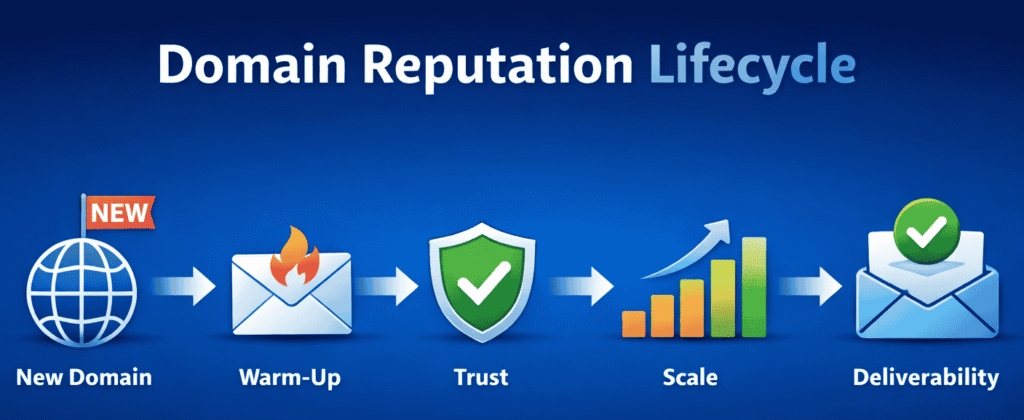
Email domain warm-up is the process of gradually increasing your email sending volume from a new domain or inbox to build trust with email providers like Gmail, Outlook, and Yahoo.
Instead of sending hundreds of emails immediately, you start with a low daily volume and scale slowly over time.
👉 This controlled, consistent behavior signals that you’re a legitimate sender—helping your emails land in the primary inbox instead of spam.
Why Email Providers Require Warm-Up
Email providers use advanced filtering systems to protect users from:
- Spam emails
- Phishing attacks
- Malicious senders
When a new or inactive domain suddenly sends high-volume emails, it raises red flags:
- Unusual sending pattern
- No prior sender history
- No engagement data
👉 Result: Your emails are flagged, filtered, or blocked—regardless of content quality.
What Happens If You Skip Email Warm-Up
Ignoring the warm-up process can damage your email performance from day one:
❌ Emails land in spam or promotions tab
❌ Open rates drop drastically
❌ Replies and conversions stay low
❌ Domain reputation gets negatively impacted
❌ Future campaigns become harder to scale
👉 In many cases, recovering a damaged sender reputation can take weeks or even months—and sometimes requires starting with a new domain.
How Email Domain Warm-Up Works (Step-by-Step Concept)
The goal of warm-up is simple: build trust through gradual, natural activity.
Step 1: Start Small
Send 5–10 emails per day from your domain.
Step 2: Drive Engagement
Ensure your emails are:
- Opened
- Replied to
- Marked as important (if possible)
Step 3: Increase Volume Gradually
Every few days, increase your sending volume slowly (e.g., +5 to 10 emails).
Step 4: Maintain Consistency
Avoid:
- Sudden spikes in sending
- Irregular sending patterns
Step 5: Build Positive History
Over time, your domain develops a track record of safe, engaged sending behavior.
👉 This is what email providers use to decide whether you belong in the inbox.
Key Signals That Build Sender Reputation
During the warm-up phase, email providers track critical engagement metrics:
- Open Rates → Are recipients interested?
- Replies → Are conversations happening?
- Click-Through Rates → Is your content valuable?
- Bounce Rates → Are you sending to valid emails?
- Spam Complaints → Are users marking you as spam?
👉 Positive signals = higher trust = better inbox placement
What Email Warm-Up Actually Protects
A proper warm-up process helps you:
✅ Build a strong sender reputation
✅ Avoid spam filters and blacklists
✅ Improve inbox placement rates
✅ Increase open and reply rates
✅ Ensure long-term email deliverability
👉 Think of warm-up as the foundation of your entire email marketing and cold outreach strategy.
Simple Analogy
Email warm-up works like building a credit score:
- You don’t get a high credit limit on day one
- You start small and prove reliability
- Over time, trust increases
👉 Similarly, email providers increase your sending limit and trust level based on your behavior.
Real-World Scenario
❌ No Warm-Up
Send 200 emails on Day 1
👉 Result: Spam filtering, low deliverability, poor engagement
✅ Proper Warm-Up
Start with 10 emails/day and scale gradually
👉 Result: Better inbox placement, higher open rates, consistent growth
Key Takeaway
Email domain warm-up is not optional—it’s a critical trust-building process.
👉 The stronger your warm-up, the better your:
- Deliverability
- Engagement rates
- Campaign performance
Skip it, and you risk burning your domain. Do it right, and you unlock scalable email success.
What Happens If You Skip Email Domain Warm-Up?
Skipping email domain warm-up is one of the biggest mistakes in cold email and email marketing. It can destroy your sender reputation before you even start seeing results.
When you send emails from a new or inactive domain, email providers like Gmail and Outlook have no trust signals to evaluate you. Without a warm-up phase, your emails are automatically treated as high risk or potential spam.
👉 In simple terms: No trust = No inbox placement
1. Your Emails Go to Spam (or Never Get Seen)
Without warm-up, your emails lack engagement history (opens, replies, clicks). This leads to:
- Emails landing directly in spam folders
- Getting filtered into promotions or updates tabs
- Throttling (delayed or limited delivery)
👉 Even high-quality emails won’t perform if they don’t reach the primary inbox.
2. Open Rates Drop & Engagement Dies
Poor deliverability directly impacts your campaign performance:
- ❌ Low open rates
- ❌ Few or no replies
- ❌ Almost zero clicks
Email providers track these signals closely. When users don’t engage:
👉 It tells providers: “This sender is not valuable.”
This creates a negative feedback loop where every campaign performs worse than the last.
3. High Risk of Blacklisting
Sending large volumes from a cold domain is a major red flag.
You’re more likely to get flagged if you:
- Send bulk emails too quickly
- Target unverified or purchased email lists
- Receive spam complaints or high bounce rates
👉 Once blacklisted, your domain may be blocked across multiple email networks.
Recovery is slow, complex, and sometimes not fully possible.
4. Your Domain Gets “Burned”
A burned domain means your sender reputation is permanently damaged.
This results in:
- Consistent spam placement
- Poor inbox delivery—even to warm leads
- Reduced effectiveness of all future campaigns
👉 In many cases, businesses have no choice but to abandon the domain and start over.
5. Long-Term Deliverability Damage
Email reputation is built over time—but it can be damaged instantly.
If you skip warm-up:
- Recovery can take weeks or months
- Negative history continues to affect performance
- Your domain + IP reputation stays flagged
👉 Email providers value consistent behavior, not quick fixes.
Why Email Warm-Up Is Non-Negotiable
Warm-up is not optional—it’s the foundation of successful email outreach.
A proper warm-up helps you:
- ✅ Build sender trust gradually
- ✅ Improve inbox placement rates
- ✅ Increase opens and replies
- ✅ Avoid spam filters and blacklists
- ✅ Scale campaigns safely
👉 Think of it as setting up your domain for long-term success, not short-term wins.
Key Takeaway
Skipping email domain warm-up might save time initially—but it will cost you:
- Lost campaigns
- Poor engagement
- Damaged domain reputation
👉 A structured warm-up ensures your emails are:
- Delivered
- Opened
- Trusted
Do it right from the start, and every campaign becomes easier to scale and optimize.
How Long Does Email Domain Warm-Up Take?
Email domain warm-up is not something you should rush. The timeline depends on how aggressively you plan to send emails and the level of trust you need to build with email providers.
👉 In general, a proper warm-up takes 2 to 4+ weeks to establish a healthy sender reputation.
Recommended Warm-Up Timeline (Based on Use Case)
Light Email Sending (Basic Outreach)
Timeline: 14–21 days
- Suitable for low-volume communication
- Small daily sending limits
- Lower risk of spam filtering
👉 Ideal for freelancers, small businesses, or internal communication.
Sales & Cold Email Campaigns
Timeline: 21–30 days
- Moderate sending volume
- Requires stronger engagement signals (opens, replies)
- Higher scrutiny from email providers
👉 Best for lead generation, outreach campaigns, and B2B sales.
High-Volume Email Sending
Timeline: 30+ days
- Large-scale campaigns
- Multiple inboxes or domains
- Requires a strong and consistent sender reputation
👉 Recommended for agencies, scaling startups, or bulk outreach systems.
Why You Should Never Rush Warm-Up
Trying to speed up the warm-up process often leads to:
❌ Spam folder placement
❌ Poor engagement rates
❌ Domain reputation damage
❌ Increased risk of blacklisting
👉 Sending too many emails too soon signals spam-like behavior to email providers.
The Real Goal: Build Trust, Not Speed
Email warm-up is about gradual trust accumulation, not quick results.
- Start small
- Increase volume slowly
- Maintain consistent sending behavior
- Focus on engagement (opens, replies)
👉 The more natural your sending pattern looks, the more email providers trust your domain.
Key Takeaway
There’s no shortcut to email deliverability.
- 2–3 weeks → Minimum for basic trust
- 3–4+ weeks → Strong foundation for scaling
👉 A slow, structured warm-up ensures:
- Better inbox placement
- Higher open and reply rates
- Long-term campaign success
Go slow at the start so you can scale faster later.
Email Warm-Up vs Email Deliverability: What’s the Difference?
Many beginners confuse email warm-up with email deliverability—but they are not the same.
Understanding this difference is key if you want your emails to actually land in the inbox and get replies.
What is Email Warm-Up? (The Process)
Email warm-up is the process of gradually building trust with email providers by sending small volumes of emails and increasing them over time.
In simple terms:
👉 It’s how you prepare your email account to send campaigns safely.
Key points:
- Starts with low sending volume
- Increases daily activity gradually
- Builds sender reputation
- Often automated using warm-up tools
What is Email Deliverability? (The Outcome)
Email deliverability refers to where your emails actually land—inbox, promotions tab, or spam.
In simple terms:
👉 It’s the result of your email practices.
Key points:
- Determines inbox vs spam placement
- Affected by reputation, content, and engagement
- Measured using open rates, bounce rates, spam reports
- Directly impacts campaign success
Email Warm-Up vs Deliverability (Quick Comparison)
| Factor | Email Warm-Up | Email Deliverability |
|---|---|---|
| Definition | Process | Outcome |
| Purpose | Build sender trust | Ensure inbox placement |
| Timing | Before & during campaigns | During campaigns |
| Controlled by | You (setup & behavior) | Email providers (Gmail, Outlook) |
| Impact | Improves reputation | Affects results directly |
Why This Difference Matters
If you skip warm-up:
- ❌ Your emails may go to spam
- ❌ Open rates will drop
- ❌ Campaigns won’t perform
If you understand both:
- ✅ Better inbox placement
- ✅ Higher engagement
- ✅ More replies and conversions
What Actually Works (Real Insights)
- Warm-up is not optional—it’s your foundation
- Deliverability is ongoing—you must maintain it
- Even with warm-up, poor targeting or spammy content can hurt results
👉 The best strategy combines:
- Gradual warm-up
- Clean email lists
- Human-like messaging
- Consistent sending behavior
To understand how this impacts your results, learn more about Email deliverability and why it matters for cold emails.
Email Domain Warm-Up: The Proven Step-by-Step System
If you want high deliverability, you need more than just sending emails—you need the right foundation.
This is the exact system professionals follow to build trust, avoid spam filters, and scale safely.
Step 1: Set Up Your Email Infrastructure (Do This First)
Before you send a single email, your technical setup must be 100% correct.
👉 This is non-negotiable. Even the best warm-up strategy will fail without proper authentication.
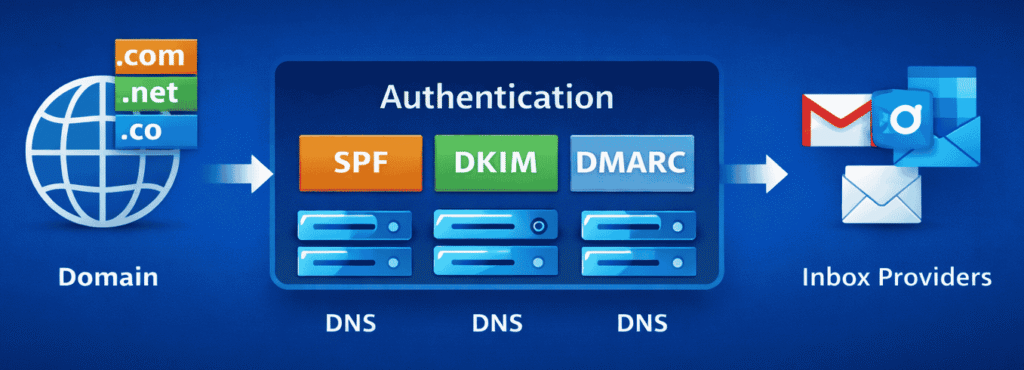
Configure Email Authentication (SPF, DKIM, DMARC)
These are the core trust signals that tell email providers you’re a legitimate sender:
- ✅ SPF (Sender Policy Framework)
Confirms which servers are allowed to send emails from your domain - ✅ DKIM (DomainKeys Identified Mail)
Adds a secure signature to ensure your email content isn’t altered - ✅ DMARC (Domain-based Message Authentication, Reporting & Conformance)
Tells inbox providers how to handle failed authentication (and protects your domain)
👉 Without these, your emails are much more likely to be flagged, filtered, or rejected.
Use a Dedicated Domain for Outreach
Never use your primary business domain for cold emails.
Best practice:
- Use a separate domain like:
yourbrand.coinstead ofyourbrand.com
👉 Why this matters:
- Protects your main domain reputation
- Reduces risk if something goes wrong
- Keeps your core business emails safe
Create Limited Inboxes Per Domain
Don’t over-scale too early.
Recommended setup:
- Start with 1–3 inboxes per domain
- Each inbox should have controlled daily sending limits
👉 This keeps your sending behavior natural and safe during warm-up.
Make Your Inbox Look Human
Email providers track behavior—and appearance matters more than you think.
Set up each inbox like a real person:
✅ Use a real name (not “sales@” or “info@”)
✅ Add a professional profile picture
✅ Write a simple, natural email signature
✅ Avoid overly “salesy” formatting
👉 The goal is to look and behave like a real human sender, not an automated system.
Common Beginner Mistakes to Avoid
❌ Skipping SPF, DKIM, or DMARC setup
❌ Using your main domain for cold outreach
❌ Creating too many inboxes too quickly
❌ Using generic or robotic sender identities
👉 These mistakes can kill deliverability before warm-up even begins.
Why This Step Matters
This step sets the foundation for everything that follows:
- Strong authentication = higher trust
- Clean setup = better inbox placement
- Proper structure = safe scaling
👉 If you get this right, your warm-up process becomes faster, safer, and more effective.
Key Takeaway
Before you think about sending emails, fix your setup.
👉 A properly configured email infrastructure ensures:
- Your domain is trusted
- Your emails are authenticated
- Your warm-up efforts actually work
Do this once, do it right—and every campaign after becomes easier to scale.
Step 2: Start With Manual, Human-Like Emails
Once your email infrastructure is set up, the next step is to build trust through real human activity.
👉 In the early stage of warm-up, how you send emails matters more than how many you send.
Why Manual Sending Is Critical in the Beginning
Email providers closely monitor early behavior patterns from new domains.
If your activity looks automated or unnatural:
- You trigger spam filters early
- Your domain gets flagged faster
- Your warm-up becomes ineffective
👉 Manual sending helps create authentic engagement signals, which are essential for building trust.
What to Do in the First Few Days
For the first 5–7 days, focus only on manual, personalized communication.
✅ Send Emails Manually
Avoid using any automation tools at this stage. Log in and send emails yourself.
✅ Write Real, Natural Messages
Keep your emails:
- Short
- Simple
- Conversational
👉 Think: normal human conversation, not marketing copy.
Avoid Templates & Bulk Messaging
Using templates too early can:
- Make your emails look repetitive
- Reduce authenticity
- Trigger spam detection algorithms
👉 Every email should feel slightly different and personal.
Prioritize Replies & Conversations
Engagement is the strongest trust signal.
Focus on:
- Getting replies
- Continuing conversations
- Asking simple, natural questions
👉 Even a short reply like “Thanks” or “Got it” helps build credibility.
Recommended Sending Volume
Start small and controlled:
- 📩 5–10 emails per inbox per day
- Spread them throughout the day (not all at once)
👉 This creates a natural sending pattern that email providers trust.
Common Mistakes to Avoid
❌ Sending too many emails too quickly
❌ Using copy-paste templates
❌ Adding links or heavy formatting too early
❌ Ignoring replies or not engaging back
👉 These actions signal low-quality or spam-like behavior.
What You’re Really Building Here
At this stage, your goal is NOT volume.
You are building:
- Trust with email providers
- Positive engagement history
- A natural sending pattern
👉 This foundation determines whether your future campaigns land in the inbox or spam.
Key Takeaway
Start slow, stay human, and focus on engagement.
- Manual sending builds trust
- Conversations boost reputation
- Consistency creates long-term deliverability
👉 The more human your behavior looks, the faster your domain earns trust.
Step 3: Gradually Increase Sending Volume (The Right Way)
Once you’ve built initial trust through manual emails, the next step is to scale your sending volume safely.
👉 This is where most people make mistakes—growing too fast and damaging their domain reputation.
The key principle: increase slowly, stay consistent, and protect your sender trust.
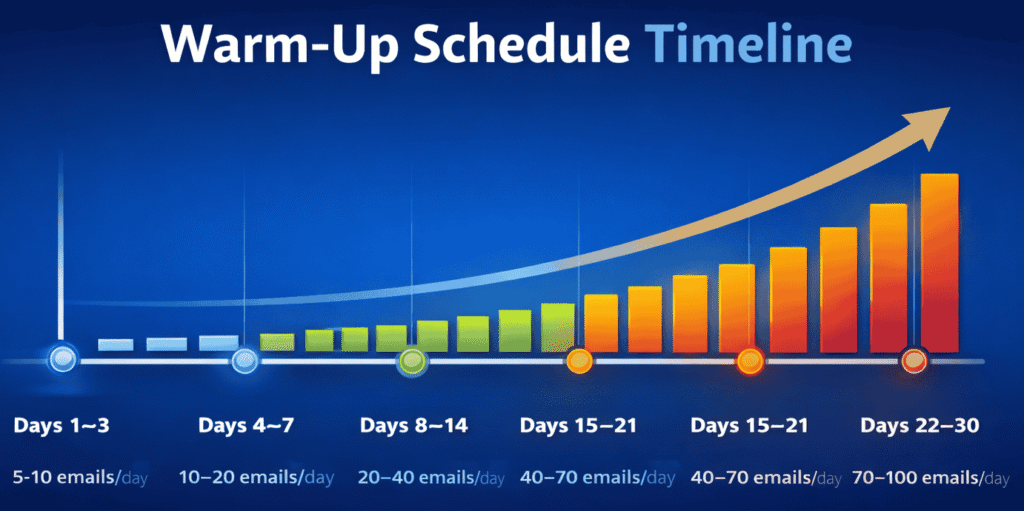
Safe Email Warm-Up Schedule (Per Inbox)
Follow this proven ramp-up plan to grow your sending volume without triggering spam filters:
| Day Range | Emails per Inbox per Day |
|---|---|
| Days 1–3 | 5–10 emails |
| Days 4–7 | 10–20 emails |
| Days 8–14 | 20–40 emails |
| Days 15–21 | 40–70 emails |
| Days 22–30 | 70–100 emails |
👉 This gradual increase helps email providers adjust to your sending behavior naturally.
Golden Rule: Never Scale Too Fast
Avoid sudden spikes in volume at all costs.
👉 Do not increase your sending volume by more than 30–50% every 3–4 days.
If you jump too quickly:
- Your activity looks unnatural
- Spam filters get triggered
- Your domain reputation drops
Why Gradual Scaling Works
Email providers evaluate:
- Sending consistency
- Volume patterns
- Engagement trends
A slow ramp-up signals:
- Stable behavior
- Legitimate usage
- Low spam risk
👉 This builds a strong sender reputation over time.
Consistency > Aggression
It’s not about sending more emails—it’s about sending them correctly.
Do this:
- Send emails daily (no long gaps)
- Maintain similar volume patterns
- Scale steadily over time
Avoid this:
- Sending 10 emails one day, 100 the next
- Skipping days and then over-sending
- Sudden campaign blasts
👉 Inconsistent behavior is a major red flag.
Pro Tips for Better Results
- Spread emails throughout the day (avoid bulk sending at once)
- Continue getting replies and engagement while scaling
- Monitor bounce rates and spam signals closely
- Keep email content natural and non-promotional
👉 Volume + engagement together = maximum deliverability
Common Mistakes That Kill Warm-Up
❌ Increasing volume too aggressively
❌ Ignoring engagement quality
❌ Scaling without replies or opens
❌ Using automation too early
👉 These mistakes can undo all your previous warm-up progress.
What This Step Achieves
By the end of this phase, you’ll have:
- A trusted sending pattern
- Stable inbox placement
- Capacity to run campaigns safely
👉 This is what allows you to scale outreach without risking your domain.
Key Takeaway
Warm-up is a marathon, not a sprint.
- Scale gradually
- Stay consistent
- Prioritize engagement
👉 Consistency beats aggression every time in email deliverability.
We tested outreach tools like Apollo — see our full Apollo.io review to understand how its infrastructure affects warm-up and inbox placement.
Step 4: Prioritize Positive Engagement Signals
At this stage, your sending volume is increasing—but engagement becomes the most important factor.
👉 Email providers don’t just track how many emails you send—they track how people interact with them.
This is what ultimately decides whether your emails land in the inbox, promotions tab, or spam folder.
What Inbox Providers Actually Monitor
Every email you send generates behavioral signals. The most important ones include:
- Opens → Did the recipient read your email?
- Replies → Did they respond or start a conversation?
- Forwards → Was your email valuable enough to share?
- Deletes (without reading) → Was it ignored?
- Spam Reports → Was it marked as unwanted?
👉 These signals collectively define your sender reputation score.
Signals You Want More Of (Positive Indicators)
Focus on generating strong engagement signals:
✅ Replies (Most Powerful Signal)
✅ Email Opens / Reads
✅ Forwards or meaningful interactions
Ongoing conversations
👉 These tell email providers:
“This sender is trusted and relevant.”
Signals You Must Avoid (Negative Indicators)
Even a small number of negative signals can hurt your reputation:
❌ Spam complaints
❌ Emails deleted without being opened
❌ Ignored messages at scale
❌ High unsubscribe rates
👉 These signals suggest your emails are low-quality or unwanted.
Why Engagement Matters More Than Volume
You can send 100 emails—but if no one engages:
👉 Your future emails are more likely to go to spam.
On the other hand:
- 20 emails with replies and conversations
👉 Builds stronger trust than high-volume, low-engagement sending.
How Warm-Up Tools Help
Modern email warm-up tools simulate real human interaction by using networks of inboxes.
They:
- Automatically open your emails
- Send replies and continue conversations
- Mark emails as important
- Prevent spam signals
👉 This creates consistent, positive engagement patterns during your warm-up phase.
How to Boost Engagement Naturally (Manual Tips)
Even without tools, you can improve signals by:
- Writing simple, conversational emails
- Asking easy-to-answer questions
- Targeting relevant, high-quality contacts
- Following up naturally (not aggressively)
👉 The goal is to make your emails feel like real conversations—not campaigns.
Common Mistakes to Avoid
❌ Sending emails without expecting replies
❌ Writing overly promotional or sales-heavy messages
❌ Ignoring responses or not replying back
❌ Scaling volume without engagement
👉 These mistakes weaken your sender reputation—even if your setup is perfect.
What This Step Builds
By focusing on engagement, you create:
- Strong sender credibility
- Better inbox placement
- Higher open and reply rates
- Long-term deliverability stability
👉 Engagement is the core signal that determines your email success.
Key Takeaway
Email warm-up is not just about sending—it’s about getting responses.
- Prioritize conversations over volume
- Encourage replies and interactions
- Eliminate negative signals
👉 The more people engage with your emails, the more inbox providers trust you.
Step 5: Introduce Automation Slowly (After Warm-Up)
Once your domain has built basic trust and engagement history (after ~14–21 days), you can begin introducing automation.
👉 But this is where many people ruin their progress—by scaling too fast, too soon.
The goal is to transition from manual to automated sending without breaking trust.
When Should You Start Automation?
Only move to automation if:
- ✅ Your emails are landing in the inbox (not spam)
- ✅ You’re getting consistent opens and replies
- ✅ Your sending pattern has been stable for 2–3 weeks
👉 If these signals aren’t strong yet, delay automation.
What You Can Start Doing
Once ready, you can gradually introduce:
📩 Email Sequences
- Set up follow-ups and drip campaigns
- Keep messaging natural and personalized
🎯 Cold Outreach Campaigns
- Start targeting new prospects
- Ensure your lists are clean and verified
📈 Controlled Scaling
- Increase volume carefully using automation tools
📊 Safe Automation Starting Point
Don’t jump into high volume immediately.
👉 Start with:
- 10–20 automated emails per day per inbox
Then:
- Monitor performance for a few days
- Gradually increase volume based on engagement
📉 What to Monitor Closely
Automation increases risk—so tracking is critical:
- Open rates → Are emails still being seen?
- Reply rates → Are conversations continuing?
- Bounce rates → Are your lists clean?
- Spam complaints → Any negative signals?
👉 If performance drops, pause and adjust immediately.
Common Mistakes When Switching to Automation
- ❌ Scaling too fast after warm-up
- ❌ Using aggressive or spammy templates
- ❌ Sending to unverified or scraped lists
- ❌ Ignoring engagement metrics
👉 These mistakes can instantly damage your sender reputation.
Best Practices for Safe Automation
- Personalize your emails (don’t sound robotic)
- Keep subject lines simple and human
- Limit links and heavy formatting
- Space out emails naturally (avoid bulk sending at once)
👉 Automation should enhance human behavior—not replace it.What This Step Achieves
By introducing automation gradually, you:
- Scale outreach safely
- Maintain strong deliverability
- Increase efficiency without risking your domain
👉 This is how you move from manual effort to scalable systems.
Key Takeaway
Automation is powerful—but only when used at the right time.
- Warm up first
- Start small
- Monitor everything
- Scale gradually
👉 The safest way to scale email is to stay human—even with automation.
For teams running multichannel campaigns, our Reply.io review explains how its warm-up and sequencing systems handle deliverability at scale.
30-Day Email Warm-Up Plan
If you want a clear, actionable roadmap, this 30-day email warm-up plan gives you a simple timeline to follow and scale safely.
👉 Use this as your go-to checklist before launching any cold email or outreach campaign.
Week-by-Week Email Warm-Up Breakdown
🟢 Week 1: Build Initial Trust (Days 1–7)
- Send 5–10 emails/day per inbox
- Focus on manual, human-like emails
- Prioritize opens, replies, and conversations
- Avoid links, images, and automation
👉 Goal: Establish basic sender trust and natural engagement
🟡 Week 2: Increase Volume Gradually (Days 8–14)
- Scale to 10–30 emails/day per inbox
- Continue focusing on reply-driven engagement
- Maintain consistent sending patterns
- Keep emails simple and text-based
👉 Goal: Strengthen sender reputation and consistency
🟠 Week 3: Introduce Automation Carefully (Days 15–21)
- Start using email warm-up tools or light automation
- Send 20–50 emails/day per inbox
- Monitor open rates, replies, and bounce rates closely
👉 Goal: Transition from manual to scalable systems
🔵 Week 4: Prepare for Outreach Scaling (Days 22–30)
- Increase to 50–100 emails/day per inbox
- Start adding cold outreach sequences gradually
- Maintain strong engagement signals
- Continue monitoring deliverability metrics
👉 Goal: Build a fully warmed-up, campaign-ready domain
Important Rule
👉 Never increase volume aggressively.
Stick to gradual growth (30–50% increase every few days).
Consistency always beats speed in email warm-up.
Why This Timeline Works
- Builds trust step-by-step
- Reduces risk of spam filtering
- Improves inbox placement rates
- Prepares your domain for safe scaling
👉 This structure mirrors how email providers expect natural sending behavior.
Key Takeaway
This 30-day plan turns theory into action.
👉 Follow it consistently, and you’ll:
- Build a strong sender reputation
- Improve deliverability
- Scale outreach with confidence
Save this section—it’s your blueprint for successful email warm-up.
“Even after setting everything up correctly, you might still face issues like low open rates or emails going to spam. Let’s fix that.”
Email Warm-Up Not Working? Fix These Issues
If your email warm-up isn’t delivering results, you’re not alone. Many beginners struggle with low engagement, spam issues, or no replies—even after using tools.
Let’s break down the real problems + practical fixes 👇
1. Low Open Rates (Emails Not Getting Attention)
Symptoms:
- Open rates below 20%
- Emails marked as “seen” but not opened
- Campaign performance declining over time
Why this happens:
- Weak or spammy subject lines
- Sending from a new or untrusted domain
- Poor sender reputation
- Emails landing in Promotions or Spam tabs
How to fix it:
- ✅ Use natural, human-like subject lines
→ Example: “Quick question about your workflow” - ✅ Avoid spam trigger words (FREE, URGENT, BUY NOW)
- ✅ Warm up your domain gradually (don’t rush volume)
- ✅ Set up SPF, DKIM, and DMARC authentication
Pro Tip:
Focus on curiosity-driven subject lines, not salesy ones.
2. No Replies (Poor Engagement Signals)
Symptoms:
- Opens but zero replies
- No conversations or conversions
- High bounce but low interaction
Why this happens:
- Emails feel automated or robotic
- No clear call-to-action (CTA)
- Targeting the wrong audience
- Poor personalization
How to fix it:
- ✅ Write like a human, not a marketer
- ✅ Ask simple, low-effort questions
→ “Is this something you’re currently exploring?” - ✅ Personalize first lines (name, company, role)
- ✅ Keep emails short (50–125 words max)
Pro Tip:
Your goal is not to sell—it’s to start a conversation.
You can also improve results by using better messaging—check these Cold email templates that get replies.
3. Emails Going to Spam (Deliverability Issues)
Symptoms:
- Emails not appearing in inbox
- High bounce rates
- Spam folder placement
Why this happens:
- No proper email authentication
- Sending too many emails too quickly
- Using low-quality or scraped email lists
- Poor domain/IP reputation
How to fix it:
- ✅ Authenticate your domain (SPF, DKIM, DMARC)
- ✅ Use verified email lists only
- ✅ Slowly increase sending volume (warm-up phase)
- ✅ Use a dedicated sending domain (not your main domain)
Pro Tip:
Even the best copy won’t work if your emails never reach the inbox.
4. Warm-Up Tool Not Showing Results
Symptoms:
- Using tools but no improvement in deliverability
- Inbox placement still poor
- Engagement metrics stagnant
Why this happens:
- Warm-up duration too short (needs 2–4 weeks minimum)
- Tool settings not optimized
- Sending real campaigns too early
- Using multiple tools incorrectly
How to fix it:
- ✅ Let warm-up run for at least 14–30 days
- ✅ Keep daily sending limits low initially
- ✅ Avoid mixing manual + automated sending early
- ✅ Use only one primary warm-up system
Pro Tip:
Warm-up is a process, not a quick fix.
5. Domain Reputation Already Damaged
Symptoms:
- Consistent spam placement
- Very low open rates (<10%)
- Blacklisted domain/IP
Why this happens:
- Past spam activity
- Bulk cold emails without warm-up
- High complaint rates
How to fix it:
- ✅ Pause campaigns immediately
- ✅ Start fresh with a new domain for outreach
- ✅ Rebuild reputation slowly with warm-up
- ✅ Clean your email list
Pro Tip:
Sometimes it’s faster to start fresh than fix a damaged domain.
Final Insight (What Actually Works Real Insights)
Email warm-up alone is not enough.
To get real results, you need:
- ✔️ Good targeting
- ✔️ Human-like messaging
- ✔️ Consistent sending behavior
- ✔️ Proper technical setup
👉 Think of warm-up as the foundation, not the full strategy.
Manual vs Automated Email Warm-Up: Which One Should You Choose?
Choosing between manual and automated email warm-up is a critical decision that directly impacts your deliverability and scalability.
👉 The truth is: both methods have their place—but using them at the right stage is what separates beginners from professionals.
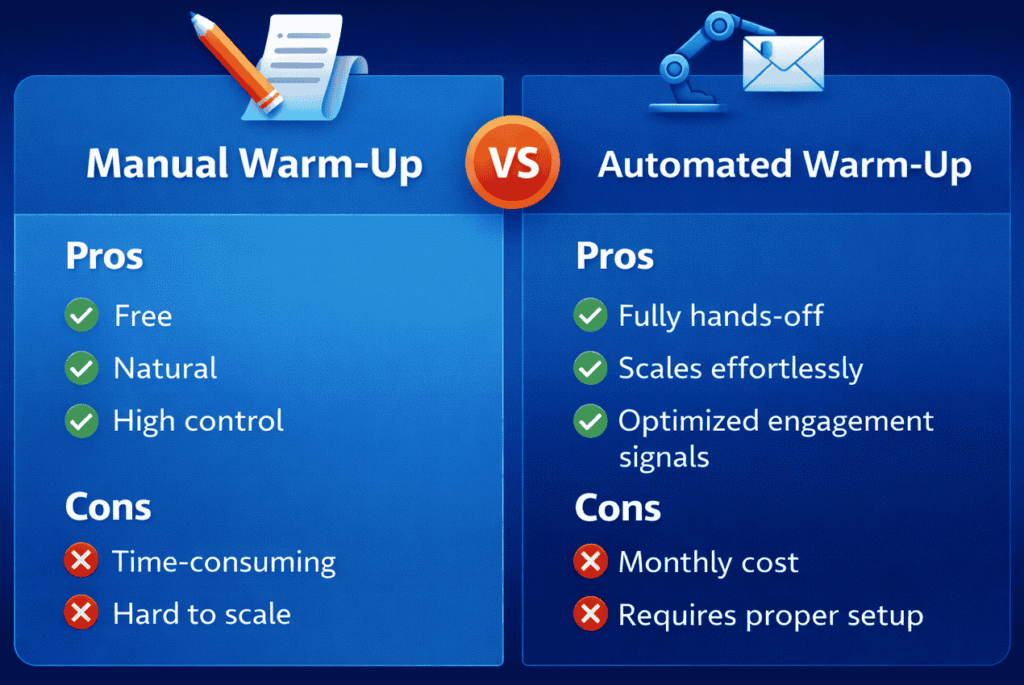
🔹 Manual Email Warm-Up (Best for Starting Phase)
Manual warm-up means sending emails yourself, one by one, with real conversations.
✅ Advantages
- Free to start → No tools or subscriptions needed
- Highly natural behavior → Looks 100% human to email providers
- Full control → You manage timing, messaging, and engagement
👉 This makes it ideal for building initial trust signals.
❌ Limitations
- Time-consuming → Requires daily effort
- Difficult to scale → Not practical beyond small volumes
- Human errors → Inconsistent sending or missed follow-ups
👉 Manual warm-up works best only in the early stage (first 5–10 days).
🔹 Automated Email Warm-Up Tools (Best for Scaling Phase)
Automated tools simulate human-like email activity using networks of inboxes.
They automatically:
- Send emails
- Open messages
- Reply and maintain conversations
- Generate consistent engagement signals
✅ Advantages
- Fully hands-off → Saves time and effort
- Scalable → Handles multiple inboxes and higher volumes
- Optimized engagement → Maintains consistent positive signals
👉 Perfect for maintaining long-term sender reputation.
❌ Limitations
- Monthly cost → Requires investment
- Setup required → Needs proper configuration to work effectively
👉 Poor setup can reduce effectiveness or create unnatural patterns.
Best Strategy (What Professionals Actually Do)
Instead of choosing one, combine both for maximum results:
Phase 1: Manual Warm-Up (Days 1–7)
- Send emails yourself
- Focus on real conversations
- Build initial trust
Phase 2: Automated Warm-Up (Days 7–21+)
- Introduce warm-up tools
- Maintain consistent engagement
- Gradually increase volume
Phase 3: Outreach & Scaling
- Start cold email campaigns
- Add sequences and automation
- Scale safely based on performance
👉 This hybrid approach gives you the best of both worlds: authenticity + scalability.
Common Mistake to Avoid
- Jumping straight into automation without manual warm-up
- Relying only on tools without real engagement
- Scaling too fast without monitoring results
👉 These mistakes can damage your domain reputation early.
Key Takeaway
There’s no “one-size-fits-all” approach.
- Manual warm-up builds initial trust
- Automated tools ensure consistency and scale
👉 Use manual first, then automate smartly—that’s the proven system for high deliverability.
Best Email Warm-Up Tools (2026 Edition)
If you want to scale email outreach safely, using a reliable warm-up tool is no longer optional—it’s a competitive advantage.
👉 These tools automate the warm-up process while maintaining human-like behavior and strong engagement signals.
Below are the most trusted email warm-up tools professionals use in 2026.
Top Email Warm-Up Tools
🔹 Warmbox
One of the most popular tools for beginners and agencies.
Best for: Simple setup + strong automation
Key Features:
- AI-driven email conversations
- Automatic replies and interactions
- Gradual sending volume increase
- Easy integration with Gmail & Outlook
👉 Great choice if you want a plug-and-play warm-up system.
🔹 Mailreach
Focused heavily on deliverability improvement and inbox placement.
Best for: Cold email outreach optimization
Key Features:
- Advanced warm-up network
- Spam score monitoring
- Deliverability insights dashboard
- Inbox placement testing
👉 Ideal if you care about data-driven email performance.
🔹 Warmup Inbox
A reliable tool with a large network of inboxes.
Best for: Consistent long-term warm-up
Key Features:
- Global inbox network
- Automated opens, replies, and marking emails as important
- Works with all major email providers
- Simple UI for beginners
👉 Strong option for maintaining stable sender reputation over time.
🔹 Instantly.ai Warm-Up
Part of the popular Instantly cold email platform.
Best for: All-in-one outreach + warm-up
Key Features:
- Built-in warm-up system
- Unlimited email accounts (in main platform)
- Smart sending rotation
- Campaign + warm-up in one place
👉 Perfect if you want warm-up + outreach in a single tool.
🔹 Smartlead.ai Warm-Up
Designed for agencies and high-scale outreach.
Best for: Advanced users & scaling teams
Key Features:
- AI-powered warm-up system
- Multi-inbox management
- Advanced automation workflows
- High deliverability focus
👉 Best for scaling cold email campaigns aggressively but safely.
Email Warm-Up Tools Comparison
Choosing the right tool can significantly impact your email deliverability, scalability, and results.
👉 This quick comparison helps you pick the best email warm-up tool based on your needs—without wasting time on research.
Best Email Warm-Up Tools (2026 Comparison)
| Tool | Best For | Pricing | Ease of Use | Key Feature |
|---|---|---|---|---|
| Warmbox | Beginners & small teams | $$ | ⭐⭐⭐⭐⭐ | AI-driven automated conversations |
| Mailreach | Deliverability optimization | $$$ | ⭐⭐⭐⭐ | Spam score + inbox placement tracking |
| Warmup Inbox | Long-term warm-up consistency | $$ | ⭐⭐⭐⭐ | Large global inbox network |
| Instantly.ai Warm-Up | All-in-one outreach + warm-up | $$ | ⭐⭐⭐⭐⭐ | Unlimited inbox scaling (platform-based) |
| Smartlead.ai Warm-Up | Agencies & scaling teams | $$$ | ⭐⭐⭐⭐ | Advanced automation + multi-inbox control |
How to Choose the Right Email Warm-Up Tool
Choosing the right email warm-up tool isn’t about picking the “best” tool—it’s about choosing the right tool for your stage, setup, and goals.
👉 This section gives you a clear, no-confusion walkthrough so you can make the right decision quickly and avoid costly mistakes.
Step 1: Identify Your Current Stage
Your experience level determines how simple or advanced your tool should be.
🟢 Beginner (Just Starting Out)
- New domain
- Low sending volume
- Learning cold email basics
👉 Best tools:
- Warmbox
- Warmup Inbox
Why: Easy setup, minimal configuration, beginner-friendly UI
🟡 Intermediate (Running Campaigns)
- Some warm-up experience
- Starting outreach campaigns
- Need better deliverability insights
👉 Best tool:
- Mailreach
Why: Strong focus on inbox placement, spam score, and performance tracking
🔴 Advanced / Scaling (Agencies, Teams)
- Multiple inboxes/domains
- High-volume outreach
- Need automation + control
👉 Best tools:
- Instantly.ai Warm-Up
- Smartlead.ai Warm-Up
Why: Built for scaling, automation, and multi-inbox management
Step 2: Choose Based on Your Email Setup
Your email provider also affects compatibility and performance.
📩 Gmail / Google Workspace
- Best compatibility with:
- Warmbox
- Instantly
👉 Smooth integration and reliable performance
📨 Outlook / Microsoft 365
- Recommended tools:
- Mailreach
- Warmup Inbox
👉 Better handling of Microsoft deliverability systems
🔧 Custom SMTP / Multiple Domains
- Best option:
- Smartlead
👉 Built for flexibility, scaling, and advanced setups
Step 3: Define Your Goal (This Is Critical)
Different tools solve different problems.
🚀 Goal: Simple Warm-Up Only
👉 Choose:
- Warmbox
- Warmup Inbox
✔ Quick setup
✔ Hands-off warm-up
📈 Goal: Improve Deliverability & Inbox Placement
👉 Choose:
- Mailreach
✔ Data insights
✔ Spam monitoring
✔ Optimization-focused
🔄 Goal: Warm-Up + Cold Outreach in One Tool
👉 Choose:
- Instantly
✔ Campaign + warm-up combined
✔ Easier workflow
⚡ Goal: Scale Aggressively (Agency Level)
👉 Choose:
- Smartlead
✔ Multi-inbox control
✔ Advanced automation
✔ High scalability
Step 4: Avoid These Common Decision Mistakes
Many users pick the wrong tool because of these mistakes:
- ❌ Choosing based on price only
- ❌ Using advanced tools too early
- ❌ Ignoring compatibility with email provider
- ❌ Scaling before proper warm-up
👉 The result: poor deliverability and wasted effort
Pro Tip: Start Simple, Then Upgrade
If you’re unsure, follow this safe path:
- Start with Warmbox (beginner-friendly)
- Build initial reputation
- Upgrade to Instantly or Smartlead when scaling
👉 This reduces risk and keeps your setup manageable.
Final Decision Framework
- Beginner → Warmbox / Warmup Inbox
- Deliverability focus → Mailreach
- All-in-one outreach → Instantly
- Scaling / agency → Smartlead
👉 Match the tool to your stage + goal + setup
Key Takeaway
The best email warm-up tool is not the most advanced—it’s the one that fits your current needs.
👉 Choose smart, start simple, and scale when ready.
Right tool + right strategy = better deliverability and faster results.
If you’re using outreach platforms, see how tools like Apollo.io for cold email outreach can integrate with your setup.
What These Tools Actually Do
All modern warm-up tools work on the same core principles:
📩 Simulate Real Email Activity
- Send emails between real inbox networks
- Create natural conversation threads
💬 Generate Engagement Signals
- Auto-open emails
- Send replies
- Mark emails as important
📈 Gradually Increase Volume
- Start with low sending
- Scale daily activity safely
🔐 Protect Your Sender Reputation
- Reduce spam risk
- Improve inbox placement
- Build long-term trust with email providers
👉 This creates a healthy sending pattern without manual effort.
Common Mistakes When Using Warm-Up Tools
- ❌ Relying only on tools without manual warm-up
- ❌ Scaling outreach too quickly after starting
- ❌ Not monitoring engagement metrics
- ❌ Poor email infrastructure setup (SPF, DKIM, DMARC missing)
👉 Tools amplify your strategy—but they don’t fix bad setups.
Pro Tip
For best results:
- Start with manual warm-up (5–7 days)
- Add a warm-up tool for consistency (next 2–3 weeks)
- Then begin cold outreach gradually
👉 This hybrid approach gives you:
- Real human signals
- Automated consistency
- Safe scalability
Key Takeaway
Email warm-up tools help you:
- Save time
- Maintain consistent engagement
- Scale outreach safely
👉 But the real power comes from using them at the right stage with the right strategy.
Use tools to scale—but build trust first.
Sample Email Warm-Up Templates (Copy & Use)
This is one of the most practical and high-impact sections in your entire guide.
👉 Why? Because readers don’t just want theory—they want ready-to-use emails they can copy, send, and get results with immediately.
These templates are designed to:
- Improve inbox placement
- Generate natural engagement
- Avoid spam triggers
- Mimic real human conversations
5 Proven Email Warm-Up Templates
Use these during your first 7–14 days of warm-up.
📩 Template 1: Simple Inbox Check
Subject: quick check
Hey,
just testing this new email setup—did this land in your inbox?thanks!
👉 Best for: Day 1–3 (starting conversations)
💬 Template 2: Casual Question
Subject: quick question
Hey [Name],
quick question—are you usually available in the mornings or afternoons?just trying to plan something simple.
👉 Best for: Natural replies + engagement signals
🔁 Template 3: Light Follow-Up
Subject: following up
Hey,
just wanted to follow up on my last message—did you get a chance to see it?no rush, just checking.
👉 Best for: Building conversation threads
🤝 Template 4: Friendly Check-In
Subject: quick check-in
Hey [Name],
hope you’re doing well—just checking in to see how things are going on your end.would love to hear back when you get a moment.
👉 Best for: Human-like, non-sales interaction
📅 Template 5: Availability Prompt
Subject: are you free this week?
Hey,
are you free sometime this week for a quick chat?let me know what works best for you.
👉 Best for: Simulating real outreach intent (without selling)
How to Use These Templates Correctly
👉 Follow these rules for best results:
✅ Do:
- Personalize slightly (name, context)
- Keep emails short (1–3 lines)
- Encourage replies
❌ Don’t:
- Add links or images early
- Use sales language
- Send identical emails repeatedly
👉 Small variations = better deliverability
Pro Tip
Don’t just send emails—reply to them as well.
👉 Warm-up works best when:
- Emails are opened
- Replies happen
- Conversations continue
This creates strong positive engagement signals.
Why These Templates Work
These emails:
- Look natural and human
- Avoid spam trigger patterns
- Encourage real interaction
- Build trust with inbox providers
👉 Exactly what email algorithms want to see.
Key Takeaway
Email warm-up success depends on how real your emails feel.
👉 Use these templates to:
- Start conversations
- Generate replies
- Build sender reputation
Simple emails. Real engagement. Better deliverability.
Advanced Email Warm-Up Best Practices
Once you understand the basics, these advanced warm-up strategies are what truly separate average deliverability from high inbox placement and scalable outreach.
👉 These are the micro-optimizations professionals use to protect sender reputation, improve engagement, and avoid hidden spam triggers.
1. Use Plain Text Emails (Especially Early)
During warm-up, always send simple, plain text emails.
✅ Why it works:
- Looks like real human communication
- Avoids spam filter triggers
- Improves inbox placement
❌ Avoid:
- HTML-heavy emails
- Designed templates
- Promotional formatting
👉 Think: personal email, not marketing campaign
2. Avoid Links & Images in the Beginning
Links and images are common spam signals—especially from new domains.
⚠️ Risk:
- Triggers spam filters
- Reduces trust early
✅ Best approach:
- First 1–2 weeks → No links or images
- After warm-up → introduce gradually
👉 Build trust first, then add complexity.
3. Don’t Use Tracking Pixels Too Early
Email tracking tools (opens, clicks) rely on hidden pixels—which can hurt deliverability early.
❌ Problem:
- Makes emails look automated
- Can trigger filtering algorithms
✅ Strategy:
- Avoid tracking in initial phase
- Enable tracking only after stable inbox placement
👉 Early stage = trust building, not data tracking
4. Keep Subject Lines Natural & Human
Your subject line is one of the first spam signals checked.
✅ Best practices:
- Simple and conversational
- Lowercase or sentence case
- No hype or urgency
❌ Avoid:
- “Buy now”, “Limited offer”, “Free!!!”
- Excessive punctuation or caps
👉 Example:
✔️ “quick question”
✔️ “following up on this”
5. Avoid Spam Trigger Words
Certain words instantly raise red flags.
❌ Common triggers:
- Free, discount, guarantee
- Urgent, act now
- Earn money, risk-free
✅ Use:
- Neutral, professional language
- Value-driven messaging
👉 Focus on conversation, not conversion (yet)
6. Maintain Consistent Daily Sending
Consistency is one of the strongest trust signals.
✅ Do this:
- Send emails every day
- Keep volume stable or gradually increasing
❌ Avoid:
- Skipping days
- Sudden spikes in volume
👉 Email providers reward predictable behavior.
7. Don’t Warm Up Multiple Domains Aggressively on the Same IP
If you’re running multiple domains, be careful with infrastructure.
⚠️ Risk:
- Shared IP reputation damage
- Cross-domain penalties
✅ Best practice:
- Limit domains per IP initially
- Scale gradually
- Use separate inbox clusters if needed
👉 One mistake can impact multiple domains.
8. Monitor Bounce Rates (Keep It Under 3%)
Bounce rate is a critical deliverability metric.
🎯 Ideal benchmark:
- Below 3%
❌ High bounce rate means:
- Poor email list quality
- Invalid or outdated contacts
✅ Fix:
- Use verified email lists
- Clean your data regularly
👉 High bounces = instant trust loss
9. Use Google Postmaster Tools (For Gmail Users)
If you’re using Gmail or Google Workspace, this tool is essential.
✅ What it shows:
- Domain reputation
- Spam rate
- Feedback loop data
👉 Helps you monitor and fix deliverability issues early.
10. Segment Inboxes by Purpose
Don’t use one inbox for everything.
✅ Smart segmentation:
- Sales outreach
- Operations/internal emails
- Partnerships/networking
🎯 Why it matters:
- Keeps sending patterns clean
- Reduces risk of mixed signals
- Improves targeting and engagement
👉 Each inbox should have a clear, consistent purpose.
Most People Ignore These (Big Mistake)
Basic warm-up builds initial trust—but these advanced practices:
- Strengthen your reputation
- Reduce hidden spam risks
- Improve long-term deliverability
👉 This is where most beginners fail—and where professionals win.
What You Achieve With These Practices
- Higher inbox placement rates
- Better open and reply rates
- Lower spam complaints
- Safer scaling of outreach campaigns
👉 These small changes create massive long-term impact.
Key Takeaway
Email warm-up isn’t just about volume—it’s about behavior, consistency, and signals.
- Keep emails simple
- Avoid early risk factors
- Monitor performance closely
- Stay consistent
👉 Master these advanced practices, and your email deliverability will outperform 90% of senders.
Real Example: Warming Up a New Domain (Day 1–14)
Most guides explain theory—but this section shows you exactly how email domain warm-up works in real life.
👉 Follow this practical walkthrough to understand what to do daily, what to expect, and how results improve over time.
Step 1: Inbox Setup (Day 0)
Before starting, the domain and inboxes are configured properly:
Technical Setup
- SPF, DKIM, and DMARC fully configured
- Domain verified with email provider (Gmail/Outlook)
Inbox Setup
- 2 inboxes created (e.g., john@yourdomain.com, sales@yourdomain.com)
- Real names and profile images added
- Simple email signature included
👉 Goal: Make each inbox look like a real human sender
Step 2: Daily Warm-Up Activity (Day 1–14)
Here’s how the sending pattern looks during the first 2 weeks:
🟢 Days 1–3 (Initial Trust Phase)
- Send 5–8 emails/day per inbox
- Fully manual sending
- Focus on short, natural conversations
Example actions:
- Email a friend/secondary inbox
- Ask simple questions
- Reply to every response
🟡 Days 4–7 (Engagement Building)
- Increase to 10–15 emails/day per inbox
- Continue manual sending
- Start light follow-ups
Focus:
- More replies
- Ongoing conversations
- Consistent sending timing
🟠 Days 8–14 (Scaling Foundation)
- Increase to 15–25 emails/day per inbox
- Introduce light automation or warm-up tool
- Maintain strong engagement
👉 Key rule:
- No sudden spikes
- Keep emails natural and simple
Step 3: Sample Warm-Up Emails (Real Examples)
Use simple, human-like messages like these:
Example 1:
“Hey, just testing this new email setup. Did this land in your inbox?”
Example 2:
“Quick question—are you available this week for a quick chat?”
Example 3:
“Following up on this—just wanted to check if you saw my last email.”
👉 Keep emails:
- Short
- Conversational
- Non-promotional
Step 4: Results After 14 Days
If done correctly, here’s what you should see:
Deliverability Signals
- Emails landing in primary inbox
- No spam folder issues
Engagement Metrics
- Open rates: 40–60%+
- Replies increasing steadily
Risk Metrics
- Bounce rate: < 3%
- Spam complaints: near zero
👉 This indicates your domain is building trust successfully
What This Example Teaches You
- Warm-up is about behavior, not just volume
- Engagement matters more than sending count
- Consistency beats speed
👉 Small daily actions create long-term deliverability success
Key Takeaway
Email warm-up isn’t complicated—it’s about consistent, human-like behavior over time.
👉 Follow this 14-day process, and you’ll:
- Build sender trust
- Improve inbox placement
- Prepare your domain for scaling
Start simple, stay consistent, and results will follow.
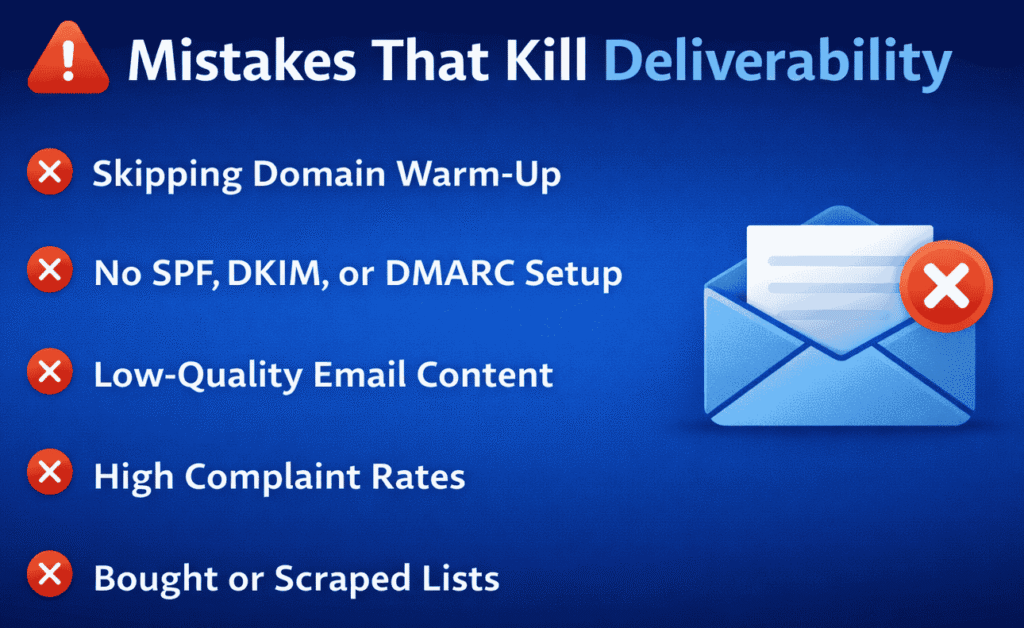
Common Email Warm-Up Mistakes That Kill Deliverability
Even with the right strategy, a few critical mistakes can destroy your sender reputation quickly.
👉 Email providers are highly sensitive to unnatural behavior—one bad week can undo months of proper warm-up.
Here are the most common mistakes you must avoid (and how to fix them).
1. Sending Bulk Emails on Day One
Starting with high volume is the fastest way to get flagged.
❌ What happens:
- Looks like spam activity
- No trust history
- Immediate filtering or blocking
✅ What to do instead:
- Start with 5–10 emails/day
- Increase gradually over time
👉 Build trust first, then scale.
2. Using Link-Heavy Templates Too Early
Links are one of the strongest spam signals—especially from new domains.
❌ Risk:
- Triggers spam filters
- Reduces inbox placement
✅ Best approach:
- Avoid links in the first 1–2 weeks
- Add them gradually after warm-up
👉 Keep early emails simple and text-based.
3. Skipping SPF, DKIM, and DMARC Setup
This is a foundational mistake.
❌ Without authentication:
- Emails look suspicious
- Higher chance of rejection or spam placement
✅ Fix:
- Properly configure SPF, DKIM, and DMARC before sending
👉 No setup = no deliverability (no matter what you do later).
4. Warming Up Multiple Inboxes Too Aggressively
Scaling too many inboxes at once creates unnatural patterns.
❌ Problem:
- Sudden spike in activity
- Shared reputation risks
- Easier to trigger spam filters
✅ Best practice:
- Start with 1–3 inboxes per domain
- Warm them up gradually
👉 Controlled scaling = safer growth.
5. Buying Low-Quality or Unverified Leads
Your email list quality directly impacts deliverability.
❌ Risks:
- High bounce rates
- Spam complaints
- Low engagement
✅ Solution:
- Use verified, high-quality leads only
- Clean your lists regularly
👉 Bad data = bad reputation.
6. Ignoring Bounce Rates and Spam Signals
Many beginners send emails without tracking performance.
❌ What happens:
- Issues go unnoticed
- Reputation damage increases over time
✅ Monitor regularly:
- Bounce rate (keep it <3%)
- Spam complaints
- Open and reply rates
👉 What you don’t track will hurt you.
7. Switching Domains Too Frequently
Changing domains too often resets your progress.
❌ Impact:
- No consistent trust history
- Repeated warm-up cycles
- Lower long-term credibility
✅ Best practice:
- Stick with one domain
- Build reputation over time
👉 Consistency builds authority.
8. Sending Identical Email Copy Repeatedly
Repetitive content is easy for spam filters to detect.
❌ Risk:
- Pattern detection triggers filters
- Lower engagement rates
✅ Fix:
- Slightly vary your messages
- Personalize emails where possible
👉 Natural variation = safer deliverability.
Why These Mistakes Are Dangerous
Email providers don’t just evaluate individual emails—they analyze:
- Sending behavior
- Content patterns
- Engagement signals over time
👉 One mistake may not hurt—but repeated mistakes create a negative sender profile.
What Happens If You Ignore These
- Emails go to spam
- Open rates collapse
- Domain reputation drops
- Campaigns stop performing
👉 In worst cases, your domain gets permanently damaged (“burned”).
Pro Tip: Prevention Is Easier Than Recovery
Fixing deliverability issues takes:
- Weeks of reduced sending
- Rebuilding trust slowly
- Sometimes switching domains
👉 Avoiding mistakes is far easier than recovering from them.
Key Takeaway
Email warm-up is fragile—small mistakes can have big consequences.
- Start slow
- Keep emails simple
- Monitor performance
- Stay consistent
👉 Protect your sender reputation like an asset—because it is.
How to Tell If Your Email Domain Is Properly Warmed Up
Before you scale your outreach or launch full campaigns, you need to confirm one thing:
👉 Is your domain actually trusted by email providers?
A properly warmed-up domain shows clear performance signals. If these are missing, scaling too early can damage your reputation.
Key Signs Your Domain Is Ready
Use the checklist below to evaluate your readiness:
📥 1. Emails Consistently Land in the Inbox
Your emails should reliably reach the primary inbox, not:
- Spam folder
- Promotions tab (for cold outreach)
👉 Test by sending emails to multiple accounts (Gmail, Outlook, etc.).
Goal: Stable inbox placement across providers
📈 2. Open Rates Are Strong (40–60%+)
Healthy open rates indicate:
- Good deliverability
- Relevant targeting
- Strong subject lines
👉 Benchmark:
- 40–60%+ open rate = strong signal
If opens are low:
- Your emails may be going to spam
- Or your targeting needs improvement
💬 3. Reply Rates Are Increasing
Replies are one of the strongest trust signals.
You should see:
- Natural conversations starting
- Replies increasing over time
- Engagement from real recipients
👉 Even a 5–15% reply rate is a great sign during early outreach.
📉 4. Bounce Rates Stay Below 3%
Bounce rate reflects list quality and sending health.
- ✅ Ideal: < 3%
- ❌ Risky: Above 5%
High bounce rates can:
- Damage your reputation
- Trigger spam filters
👉 Always use verified email lists.
🚫 5. Spam Complaints Are Near Zero
This is critical.
Even a few spam complaints can:
- Lower your sender reputation
- Push future emails to spam
👉 Your goal:
- Close to 0% spam complaints
⚡ 6. No Throttling or Sending Blocks
If your domain is not warmed up, providers may:
- Limit how many emails you can send
- Delay delivery
- Temporarily block your account
👉 A healthy domain shows:
- Smooth sending
- No warnings or restrictions
Warning Signs You’re NOT Ready Yet
If you notice any of these, pause scaling:
- Emails randomly going to spam
- Open rates below 30%
- No replies or engagement
- Increasing bounce rates
- Platform warnings or limits
👉 These indicate low trust signals.
What to Do If You’re Not Ready
Don’t rush.
Instead:
- Reduce sending volume
- Continue warm-up for 1–2 more weeks
- Focus on getting replies and engagement
- Fix list quality issues
👉 Slowing down now prevents long-term damage.
Why This Step Matters
Scaling too early is one of the biggest deliverability mistakes.
👉 A properly warmed-up domain allows you to:
- Scale campaigns safely
- Maintain inbox placement
- Maximize open and reply rates
Key Takeaway
Your domain is ready only when performance data proves it—not assumptions.
- Inbox placement is consistent
- Engagement is strong
- Negative signals are minimal
👉 If the signals aren’t there, don’t scale—optimize and continue warming up.
Email Domain Warm-Up Checklist (Quick Copy & Use)
Before you scale your email outreach or launch campaigns, run through this final warm-up checklist.
👉 This ensures your domain is fully prepared, trusted, and safe to scale—without risking deliverability issues.
Pre-Scaling Email Warm-Up Checklist
🔐 Technical Setup (Must Be Completed)
- ✅ SPF record configured correctly
- ✅ DKIM authentication enabled
- ✅ DMARC policy set up and active
👉 These are your core trust signals—never skip them.
⏳ Warm-Up Duration
- ✅ Minimum 14–30 days of gradual sending completed
- ✅ Email volume increased slowly (no sudden spikes)
👉 Consistency over time = stronger sender reputation
📥 Deliverability & Engagement Signals
- ✅ Emails consistently landing in the primary inbox
- ✅ Open rates stable (ideally 40–60%+)
- ✅ Replies and conversations happening regularly
👉 Engagement proves your emails are wanted and trusted.
🚫 Risk & Quality Checks
- ✅ Spam complaints are near zero
- ✅ Bounce rate is below 3%
- ✅ Email list is clean and verified
👉 Low negative signals = higher inbox placement
🤖 Automation Readiness
- ✅ Automation introduced gradually (not aggressively)
- ✅ Starting volume controlled (10–20 emails/day/inbox)
- ✅ Performance monitored before scaling further
👉 Safe automation = scalable outreach
⚠️ If Any Box Is NOT Checked
👉 Do NOT scale yet.
Instead:
- Continue warm-up for a few more days
- Improve engagement (focus on replies)
- Fix technical or list quality issues
👉 Scaling too early can damage your domain permanently.
Why This Checklist Matters
This checklist acts as your final safety filter before scaling.
It helps you:
- Avoid spam filters and blacklisting
- Protect your domain reputation
- Improve open and reply rates
- Scale campaigns confidently
Pro Tip
Bookmark or save this checklist and review it before every new campaign or domain setup.
👉 Even experienced marketers use checklists to avoid costly mistakes.
Key Takeaway
Email warm-up success is not about guesswork—it’s about meeting the right signals consistently.
✔ Setup complete
✔ Warm-up done
✔ Engagement strong
✔ Risks minimized
👉 Check everything, then scale with confidence.
Why Email Domain Warm-Up Is Non-Negotiable in 2026
Email deliverability has changed dramatically. What worked a few years ago no longer works today.
👉 In 2026, inbox providers are smarter, stricter, and far less forgiving.
If you skip proper warm-up, your emails won’t just underperform—they may never reach the inbox at all.
The New Reality of Email Deliverability
📈 1. Cold Email Volume Is Exploding
More businesses are using cold email for:
- Lead generation
- Sales outreach
- Marketing campaigns
👉 This means inbox providers are dealing with massive volumes of outbound emails daily.
Result: Increased competition for inbox placement
🤖 2. Spam Filters Are Now AI-Powered
Modern email platforms use advanced AI to detect:
- Sending patterns
- Content behavior
- Engagement signals
👉 They don’t just scan keywords—they analyze how you behave over time.
Result: Even slightly unnatural activity can trigger spam filters.
🔐 3. Sender Reputation Systems Are Stricter Than Ever
Your domain reputation is now:
- Built slowly
- Lost quickly
- Hard to recover
Inbox providers track:
- Opens and replies
- Bounce rates
- Spam complaints
- Sending consistency
👉 One mistake can impact your entire sending ability.
What This Means for You
- You can’t “blast” emails anymore
- You can’t rely on templates alone
- You can’t scale without trust
👉 The old approach of volume-first email marketing is dead.
Your Real Competitive Advantage
It’s not about sending more emails.
👉 It’s about getting your emails delivered and opened.
- High deliverability = more visibility
- Better inbox placement = higher engagement
- Strong reputation = scalable campaigns
Where It All Starts: Email Domain Warm-Up
Email domain warm-up is the foundation of modern email success.
It helps you:
- Build trust with inbox providers
- Establish a clean sending history
- Generate positive engagement signals
- Avoid spam filters and blacklists
👉 Without warm-up, none of your campaigns will perform consistently.
The Bottom Line
In 2026:
- Inbox providers are stricter
- Competition is higher
- Algorithms are smarter
👉 Your success depends on trust—not volume.
Key Takeaway
Email domain warm-up is no longer optional—it’s a critical requirement.
- Skip it → poor deliverability, wasted campaigns
- Do it right → consistent inbox placement, scalable growth
👉 If you want results from cold email, start with warm-up—or don’t start at all.
Final Takeaway: Build Trust First, Scale Results Later
Email warm-up isn’t just a technical step—it’s the foundation of your entire email strategy.
👉 You’re not just sending emails. You’re training inbox providers to trust you.
If You Do It Right
- ✅ Your emails land in the primary inbox
- ✅ Open and reply rates increase naturally
- ✅ Campaigns generate consistent results
- ✅ Your domain builds long-term credibility
👉 This leads to higher ROI and scalable growth.
If You Do It Wrong
- ❌ Emails go straight to spam
- ❌ Engagement drops to near zero
- ❌ Your domain reputation gets damaged
- ❌ Campaigns fail before they even start
👉 In many cases, you’ll be forced to start over with a new domain.
The Real Strategy
- Warm up slowly
- Focus on real engagement
- Stay consistent
- Scale only when signals are strong
👉 Short-term patience = long-term results
Final Thought
Warm slow. Scale smart. Win long-term.
Because in email marketing today,
👉 trust is your biggest asset—and deliverability is your unfair advantage.
FAQs (For Beginners & Practitioners)
-
What is email domain warm-up?
Email domain warm-up is the process of gradually increasing email sending volume from a new domain or inbox to build trust with email providers. It helps improve inbox placement and sender reputation over time.
-
Why is email warm-up important for deliverability?
Warm-up is critical because email providers evaluate sending behavior and engagement signals. Without it, your emails are more likely to land in spam or get blocked, reducing campaign performance.
-
How long should you warm up an email domain?
Most domains require:
14–21 days for basic outreach
21–30 days for cold email campaigns
30+ days for high-volume sending
👉 The timeline depends on your sending volume and use case. -
How many emails should I send during warm-up?
Start with 5–10 emails per day per inbox, then gradually increase volume every few days.
👉 Avoid increasing volume by more than 30–50% every 3–4 days. -
Can I skip email warm-up?
No. Skipping warm-up can lead to:
Emails going to spam
Low open and reply rates
Domain blacklisting
Long-term reputation damage
👉 Warm-up is non-negotiable for successful email outreach. -
What are the key signals that affect email deliverability?
Email providers track:
Open rates
Reply rates
Bounce rates
Spam complaints
Sending consistency
👉 Positive engagement signals improve inbox placement. -
Should I use email warm-up tools or do it manually?
Best practice is a hybrid approach:
Start with manual warm-up (first few days)
Then use automated warm-up tools for consistency and scale
👉 This combines authentic engagement + automation efficiency. -
When should I start using automation for outreach?
Only after 14–21 days of warm-up, when:
Emails are landing in inbox
Open and reply rates are stable
👉 Start with 10–20 automated emails/day/inbox, then scale gradually. -
What is a good open rate during warm-up?
A healthy open rate is:
40–60% or higher
👉 Lower rates may indicate spam placement or poor targeting. -
What bounce rate is acceptable for email campaigns?
✅ Ideal: Below 3%
❌ Risky: Above 5%
👉 High bounce rates damage your sender reputation quickly. -
Can I use my main domain for cold email?
It’s not recommended.
👉 Always use a separate domain for outreach to protect your main business domain from potential reputation damage. -
Why are my emails going to spam even after warm-up?
Common reasons include:
Poor email list quality
Spam-triggering content
Too many links or images
Sudden increase in sending volume
👉 Review your setup, content, and sending behavior. -
Do email warm-up tools really work?
Yes, when used correctly.
They help by:
Simulating real email engagement
Sending replies and interactions
Maintaining consistent sending patterns
👉 But they must be used with proper setup and strategy. -
Can I warm up multiple inboxes at the same time?
Yes, but carefully.
👉 Start with 1–3 inboxes per domain and scale gradually to avoid triggering spam filters. -
What happens if my domain gets “burned”?
A burned domain has a damaged sender reputation, leading to:
Constant spam placement
Low deliverability
Poor campaign performance
👉 In severe cases, you may need to switch to a new domain.