
Apollo.io + Reply.io Workflow: The Smart Cold Email System for Beginners & Small Teams
Cold email outreach doesn’t fail because of poor tools—it fails because most people try to do everything with a single platform.
The smarter approach?
👉 Use the right tools for the right job.
With a combination of Apollo.io and Reply.io, you can build a simple, scalable, and high-performing cold email system without technical complexity.
- Use Apollo.io to find and qualify high-quality leads
- Use Reply.io to automate email sequences, follow-ups, and reply management
This guide will walk you through a step-by-step workflow to combine both tools effectively—so you can generate leads, automate outreach, and manage conversations with ease.
Whether you’re a solo founder, freelancer, consultant, or small sales team, this system is designed to be:
✔ Beginner-friendly
✔ Easy to implement
✔ Scalable as you grow
🎯 Who This Apollo.io + Reply.io Workflow Is For
This workflow is designed for anyone who wants a simple, scalable, and results-driven cold email system—without wasting time on trial and error.
If you fall into any of the categories below, this setup will work perfectly for you 👇
👤 Solo Founders & Consultants
If you’re running your business alone, managing both lead generation and outreach can be overwhelming.
👉 With Apollo.io + Reply.io, you can:
- Find targeted leads quickly
- Automate follow-ups
- Focus more on closing deals instead of manual work
💡 Perfect for building a consistent lead pipeline without hiring a team.
👥 Small Teams (Upto 15 Members)
Small teams often struggle with scaling outreach while staying organized.
👉 This workflow helps you:
- Assign and manage leads efficiently
- Automate email sequences across team members
- Track replies and conversations in one place
💡 Ideal for startups and growing businesses looking to scale outbound sales.
👉 Can it scale beyond 15 users?
Yes—but with the right setup.
Teams with 15–30 users can still use this workflow effectively if they:
- Set up proper lead segmentation
- Use multiple sending accounts and domains
- Define clear outreach roles and responsibilities
💡 Beyond this level, businesses usually require more advanced systems or enterprise-level automation.
🚀 Beginners in Outbound Sales
If you’re new to cold email outreach, this system keeps things simple and structured.
👉 You’ll learn how to:
- Find quality leads using Apollo.io
- Launch automated campaigns via Reply.io
- Avoid common beginner mistakes
💡 No technical experience required—just follow a step-by-step process.
🏢 Agencies Doing Cold Outreach
Agencies managing multiple clients need a scalable and reliable system.
👉 With this setup, you can:
- Run multiple outreach campaigns simultaneously
- Manage client leads efficiently
- Automate follow-ups without missing opportunities
💡 Great for lead generation agencies and outbound marketing services.
⏳ Anyone Tired of Manual Follow-Ups
Manually sending emails and tracking replies is time-consuming and inefficient.
👉 This workflow helps you:
- Automate follow-ups based on prospect behavior
- Never miss a response or opportunity
- Save hours of repetitive work
💡 Turn your outreach into a semi-automated system.
💡 Final Takeaway
If you want a clear, proven system instead of guessing what works, this workflow gives you a structured approach to:
👉 Find leads → Automate outreach → Manage replies → Close deals

🎯 When This Apollo.io + Reply.io Workflow Works Best
This workflow is highly effective—but it performs best in specific business models where targeted outreach and relationship-building matter most.
Here’s where this system delivers the strongest results 👇
🏢 B2B Service Businesses
If you offer services to other businesses (marketing, IT, consulting, etc.), this workflow helps you:
- Reach decision-makers directly
- Generate qualified leads consistently
- Build a predictable sales pipeline
💡 Cold email works best when targeting businesses—not mass consumers.
🚀 SaaS Startups
For SaaS companies, especially in early stages, outbound outreach is crucial.
👉 Using Apollo.io + Reply.io, you can:
- Find ideal users based on role and company type
- Promote your product to relevant prospects
- Get early adopters and feedback
💡 Great for user acquisition and growth.
🏢 Agencies (Marketing, Lead Gen, Recruitment)
Agencies can use this workflow to scale outreach across multiple clients.
👉 You can:
- Run parallel campaigns
- Manage multiple prospect lists
- Automate follow-ups efficiently
💡 Perfect for lead generation and client acquisition.
👤 Consultants & Freelancers
If you’re a solo professional, this system helps you build a steady flow of opportunities.
👉 You can:
- Reach targeted prospects without paid ads
- Automate outreach while focusing on delivery
- Generate consistent inbound conversations
💡 Ideal for building a personal client pipeline.
👥 Recruiters & Hiring Agencies
Cold outreach is highly effective in recruitment.
👉 This workflow helps you:
- Reach potential candidates directly
- Contact hiring managers
- Build talent pipelines faster
💡 Especially useful for niche or hard-to-fill roles.
📈 Small Sales Teams
For small teams (1–15 members), this system provides a scalable outreach process.
👉 Teams can:
- Assign leads efficiently
- Track replies and conversations
- Maintain a structured outreach system
💡 Simple enough to manage, powerful enough to scale.
💡 Final Takeaway
This workflow works best when:
- You’re targeting a specific audience (not mass market)
- You need direct outreach instead of inbound traffic
- You want a repeatable and scalable lead generation system
🔗 Why Combine Apollo.io and Reply.io?
Trying to use one tool for everything often leads to limited results and inefficient workflows.
The smarter approach is to use specialized tools that excel at specific tasks—and combine them into a streamlined system.
That’s exactly what happens when you use Apollo.io and Reply.io together 👇
🚀 What Apollo.io Does Best
Apollo.io is built for lead generation and data intelligence, helping you find the right prospects quickly.
👉 You can:
- Discover targeted B2B leads based on industry, role, and company size
- Filter prospects using advanced search criteria
- Enrich contact data with verified emails and phone numbers
- Build high-quality, segmented lead lists
💡 This ensures you’re reaching the right people—not just sending random emails.
✉️ What Reply.io Does Best
Reply.io is designed for outreach automation and conversation management.
👉 You can:
- Create multi-step cold email sequences
- Automate follow-ups based on user behavior
- Detect replies and stop campaigns automatically
- Manage conversations in a CRM-style inbox
💡 This turns your outreach into a consistent, automated system.
🔄 How They Work Better Together
When combined, these tools create a complete cold email workflow:
👉 Find leads in Apollo.io → Send & automate emails in Reply.io → Track replies and manage conversations
This eliminates the need for:
- ❌ Manual prospecting
- ❌ Spreadsheet-based lead tracking
- ❌ Basic one-off email tools
💡 Real Advantage of This Combination
Using Apollo.io + Reply.io gives you:
- A clear separation of tasks (no tool overload)
- Better data quality + outreach performance
- A repeatable and scalable sales system
- Less manual work and more automation
⚡ Simple Breakdown
- Apollo.io → Find and prepare leads
- Reply.io → Automate outreach and manage replies
👉 Together → A complete AI-powered outbound sales system
💡 Final Takeaway
Instead of forcing one tool to do everything, combining the right tools allows you to:
- Work more efficiently
- Scale outreach faster
- Build a system that grows with your business
New to outbound sales tools? Our Apollo.io Review for Beginners explains how to find leads easily, while the Reply.io Review for Beginners shows how to automate follow-ups and outreach across multiple channels.
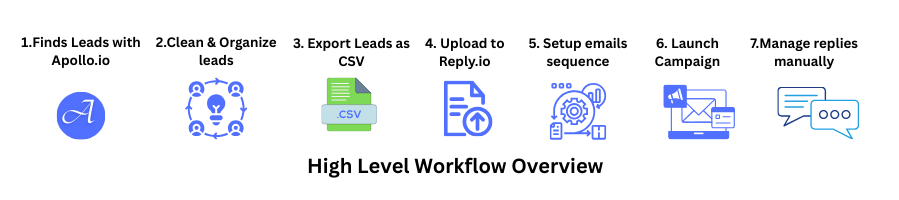
🔄 High-Level Workflow Overview
Before we dive into the detailed steps, here’s a quick overview of how the entire system works using Apollo.io and Reply.io.
This will give you a clear picture of the process so you can follow each step more easily 👇
⚡ Simple Workflow Flow
- Find targeted leads using Apollo.io
- Clean and organize your lead data
- Export leads as a CSV file
- Upload leads into Reply.io
- Set up your email sequences
- Launch your outreach campaign
- Manage and respond to replies manually
💡 What This Means
👉 You handle lead generation in Apollo.io
👉 You automate outreach in Reply.io
👉 You focus on closing conversations manually
👉 “Now let’s break down each step so you can implement this workflow from scratch.”
🎯 Define Your Ideal Customer Profile (ICP) Before Searching for Leads
Before you start building a lead list or sending cold emails, it’s important to define your Ideal Customer Profile (ICP).
Many outreach campaigns fail not because of poor messaging—but because they target the wrong audience.
A clear ICP ensures that your outreach is focused, relevant, and more likely to generate responses.
🔍 What is an Ideal Customer Profile (ICP)?
An Ideal Customer Profile is a description of the type of company or person that is most likely to benefit from your product or service.
Instead of targeting everyone, you focus on prospects who:
- Have a clear need for your solution
- Fit your business model
- Are more likely to convert
🧠 Why ICP Matters in Cold Email Outreach
Defining your ICP helps you:
- Improve lead quality
- Increase reply rates
- Avoid wasted outreach efforts
- Personalize messages more effectively
👉 In simple terms:
Better targeting = better conversations = better results
📊 Key Factors to Define Your ICP
When building your ICP, consider:
1. Industry
Which industries are most relevant to your solution?
2. Company Size
Are you targeting startups, small businesses, or mid-sized companies?
3. Job Roles / Decision Makers
Who are you reaching out to? (Founder, Marketing Head, Sales Manager, etc.)
4. Pain Points
What specific problems are they trying to solve?
5. Use Case Fit
How does your solution fit into their workflow?
⚠️ Common Mistake to Avoid
One of the biggest mistakes is using a broad or unclear ICP, such as:
“Small business owners”
Instead, refine it into something more specific:
“B2B SaaS founders with small sales teams struggling with outbound lead generation”
The more specific your ICP, the more relevant your outreach becomes.
⚙️ How This Connects to Your Workflow
Once your ICP is clearly defined:
- Use Apollo.io to find matching prospects
- Build a targeted lead list
- Segment leads based on ICP criteria
- Personalize outreach messages effectively
👉 This makes every step in your cold email workflow more efficient.
✅ Key Takeaway
Cold outreach success starts before the first email is sent.
By defining a clear Ideal Customer Profile, you ensure that your outreach is:
- Targeted
- Relevant
- Scalable
Once your Ideal Customer Profile is clearly defined, the next step is to build a targeted list using a structured lead generation workflow for small businesses.
🎯 Step 1: Find Your Ideal Leads in Apollo.io
Your cold email success starts with one thing: the quality of your leads.
This is where Apollo.io plays a crucial role—helping you find the right people instead of wasting time on unqualified prospects.
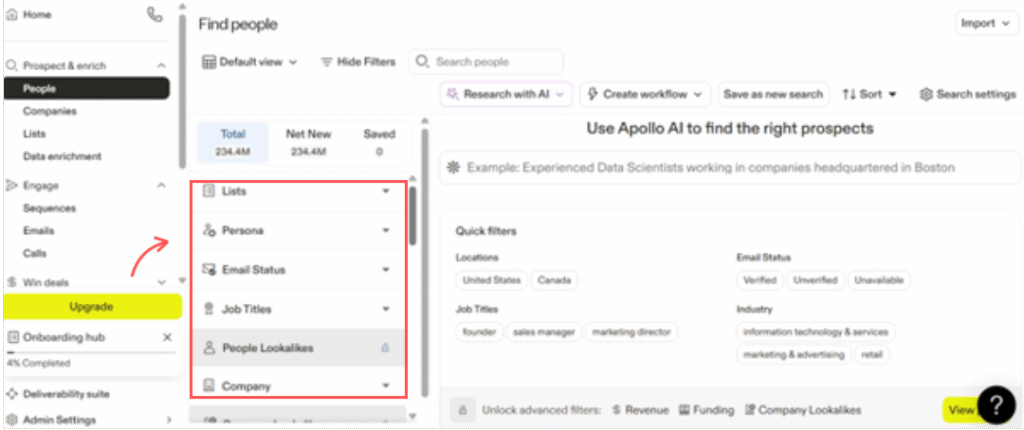
🔍 How to Start Finding Leads (Beginner-Friendly Setup)
When you’re just getting started, keep your targeting simple and focused.
Use these basic filters 👇
- Location → Choose a country or region (e.g., United States, UK)
- Job Title → Founder, CEO, Marketing Manager, Sales Head
- Company Size → Start with 1–50 or 11–50 employees
- Industry (Optional) → Add only if you want niche targeting
🧠 Why These Filters Matter
- Location ensures your outreach is relevant
- Job Title targets decision-makers
- Company Size helps match your ideal customer profile
- Industry helps refine later (not required initially)
⚡ Simple Beginner Workflow
👉 Go to Apollo.io → Open “People Search” → Apply filters → Preview results → Save leads
📌 Beginner Tip
More filters do NOT mean better leads.
👉 Start broad → analyze results → refine step by step
💡 Over-filtering early can limit your reach and reduce opportunities.
💡 Pro Tip for Better Results
- Start with 200–500 leads per campaign
- Focus on relevance over perfection
- Save multiple lists instead of one large list
👉 If you’re new, check out our Apollo.io lead generation guide to learn how to build high-quality prospect lists step by step.
🚀 What’s Next?
Now that you have your leads, the next step is to clean and organize your data before outreach.
📋 Step 2: Save, Clean & Organize Your Lead List
Once you’ve found relevant leads in Apollo.io, the next step is to clean, organize, and prepare your list before exporting.
This step is critical because poor-quality data = poor outreach results.
✅ Select & Save Relevant Leads
Start by selecting contacts that match your target audience.
👉 Then save them into a list inside Apollo.io
Example:
- SaaS Founders – Cold Outreach
- Marketing Managers – US
💡 Creating organized lists makes campaign management much easier later.
🧹 Clean & Prepare Your Data (Important Step)
Before exporting your leads, take a few minutes to clean your list 👇
- Email Status → Keep only Verified or Recommended
- Remove Duplicates → Avoid sending multiple emails to the same contact
- Exclude Generic Emails → Filter out emails like:
- info@
- support@
- admin@
💡 These rarely convert and can hurt deliverability.
📌 Golden Rule
👉 Quality beats quantity—especially in the beginning.
- 100 high-quality leads > 1,000 random contacts
- Better targeting = higher reply rates
⚡ Simple Workflow
👉 Select leads → Save to list → Clean data → Prepare for export
🚀 What’s Next?
Now that your lead list is clean and ready, the next step is to export your data and upload it into Reply.io for outreach.
To understand this process in detail, you can follow a step-by-step lead generation workflow that breaks down how to find and build high-quality prospect lists.
📤 Step 3: Export Your Lead List for Outreach
Once your lead list is clean and ready, the next step is to export your data in the correct format so it can be used for outreach.
This step ensures a smooth import into your email automation tool like Reply.io.
📥 How to Export Your Leads
In Apollo.io:
👉 Go to your saved list → Click Export → Choose CSV format
💡 CSV is the most compatible format for uploading into outreach tools.
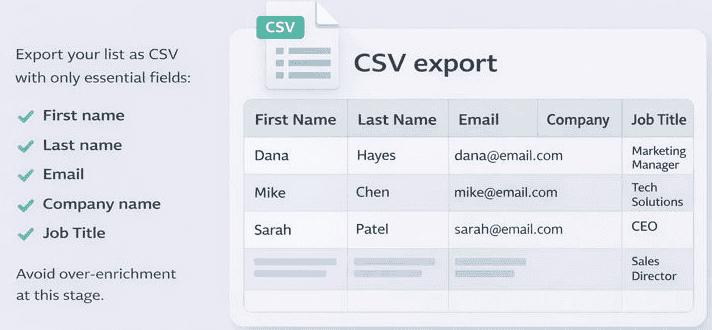
📊 Select Only Essential Fields (Very Important)
When exporting, keep your data minimal and clean.
Include only these fields 👇
- First Name
- Last Name
- Email Address
- Company Name
- Job Title
🧠 Why Minimal Data Works Better
- Keeps your file clean and easy to manage
- Reduces errors during upload
- Improves email personalization accuracy
- Prevents unnecessary clutter in your campaigns
💡 More data doesn’t mean better results—relevant data does.
⚠️ Common Mistake to Avoid
👉 Exporting too many fields like:
- Phone numbers
- LinkedIn URLs
- Company details (not needed initially)
❌ This can:
- Confuse your workflow
- Slow down campaign setup
- Increase chances of formatting errors
📌 Best Practice
👉 Keep your export simple → clean → focused on outreach
You can always enrich or expand your data later if needed.
⚡ Simple Workflow
👉 Open list → Export as CSV → Select essential fields → Download file
🚀 What’s Next?
Now that your CSV file is ready, the next step is to upload your leads into Reply.io and start setting up your email campaign.
💡 Pro Tip
Before uploading, quickly open your CSV file and:
- Check for missing emails
- Remove any unwanted rows
- Ensure columns are properly labeled
👉 This avoids errors in the next step.
⚙️ Step 4: Set Up Your Reply.io Account for Email Automation
Now that your lead data is ready, it’s time to move into execution.
This is where Reply.io comes in—helping you automate outreach, manage replies, and track performance.
🔑 What Happens in This Step
In simple terms:
👉 You’ll prepare your system to send emails safely and efficiently
Before launching any campaign, you must ensure your setup is correct and optimized.
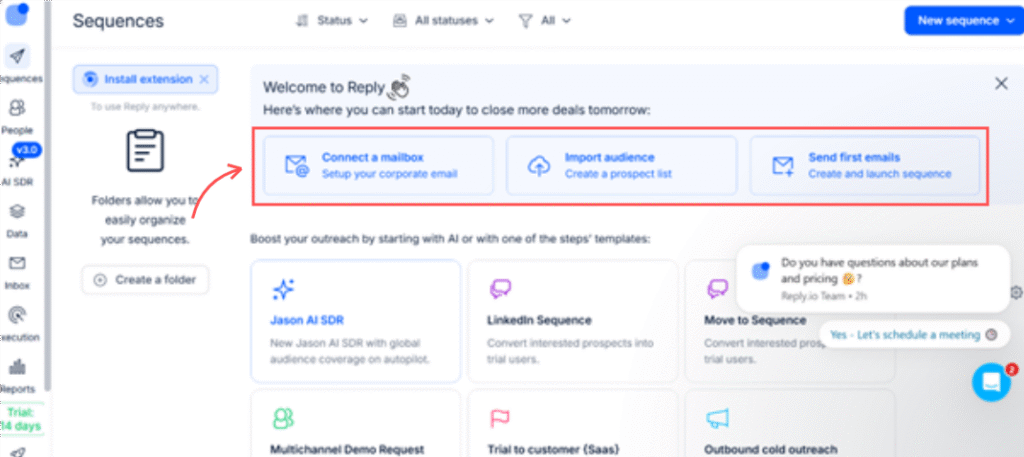
🖥️ What You’ll See on First Login
When you log in to Reply.io, you’ll see these main sections 👇
- Email Accounts → Connect and manage sending inboxes
- Sequences → Create automated email campaigns
- Prospects → Upload and manage your lead list
- Inbox / Conversations → Track replies and manage responses
- Analytics → Monitor campaign performance
💡 Don’t worry—you don’t need everything at once. Focus on setup first.
🎯 Beginner Goal (Very Important)
👉 Your goal here is NOT to launch immediately
👉 First, you need to:
- Connect your email account
- Ensure proper sending setup
- Prepare for safe outreach
💡 This step protects your domain and improves deliverability.
Once leads are qualified, the next step is executing a consistent cold outreach workflow that ensures proper sequencing and messaging.
⚡ Step-by-Step Setup (Beginner Flow)
1️⃣ Connect Your Email Account
- Add your Gmail or Outlook account
- Allow necessary permissions
💡 Use a dedicated outreach email (not your primary business email).
2️⃣ Configure Basic Settings
- Set your sender name
- Add a professional email signature
- Check timezone and sending schedule
3️⃣ Warm Up Your Email (Critical Step)
Before sending campaigns, your email needs to build trust.
👉 In Reply.io:
- Enable email warm-up (if available)
- Start with low sending volume
💡 Skipping warm-up = high risk of spam.
4️⃣ Review Dashboard Structure
Quickly explore:
- Where sequences are created
- Where prospects are uploaded
- Where replies appear
💡 This helps you avoid confusion in later steps.
📌 Common Beginner Mistake
❌ Jumping directly into campaign launch
👉 Always complete setup first to:
- Protect deliverability
- Avoid account restrictions
- Improve response rates
🚀 What’s Next?
Now that your dashboard is ready, the next step is to:
👉 Upload your leads into Reply.io and map the fields correctly
💡 Pro Tip
Use:
- 1–2 email accounts initially
- Low daily sending volume (20–30 emails/day)
👉 Then scale gradually.
📧 Step 5: Connect & Warm Up Your Email Accounts (Critical Step)
Now that your Reply.io dashboard is set up, the next step is to connect your email accounts and prepare them for safe outreach.
This is one of the most important steps—because your deliverability depends on it.
🔑 What Happens in This Step
👉 You’ll connect your sending inbox
👉 You’ll start warming it up
👉 You’ll prepare your account for campaign launch
💡 Think of this as building trust with email providers before sending outreach.
⚙️ Step-by-Step Setup (Beginner-Friendly)
1️⃣ Connect Your Email Account
- Add your Gmail or Outlook inbox inside Reply.io
- Complete authentication and permissions
💡 Always use a dedicated outreach email (not your main business email).
2️⃣ Start with 1–2 Email Accounts
👉 As a beginner, keep it simple:
- Use 1–2 inboxes only
- Focus on learning before scaling
💡 You can always add more accounts later.
3️⃣ Enable Email Warm-Up Immediately (Must Do)
Warm-up gradually increases your sending activity to build reputation.
👉 In Reply.io:
- Turn on warm-up feature (if available)
- Let it run for a few days before campaigns
💡 This improves inbox placement and avoids spam filters.
4️⃣ Set Safe Sending Limits
Start with low daily limits:
- 20–30 emails per day per inbox
- Gradually increase over time
💡 Slow scaling = better deliverability.
📌 Common Mistake to Avoid
❌ Sending cold emails without warm-up
👉 This can lead to:
- Emails going to spam
- Domain reputation damage
- Account restrictions
💡 Warm-up is NOT optional—it’s essential.
🚀 What’s Next?
Once your email accounts are connected and warming up, the next step is to:
👉 Upload your lead list into Reply.io and map the fields correctly
💡 Pro Tip
Keep sending behavior consistent
Never send cold emails without warm-up.
Use a custom domain email (e.g., name@yourdomain.com)
Avoid free emails for serious outreach
If you want to go deeper, explore our detailed guide on cold email follow-up strategy and how to structure sequences that improve response rates.
🛡️ Basic Email Setup for Better Deliverability
Before you start sending cold emails, it’s important to set up your domain properly.
Even if you’re using tools like Reply.io, your emails can still land in spam if your technical setup is incomplete.
🔑 Why This Step Matters
👉 Email providers (Gmail, Outlook) check your domain’s authenticity before delivering emails
👉 Without proper setup:
- Emails may go to spam
- Your domain reputation can drop
- Campaign performance will suffer
⚙️ Key Email Authentication Settings
Here are the three essential DNS records you must configure 👇
✅ SPF (Sender Policy Framework)
- Defines which servers can send emails on behalf of your domain
- Helps prevent spoofing
💡 Think of SPF as a permission list for sending emails.
✅ DKIM (DomainKeys Identified Mail)
- Adds a digital signature to your emails
- Confirms the message wasn’t altered
💡 Builds trust with receiving email servers.
✅ DMARC (Domain-based Message Authentication)
- Works with SPF and DKIM
- Tells email providers how to handle suspicious emails
💡 Adds an extra layer of protection and control.
🌐 Custom Domain vs Free Email (Important)
👉 Always use a custom domain email
Example:
Why?
- Builds credibility
- Improves deliverability
- Looks more professional
⚠️ Common Mistakes to Avoid
❌ Sending cold emails from personal Gmail accounts
❌ Skipping DNS setup completely
❌ Using unverified domains
👉 These can lead to:
- Spam issues
- Low open rates
- Poor campaign performance
💡 Pro Tip
Before launching campaigns:
- Verify SPF, DKIM, and DMARC are active
- Use a domain testing tool if needed
- Combine this with warm-up (Steps 5–6)
👉 This creates a strong deliverability foundation
📈 Step 6: Configure Email Warm-Up & Sending Limits (Deliverability Setup)
Now that your email accounts are connected in Reply.io, it’s time to configure your warm-up and sending behavior properly.
This step ensures your emails land in inbox—not spam.
🔑 What Happens in This Step
👉 You define how your emails will be sent
👉 You control sending volume and growth
👉 You protect your domain reputation
💡 This is where most beginners either succeed or fail.
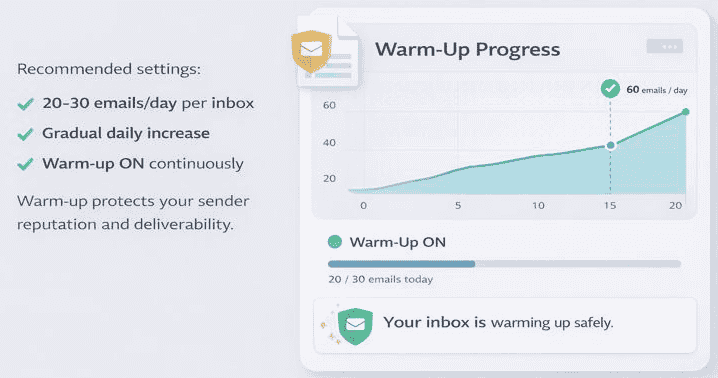
⚙️ Recommended Safe Settings (Beginner Defaults)
Start with these proven settings 👇
- 20–30 emails/day per inbox
- Gradual daily increase (5–10 emails max)
- Warm-up ON continuously
💡 These settings balance safety and performance.
📊 Why These Settings Matter
- Prevent sudden spikes (which trigger spam filters)
- Build a natural sending pattern
- Improve long-term deliverability
- Reduce bounce and block risks
🔄 Warm-Up Strategy (Simple & Effective)
👉 Week 1:
- Warm-up ON
- Low sending volume
👉 Week 2:
- Slight increase in daily emails
- Continue warm-up
👉 Ongoing:
- Keep warm-up running in the background
💡 Warm-up is not a one-time setup—it’s continuous.
⚠️ Common Mistakes to Avoid
❌ Sending 100+ emails/day from day one
❌ Turning off warm-up after setup
❌ Increasing volume too quickly
👉 These mistakes can:
- Damage your domain
- Reduce inbox placement
- Kill campaign performance
🚀 What’s Next?
Now that your email system is fully ready, the next step is:
👉 Upload your lead list into Reply.io and map the fields correctly
🔥 Pro Tip
👉 If using multiple inboxes:
- 2 inboxes = 40–60 emails/day
- 3 inboxes = 60–90 emails/day
💡 Scale accounts—not individual inbox limits.
For a deeper breakdown, check our detailed Apollo.io review for lead generation and Reply.io review for cold email automation.
📥 Step 7: Upload & Map Your Leads in Reply.io
Now that your email system is fully set up and optimized, it’s time to bring your leads into your outreach platform.
This step connects everything you’ve done so far—moving your data from Apollo.io into Reply.io so you can start campaigns.
🔑 What Happens in This Step
👉 You upload your CSV file
👉 You map your data fields correctly
👉 You organize leads inside Reply.io
💡 Accurate mapping = correct personalization in emails.
⚙️ Step-by-Step: How to Upload Apollo Leads
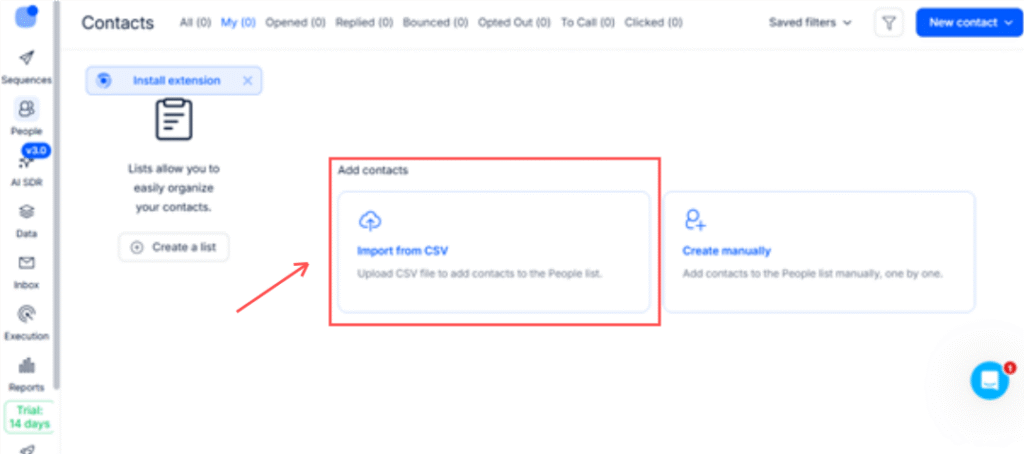
1️⃣ Upload Your CSV File
- Go to Prospects section in Reply.io
- Click Import / Upload CSV
- Select the file exported from Apollo.io
2️⃣ Map Your Fields Correctly (Very Important)
You’ll now match your CSV columns with Reply.io fields.
👉 Make sure to map these correctly 👇
- First Name → First Name
- Last Name → Last Name (if available)
- Email → Email Address
- Company → Company Name
- Job Title → Position / Role
💡 Even one wrong mapping can break personalization.
3️⃣ Double-Check Before Saving
Before finalizing import:
- Ensure emails are mapped correctly
- Check for missing fields
- Confirm no columns are mismatched
💡 This avoids errors in your campaign later.
📊 Optional (But Recommended)
👉 Create a prospect list inside Reply.io
Example:
- SaaS Founders – Campaign 1
💡 Helps you manage and track campaigns easily.
⚠️ Common Mistakes to Avoid
❌ Skipping field mapping verification
❌ Uploading unclean data
❌ Missing personalization fields (like first name)
👉 These can lead to:
- Broken email variables (e.g., “Hi {{name}}”)
- Poor user experience
- Lower reply rates
🚀 What’s Next?
Now that your leads are inside Reply.io, the next step is:
👉 Create your cold email sequence with proper personalization and follow-ups
💡 Pro Tip
Before launching campaigns:
- Open a few contacts inside Reply.io
- Check if all fields (name, company, etc.) display correctly
👉 This ensures your emails look natural and personalized.
This approach aligns with how small teams apply automation, as explained in our guide on how small businesses use AI tools in workflows.
✉️ Step 8: Create Your Cold Email Sequence (Simple & Effective)
Now that your leads are uploaded into Reply.io, it’s time to create the actual outreach messages.
This is where your campaign success is decided—because even with great leads, poor messaging = no replies.
🔑 What Happens in This Step
👉 You create your email sequence
👉 You define follow-ups
👉 You personalize your messaging
💡 Your goal is to start conversations—not close deals in the first email.
📩 Beginner-Friendly Sequence Structure
Keep your sequence simple and natural 👇
1️⃣ Email 1: Short Introduction
- Who you are
- Why you’re reaching out
- One clear value or relevance
💡 Keep it under 75–100 words.
2️⃣ Follow-Up 1 (After 2–3 Days)
- Gentle reminder
- Reference previous email
- Keep it casual
💡 Most replies come from follow-ups—not the first email.
3️⃣ Optional Follow-Up 2 (Value-Based Nudge)
- Share a quick insight, idea, or benefit
- Keep it helpful, not pushy
💡 Adds value instead of pressure.
✍️ Cold Email Writing Rules (Very Important)
Follow these principles to improve reply rates 👇
- Keep it short and conversational
- Personalize using name or company
- Focus on relevance, not selling
- Ask simple, low-friction questions
- Avoid adding links in the first email
💡 Your goal is a reply—not a click.
⚠️ Common Mistakes to Avoid
❌ Writing long, sales-heavy emails
❌ Using generic templates without personalization
❌ Adding too many links or CTAs
❌ Trying to “pitch” in the first message
👉 These reduce trust and lower response rates.
⚡ Simple Workflow
👉 Create sequence → Add emails → Set delays → Personalize variables
🚀 What’s Next?
Now that your sequence is ready, the next step is:
👉 Launch your campaign with the right sending settings and schedule
💡 Pro Tip
Before launching:
- Send test emails to yourself
- Check formatting (mobile + desktop)
- Ensure personalization fields work correctly
👉 This avoids embarrassing mistakes.
📧 Sample Cold Email Templates (Ready to Use)
Now that you understand the structure, here are simple, proven templates you can use right away in your campaigns with Reply.io.
👉 These are designed to be short, personalized, and reply-focused.
✉️ Template 1: Beginner Cold Email (First Touch)
Subject: Quick question, {{FirstName}}
Hi {{FirstName}},
I came across {{CompanyName}} and noticed you’re working on {{relevant context}}.
I help businesses like yours with {{specific outcome/result}}—thought it might be relevant.
Would you be open to a quick chat to explore this?
Best,
{{YourName}}
💡 Why this works:
- Short and easy to read
- Personalized (name + company)
- Focused on relevance—not selling
- Ends with a simple, low-pressure question
🔁 Template 2: Follow-Up Email (2–3 Days Later)
Subject: Just following up
Hi {{FirstName}},
Just wanted to quickly follow up on my previous message.
Let me know if this is something you’re exploring right now—or if I should reach out later.
Happy to share more details if helpful.
Best,
{{YourName}}
💡 Why this works:
- Polite and non-pushy
- Keeps the conversation open
- Increases reply chances significantly
⚡ How to Customize These Templates
To improve results, always:
- Replace placeholders with real data ({{FirstName}}, {{CompanyName}})
- Add one line of relevance or personalization
- Keep tone natural and conversational
💡 Even small personalization can double your reply rate.
👉 “Copy this template, customize it, and test it with your first 50 leads.”
⚠️ Common Mistakes to Avoid
❌ Sending templates without personalization
❌ Writing long paragraphs
❌ Adding links in the first email
❌ Trying to sell immediately
👉 Keep it simple → Start conversations → Build trust
🚀 Step 9: Launch Your Campaign with Safe Sending Settings
Now that your email sequence is ready, it’s time to launch your campaign inside Reply.io.
But before hitting send, you need to make sure your sending settings are safe and optimized.
👉 This step directly impacts your deliverability, open rates, and overall success.
🔑 What Happens in This Step
👉 You define how and when emails are sent
👉 You control volume and timing
👉 You launch your first outreach campaign safely
💡 A slow, controlled start always performs better than aggressive sending.
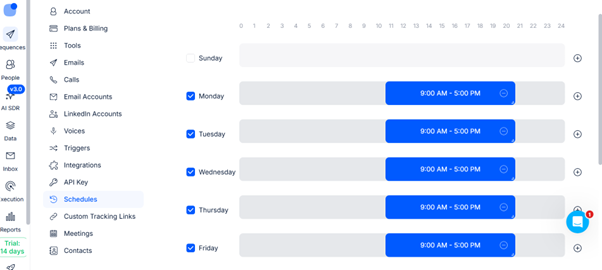
⚙️ Safe Sending Rules (Beginner Defaults)
Start with these proven settings 👇
- 20–40 emails/day per inbox
- Send during business hours (9 AM – 5 PM)
- Avoid weekends initially
- Scale only after results stabilize
💡 Consistency matters more than volume.
🧠 Why These Settings Matter
- Business hours improve open and reply rates
- Lower volume protects your email reputation
- Avoiding weekends ensures better engagement
- Gradual scaling prevents spam flags
📅 Recommended Sending Schedule
👉 Start with:
- Monday to Friday
- Morning or early afternoon
💡 This matches when your prospects are most active.
⚠️ Common Mistakes to Avoid
❌ Sending too many emails too quickly
❌ Running campaigns 24/7
❌ Ignoring reply and bounce rates
❌ Scaling before testing results
👉 These can lead to:
- Spam issues
- Low engagement
- Poor campaign performance
📈 When to Scale Your Campaign
Only increase volume when:
- You’re getting consistent opens and replies
- Bounce rate is low
- No spam warnings
👉 Then gradually increase by 5–10 emails/day per inbox
🚀 What’s Next?
Once your campaign is live, the final step is:
👉 Monitor replies, manage conversations, and convert leads into opportunities
💡 Pro Tip
- Start with one campaign only
- Track performance daily
- Adjust messaging before scaling
👉 Optimization > volume
💬 Step 10: Manage Replies & Optimize Your Campaign
Once your campaign is live, the real work begins.
While Reply.io helps you automate outreach, humans are still responsible for closing deals.
👉 This step is where conversations turn into opportunities.
🔑 What Happens in This Step
👉 You handle incoming replies
👉 You qualify prospects
👉 You improve campaign performance
💡 Your goal is to turn replies into meaningful conversations.
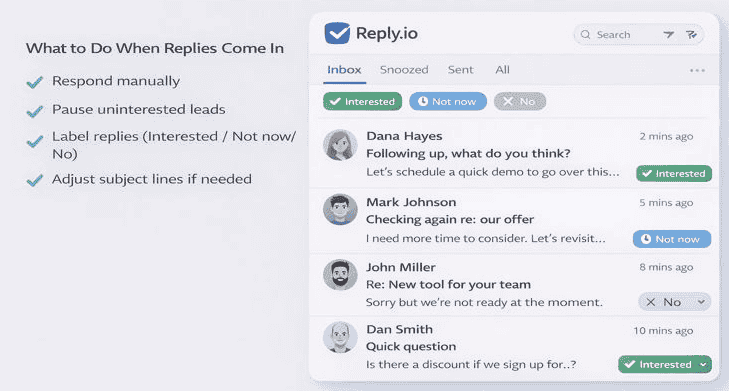
📥 What to Do When Replies Come In
1️⃣ Respond Manually (Always)
- Reply personally to each interested prospect
- Keep responses natural and conversational
💡 Avoid automation here—human replies build trust.
2️⃣ Pause Uninterested Leads
- Stop follow-ups for people who are not interested
- Avoid sending unnecessary emails
💡 This protects your reputation and improves deliverability.
3️⃣ Label & Organize Replies
Inside Reply.io, categorize responses 👇
- Interested → Ready for next step
- Not Now → Follow up later
- Not Interested → Remove from campaign
💡 This keeps your pipeline clean and actionable.
4️⃣ Track Patterns & Optimize
Look for trends in your campaign:
- Which emails get the most replies?
- Which subject lines perform better?
- Where do prospects drop off?
👉 Then optimize:
- Adjust subject lines
- Improve messaging clarity
- Refine targeting if needed
⚖️ Apollo.io vs Reply.io: What Each Tool Does in a Cold Email Workflow
When building a cold email system, one common question is whether to use Apollo.io or Reply.io.
The answer is not choosing one over the other—but understanding how each tool fits into the workflow.
Both tools serve different purposes and work best when used together.
🔍 Apollo.io vs Reply.io (Quick Comparison)
| Feature | Apollo.io | Reply.io |
|---|---|---|
| Primary Role | Lead generation & data platform | Outreach automation & email sequencing |
| Main Use Case | Finding and building targeted prospect lists | Sending cold emails and managing follow-ups |
| Data Capabilities | Contact database, company insights, enrichment | Limited (relies on imported or synced data) |
| Outreach Features | Basic email sending | Advanced sequences, multichannel outreach |
| Automation | Limited workflow automation | Strong automation for campaigns & follow-ups |
| Best For | Prospecting & list building | Outreach execution & scaling communication |
🧠 How They Work Together in a Workflow
Instead of replacing each other, Apollo.io and Reply.io complement each other:
- Use Apollo.io to:
- Identify your ideal customer profile (ICP)
- Build targeted lead lists
- Enrich and validate contact data
- Use Reply.io to:
- Create structured outreach sequences
- Automate follow-ups
- Manage conversations and replies
👉 In simple terms:
Apollo.io = Finding the right people
Reply.io = Reaching out to them effectively
⚙️ Why This Combination Works for Beginners & Small Teams
For small businesses and founders, this combination creates a simple but powerful system:
- Build a high-quality list (Apollo.io)
- Import or sync leads into outreach tool
- Run structured campaigns (Reply.io)
- Track responses and optimize
This reduces manual effort while keeping the process organized and scalable.
🚀 When to Use Each Tool Individually
You don’t always need both tools at the beginning.
- Use Apollo.io alone if:
- You are focused on lead research and list building
- You are testing manual outreach
- Use Reply.io alone if:
- You already have a lead database
- You want to automate outreach and follow-ups
As your workflow grows, combining both tools creates a more efficient system.
✅ Key Takeaway
Apollo.io and Reply.io are not competitors in a typical sense—they solve different parts of the same problem.
Understanding their roles helps you:
- Avoid tool confusion
- Build a structured outreach workflow
- Improve efficiency without unnecessary complexity
🔁 Follow-Up Strategy Deep Dive (Cold Email Follow-Up System That Works)
One of the most overlooked parts of cold email outreach is the follow-up strategy. Many campaigns fail not because of poor targeting or messaging—but because they stop too early.
In reality, most replies come after the first email, not from it.
A structured follow-up system ensures consistency, improves response rates, and keeps your outreach process predictable.
📊 Why Follow-Ups Matter in Cold Email
- Prospects are busy and often miss the first email
- Timing may not be right when your first message lands
- Multiple touchpoints build familiarity and trust
Studies and real-world campaigns consistently show that follow-ups generate the majority of replies, not the initial outreach.
⏱️ Ideal Follow-Up Timing (Simple Sequence)
A basic follow-up sequence for beginners and small teams:
- Day 1: Initial outreach email
- Day 2–3: First follow-up (gentle reminder)
- Day 5–6: Second follow-up (add value or insight)
- Day 7–10: Third follow-up (different angle or use case)
- Day 12–14: Final follow-up (soft close or check-in)
This spacing keeps communication consistent without overwhelming the prospect.
🧠 What to Say in Follow-Ups (Not Just “Checking In”)
Avoid sending repetitive messages like:
“Just following up on my previous email.”
Instead, each follow-up should add something new:
- A quick insight related to their role or industry
- A short use case or example
- A different angle on your original message
- A simple question to encourage response
The goal is to stay relevant—not repetitive.
🚦 When to Stop Following Up
A common mistake is either:
- Stopping too early
- Or continuing too long
A practical approach:
- Stop after 3–5 follow-ups if there’s no response
- Pause outreach for that lead
- Re-engage later with a new angle or campaign
This keeps your outreach respectful and avoids damaging your sender reputation.
⚙️ How Tools Support Follow-Ups
Cold email tools like Apollo.io and Reply.io help automate follow-ups by:
- Scheduling sequences in advance
- Triggering follow-ups based on behavior (opens, clicks, replies)
- Maintaining consistent timing without manual effort
However, the effectiveness still depends on the strategy behind the sequence, not just the automation.
✅ Key Takeaway
Follow-ups are not an optional step—they are a core part of any successful cold email system.
Instead of focusing only on the first message, build a structured follow-up process that:
- Maintains consistency
- Adds value at each step
- Improves response rates over time
🔐 Is Cold Email Legal? GDPR, CAN-SPAM & Compliance Basics
Cold email is a powerful outreach method—but many beginners hesitate because of one key question:
Is cold email actually legal?
The answer is yes—cold email is legal when done correctly and ethically.
However, there are important compliance guidelines you need to follow depending on your audience and location.
📜 Understanding Cold Email Legality
Cold email is generally allowed for business communication, especially in B2B contexts.
The key requirement is that your outreach must be:
- Relevant to the recipient
- Transparent about who you are
- Easy to opt out from
Following these principles helps ensure your outreach remains compliant and professional.
🇪🇺 GDPR Basics (For EU Contacts)
If you’re reaching out to prospects in the European Union, the General Data Protection Regulation (GDPR) applies.
Key points to follow:
- You must have a legitimate interest in contacting the prospect
- Your message should be relevant to their role or business
- Avoid sending mass, untargeted emails
- Clearly identify yourself and your company
👉 In simple terms:
If your email provides genuine business value and is targeted, it is generally acceptable under GDPR principles.
🇺🇸 CAN-SPAM Act Basics (For US Outreach)
For outreach in the United States, the CAN-SPAM Act sets the rules.
Basic requirements include:
- Clearly state who you are (no misleading sender information)
- Use honest and accurate subject lines
- Include your business address
- Provide a clear way to opt out
🚫 Always Include an Opt-Out Option
Every cold email should give the recipient a way to stop further communication.
Simple examples:
- “Let me know if you’d prefer not to receive further emails.”
- “Happy to stop reaching out if this isn’t relevant.”
This improves:
- Compliance
- Deliverability
- Brand perception
⚠️ Common Mistakes to Avoid
- Sending bulk emails without targeting
- Hiding your identity or company details
- Ignoring unsubscribe requests
- Over-emailing without a clear purpose
These practices can harm both your reputation and email performance.
⚙️ How Tools Help with Compliance
Cold email platforms like Apollo.io and Reply.io support compliance by:
- Managing unsubscribe requests automatically
- Allowing controlled follow-up sequences
- Helping maintain structured outreach
However, compliance ultimately depends on how you use the tools, not just the features they provide.
✅ Key Takeaway
Cold email is legal when it is:
- Targeted
- Transparent
- Respectful
By following basic compliance principles, you can build a sustainable outreach system that is both effective and trustworthy.
Following these guidelines ensures your outreach aligns with best practices for cold email outreach while maintaining compliance.
📊 What Results Can You Expect from Cold Email Outreach?
One of the biggest questions beginners have is:
👉 “What does a successful cold email campaign actually look like?”
Understanding realistic benchmarks helps you set the right expectations and measure performance effectively.
📈 Average Cold Email Benchmarks (Beginner to Intermediate)
When using tools like Apollo.io and Reply.io with proper setup, here’s what you can expect 👇
- Open Rate: 40% – 70%
- Reply Rate: 5% – 15%
- Positive Reply Rate: 1% – 5%
💡 These numbers can vary based on targeting, messaging, and deliverability setup.
🧠 What These Metrics Actually Mean
- Open Rate → How many people opened your email
- Reply Rate → How many responded (positive + negative)
- Positive Replies → Real opportunities (interested prospects)
👉 Focus more on positive replies, not just opens.
⚠️ Important Reality Check
If your results are below these benchmarks, it usually means:
- Poor targeting
- Weak subject lines
- Lack of personalization
- Deliverability issues
👉 The good news: all of these can be improved.
💡 Pro Tip
Don’t expect perfect results immediately.
👉 Cold email success improves over time as you:
- Refine your targeting
- Optimize messaging
- Improve follow-ups
⚠️ Common Mistakes to Avoid
❌ Ignoring replies or responding late
❌ Continuing follow-ups after a negative response
❌ Not tracking response quality
❌ Failing to optimize based on results
👉 These reduce trust and waste opportunities.
📈 Simple Optimization Loop
👉 Launch → Monitor replies → Improve messaging → Scale
💡 Continuous improvement is the key to long-term success.
🏁 Final Outcome of This Workflow
By following this system, you can:
👉 Find leads → Automate outreach → Manage conversations → Close deals
💡 Pro Tip
- Respond within 24 hours for best results
- Keep replies short and relevant
- Focus on starting a conversation—not selling immediately
⚠️ Common Mistakes Beginners Make in Cold Email Outreach
Getting started with cold email is simple—but small mistakes can destroy your results quickly.
Avoid these common beginner mistakes to improve your deliverability, response rates, and overall campaign performance 👇
❌ 1. Sending Too Many Emails Too Fast
One of the biggest mistakes is trying to scale too quickly.
👉 What happens:
- Emails land in spam
- Domain reputation gets damaged
👉 Fix:
- Start with 20–30 emails/day per inbox
- Increase gradually over time
💡 Slow and steady always wins in cold outreach.
❌ 2. Skipping Email Warm-Up
Many beginners ignore warm-up and jump straight into campaigns.
👉 What happens:
- Low inbox placement
- High spam risk
👉 Fix:
- Always enable warm-up in tools like Reply.io
- Let it run before and during campaigns
💡 Warm-up is essential—not optional.
❌ 3. Poor Targeting (Wrong Audience)
Even perfect emails won’t work if you’re targeting the wrong people.
👉 What happens:
- Low reply rates
- Wasted outreach effort
👉 Fix:
- Use Apollo.io to filter by:
- Job title
- Company size
- Industry
💡 Right audience = better conversations.
❌ 4. Over-Automation Without Control
Automation is powerful—but too much of it can hurt your campaigns.
👉 What happens:
- Robotic messaging
- Poor engagement
👉 Fix:
- Automate outreach
- But handle replies manually
💡 Automation should support—not replace—human interaction.
❌ 5. Writing Long, Sales-Heavy Emails
Many beginners try to “sell” in the first email.
👉 What happens:
- Prospects ignore or delete emails
- Lower response rates
👉 Fix:
- Keep emails short (75–100 words)
- Focus on starting a conversation
- Avoid hard selling
💡 Your goal is a reply—not a pitch.
💡 Final Takeaway
Avoiding these mistakes can dramatically improve your results.
👉 Focus on:
- Deliverability
- Targeting
- Simplicity
- Consistency
🏁 Final Thoughts: Build a Simple, Scalable Outbound System
You don’t need a complex or expensive tech stack to succeed with cold outreach.
With the right combination of tools:
- Apollo.io for lead intelligence
- Reply.io for outreach and follow-ups
👉 You can build a clean, scalable, and beginner-friendly outbound system.
💡 What Really Matters
Success in cold email doesn’t come from using more tools—it comes from using the right system consistently.
- Target the right people
- Keep your messaging simple
- Follow up consistently
- Optimize based on results
⚡ The Real Power of Automation
Automation doesn’t replace your effort—
👉 it protects your time
👉 it reduces manual work
👉 it helps you stay consistent at scale
🚀 Your Next Step
If you’re ready to implement this workflow:
👉 Use Apollo.io to build your lead list
👉 Set up campaigns in Reply.io to automate outreach
💡 Start small, stay consistent, and scale as you learn.
🎯 Final Takeaway
A simple system executed consistently will always outperform a complex system that’s never fully implemented.
👉 Focus on action → refine → scale
To build a complete system, combine this workflow with a strong lead generation workflow, an effective lead qualification process, and a structured cold outreach system.
FAQs
-
What is the best tool combination for cold email outreach?
The most effective combination is using Apollo.io for lead generation and Reply.io for email automation.
👉 This setup allows you to find targeted leads and automate outreach efficiently without switching between multiple tools. -
Can beginners use Apollo.io and Reply.io together?
Yes, this workflow is beginner-friendly.
👉 With simple filters in Apollo.io and guided campaign setup in Reply.io, even beginners can launch their first outreach campaign without technical experience. -
How many emails should I send per day as a beginner?
Start with 20–30 emails per day per inbox.
👉 Gradually increase volume as your email account warms up and your campaign performance stabilizes. -
Do I need to warm up my email before sending cold emails?
Yes, email warm-up is essential.
👉 Tools like Reply.io offer built-in warm-up features to improve deliverability and prevent emails from going to spam. -
Why is my cold email campaign not getting replies?
Common reasons include:
Poor targeting
Long or sales-heavy emails
Lack of personalization
Skipping follow-ups
👉 Focus on short, relevant, and personalized emails for better results. -
How many follow-ups should I send in a cold email sequence?
A simple sequence works best:
1 initial email
1–2 follow-ups
👉 Most replies come from follow-ups, so don’t skip them. -
Should I include links in my first cold email?
No, it’s better to avoid links in the first email.
👉 This improves deliverability and increases the chances of getting a reply. -
What type of businesses benefit most from this workflow?
This workflow works best for:
B2B services
SaaS companies
Agencies
Consultants
Recruiters
👉 Any business targeting specific decision-makers will benefit the most. -
Can I scale this workflow for a team?
es, this system works best for teams of 1–15 users and can scale up to 30 users with proper setup.
👉 Larger teams may require advanced CRM and automation systems. -
Is this workflow better than using a single tool?
Yes, because each tool specializes in a specific task.
👉 Apollo.io handles lead intelligence, while Reply.io focuses on outreach automation—resulting in better overall performance. -
How long does it take to see results from cold email outreach?
You can start seeing responses within 3–7 days, especially after follow-ups.
👉 Consistency and optimization are key for long-term success. -
What is the biggest mistake beginners make in cold email?
The most common mistake is sending too many emails too quickly without proper warm-up.
👉 This can damage your email reputation and reduce deliverability.