
Table of Contents
Reply.io Pricing Explained: Plans, Costs & Which One Is Right for You?
Quick takeaway: Reply.io pricing is built for businesses focused on Scaling outbound sales and Multichannel outreach. Instead of paying just for email sending, you’re investing in Automation, LinkedIn + SMS workflows, AI features, and Team collaboration tools—making it ideal for growing Sales teams, Agencies, and B2B prospecting.
What Is Reply.io & Why Pricing Matters
Reply.io is a sales engagement and outreach automation platform designed to help businesses streamline and scale their outbound prospecting.
With Reply.io, you can:
- Run personalized cold email campaigns at scale
- Automate outreach across LinkedIn, calls, SMS, and tasks
- Build multichannel sales sequences from a single dashboard
- Manage and optimize outreach for individuals or entire teams
👉 In simple terms, it helps you reach more prospects faster—without manual effort
💰 Why Understanding Reply.io Pricing Is Important
Choosing the right plan is crucial because Reply.io pricing is based on features, channels, and team usage—not just email volume.
Here’s why it matters:
1. Plans Vary by Features & Channels
Different pricing tiers unlock:
- Multichannel outreach (LinkedIn, SMS, calls)
- Advanced automation workflows
- AI-powered tools and analytics
👉 Picking the wrong plan can limit your outreach potential.
2. Beginners Often Overpay
Many users choose higher plans without needing:
- Advanced integrations
- Team collaboration features
👉 Starting with the right plan helps you avoid unnecessary costs
3. Team Pricing Impacts Scalability & ROI
Reply.io uses a per-user pricing model, which means:
- Costs increase as your team grows
- But so does your outreach capacity
👉 The key is balancing cost vs performance to maximize ROI.
🧠 In Simple Terms
Reply.io pricing isn’t just about cost—
👉 It’s about choosing the right level of automation and features based on your business needs.
👉If you’re new to the platform, start with this complete Reply.io review and feature breakdown to understand how it works.
Reply.io Pricing Plans (Overview)
| Feature | Starter | Professional | Custom / Enterprise |
|---|---|---|---|
| Best for | Solopreneurs & small teams | Growing sales teams | Large teams & agencies |
| Monthly pricing | Entry-level | Mid-range | Custom quote |
| Email outreach | ✅ Yes | ✅ Yes | ✅ Yes |
| Multichannel sequences (email, LinkedIn, calls) | ❌ Limited | ✅ Full access | ✅ Advanced |
| Automation workflows | ❌ Basic | ✅ Advanced | ✅ Custom-built |
| Team collaboration | ❌ No | ✅ Yes | ✅ Yes |
| Analytics & reporting | ❌ Basic | ✅ Detailed | ✅ Advanced & custom |
| CRM integrations | ❌ Limited | ✅ Popular CRMs | ✅ Custom integrations |
| API access | ❌ No | ❌ Limited | ✅ Yes |
| Dedicated support | ❌ Standard | ❌ Standard | ✅ Priority support |
💼 Reply.io Pricing Plans Explained (What You Actually Get)
Reply.io offers flexible pricing plans designed for different stages of business growth—from solo users to large sales teams.
Instead of charging based on contacts, Reply.io pricing focuses on automation power, outreach channels, and team collaboration.
Let’s break down each plan so you can choose the right one confidently.
🟢 1. Starter Plan (Best for Beginners & Solo Users)
👉 Ideal for: Freelancers, solo founders, and small teams starting with cold outreach
✅ What You Get:
- Email outreach automation
- Basic email sequences
- Analytics and performance tracking
- Simple campaign management
⚠️ Limitations:
- Email-only outreach (no full multichannel access)
- Limited automation logic and conditions
- Basic team collaboration features
💡 Real Use Case:
If you’re just starting with cold email campaigns and want to:
- Test outreach
- Get initial leads
- Learn automation basics
👉 The Starter plan is more than enough.
🔵 2. Professional Plan (Best Value for Growth)
👉 Ideal for: Growing sales teams, agencies, and serious outbound users
✅ What You Get:
- Multichannel outreach (Email + LinkedIn + Calls + SMS)
- Advanced sequences with conditions and branching
- CRM integrations (like HubSpot)
- Team collaboration and shared workflows
- Detailed analytics and reporting
🚀 Why This Plan Stands Out:
This is where Reply.io becomes a complete sales engagement system.
👉 You can:
- Reach prospects across multiple channels
- Automate complex workflows
- Manage outreach as a team
💡 Real Use Case:
Perfect if you:
- Run outreach daily
- Manage multiple campaigns
- Want better reply rates with multichannel strategy
👉 This is the most recommended plan for serious users
🟣 3. Custom / Enterprise Plan (For Scale & Advanced Needs)
👉 Ideal for: Large teams, enterprises, and high-volume outreach operations
✅ What You Get:
- Custom pricing based on usage
- Advanced user roles and permissions
- Dedicated onboarding and support
- API access and custom integrations
- Enterprise-level security and compliance
💡 Real Use Case:
Best for companies that:
- Have large sales teams
- Need custom workflows
- Require deeper system integrations
👉 Designed for scalability and operational control
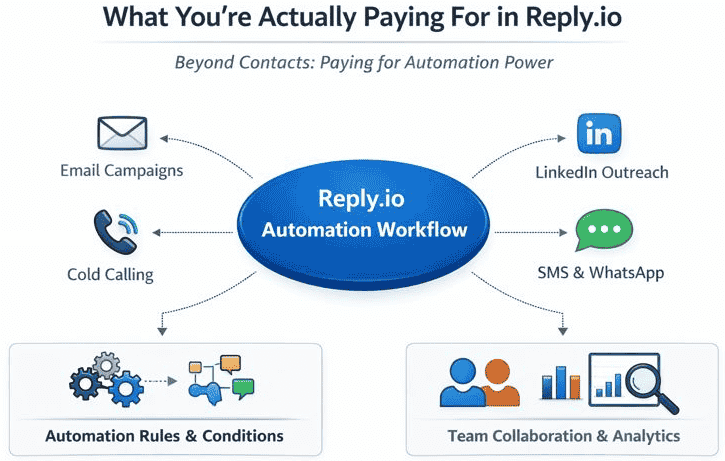
💰 What You’re Actually Paying for in Reply.io
Unlike many tools, Reply.io doesn’t just charge for sending emails.
👉 You’re investing in automation, efficiency, and scalability
🔄 1. Multichannel Outreach Power
You’re paying for the ability to reach prospects across:
- Calls
- SMS
💡 More channels = more touchpoints = higher reply rates
🧠 2. Automation Logic & Smart Sequences
Reply.io allows you to:
- Set conditional follow-ups
- Create branching sequences
- Automate decision-based actions
👉 This replaces hours of manual work.
👥 3. User Seats & Team Collaboration
Pricing is based on per-user access, which means:
- Each team member gets their own workspace
- Campaigns can be shared and managed together
💡 As your team grows → your outreach capacity scales
📊 4. Analytics & Performance Insights
You get access to:
- Open rates
- Reply rates
- Campaign performance
👉 These insights help you continuously improve results.
🧠 In Simple Terms
With Reply.io, you’re not just paying for a tool—
👉 You’re paying for a complete outbound sales system that saves time, increases efficiency, and helps you scale.
🎯 Final Insight
- Starter Plan → Learn & test outreach
- Professional Plan → Scale and optimize
- Enterprise Plan → Customize and expand
👉 Choose based on your stage, team size, and outreach goals
👉 For best results, learn how to combine tools in this Apollo.io + Reply.io outreach workflow guide.
🎯 Which Reply.io Plan Should You Choose?
Choosing the right Reply.io plan depends on your experience level, team size, and outreach goals.
Instead of picking the most expensive option, the goal is to choose a plan that matches your current needs while allowing room to grow.
🟢 If You’re a Beginner or Solo User
👉 Go with: Starter Plan
You should choose this if:
- You’re new to cold email outreach
- You’re testing campaigns for the first time
- You don’t need LinkedIn or multichannel features yet
Why it works:
- Simple setup
- Lower cost
- Enough features to get your first results
💡 Best approach:
Start small → learn → upgrade later
👉Before launching campaigns, read this Cold email deliverability setup guide (SPF, DKIM, DMARC explained) to avoid spam issues.
🔵 If You’re Serious About Outreach Growth
👉 Go with: Professional Plan (Best Value)
You should choose this if:
- You want to scale outreach across multiple channels
- You’re running campaigns consistently
- You want better reply rates and automation
Why it works:
- Unlocks multichannel outreach (Email + LinkedIn + Calls)
- Advanced automation improves efficiency
- Built for real business growth
💡 This is the most recommended plan for freelancers, agencies, and small teams
🟣 If You’re Running a Large Team or Agency
👉 Go with: Custom / Enterprise Plan
You should choose this if:
- You manage multiple team members
- You need custom workflows and integrations
- You require advanced permissions and security
Why it works:
- Fully scalable
- Tailored to your business needs
- Includes dedicated support and API access
💡 Best for companies with high-volume outreach operations
⚖️ Quick Decision Table
| Your Situation | Recommended Plan |
|---|---|
| Just starting | Starter |
| Scaling outreach | Professional |
| Managing teams | Enterprise |
💡 Smart Strategy (Most Important Tip)
👉 Don’t overpay in the beginning.
Start with a plan that:
- Covers your current needs
- Allows testing and learning
Then upgrade when:
- Your campaigns are working
- You need more channels or automation
🧠 In Simple Terms
- Beginner → Keep it simple
- Growth stage → Unlock full features
- Advanced → Customize everything
👉 The right plan is the one that gives you maximum ROI, not maximum features
⚖️ Reply.io Starter vs Professional: Quick Decision Guide
If you’re confused between the Starter and Professional plans, this quick comparison will help you choose the right option based on your current needs.
🟢 Choose Starter Plan if:
- You’re just starting with cold email outreach
- You only need email-based campaigns
- You’re working solo or with a small team
- You want a low-cost way to test outreach
💡 Best for: Beginners, freelancers, and first-time users
🔵 Choose Professional Plan if:
- You want to use LinkedIn + email together (multichannel outreach)
- You’re running multiple campaigns consistently
- You need CRM integrations and automation workflows
- You want to improve reply rates with advanced features
💡 Best for: Growing businesses, agencies, and serious users
🎯 Smart Recommendation
👉 If you’re just starting:
Start with the Starter plan to learn the basics and validate your outreach strategy.
👉 Upgrade to Professional when:
- You want better results with multichannel outreach
- You need automation at scale
- Your campaigns are already working
🧠 In Simple Terms
- Starter = Learn & test
- Professional = Scale & optimize
👉 Don’t pay for advanced features until you actually need them
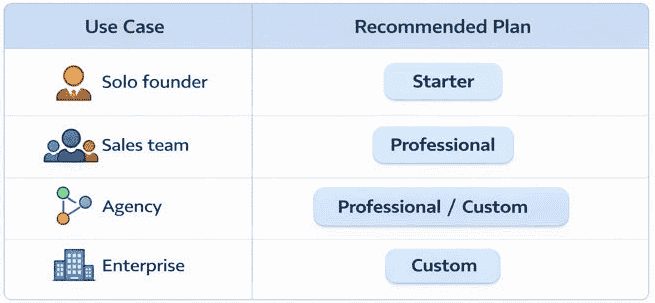
📊 Best Reply.io Plan by Use Case
If you prefer a quick recommendation, here’s a simple breakdown based on real-world use cases:
| Use Case | Recommended Plan |
|---|---|
| Solo founder / freelancer | Starter |
| Small sales team | Professional |
| Agency (multiple clients) | Professional / Custom |
| Enterprise / large teams | Custom |
💡 Quick Insight
- Starter → Best for learning and testing outreach
- Professional → Best for scaling campaigns and using multichannel
- Custom → Best for teams needing advanced control and integrations
👉 Choose based on your current stage—not future assumptions
⚠️ Common Reply.io Pricing Mistakes to Avoid (Save Money & Maximize ROI)
Choosing the wrong plan—or using it incorrectly—can lead to wasted budget and poor results.
Before you invest in Reply.io, make sure you avoid these common pricing mistakes.
❌ 1. Paying for Multichannel Before Mastering Email
Many beginners jump straight into advanced plans with LinkedIn, calls, and SMS.
What happens:
- You don’t fully use the features
- Campaigns become complex and hard to manage
- ROI stays low
What to do instead:
- Start with email-only outreach
- Learn what works (subject lines, messaging, follow-ups)
- Upgrade only when you’re ready to scale
💡 Rule: Master basics → then scale with multichannel
❌ 2. Ignoring Seat-Based Pricing (Hidden Cost)
Reply.io uses a per-user pricing model.
What happens:
- Costs increase as you add team members
- Budget can grow quickly without planning
What to do instead:
- Start with fewer users
- Optimize workflows before expanding
- Add team members only when needed
💡 Tip: Focus on efficiency before scaling your team
❌ 3. Using Reply.io Without a Lead Data Tool
This is one of the most common beginner mistakes.
⚠️ Important:
Reply.io does NOT provide a built-in lead database
What happens:
- You struggle to find quality leads
- Campaign performance drops
- You blame the tool instead of the data
What to do instead:
Use lead generation tools like:
- Apollo.io
- Hunter.io
👉 These help you:
- Find verified emails
- Build targeted prospect lists
- Improve outreach results
💡 Better data = better ROI
❌ 4. Overpaying for Features You Don’t Use
Many users choose higher plans “just in case.”
What happens:
- Paying for advanced automation you don’t need
- Lower return on investment
What to do instead:
- Choose a plan based on your current use case
- Upgrade only when required
💡 Start lean → scale smart
❌ 5. Not Calculating ROI Before Choosing a Plan
Some users focus only on cost—not results.
What happens:
- Wrong expectations
- Poor decision-making
What to do instead:
Ask:
- How many leads do I need per month?
- How many conversions will cover the cost?
👉 Think in terms of returns, not just pricing
🧠 Quick Summary
Most pricing mistakes with Reply.io come from:
- Overestimating needs
- Ignoring fundamentals
- Skipping proper setup
👉 Avoid these, and you’ll get better results with lower costs.
🔗 Helpful Comparison (Before You Decide)
If you’re comparing tools before making a decision:
👉 Check this Reply.io vs Apollo.io detailed comparison to understand feature differences, pricing models, and best use cases.
⚖️ Reply.io Pricing vs Competitors (Which Tool Offers Better Value?)
When evaluating Reply.io pricing, it’s important to compare it with other popular outreach tools in the market.
Each tool focuses on a different strength—so the “best value” depends on your specific use case.
🔍 How Reply.io Compares to Other Tools
🚀 Instantly.ai (Email-First Automation)
Best for: High-volume cold email campaigns
Key difference:
- Instantly.ai focuses mainly on email automation and sending volume
- Reply.io offers multichannel outreach (LinkedIn, calls, SMS)
👉 When to choose Instantly.ai:
- You only want email outreach
- You prioritize sending volume over features
👉 When to choose Reply.io:
- You want a complete outreach system across multiple channels
📬 Smartlead.ai (Deliverability-Focused Tool)
Best for: Advanced deliverability and inbox placement
Key difference:
- Smartlead.ai specializes in email deliverability and scaling inboxes
- Reply.io focuses on automation + workflow + multichannel engagement
👉 When to choose Smartlead.ai:
- Deliverability is your top priority
- You’re running large-scale email campaigns
👉 When to choose Reply.io:
- You want automation + engagement + tracking in one tool
🔎 Apollo.io (Lead Database + Outreach)
Best for: Lead generation + CRM-like functionality
Key difference:
- Apollo.io provides a massive contact database + built-in CRM
- Reply.io focuses on outreach automation (not lead sourcing)
👉 When to choose Apollo.io:
- You need lead data + prospecting + CRM in one platform
👉 When to choose Reply.io:
- You already have leads and want to automate outreach effectively
🧠 Key Insight
👉 Reply.io is not a lead generation tool—it’s an outreach engine
That means:
- You may need to combine it with tools like Apollo.io
- Or other lead data platforms for best results
📊 Simple Comparison Summary
| Tool | Best For | Key Strength |
|---|---|---|
| Reply.io | Multichannel outreach | Automation + workflows |
| Instantly.ai | Cold email campaigns | Sending volume |
| Smartlead.ai | Deliverability | Inbox placement |
| Apollo.io | Lead generation | Contact database + CRM |
🎯 How to Choose the Right Tool
Choose based on your priority:
- 👉 Want automation + multichannel outreach → Go with Reply.io
- 👉 Want high-volume email sending → Choose Instantly.ai
- 👉 Want better deliverability control → Use Smartlead.ai
- 👉 Want lead database + prospecting → Pick Apollo.io
🔗 Explore More Options
If you’re still comparing tools:
👉 Check this Best Reply.io alternatives guide to explore features, pricing, and use cases in detail.
💰 Is Reply.io Pricing Worth It?
Whether Reply.io is worth the cost depends on how you plan to use it and your outreach goals.
It’s not the cheapest tool—but it delivers strong value for users who need structured, scalable outbound systems.
✅ Pros of Reply.io Pricing
- Powerful automation engine
→ Automates follow-ups, sequences, and workflows, saving hours of manual work - True multichannel outreach
→ Combine email, LinkedIn, calls, and SMS in one campaign - Scales efficiently with teams
→ Ideal for growing sales teams and agencies managing multiple campaigns
❌ Cons to Consider
- No built-in lead database
→ You’ll need tools like Apollo.io to find prospects - Learning curve for beginners
→ Advanced features can feel overwhelming at first
🎯 Final Verdict
👉 Reply.io pricing is worth it if you want to:
- Build a structured outbound sales system
- Use multichannel outreach to improve reply rates
- Scale campaigns efficiently over time
🧠 When It’s NOT Worth It
It may not be the best fit if:
- You only need simple email sending
- You’re not ready to invest in outreach tools
- You don’t have a lead generation system in place
💡 In Simple Terms
- Beginners → Start small and grow into it
- Serious users → High ROI with proper setup
👉 You’re not just paying for a tool—you’re investing in a scalable outreach system
🎯 Final Recommendation
If you’re serious about scaling outbound outreach, Reply.io is a smart investment.
It goes beyond basic email tools by offering structured automation, multichannel engagement, and team scalability—everything you need to build a consistent lead generation system.
👉 For best results, combine it with a lead data tool like Apollo.io to ensure you’re reaching the right prospects.
🚀 What You Should Do Next
- Start with the Starter plan to learn and test your outreach
- Upgrade to Professional when you’re ready to scale with multichannel automation
💡 Final Insight
Reply.io is not just a tool—
👉 It’s a long-term outbound growth system that becomes more powerful as your campaigns improve.
FAQs
How much does Reply.io cost per month?
Reply.io pricing typically starts at around $60 per user/month for the Starter plan and goes up to $90+ per user/month for the Professional plan.
👉 Pricing depends on:
Features
Outreach channels
Number of users
Is there a free plan available?
Yes, Reply.io offers a limited free plan for testing basic email outreach features.
👉 It’s best for:
Beginners
Users exploring the platform before upgrading
What is included in the Reply.io Professional plan?
The Professional plan includes:
Multichannel outreach (Email, LinkedIn, Calls, SMS)
Advanced automation workflows
CRM integrations
Team collaboration tools
Detailed analytics and reporting
👉 It’s ideal for scaling outreach and improving reply rates
Does Reply.io provide leads or a contact database?
No, Reply.io does not include a built-in lead database.
👉 You’ll need tools like:
Apollo.io
Hunter.io
to find and verify prospects.
Is Reply.io worth the price?
Yes—Reply.io is worth it if you need:
Automated outreach
Multichannel engagement
Scalable workflows for teams
👉 It offers strong ROI when used with the right strategy and lead data.
Which Reply.io plan is best for beginners?
The Starter plan is best for beginners.
👉 It allows you to:
Learn cold email outreach
Test campaigns
Avoid overpaying for advanced features
Can I upgrade or downgrade my plan anytime?
Yes, Reply.io allows you to upgrade or downgrade plans based on your needs.
👉 This makes it flexible as your outreach grows.
How does Reply.io pricing compare to competitors?
Compared to tools like:
Instantly.ai
Smartlead.ai
Reply.io focuses more on multichannel automation and structured workflows, rather than just email sending.
How many emails can I send with Reply.io?
Email sending limits depend on:
Your email provider
Deliverability setup
Warm-up process
👉 Best practice:
Start with 30–50 emails/day per account to avoid spam issues.
Do I need technical skills to use Reply.io?
No, Reply.io is beginner-friendly.
👉 If you can:
Send emails
Use spreadsheets
Write simple messages
You can start using it easily.