
Table of Contents
Best LinkedIn Prospecting Tools for Sales Teams
LinkedIn has evolved into the #1 platform for B2B lead generation, with millions of decision-makers actively engaging every day. For sales teams, it’s no longer optional — it’s where real conversations and opportunities begin.
But here’s the challenge.
Manually searching for prospects, sending connection requests, and following up one by one is not just time-consuming — it’s nearly impossible to scale. Most sales teams get stuck between Low volume (Manual effort) and Low quality (Mass automation).
That’s exactly where LinkedIn prospecting tools make the difference.
These tools help you:
- Identify and target the right prospects faster
- Extract verified contact data
- Automate outreach while maintaining personalization
- Build a consistent and scalable sales pipeline
When used correctly, they don’t just save time — they increase reply rates, improve efficiency, and drive predictable growth.
In this guide, you’ll learn:
- The best LinkedIn prospecting tools for sales teams
- Key features to look for before choosing a tool
- How to use these tools without risking your account
- Proven strategies to combine LinkedIn + cold email for better results
Whether you’re a founder, SDR, or part of a growing sales team, this guide will help you move from Random Outreach → Structured Prospecting System.
What Are LinkedIn Prospecting Tools?
LinkedIn prospecting tools are software solutions designed to help sales teams and businesses find, connect, and convert potential leads on LinkedIn more efficiently.
Instead of relying on manual effort, these tools streamline the entire prospecting process — from identifying the right audience to automating outreach and tracking performance.
🔍 Key Functions of LinkedIn Prospecting Tools
- Find Targeted Leads
Use advanced filters (Industry,Job Title, Location, Company Size) to identify highly relevant prospects. - Extract Contact Data
Access Verified Emails, Phone Numbers, and Company details to move beyond LinkedIn into multichannel outreach. - Automate Outreach
Send connection requests, follow-ups, and messages at scale while maintaining personalization. - Track Engagement
Monitor opens, replies, and interactions to optimize campaigns and improve results over time.
🎯 Why These Tools Are Essential
- Sales Teams
Build predictable pipelines and reduce time spent on manual prospecting. - Agencies
Manage multiple client campaigns efficiently and deliver measurable results. - Founders Doing Outbound
Generate leads without hiring a large sales team.
⚙️ How LinkedIn Prospecting Tools Work
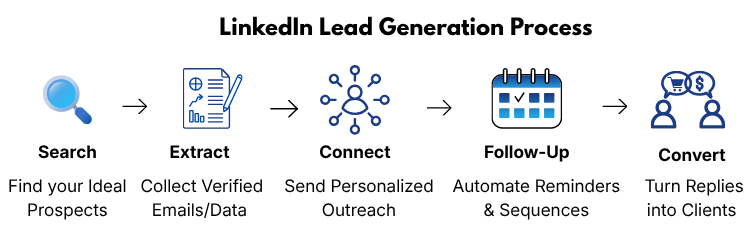
- Search → Extract → Connect → Follow-Up → Convert
This structured workflow helps turn random outreach into a repeatable and scalable system.
💡 Pro Insight
Most people think these tools are just about automation — but that’s only one part of the equation.
The real value comes from combining:
- Targeting (who you reach)
- Messaging (what you say)
- Timing (when you send)
When these three align, LinkedIn prospecting tools become a growth engine — not just a shortcut.
⚙️ Why Sales Teams Need LinkedIn Prospecting Tools
Modern sales is no longer about manual effort — it’s about building efficient, repeatable systems. LinkedIn prospecting tools help sales teams move faster, work smarter, and generate consistent results without burning time.
1. Save Time on Manual Work
- Automate Lead Discovery
Instantly find prospects using advanced filters instead of manual searches. - Reduce Repetitive Tasks
Eliminate time spent on profile visits, connection requests, and basic outreach. - Focus on High-Value Activities
Spend more time on conversations, closing deals, and strategy — not admin work.
2. Scale Outreach Without Losing Personalization
- Send Messages at Scale
Reach hundreds of prospects while maintaining a structured workflow. - Maintain Personalization
Use dynamic variables (name, company, role) to keep messages relevant. - Build Consistent Pipelines
Ensure daily outreach without gaps or inconsistency.
3. Improve Conversion Rates
- Target the Right Audience
Better filtering leads to higher-quality prospects. - Increase Reply Rates
Relevant outreach + proper timing = more responses. - Optimize Campaigns with Data
Track performance and refine messaging based on results.
4. Enable Multichannel Prospecting
- Combine LinkedIn + Email
Reach prospects across multiple channels for better visibility. - Improve Touchpoints
Increase chances of response with consistent follow-ups. - Create Omnichannel Strategy
Build a stronger, more professional outreach system.
5. Build a Predictable Sales System
- Standardize Your Process
Turn random outreach into a repeatable workflow. - Scale Without Chaos
Grow outreach without losing control or quality. - Generate Consistent Pipeline
Move from “hope-based sales” to data-driven growth.
💡 Key Insight :
The biggest advantage isn’t just saving time —
It’s creating a system where Lead generation becomes Predictable, Scalable, and Measurable.
🧰 Best LinkedIn Prospecting Tools (2026)
1. Apollo.io
Best For:
All-in-one prospecting + Email outreach for Sales teams and Founders
🔑 Key Features
- Large B2B Database
Access millions of verified contacts across industries, roles, and companies. - Email Finder + Verifier
Find accurate email addresses and reduce bounce rates with built-in verification. - LinkedIn Integration
Easily capture leads directly from LinkedIn and enrich them with contact data. - Automation Workflows
Create outreach sequences (email + tasks) to streamline your prospecting process.
✅ Pros
- All-in-One Platform
No need for multiple tools — everything from lead generation to outreach in one place. - Affordable Pricing
Great value compared to other enterprise-level tools. - Strong Data Coverage
Reliable database for B2B prospecting across global markets.
❌ Cons
- Learning Curve
Beginners may need time to understand workflows and features. - Data Accuracy Can Vary
Some contacts may need manual verification depending on the niche.
⚙️ How Sales Teams Use Apollo.io (Simple Workflow)
- Search Prospects → Filter by industry, role, company size
- Build Lead List → Save and organize targeted contacts
- Enrich Data → Get emails and company insights
- Launch Campaigns → Send personalized outreach sequences
- Track Results → Monitor opens, clicks, and replies
💡 Pro Tips for Better Results
- Start with Narrow Targeting
Focus on a specific niche for higher reply rates - Combine LinkedIn + Email
Use Apollo data to support multichannel outreach - Warm Up Before Scaling
Ensure your email domain is properly set up before sending campaigns
🎯 Who Should Use Apollo.io?
- Sales Teams → Build and scale outbound pipelines
- Agencies → Manage multiple client campaigns
- Founders → Generate leads without hiring a full sales team
👉 Read our detailed Apollo.io review and step-by-step setup guide to learn how to find and manage high-quality leads effectively.
2. Reply.io
Best For:
Multichannel outreach combining LinkedIn + email for higher response rates
🔑 Key Features
- Automated Sequences
Create structured outreach campaigns with multiple touchpoints (email, LinkedIn, follow-ups). - LinkedIn + Email Integration
Combine LinkedIn actions (profile visits, connection requests) with email outreach in one workflow. - AI Personalization
Use AI to generate personalized messages at scale, improving engagement and reply rates.
✅ Pros
- True Multichannel Outreach
Reach prospects across LinkedIn and email for better visibility and response. - Advanced Automation
Build complex sequences with conditional logic and triggers. - Strong Personalization Capabilities
AI helps tailor messages without spending hours manually writing each one.
❌ Cons
- Higher Pricing
More expensive compared to basic tools or beginner platforms. - Setup Complexity
Requires proper configuration to fully utilize multichannel workflows.
⚙️ How Sales Teams Use Reply.io (Simple Workflow)
- Import or Build Lead List → Add prospects from LinkedIn or CRM
- Create Multichannel Sequence → Combine email + LinkedIn steps
- Personalize Messages → Use AI variables and dynamic fields
- Launch Campaign → Start automated outreach
- Track Engagement → Monitor replies, clicks, and conversions
💡 Pro Tips for Better Results
- Mix Channels Strategically
Don’t rely only on email — combine LinkedIn touchpoints for higher response rates - Keep Messages Human
Use AI for support, but always review for natural tone - Optimize Follow-Ups
Most replies come after 2–3 follow-ups — don’t stop early
🎯 Who Should Use Reply.io?
- Sales Teams → Looking to scale outreach across multiple channels
- Agencies → Running advanced outbound campaigns for clients
- Growth Teams → Focused on optimizing conversion rates
👉 Check our detailed Reply.io review, features, pricing, and setup guide to understand how it compares with other outreach tools.
3. Waalaxy
Best For:
LinkedIn automation beginners looking for a simple and easy-to-use tool
🔑 Key Features
- Simple User Interface
Beginner-friendly dashboard that makes it easy to launch campaigns without technical knowledge. - Automated Connection Requests
Send connection requests at scale with personalized messages. - Follow-Up Automation
Automatically send follow-up messages to increase reply rates.
✅ Pros
- Easy to Use
Perfect for beginners with no steep learning curve. - Quick Setup
Get started with LinkedIn automation in minutes. - Affordable Entry Plans
Budget-friendly option for individuals and small teams.
❌ Cons
- Limited Advanced Features
Lacks deep customization compared to advanced tools like Reply.io. - LinkedIn-Focused Only
No strong multichannel (email + LinkedIn) capabilities.
⚙️ How Sales Teams Use Waalaxy (Simple Workflow)
- Find Prospects on LinkedIn → Use LinkedIn search filters
- Import Leads into Waalaxy → Build targeted lists
- Send Connection Requests → Add personalization
- Automate Follow-Ups → Nurture prospects
- Track Replies → Manage conversations
💡 Pro Tips for Better Results
- Personalize First Message
Avoid generic connection requests — keep it relevant - Use Safe Limits
Don’t over-automate to avoid LinkedIn restrictions - Focus on Niche Targeting
Smaller, targeted lists perform better than broad outreach
🎯 Who Should Use Waalaxy?
- Beginners → Starting LinkedIn prospecting
- Freelancers → Generating leads without complex tools
- Small Teams → Looking for simple automation
👉Want better results? Discover how LinkedIn automation with cold email can boost your outreach strategy.
4. Expandi
Best For:
Safe and scalable LinkedIn automation with advanced personalization
🔑 Key Features
- Cloud-Based Automation
Run campaigns securely in the cloud without relying on your local device. - Smart Limits & Safety Controls
Automatically adjust activity limits to mimic human behavior and reduce risk. - Advanced Personalization
Use dynamic variables, images, and custom fields to create highly tailored outreach messages.
✅ Pros
- High Safety Standards
Designed to minimize the risk of LinkedIn restrictions or account bans. - Advanced Campaign Flexibility
Create detailed outreach sequences with multiple steps and conditions. - Strong Personalization Options
Helps improve reply rates with customized messaging.
❌ Cons
- Premium Pricing
More expensive compared to beginner tools like Waalaxy. - Learning Curve
Requires time to understand advanced features and workflows.
⚙️ How Sales Teams Use Expandi (Simple Workflow)
- Define Target Audience → Use LinkedIn filters to identify prospects
- Import Leads into Expandi → Build segmented lists
- Set Smart Campaign Limits → Ensure safe automation
- Launch Personalized Campaigns → Send tailored connection requests & messages
- Track Engagement → Monitor replies and optimize outreach
💡 Pro Tips for Better Results
- Warm Up Your LinkedIn Account First
Avoid starting automation aggressively on new accounts - Use Hyper-Personalization
Mention company, role, or recent activity for better engagement - Combine with Email Outreach
Use Expandi alongside cold email for multichannel success
🎯 Who Should Use Expandi?
- Sales Teams → Scaling LinkedIn outreach safely
- Agencies → Managing high-volume campaigns
- Advanced Users → Needing more control and customization
👉 Follow this guide to set up a Safe cold email and LinkedIn outreach system for better results and long-term growth.
5. Phantombuster
Best For:
Data scraping and advanced automation workflows for lead generation
🔑 Key Features
- Extract LinkedIn Data
Collect profile data, search results, and engagement insights directly from LinkedIn. - Automate Workflows
Create automated sequences (called “Phantoms”) to handle repetitive tasks like profile visits, data extraction, and messaging. - API Integrations
Connect with tools like CRMs, Google Sheets, and other platforms for seamless data flow.
✅ Pros
- Highly Flexible Automation
Build custom workflows tailored to your specific prospecting needs. - Powerful Data Extraction
Ideal for building targeted lead lists quickly. - Wide Integration Options
Easily connect with other tools in your sales stack.
❌ Cons
- Technical Setup Required
Not beginner-friendly — requires understanding of workflows and automation logic. - No Native Outreach System
Focuses more on data extraction than full outreach campaigns.
⚙️ How Sales Teams Use Phantombuster (Simple Workflow)
- Search Prospects on LinkedIn → Identify target audience
- Extract Data Using Phantoms → Collect profile and company info
- Export Leads → Send data to CRM or Google Sheets
- Use Other Tools for Outreach → Combine with email or LinkedIn tools
- Track & Optimize → Refine targeting and workflows
💡 Pro Tips for Better Results
- Use for List Building First
Focus on extracting high-quality leads before outreach - Combine with Outreach Tools
Pair with tools like Apollo.io or Reply.io for full campaigns - Avoid Over-Scraping
Stay within safe limits to prevent account issues
🎯 Who Should Use Phantombuster?
- Growth Hackers → Building custom automation systems
- Agencies → Handling large-scale data extraction
- Advanced Users → Needing flexibility beyond standard tools
👉 Learn how to turn scraped Leads into high-converting outreach campaigns with the right strategy and tools.
📊Best LinkedIn Prospecting Tools Comparison
| Tool | Best For | Key Strength | Pricing Level | Ease of Use |
|---|---|---|---|---|
| Apollo.io | All-in-one | Database + Outreach | $$ | Medium |
| Reply.io | Multichannel | LinkedIn + Email | $$$ | Medium |
| Waalaxy | Beginners | Simple Automation | $ | Easy |
| Expandi | Safety | Secure Automation | $$$ | Medium |
| Phantombuster | Data | Scraping + Workflows | $$ | Advanced |
👉 Not sure which tool to choose? Here’s a simple breakdown based on your needs
📊 How to Choose the Right LinkedIn Prospecting Tool
Choosing the right tool isn’t about picking the most popular option — it’s about selecting what fits your workflow, goals, and stage of growth.
The wrong tool can slow you down.
The right one can turn your outreach into a scalable system.
🔍 Key Factors to Consider
- Budget
Choose a tool that fits your current stage.
Start simple, then upgrade as your outreach scales. - Team Size
Solo founders need simplicity, while teams need collaboration, tracking, and scalability. - Outreach Goals
Are you focusing on lead generation, brand building, or full sales automation?
Your goal determines the type of tool you need. - Automation Level
Decide how much automation you actually need —
basic (connection requests) vs advanced (multichannel sequences).
🎯 Tool Selection Based on Use Case
- Beginners / Solo Founders
👉 Choose Waalaxy
Simple, easy-to-use, and perfect for getting started with LinkedIn automation - Growing Sales Teams
👉 Choose Apollo.io
All-in-one platform for lead generation + outreach - Advanced Teams / Agencies
👉 Choose Reply.io
Best for multichannel automation (LinkedIn + email) - Safety-Focused Users
👉 Choose Expandi
Ideal for scaling LinkedIn outreach with lower risk - Data-Driven / Technical Users
👉 Choose Phantombuster
Best for scraping, workflows, and custom automation
⚙️ Simple Decision Framework (Easy to Follow)
- Start Simple → Then Scale
Don’t jump into complex tools too early - Fix Foundations First
Deliverability + targeting matter more than automation - Choose Based on Workflow, Not Features
The best tool is the one you’ll actually use consistently
💡 Pro Insight
Most people make this mistake:
They choose tools based on features… not their current needs.
The result?
Overcomplication, poor execution, and low results.
👉 The real advantage comes from:
- Using the right tool at the right stage
- Building a simple, repeatable process
- Scaling only after the system works
🎯 Which LinkedIn Prospecting Tool Should You Choose?
Choosing the right LinkedIn prospecting tool can feel overwhelming — especially with so many options available. But the truth is, there’s no “one-size-fits-all” solution.
The best tool depends on your experience level, outreach goals, and how you plan to scale.
To make it simple, here’s exactly which tool you should choose based on your use case:
👉 Choose Waalaxy if:
- You’re just getting started with LinkedIn prospecting
- You want a simple, beginner-friendly tool
- You only need basic automation (connection requests + follow-ups)
Waalaxy is perfect for learning the fundamentals without overcomplicating your workflow. It helps you build confidence before moving to advanced tools.
👉Choose Apollo.io if:
- You want an all-in-one prospecting + outreach platform
- You need access to a large B2B contact database
- You’re planning to scale your outbound efforts
Apollo.io is ideal for sales teams and founders who want everything in one place — from lead generation to email outreach.
👉 Read our complete Apollo.io setup guide to learn how to configure it step-by-step for effective lead generation.
👉 Choose Reply.io if:
- You want to combine LinkedIn + email outreach
- You’re running multichannel campaigns
- You need advanced automation and sequencing
Reply.io works best for teams looking to maximize reply rates by reaching prospects across multiple touchpoints.
👉 Check our detailed Reply.io review and setup guide
👉 Choose Expandi if:
- You prioritize LinkedIn account safety
- You want controlled and scalable automation
- You’re running high-volume outreach campaigns
Expandi is a strong choice for users who want to scale safely while maintaining personalization and compliance with LinkedIn limits.
👉 Choose Phantombuster if:
- You need advanced data scraping capabilities
- You want to build custom automation workflows
- You’re comfortable with technical setups
Phantombuster is best suited for growth hackers and advanced users who want flexibility beyond standard prospecting tools.
💡 Simple Decision Framework (Don’t Skip This)
If you’re still unsure, follow this path:
- Start simple → Waalaxy
- Need database + outreach → Apollo.io
- Want multichannel scaling → Reply.io
- Need safety + control → Expandi
- Need data + flexibility → Phantombuster
🚀 Final Takeaway
The biggest mistake most people make is choosing tools based on features instead of their actual needs.
The goal isn’t to use the most advanced tool —
it’s to build a simple, repeatable prospecting system that you can scale over time.
Start with what fits your current stage, master the basics, and then upgrade as your outreach grows.
📈 Best Practices for LinkedIn Prospecting
Successful LinkedIn prospecting isn’t about sending more messages — it’s about sending the right messages to the right people at the right time.
Follow these proven best practices to improve response rates and build a consistent pipeline:
1. Personalization First
- Avoid Generic Messages
Messages like “Let’s connect” or “I help businesses grow” get ignored instantly. - Reference Something Specific
Mention their role, company, recent post, or industry to stand out. - Keep It Short and Relevant
Personalized doesn’t mean long — clarity beats complexity.
👉 Goal: Make your message feel like it was written for one person, not 100.
2. Warm Up Accounts Before Automation
- Start with Manual Activity
Engage with profiles, posts, and connections before using automation tools. - Gradually Increase Activity
Avoid sending too many requests/messages in the beginning. - Build Trust with LinkedIn Algorithm
Consistent, natural behavior reduces the risk of restrictions.
👉 Goal: Look human, not automated.
3. Combine Email + LinkedIn (Multichannel Approach)
- Increase Touchpoints
Prospects are more likely to respond when they see you across platforms. - Reinforce Your Message
A LinkedIn connection + email follow-up builds familiarity and trust. - Improve Reply Rates
Multichannel outreach consistently outperforms single-channel strategies.
👉 Goal: Stay visible without being spammy.
4. Follow a Structured Outreach Process (High-Value Add)
- Define Your Target Audience Clearly
Don’t message everyone — focus on a specific niche. - Create a Simple Outreach Sequence
Connection → Follow-up → Value message → Soft CTA - Track and Improve Performance
Monitor replies and adjust your approach over time.
👉 Goal: Turn random outreach into a repeatable system.
5. Focus on Value, Not Pitching
- Start Conversations, Not Sales Pitches
Your first message should not be about selling. - Offer Insights or Help
Share something useful or relevant to their role or business. - Build Relationships First
Trust leads to conversions — not the other way around.
👉 Goal: Earn attention before asking for action.
🧩 Common Mistakes to Avoid
Even with the right tools, small mistakes can kill your results. Avoid these to protect your outreach performance:
• Over-Automation
- Sending too many messages too fast
- Using generic templates without personalization
- Relying completely on tools without human touch
👉 Fix: Balance automation with personalization
• Poor Targeting
- Messaging the wrong audience
- Using broad filters instead of niche targeting
- Not understanding your ideal customer profile (ICP)
👉 Fix: Define your target clearly before outreach
• No Follow-Ups
- Stopping after one message
- Missing opportunities to re-engage prospects
- Losing potential leads due to lack of persistence
👉 Fix: Plan 2–3 follow-ups as part of your process
💡 Key Takeaway
Most LinkedIn prospecting campaigns fail not because of the tools —
but because of poor strategy and execution.
👉 When you combine:
- Personalization
- Proper setup
- Consistent follow-ups
You turn LinkedIn from a random outreach channel into a predictable lead generation system.
FAQs
-
What is the best way to start LinkedIn prospecting?
The best way to start LinkedIn prospecting is by defining your ideal customer profile, personalizing connection requests, and starting with manual outreach before using automation tools.
-
How important is personalization in LinkedIn outreach?
Personalization is critical for LinkedIn prospecting. Generic messages are often ignored, while personalized messages that reference the prospect’s role or company significantly improve reply rates.
-
Should you automate LinkedIn prospecting?
Yes, but carefully. Automation should only be used after warming up your account and should always include personalization to avoid being flagged or ignored.
-
How many follow-ups should you send on LinkedIn?
You should send at least 2–3 follow-ups. Most replies come after the initial message, so consistent follow-ups increase your chances of getting a response.
-
Is it better to use LinkedIn or email for prospecting?
Both work best together. Combining LinkedIn with email (multichannel outreach) increases visibility and improves response rates compared to using a single channel.
-
What are the biggest mistakes in LinkedIn prospecting?
The most common mistakes include over-automation, poor targeting, sending generic messages, ignoring deliverability, and not following up consistently.
-
How do you avoid getting banned while using LinkedIn automation tools?
o stay safe, start with low activity, gradually increase usage, personalize messages, and use tools with built-in safety limits to mimic human behavior.
-
How long does it take to see results from LinkedIn prospecting?
Results can vary, but most users start seeing replies within 1–2 weeks when using proper targeting, personalization, and follow-up strategies.
-
What is the ideal connection request acceptance rate?
A good acceptance rate typically ranges between 20% to 40%, depending on your targeting and message quality.
-
Can LinkedIn prospecting generate consistent leads?
Yes, when done correctly. With the right tools, targeting, and consistent outreach, LinkedIn prospecting can become a reliable and scalable lead generation channel.
🚀 Conclusion: Build a Scalable LinkedIn Prospecting System
LinkedIn prospecting isn’t about tools alone — it’s about building a system that consistently generates results.
The right tool can help you save time and scale outreach, but your success ultimately depends on:
- Clear targeting
- Personalized messaging
- Consistent follow-ups
Start simple, focus on the fundamentals, and choose a tool that fits your current stage.
As your outreach grows, you can gradually move toward more advanced tools and multichannel strategies.
👉 The goal isn’t to send more messages —
it’s to start more meaningful conversations that convert into real opportunities.
What to do next:
- Choose one tool based on your needs
- Set up your first prospecting workflow
- Start with 10–20 targeted prospects per day
- Track results and improve
In short:
- Best beginner tool → Waalaxy
- Best all-in-one tool → Apollo.io
- Best multichannel tool → Reply.io
- Best safe automation → Expandi
- Best for data scraping → Phantombuster