
Best LinkedIn Email Finder Tools for B2B Lead Generation (2026 Guide)
LinkedIn has become one of the most powerful platforms for B2B sales and professional networking. But while LinkedIn is excellent for discovering potential prospects, it doesn’t always provide direct access to business email addresses.
This is where LinkedIn email finder tools become essential.
These tools help sales teams, founders, and marketers extract verified business emails from LinkedIn profiles so they can start meaningful outreach campaigns outside the platform.
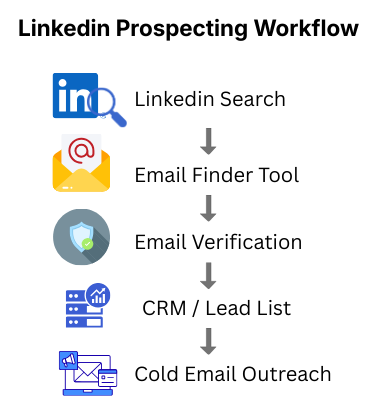
Instead of manually searching for contact details, email finder tools automate the process and connect LinkedIn prospecting directly to cold email outreach workflows.
In this guide, we’ll explore the best LinkedIn email finder tools, how they work, and how small businesses can use them to generate high-quality B2B leads.
What Are LinkedIn Email Finder Tools?
LinkedIn email finder tools are software applications that help users discover professional email addresses associated with LinkedIn profiles.
These tools typically work by:
- Scanning LinkedIn profile data
- Matching names and company domains
- Searching verified email databases
- Predicting common company email formats
- Validating email addresses before exporting them
For B2B sales teams and small businesses, this makes it possible to turn LinkedIn connections into actionable outreach opportunities.
Instead of relying only on LinkedIn messages, businesses can start personalized email conversations with decision-makers.
Why LinkedIn Email Prospecting Matters for B2B Sales
Many B2B buyers spend time researching vendors on LinkedIn, but they often prefer continuing conversations through email.
Email outreach provides several advantages:
Direct communication channel
Email allows businesses to contact prospects directly without waiting for LinkedIn connection approvals.
Better personalization
Cold email campaigns can include tailored messaging based on industry, job role, and company size.
Scalable outreach
Email sequences allow sales teams to reach hundreds of prospects while maintaining personalization.
Higher response opportunities
Decision-makers may ignore LinkedIn messages but respond to relevant, well-written emails.
Because of this, combining LinkedIn prospecting with email outreach has become one of the most effective B2B lead generation strategies.
Best LinkedIn Email Finder Tools
Below are some of the most reliable tools used by sales professionals and small businesses.
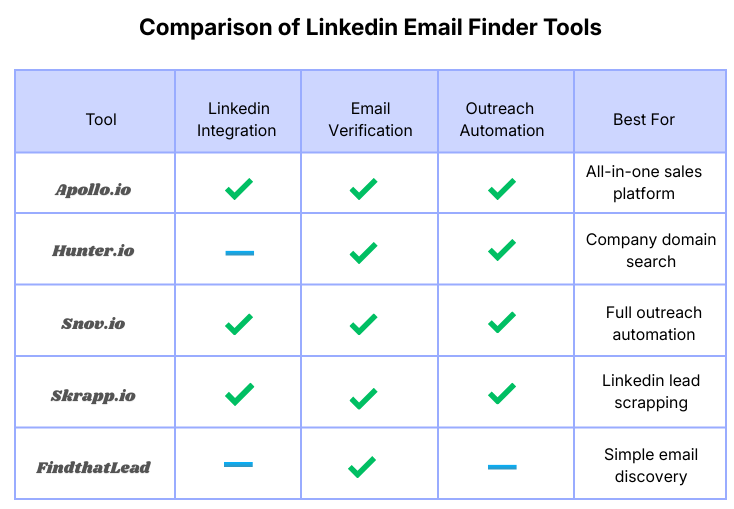
1. Apollo.io
Apollo is one of the most powerful all-in-one sales intelligence platforms available today.
It combines:
- A large B2B contact database
- Email discovery
- Sales engagement tools
- LinkedIn Chrome extension
With the Apollo extension, users can extract verified emails directly from LinkedIn profiles and export them into outreach campaigns.
Key features:
- Large B2B contact database
- LinkedIn prospecting extension
- Built-in email outreach automation
- CRM integrations
Best for:
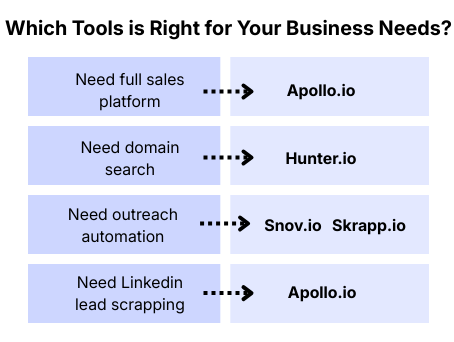
Startups, sales teams, and small businesses building scalable outbound workflows.
If you’re new to the platform, follow this Step-by-step Apollo.io tutorial for beginners to understand the complete setup process.
2. Hunter.io
Hunter is widely known for its domain-based email search engine.
Instead of scanning only LinkedIn profiles, Hunter helps users discover email addresses associated with company domains.
Features:
- Domain search
- Email finder
- Email verification
- Outreach campaigns
Best for:
Businesses that want simple tools for discovering company emails quickly.
3. Snov.io
Snov.io combines email finding, verification, and outreach into a single platform.
Its LinkedIn prospecting features allow users to collect leads from LinkedIn profiles and build cold email campaigns.
Features:
- Email finder
- LinkedIn lead extraction
- drip campaign automation
- email verification
Best for:
Sales teams that want a full outbound outreach toolkit.
4. Skrapp.io
Skrapp is designed specifically for LinkedIn lead generation.
The tool integrates directly with LinkedIn and helps users collect business emails from search results and profile pages.
Features:
- LinkedIn email extraction
- company domain discovery
- lead list exports
Best for:
Sales teams focused heavily on LinkedIn prospecting.
5. FindThatLead
FindThatLead is a popular email finder tool that helps businesses discover emails using names, domains, and company information.
Features:
- email discovery
- lead search
- email verification
Best for:
Small businesses building targeted B2B prospect lists.
How to Choose the Right LinkedIn Email Finder Tool
Not every tool fits every business. When evaluating tools, consider the following factors.
Email accuracy
High-quality tools provide verified email addresses to reduce bounce rates.
Database size
Larger databases increase the chances of finding contact details for target prospects.
LinkedIn integration
Chrome extensions make it easier to extract leads directly from LinkedIn.
Outreach features
Some tools include email automation and campaign management.
Pricing
Small businesses should evaluate tools based on lead volume and outreach needs.
Best Practices for LinkedIn Email Prospecting
To get the best results from email finder tools, follow these practical strategies.
Target the right decision makers
Focus on roles such as founders, marketing managers, and sales leaders depending on your target market.
Verify emails before outreach
Even verified tools can occasionally produce outdated contacts. Running email verification reduces bounce rates.
Personalize outreach messages
Generic outreach emails often get ignored. Mention specific details about the company or role to increase replies.
Build segmented lead lists
Segmenting prospects by industry or job role improves email campaign relevance.
You can also explore other Cold email outreach tools for small businesses that help automate prospecting and follow-ups.
Frequently Asked Questions
-
What is a LinkedIn email finder tool?
A LinkedIn email finder tool is software that helps users discover professional email addresses associated with LinkedIn profiles by using company domains, databases, and email pattern predictions.
-
Is it legal to find emails from LinkedIn profiles?
Finding publicly available business contact information is generally allowed, but outreach should comply with email regulations such as CAN-SPAM and GDPR depending on your target market.
-
Are LinkedIn email finder tools accurate?
Most modern tools provide verified emails and validation features to reduce bounce rates. However, accuracy depends on the quality of the database and verification system used by the platform.
-
Is it legal to find emails from LinkedIn profiles?
Finding publicly available business contact information is generally allowed, but outreach should comply with email regulations such as CAN-SPAM and GDPR depending on your target market.
-
What is the best LinkedIn email finder tool for small businesses?
Tools like Apollo, Hunter, and Snov are popular among small businesses because they combine email discovery, verification, and outreach automation.
-
Do LinkedIn email finder tools include email verification?
Many platforms include built-in verification features that help ensure the emails you collect are valid and deliverable.