
Table of Contents
Best Email Finder Tools for B2B Lead Generation
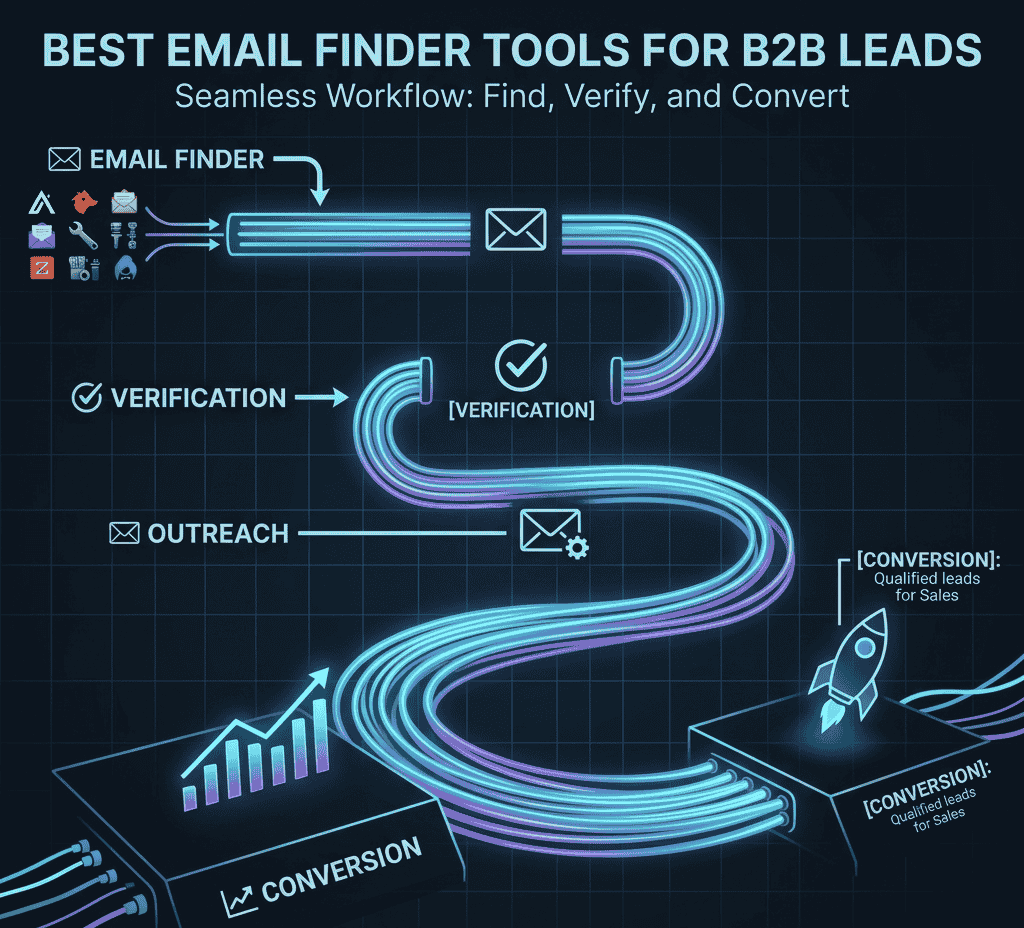
Email finder tools are no longer optional in B2B sales — they are a core part of modern lead generation systems.
Without accurate contact data, your outreach efforts can fail due to high bounce rates, poor targeting, and wasted time.
These tools help you move from random outreach to data-driven prospecting, where you connect with the right decision-makers at the right time.
Key Benefits of Email Finder Tools
• Faster Lead Discovery
Instead of manually searching for contacts, you can instantly find verified emails from company domains or LinkedIn profiles.
• Improved Email Deliverability
Verified emails reduce bounce rates, helping your domain maintain a strong sender reputation.
• Better Targeting
You can filter prospects based on role, industry, company size, and location — ensuring your outreach is relevant.
• Scalable Outreach
With bulk email search and integrations, you can scale your campaigns without compromising quality.
👉 In short, email finder tools help you build a predictable and scalable lead generation pipeline.
To turn your leads into real conversations, explore these Cold email templates for B2B sales that actually get replies and improve your outreach performance.
Key Features to Look for in Email Finder Tools
Choosing the right email finder tool is not just about features — it’s about how those features impact your results and workflow.
Here’s what you should prioritize:
1. Email Accuracy & Verification
Accuracy is the most important factor. Sending emails to invalid addresses can damage your sender reputation.
✔ Look for tools with built-in verification
✔ Aim for high deliverability rates
✔ Avoid tools with outdated databases
2. LinkedIn Integration
Most B2B prospecting happens on LinkedIn, so integration is critical.
✔ Extract emails directly from profiles
✔ Build targeted prospect lists
✔ Save time on manual research
👉 This works even better when combined with a strategy to how to find business emails from LinkedIn for targeted outreach.
3. Bulk Search & Automation
If you plan to scale outreach, bulk capabilities are essential.
✔ Upload company lists
✔ Find multiple emails at once
✔ Automate repetitive tasks
4. CRM & Outreach Integration
Your email finder should connect with your outreach tools.
✔ Sync with CRM systems
✔ Export leads easily
✔ Integrate with cold email tools
👉 This allows you to build a complete lead generation workflow.
5. Data Enrichment
Beyond emails, additional data improves personalization.
✔ Job titles
✔ Company size
✔ Industry insights
This helps you craft highly relevant cold emails that get replies.
Learn How to find business emails from LinkedIn to build highly targeted prospect lists for your campaigns.
Best Email Finder Tools for B2B Lead Generation
1. Apollo.io
Apollo.io is one of the most powerful all-in-one platforms for B2B prospecting, email discovery, and outreach automation. It combines a large contact database with built-in tools that help you move from finding leads to closing deals — all in one place.
Unlike basic email finder tools, Apollo.io allows you to build complete lead generation workflows, making it ideal for businesses that want to scale their outreach efficiently.
🔑Key Features
• Large B2B Database
Access millions of verified contacts across industries, roles, and company sizes. This helps you quickly find decision-makers without manual research.
• Email Verification System
Built-in verification ensures higher accuracy, reducing bounce rates and improving email deliverability.
• Advanced Search & Filters
Filter prospects based on job title, company size, revenue, location, and more — allowing highly targeted outreach.
• Outreach Automation
Create and manage cold email sequences, follow-ups, and campaigns directly inside the platform.
• CRM Integration
Seamlessly integrates with popular CRM tools, helping you manage leads and track interactions in one system.
• LinkedIn Extension
Find emails directly from LinkedIn profiles, making prospecting faster and more efficient.
💡Why It Stands Out
Apollo.io is not just an email finder — it’s a complete sales engagement platform.
✔ Eliminates the need for Multiple Tools
✔ Combines data + Outreach + Tracking
✔ Helps scale Lead generation without complexity
This makes it especially valuable for Startups, Agencies, and growing Sales Teams.
🎯Best Use Cases
Apollo.io works best for:
• B2B sales teams running cold email campaigns
• Marketers generating qualified leads at scale
• Agencies offering lead generation services
• Founders building outbound sales systems
⚠️ Things to Consider
• Can feel overwhelming for complete beginners
• Requires proper setup for best results
• Data accuracy may vary in niche industries
🚀 Pro Tip for Better Results
To maximize performance:
✔ Use advanced filters to target the right audience
✔ Personalize your email sequences
✔ Combine with follow-up strategies
✔ Regularly clean and verify your lists
👉 This helps you turn Apollo.io into a consistent lead generation engine, not just a tool.
YIf you’re looking for an all-in-one solution, this detailed Apollo.io review for B2B prospecting and cold outreach explains how to find leads and automate your email campaigns effectively.
2. Hunter.io
Hunter.io is a simple, reliable, and beginner-friendly email finder tool designed to help you quickly discover professional email addresses associated with any company domain.
It’s especially useful for users who want a fast and straightforward way to find verified emails without dealing with complex dashboards or advanced configurations.
Unlike all-in-one platforms, Hunter.io focuses on doing one thing well — accurate email discovery and verification.
🔑Key Features
• Domain Search
Enter a company website, and Hunter.io will list publicly available email addresses associated with that domain.
✔ Helps identify key contacts
✔ Shows email patterns used by the company
✔ Useful for building targeted outreach lists
• Email Finder Tool
Find a specific person’s email by entering their name and company domain.
✔ Ideal for reaching decision-makers
✔ Reduces manual research time
✔ Improves targeting accuracy
• Email Verification
Verify whether an email address is valid before sending messages.
✔ Reduces bounce rates
✔ Protects sender reputation
✔ Improves deliverability
• Chrome Extension
Find emails directly while browsing websites or LinkedIn profiles.
✔ Real-time prospecting
✔ Faster workflow
✔ No need to switch tools
• Bulk Email Search
Upload a list of domains or names to find multiple emails at once.
✔ Saves time
✔ Supports scalable outreach
✔ Useful for campaign preparation
💡Why It Stands Out
Hunter.io is known for its simplicity and accuracy, making it a go-to tool for beginners and small teams.
✔ Easy to use with minimal learning curve
✔ Clean interface with focused features
✔ Reliable for quick email discovery
It’s perfect if you want to start outreach quickly without technical complexity.
🎯Best Use Cases
Hunter.io works best for:
• Freelancers and Solopreneurs
• Small Business Owners doing outreach
• Marketers running targeted campaigns
• Beginners learning cold email prospecting
⚠️Things to Consider
• Limited automation features compared to advanced tools
• Smaller database compared to enterprise platforms
• Not ideal for large-scale outbound systems
🚀 Pro Tip for Better Results
To get the most out of Hunter.io:
✔ Use domain search to understand email patterns
✔ Verify emails before sending campaigns
✔ Combine with personalized outreach strategies
✔ Pair with cold email tools for automation
👉 This approach helps you turn simple email discovery into a high-converting outreach system.
💡 Bonus Insight:
Hunter.io works best when combined with a strong prospecting strategy. You can also learn how to find business emails from LinkedIn to improve targeting and increase reply rates.
If you prefer a simple and reliable tool, this detailed Hunter.io review for email finding and verification shows how to quickly discover professional email addresses.
3. Snov.io
Snov.io is a powerful all-in-one platform that combines email finding, verification, and outreach automation into a single workflow. It’s designed for businesses that want to move beyond basic email lookup and build a complete lead generation and nurturing system.
Unlike simple tools, Snov.io helps you not only find emails but also engage, follow up, and convert prospects through automated campaigns.
🔑Key Features
• Email Finder + Verifier
Discover professional email addresses and verify them in real time.
✔ Reduces bounce rates
✔ Ensures higher deliverability
✔ Improves campaign performance
• Drip Campaigns (Email Sequences)
Create automated email sequences with follow-ups.
✔ Schedule multiple emails
✔ Automate responses
✔ Increase reply rates
• Lead Management System
Organize, track, and manage your prospects inside the platform.
✔ Segment leads by behavior
✔ Track engagement (opens, clicks)
✔ Manage pipeline efficiently
• LinkedIn Prospecting Tools
Extract emails and build lead lists from LinkedIn.
✔ Faster prospecting
✔ Better targeting
✔ Reduced manual work
• CRM Integrations & API Access
Connect with your existing tools and automate workflows.
✔ Sync lead data
✔ Streamline outreach process
✔ Scale operations easily
💡Why It Stands Out
Snov.io stands out because it bridges the gap between email finding and email marketing automation.
✔ Combines multiple tools into one platform
✔ Simplifies outreach workflows
✔ Ideal for scaling cold email campaigns
It’s a strong choice for users who want more than just email discovery without moving to expensive enterprise tools.
🎯Best Use Cases
Snov.io works best for:
• Startups building outbound sales systems
• Small to mid-sized sales teams
• Marketers running cold email campaigns
• Agencies managing lead generation for clients
⚠️Things to Consider
• Interface may take time to learn for beginners
• Database size is smaller than enterprise tools
• Requires strategy to fully utilize automation features
🚀 Pro Tip for Better Results
To maximize results with Snov.io:
✔ Build segmented prospect lists
✔ Create personalized drip campaigns
✔ Use behavior-based follow-ups
✔ Test subject lines and messaging
👉 This helps you turn Snov.io into a conversion-focused outreach engine, not just a tool.
💡 Bonus Insight:
Snov.io performs best when used as part of a structured system. Combine it with a clear funnel like the cold email success funnel to guide prospects from first contact to conversion.
4. ZoomInfo
ZoomInfo is a premium B2B data intelligence platform that provides highly accurate contact data, company insights, and advanced targeting capabilities. It is designed for businesses that rely on data-driven lead generation at scale, especially in competitive markets.
Unlike basic email finder tools, ZoomInfo goes beyond contact discovery by offering intent data, deep company insights, and advanced segmentation, helping teams identify and engage prospects who are most likely to convert.
🔑 Key Features
• Extensive B2B Database
Access a massive database of verified contacts and companies across industries worldwide.
✔ Reach decision-makers directly
✔ Discover new target accounts
✔ Expand market coverage
• Intent Data (Buyer Signals)
Identify prospects actively searching for solutions like yours.
✔ Target high-intent leads
✔ Improve timing of outreach
✔ Increase conversion rates
• Advanced Segmentation & Filtering
Create highly targeted prospect lists using detailed filters.
✔ Job Title and Seniority
✔ Company size and Revenue
✔ Industry and Technologies used
• Data Enrichment
Enhance your existing lead data with additional insights.
✔ Fill missing information
✔ Improve personalization
✔ Strengthen targeting strategy
• CRM & Sales Tool Integration
Seamlessly integrates with major CRM and sales platforms.
✔ Sync contacts automatically
✔ Manage pipeline efficiently
✔ Streamline sales workflows
💡Why It Stands Out
ZoomInfo stands out for its data accuracy, depth, and intelligence-driven approach.
✔ Provides more than just emails — complete prospect insights
✔ Helps prioritize leads based on buying intent
✔ Supports large-scale outbound and inbound strategies
It’s built for teams that want to move from basic outreach to strategic, data-backed sales execution.
🎯Best Use Cases
ZoomInfo works best for:
• Enterprise sales teams
• B2B companies targeting large markets
• Organizations running account-based marketing (ABM)
• Teams focused on high-value deals and long sales cycles
⚠️Things to Consider
• Higher pricing compared to other tools
• May be too complex for beginners
• Best suited for teams with defined sales processes
🚀 Pro Tip for Better Results
To maximize ROI with ZoomInfo:
✔ Use intent data to prioritize outreach
✔ Build highly segmented prospect lists
✔ Align sales and marketing teams
✔ Personalize messaging using enriched data
👉 This approach helps you focus on quality over quantity, leading to better conversions.
💡 Bonus Insight:
ZoomInfo is most effective when combined with a structured outreach system. Pair it with a strong strategy like lead quality vs lead quantity to focus on high-value prospects instead of mass outreach.
If you’re comparing platforms, this Apollo.io vs ZoomInfo comparison (features, pricing & use case guide) will help you choose the right tool.
5. Lusha
Lusha is a popular and highly accurate B2B contact data platform known for its simplicity, speed, and ease of use. It helps sales professionals and recruiters quickly find verified email addresses and phone numbers of decision-makers without complex setup or workflows.
Unlike heavy enterprise tools, Lusha focuses on delivering clean, reliable contact data with a smooth user experience, making it ideal for teams that want fast results with minimal learning curve.
🔑 Key Features
• Contact Enrichment
Enhance your prospect data with accurate emails, phone numbers, and company details.
✔ Improves lead quality
✔ Supports better personalization
✔ Helps build complete prospect profiles
• LinkedIn Integration
Find contact details directly from LinkedIn profiles using the Chrome extension.
✔ Instant access to decision-makers
✔ Faster prospecting workflow
✔ Reduces manual research time
• Simple & User-Friendly Interface
Designed for ease of use, even for beginners.
✔ Quick setup
✔ Clean dashboard
✔ Minimal training required
• Direct Dial & Contact Data
Provides phone numbers along with email addresses.
✔ Enables multi-channel outreach
✔ Improves connection rates
✔ Useful for sales calls and recruiting
• CRM Integrations
Sync leads with your CRM and sales tools.
✔ Better lead management
✔ Streamlined workflow
✔ Improved team collaboration
💡Why It Stands Out
Lusha stands out for its balance between accuracy and simplicity.
✔ Highly reliable contact data
✔ Easy to use for daily prospecting
✔ Quick results without complex setup
It’s perfect for users who want to start outreach immediately without dealing with advanced systems.
🎯 Best Use Cases
Lusha works best for:
• Sales representatives and SDRs
• Recruiters sourcing candidates
• Small to Mid-sized sales teams
• Professionals doing LinkedIn-based prospecting
⚠️Things to Consider
• Limited automation compared to tools like Apollo or Snov.io
• Smaller database compared to enterprise platforms
• Credit-based usage can limit scaling
🚀 Pro Tip for Better Results
To maximize results with Lusha:
✔ Use LinkedIn to identify the right prospects
✔ Enrich contact data before outreach
✔ Combine email + Phone outreach for better results
✔ Personalize your messaging using enriched insights
👉 This helps you create a high-conversion outreach strategy, not just collect contacts.
💡 Bonus Insight:
Lusha works best when combined with strong messaging. Pair it with proven strategies like cold email templates for B2B sales that actually get replies to turn contacts into real conversations.
6. Voila Norbert
Voila Norbert is a lightweight and easy-to-use email finder tool designed for users who want a simple and efficient way to find and verify professional email addresses. It focuses on delivering accurate results without complexity, making it ideal for freelancers, solopreneurs, and small businesses.
Unlike advanced platforms, Voila Norbert keeps things minimal — helping you quickly find emails, verify them, and start outreach without getting overwhelmed by features.
🔑 Key Features
• Email Search
Find email addresses by entering a person’s name and company domain.
✔ Quick and straightforward lookup
✔ Ideal for targeted outreach
✔ Reduces manual research time
• Email Verification
Verify email addresses to ensure they are valid before sending emails.
✔ Lowers bounce rates
✔ Improves deliverability
✔ Protects sender reputation
• Bulk Email Finder
Upload lists to find multiple emails at once.
✔ Saves time
✔ Supports small-scale campaigns
✔ Useful for freelancers and agencies
• Easy-to-Use Interface
Clean and minimal dashboard designed for simplicity.
✔ No learning curve
✔ Fast onboarding
✔ Distraction-free workflow
• Integrations & API Access
Connect with other tools and automate basic workflows.
✔ Export leads easily
✔ Integrate with outreach tools
✔ Improve efficiency
💡Why It Stands Out
Voila Norbert stands out for its simplicity, affordability, and focused functionality.
✔ Perfect for quick email discovery
✔ No unnecessary complexity
✔ Reliable for small-scale prospecting
It’s a great choice if you want a straightforward tool that gets the job done efficiently.
🎯 Best Use Cases
Voila Norbert works best for:
• Freelancers doing client outreach
• Small businesses generating leads
• Marketers running targeted campaigns
• Beginners learning email prospecting
⚠️ Things to Consider
• Limited advanced features compared to all-in-one platforms
• Not ideal for large-scale automation
• Smaller database than enterprise tools
🚀 Pro Tip for Better Results
To get the most out of Voila Norbert:
✔ Use it for targeted, high-quality prospecting
✔ Verify emails before sending campaigns
✔ Combine with personalized messaging
✔ Pair with outreach tools for follow-ups
👉 This approach helps you turn a simple tool into a consistent lead generation process.
💡 Bonus Insight:
Voila Norbert works best when combined with a clear outreach strategy. You can improve results by following a structured system like the cold email success funnel to convert leads into customers.
You can also scale your outreach using AI tools for sales automation to streamline prospecting and follow-ups
How to Choose the Right Tool
Choosing the right tool depends on your business stage, goals, and budget.
Instead of picking the most popular tool, focus on your specific needs:
For Beginners / Small Businesses
Start with simple tools like Hunter.io or Lusha.
✔ Easy to use
✔ Affordable
✔ Quick setup
For Growing Teams
Use tools like Snov.io or Apollo.io.
✔ Automation features
✔ Email sequencing
✔ Better scalability
For Enterprise / Large Teams
Go for ZoomInfo or advanced platforms.
✔ Large databases
✔ Advanced filters
✔ High data accuracy
💡 Key Insight:
The best tool is not the most expensive — it’s the one that fits your workflow and helps you generate results consistently.
Best Email Finder Tools by Use Case
Not all tools serve the same purpose. Here’s a quick breakdown to help you choose the right tool based on your specific needs:
🔹Best All-in-One Prospecting Tool
Apollo.io
✔ Combines email finding + outreach automation
✔ Ideal for scaling lead generation
✔ Best for Startups and growing teams
🔹Best for Beginners & Simplicity
Hunter.io
✔ easy-to-use interface
✔ quick domain-based email search
✔ perfect for freelancers and small businesses
🔹Best for Outreach Automation
Snov.io
✔ Built-in drip campaigns
✔ Lead tracking and management
✔ Ideal for automated cold email systems
🔹Best for Enterprise & Data Accuracy
ZoomInfo
✔ Massive B2B database
✔ Intent data for high-quality leads
✔ Best for large teams and ABM strategies
🔹Best for LinkedIn Prospecting
Lusha
✔ Strong LinkedIn integration
✔ Quick contact enrichment
✔ Great for sales reps and recruiters
🔹Best for Lightweight Email Lookup
Voila Norbert
✔ Simple and focused tool
✔ Fast email search and verification
✔ Ideal for targeted outreach
👉 Still not sure which tool fits your workflow? Start with a simple option and scale as your outreach grows.
Email Finder Tools Comparison (Features, Use Case & Best Fit)
Choosing the right email finder tool can save hours of manual work and significantly improve your outreach results. Here’s a quick comparison to help you decide faster.
| Tool | Best For | Database Size | Email Verification | Automation | Ease of Use | Pricing Level |
|---|---|---|---|---|---|---|
| Apollo.io | All-in-one prospecting & outreach | Very Large | Yes | Advanced | Medium | Moderate |
| Hunter.io | Beginners & quick email lookup | Medium | Yes | Limited | Very Easy | Affordable |
| Snov.io | Email finding + automation | Medium | Yes | Yes (Drip) | Medium | Affordable |
| ZoomInfo | Enterprise lead generation | Very Large | Yes | Advanced | Advanced | Expensive |
| Lusha | LinkedIn prospecting | Medium | Yes | Limited | Very Easy | Moderate |
| Voila Norbert | Lightweight email lookup | Small–Medium | Yes | No | Very Easy | Affordable |
Best Practices for Using Email Finder Tools
Using the right tool is only half the job. To get real results, you need to use them strategically.
1. Always Verify Emails Before Sending
Even the best tools can have outdated data.
✔ Use built-in verification
✔ Avoid high bounce rates
✔ Protect your domain reputation
2. Focus on the Right Decision-Makers
Don’t just collect emails — target the right people.
✔ Founders
✔ Marketing heads
✔ Sales leaders
👉 This improves conversion rates significantly.
3. Combine Tools with Personalization
Tools give you data, but personalization drives results.
✔ Reference company activity
✔ Mention relevant problems
✔ Tailor your message
4. Use Tools with Outreach Systems
Don’t stop at finding emails.
👉 Combine with the best cold email tools to automate sending, follow-ups, and tracking.
5. Build a Consistent Prospecting System
Instead of random outreach:
✔ Build a weekly lead list
✔ Segment your audience
✔ Track performance
👉 This turns your process into a repeatable growth system.
Common Mistakes to Avoid
Even with powerful tools, mistakes can reduce your results.
1. Relying on Unverified Data
Sending emails without verification leads to high bounce rates.
2. Targeting the Wrong Audience
Reaching out to irrelevant contacts wastes effort.
3. Over-Automating Without Personalization
Automation without context feels spammy and reduces replies.
4. Ignoring Follow-Ups
Most conversions happen after follow-ups — not the first email.
5. Not Tracking Performance
Without tracking:
✔ You don’t know what works
✔ You can’t improve campaigns
💡 Pro Insight:
The biggest difference between average and high-performing outreach is execution, not tools.
Email Finder Tools + Cold Email = Complete System
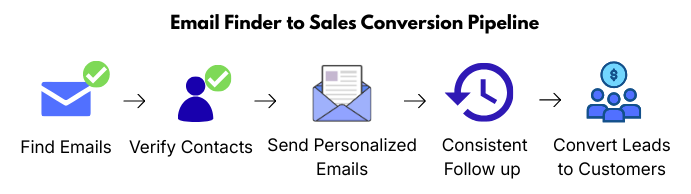
Email finder tools work best when combined with a structured outreach strategy.
Your workflow should look like this:
- Find emails
- Verify contacts
- Send personalized emails
- Follow up consistently
- Convert leads into customers
👉 You can also explore the cold email success funnel to understand how to turn prospects into paying clients.
FAQs
-
What is an email finder tool?
An email finder tool helps you discover professional email addresses of individuals or companies, making it easier to connect with decision-makers for B2B outreach.
-
Are email finder tools legal to use?
Yes, email finder tools are legal when used responsibly. You should follow data privacy regulations like GDPR and ensure your outreach is relevant and non-spammy.
-
Which email finder tool is best for beginners?
Tools like Hunter.io and Voila Norbert are best for beginners due to their simple interface and ease of use.
-
What is the most accurate email finder tool?
ZoomInfo and Lusha are known for high data accuracy, while Apollo.io also offers strong verification features.
-
Can I use email finder tools with LinkedIn?
Yes, many tools like Lusha, Apollo.io, and Snov.io offer LinkedIn integrations to extract contact details directly from profiles.
-
Do email finder tools improve cold email success rates?
Yes, verified emails reduce bounce rates and improve deliverability, which directly increases open rates and reply rates.
-
How do I verify if an email is valid?
Most tools include built-in verification systems that check whether an email is active and safe to use.
-
Should I use multiple email finder tools?
Yes, combining tools can improve accuracy and coverage, especially when targeting different industries or regions.
-
What is the difference between email finder and email verification tools?
Email finder tools locate email addresses, while verification tools ensure those emails are valid and deliverable.
-
What is the best strategy for using email finder tools?
The best strategy is to combine email finding with personalization, targeting, and consistent follow-ups to maximize results.
Conclusion
Email finder tools have become a core part of modern B2B lead generation. They allow businesses to move from manual prospecting to a more scalable, data-driven outreach system.
With the right tool, you can:
• Find accurate and verified contact data
• Save hours of manual research
• Connect directly with decision-makers
• Improve email deliverability and response rates
However, tools alone don’t guarantee results.
The real success comes from how you use them.
To build a high-performing outreach system, you need to combine:
✔ The right tools for your business stage
✔ Targeted prospecting (reaching the right audience)
✔ Personalized messaging that adds value
✔ Consistent follow-ups to stay top-of-mind
👉 When these elements work together, you create a predictable and scalable lead generation engine.
🚀 Final Insight
Start simple. Choose one tool, test your outreach strategy, and improve based on results.
Over time, you can scale by adding automation, better targeting, and advanced tools.
👉 The goal is not just to find emails — but to build meaningful business conversations that convert into real opportunities.