
Apollo.io + Reply.io Explained: The Smart Cold Email Workflow for Small Teams & Solo Founders
Cold email outreach often fails not because of bad tools — but because people try to use one tool for everything.
A smarter approach is to use:
- Apollo.io for finding and preparing leads
- Reply.io for email sequencing, follow-ups, and reply management
This guide shows you exactly how to combine Apollo.io and Reply.io, step by step, without technical complexity.
Whether you’re a solo founder, consultant, agency, or beginner in outbound sales, this workflow is designed to be simple, repeatable, and scalable.
Who This Workflow Is For
- Solo founders & consultants
- Small teams (1–10 people)
- Beginners in outbound sales
- Agencies doing cold outreach
- Anyone tired of manual follow-ups
If you want a clear system instead of trial-and-error, this workflow fits.

Why Combine Apollo.io and Reply.io?
Using one tool for everything often creates limitations. Each of these tools does one job extremely well.
Apollo.io is best for:
- B2B lead discovery
- Job title & company filtering
- Contact enrichment
- Email verification
Reply.io is best for:
- Cold email automation
- Multi-step follow-ups
- Reply detection & inbox sync
- CRM-style conversation tracking
Together, they replace:
- Manual prospecting
- Spreadsheet tracking
- One-off email tools
New to outbound sales tools? Our Apollo.io Review for Beginners explains how to find leads easily, while the Reply.io Review for Beginners shows how to automate follow-ups and outreach across multiple channels.
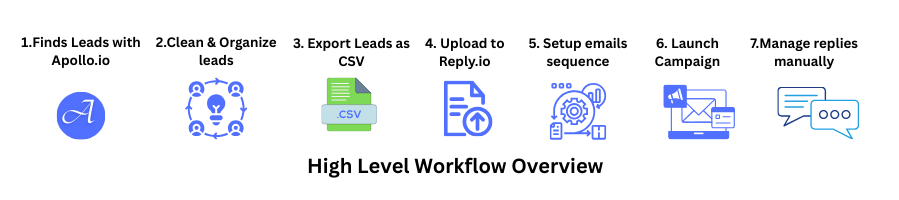
High-Level Workflow Overview
Before we go deep, here’s the full flow:
- Find leads in Apollo.io
- Clean and organize leads
- Export leads as CSV
- Upload into Reply.io
- Set up email sequences
- Launch campaigns
- Manage replies manually
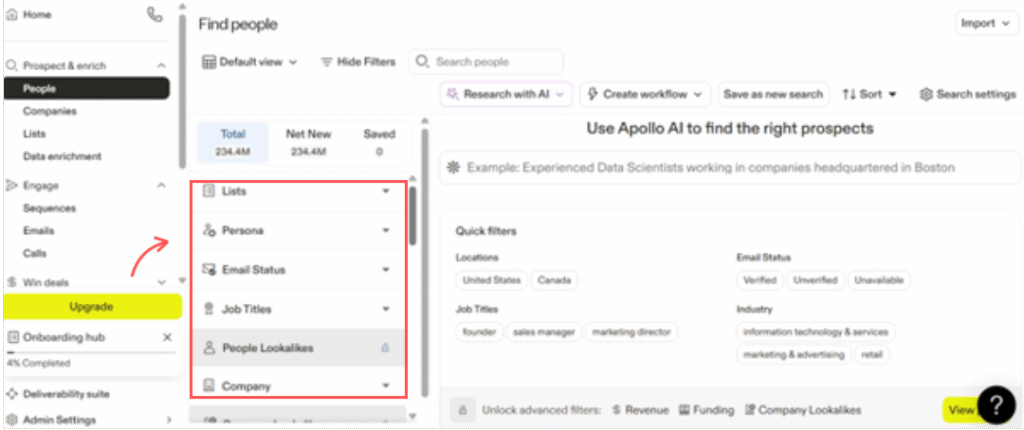
Step 1: Find Leads in Apollo.io (Lead Sourcing)
Apollo.io is where your outreach quality starts.
Beginner-Friendly Filters to Use
Start simple:
- Location (country or region)
- Job title (Founder, Marketing Manager, Sales Head)
- Company size (1–50 or 11–50)
- Industry (optional)
📌 Beginner tip:
More filters ≠ better leads. Start broad, refine later.
Step 2: Save & Prepare Your Lead List
Once leads appear:
- Select relevant contacts
- Save them into a list (example: SaaS Founders – Cold Outreach)
Before Exporting, Check:
- Email status = Verified or Recommended
- Remove duplicates
- Exclude generic emails (info@, support@)
📌 Rule:
Quality beats quantity — especially early.
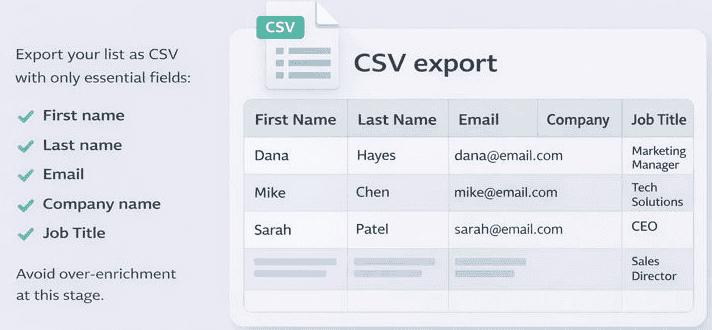
Step 3: Export Leads from Apollo.io
Export your list as CSV with only essential fields:
- First name
- Last name
- Company name
- Job title
Avoid over-enrichment at this stage.
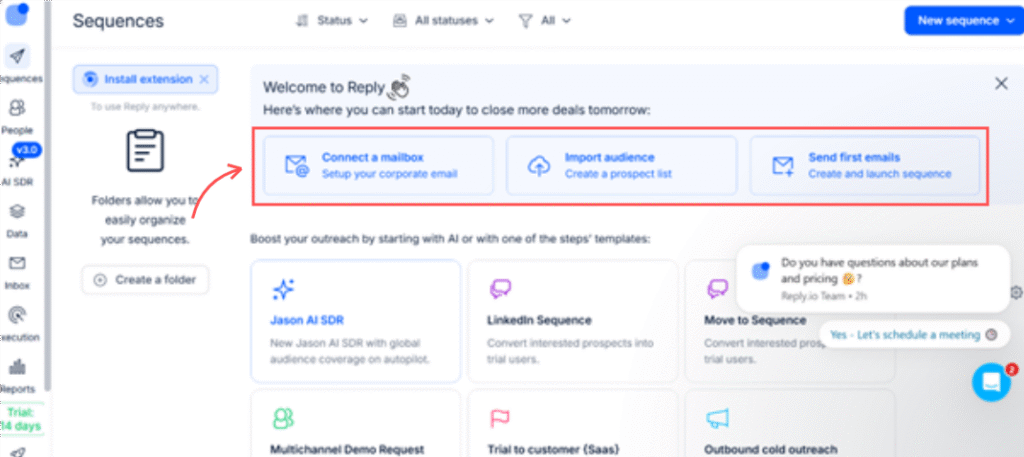
Step 4: Set Up Reply.io Dashboard (Email Automation)
Reply.io is where execution happens.
What You’ll See on First Login
- Email accounts
- Sequences
- Prospects
- Inbox / Conversations
- Analytics
Beginner goal:
Set up email sending safely before launching campaigns.
Step 5: Add Email Accounts (Critical Step)
Best Practice for Beginners
- Connect Gmail or Outlook inbox
- Start with 1–2 email accounts
- Enable inbox warm-up immediately
📌 Mistake to avoid:
Never send cold emails without warm-up.
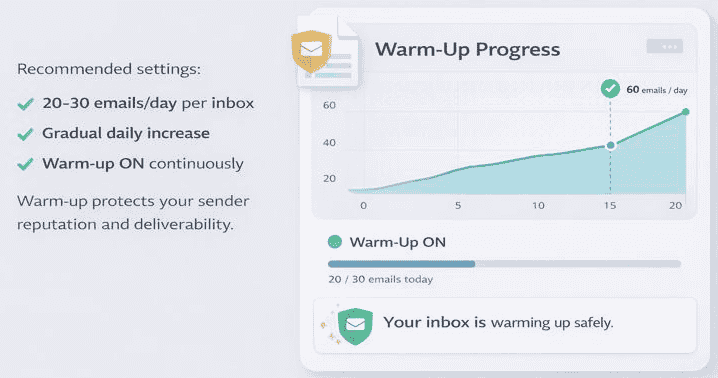
Step 6: Warm-Up Settings (Safe Defaults)
Recommended settings:
- 20–30 emails/day per inbox
- Gradual daily increase
- Warm-up ON continuously
Warm-up protects your sender reputation and deliverability.
Step 7: Import Leads into Reply.io
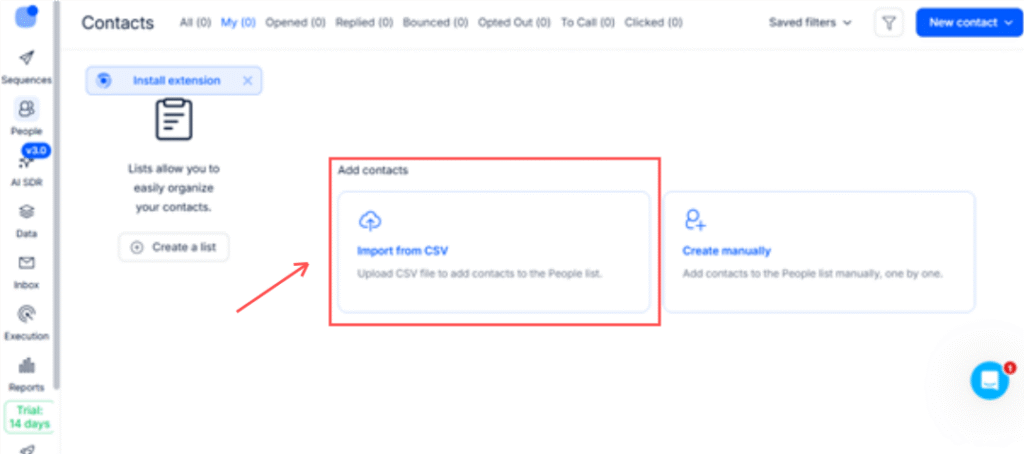
How to Upload Apollo Leads
- Upload CSV exported from Apollo
- Map fields correctly:
- First name
- Company
Double-check mapping before saving.
Step 8: Create Your Cold Email Sequence
Keep it simple.
Beginner-Friendly Sequence Structure
- Email 1: Short introduction
- Follow-up 1: Reminder (2–3 days later)
- Optional Follow-up 2: Value-based nudge
Writing Rules
- Short and conversational
- Personalized using name/company
- No hard selling
- Avoid links in the first email
Step 9: Campaign Sending Settings
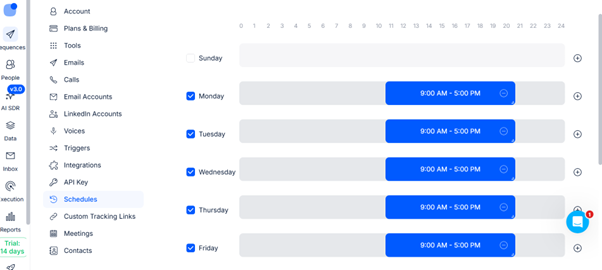
Safe sending rules:
- 20–40 emails/day per inbox
- Send during business hours
- Avoid weekends initially
Scale only after results stabilize.
Step 10: Manage Replies & Optimize
Reply.io helps you manage conversations, but humans close deals.
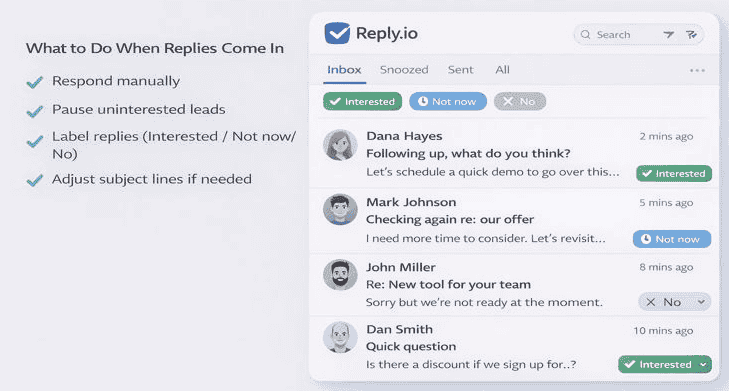
What to Do When Replies Come In
- Respond manually
- Pause uninterested leads
- Label replies (Interested / Not now / No)
- Adjust subject lines if needed
Common Mistakes Beginners Make
- Sending too many emails too fast
- Skipping warm-up
- Poor targeting
- Over-automation
- Long, sales-heavy email copy
When This Workflow Works Best
- B2B services
- SaaS startups
- Agencies
- Consultants
- Recruiters
- Small sales teams
Final Thought
You don’t need a complex tech stack to run outbound sales.
With:
- Apollo.io for lead intelligence
- Reply.io for execution and follow-ups
You get a clean, scalable, beginner-friendly system.
Automation doesn’t replace effort —
it protects your time and multiplies your consistency.
👉 Try Apollo.io for lead sourcing
👉 Use Reply.io to automate follow-ups safely
FAQs
1. What is the Apollo.io and Reply.io workflow?
The Apollo.io + Reply.io workflow is a cold email system where Apollo.io is used to find and enrich B2B leads, and Reply.io is used to automate email sequences and follow-ups. This separation helps improve lead quality, deliverability, and reply rates compared to using one tool alone.
2. Can beginners use Apollo.io and Reply.io together?
Yes. Both Apollo.io and Reply.io are beginner-friendly when used with a simple setup. You don’t need coding or technical skills. By starting with basic filters, low sending limits, and short email sequences, beginners can safely launch outbound campaigns and learn as they go.
3. Do Apollo.io and Reply.io integrate directly?
Apollo.io and Reply.io do not require a direct integration. Most users export leads from Apollo.io as a CSV file and upload them into Reply.io. This method is reliable, easy to control, and preferred by beginners who want to review leads before sending emails.
4. Is Apollo.io good for lead generation?
Yes. Apollo.io is widely used for B2B lead generation because it offers detailed job title targeting, company filters, and email enrichment. It works especially well for founders, agencies, recruiters, and sales teams targeting specific roles or industries.
5. Is Reply.io safe for cold email outreach?
Reply.io is safe for cold email outreach when used correctly. Features like inbox warm-up, sending limits, and reply detection help protect email deliverability. However, users should always warm up inboxes and avoid sending high volumes too quickly.
6. How many emails should I send per day as a beginner?
Beginners should start with 20–40 emails per inbox per day. This low volume helps maintain sender reputation and reduces spam risk. You can gradually increase sending limits once bounce rates and reply rates are stable.
7. Should I use multiple inboxes in Reply.io?
Yes, but only after mastering one inbox. Beginners should start with 1–2 email accounts. Multiple inboxes help scale outreach later, but starting small ensures you understand warm-up, replies, and campaign behavior before expanding.
8. Do I need inbox warm-up in Reply.io?
Yes. Inbox warm-up is essential for cold email success. Warm-up gradually builds your sender reputation by simulating real conversations. Sending cold emails without warm-up significantly increases the risk of emails landing in spam.
9. What kind of businesses benefit most from this workflow?
This workflow works best for B2B services, SaaS companies, agencies, consultants, recruiters, and small sales teams. It’s especially useful for businesses that rely on outbound outreach rather than paid ads or inbound traffic alone.
10. Is this workflow better than using one all-in-one tool?
For most beginners and small teams, yes. Using Apollo.io for lead sourcing and Reply.io for outreach allows each tool to do what it’s best at. This usually results in better targeting, cleaner data, and higher reply rates than all-in-one platforms.
11. Can I personalize emails using Apollo.io data?
Yes. Apollo.io provides data such as first name, job title, and company name, which can be used in Reply.io email personalization fields. Simple personalization often performs better than long, heavily customized messages.
12. How long does it take to see results from cold email campaigns?
Most beginners start seeing replies within 7–14 days after launching campaigns, assuming inboxes are warmed up and targeting is relevant. Results improve over time as you refine subject lines, messaging, and follow-ups.
13. Is this workflow compliant with cold email regulations?
The tools themselves are compliant, but users are responsible for following email laws such as CAN-SPAM or GDPR. This includes adding opt-out options, sending relevant messages, and avoiding deceptive subject lines.
14. Can I scale this workflow later?
Yes. Once you understand the basics, you can scale by adding inboxes, refining lead filters, testing subject lines, and running multiple campaigns. The Apollo.io + Reply.io setup is commonly used by growing sales teams.
15. Do I need a CRM if I use Reply.io?
Not initially. Reply.io includes basic conversation and reply management that’s enough for beginners. As your sales process grows, you can later connect a CRM if needed.