
Apollo.io + Instantly.ai Workflow: Step-by-Step Cold Email Automation for Beginners (2026)
For small businesses and lean sales teams, using one tool for everything often feels convenient — until it becomes limiting.
That’s why many teams now use a two-tool workflow:
- Apollo.io for lead sourcing and enrichment
- Instantly.ai for cold email automation and deliverability
This guide explains exactly how to combine Apollo.io and Instantly.ai, step by step, so you can run outbound campaigns efficiently without hiring a tech team.
Who This Workflow Is For
- Solo founders & consultants
- Small teams (1–10 people)
- Beginners in outbound sales
- Businesses that want DIY automation
- Anyone struggling with manual follow-ups
If you want a clear, repeatable system, this workflow is built for you.
Why Combine Apollo.io and Instantly.ai?
Apollo.io excels at:
- Finding B2B leads
- Job role targeting
- Company filtering
- Data enrichment
Instantly.ai excels at:
- Cold email automation
- Inbox rotation
- High deliverability
- Campaign scaling
Together, they replace:
- Manual prospecting
- Spreadsheet tracking
- One-off email tools
Apollo.io + Instantly.ai Workflow (Beginner Dashboard Setup Guide)
Who This Setup Is For
This setup is ideal for:
- Solo founders
- Small teams (1–10 people)
- First-time users of sales automation tools
- Anyone without a technical background
No coding or advanced automation knowledge required.
Step 1: Getting Started with Apollo.io Dashboard (Lead Sourcing)
What You See on First Login
When you log into Apollo.io, the main dashboard is focused on:
- People search
- Company search
- Saved lists
- Email credits & usage
Beginner goal: Find and organize leads — nothing more.
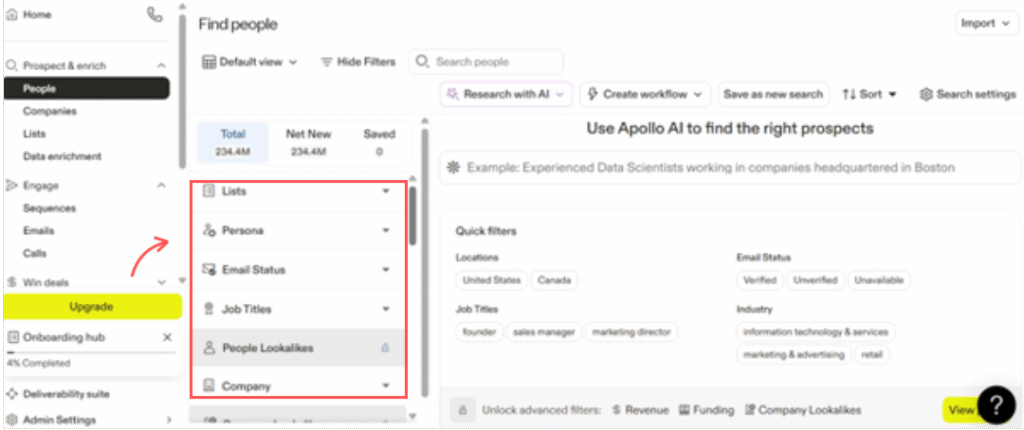
Step 1.1: Setting Up Lead Filters
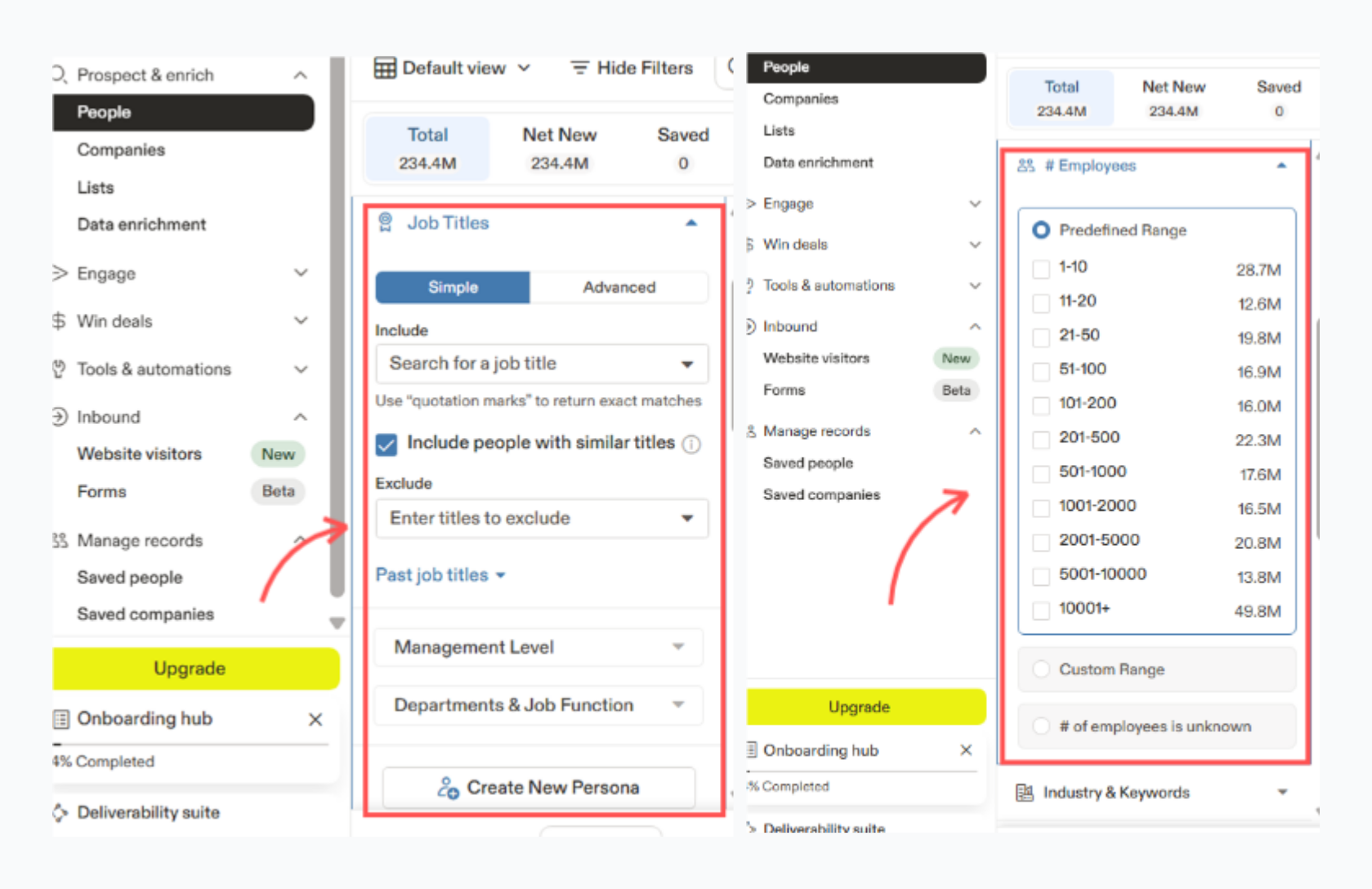
Start with simple filters:
- Location (country)
- Job title (e.g., Founder, Marketing Manager)
- Company size (1–50 employees)
- Industry (optional)
Avoid advanced filters at the beginning.
📌 Tip for beginners:
More filters ≠ better leads. Start broad, refine later.
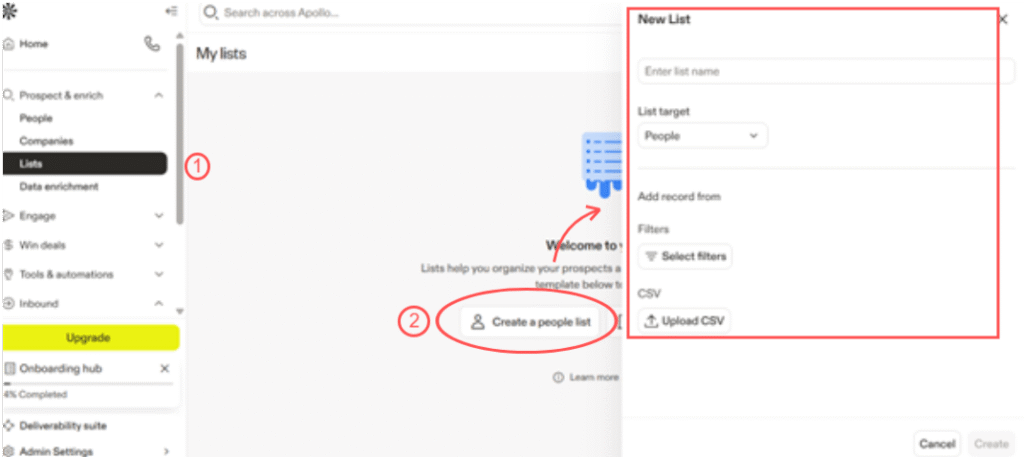
Step 1.2: Saving Leads to Lists
Once leads appear:
- Select relevant leads
- Save them to a list (e.g., “Cold Outreach – SaaS Founders”)
This list will later be used for email outreach.
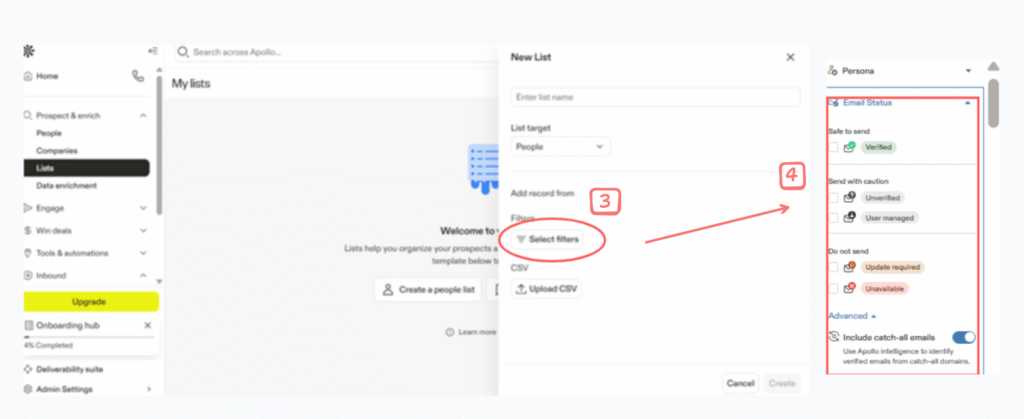
Step 2: Preparing Leads for Outreach
What to Check Before Exporting
Before sending leads to Instantly.ai:
- Ensure email status is “verified” or “recommended”
- Avoid risky or unverified emails
- Remove duplicates
📌 Beginner rule:
Quality > quantity (especially early).
Step 3: Instantly.ai Dashboard Overview (Email Automation)
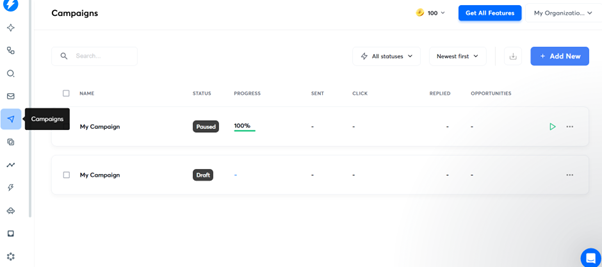
What You See on First Login
Instantly.ai’s dashboard focuses on:
- Email accounts
- Campaigns
- Warm-up
- Analytics
Beginner goal: Set up email sending safely.
Step 4: Setting Up Email Accounts
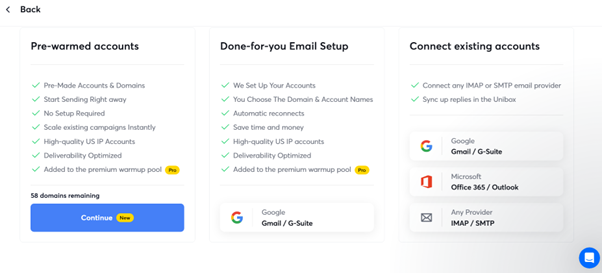
Step 4.1: Add Email Accounts
- Connect your Gmail or Outlook inbox
- Enable inbox warm-up
- Start with 1–2 accounts
📌 Beginner mistake to avoid:
Never start campaigns without warm-up.
Step 4.2: Warm-Up Settings
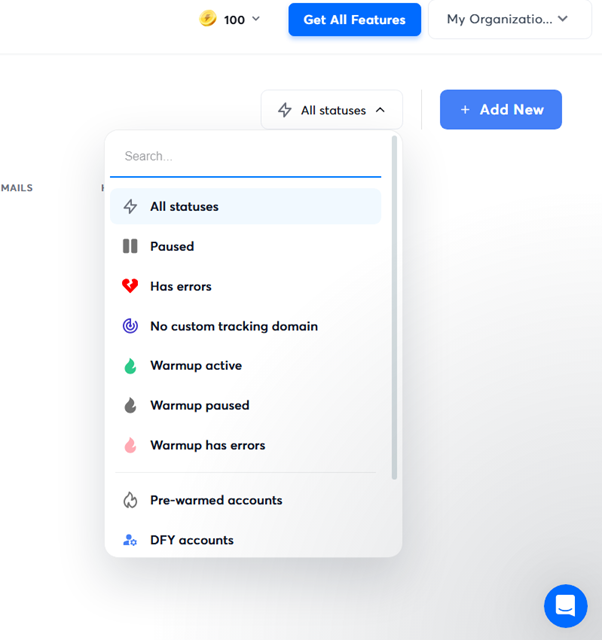
Recommended for beginners:
- Daily emails: 20–30 per inbox
- Gradual increase
- Warm-up ON at all times
Step 5: Creating Your First Campaign in Instantly.ai
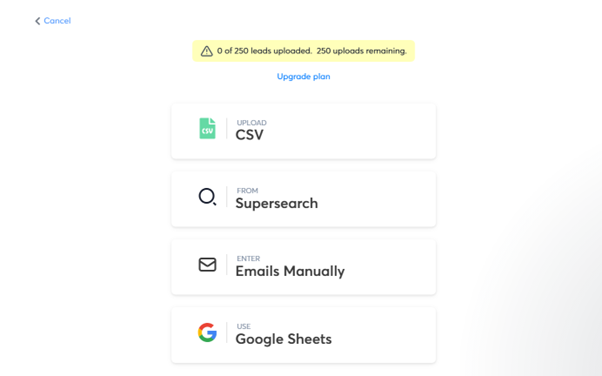
Step 5.1: Import Leads from Apollo.io
Upload:
- CSV file from Apollo
- Or copy-paste lead list
Ensure fields are mapped correctly:
- First name
- Company
Step 5.2: Writing a Simple Email Sequence
Begin with:
- 1 main email
- 1 follow-up (2–3 days later)
Keep it:
- Short
- Personalized
- Non-salesy
📌 Beginner tip:
Avoid links in the first email.
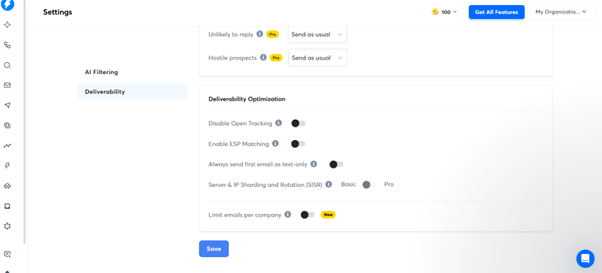
Step 6: Campaign Sending Settings (Safe Defaults)
Beginner Sending Rules
- 20–40 emails/day per inbox
- Send during business hours
- Avoid weekends initially
Step 7: Monitoring Replies & Optimizing
What to Track (Beginner Metrics)
Focus only on:
- Replies
- Bounces
- Spam warnings
Ignore advanced analytics at first.
Step 8: Complete Apollo + Instantly Workflow
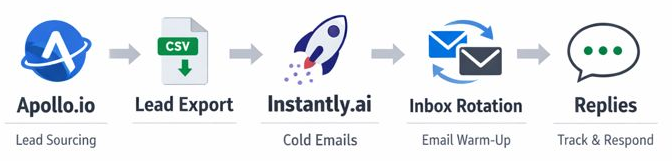
Apollo.io → Lead Search → Save List → Export → Instantly.ai → Warm-Up → Campaign → Replies
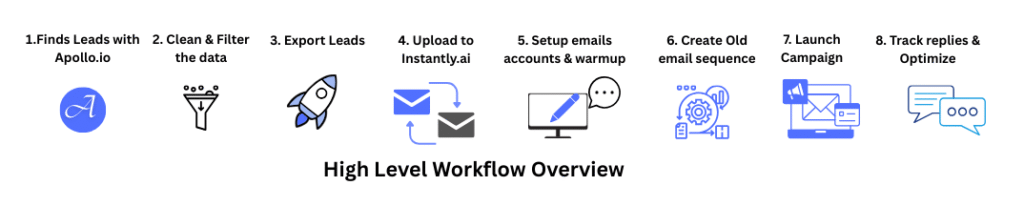
High-Level Workflow Overview
Here’s the full flow before we go into details:
- Find leads in Apollo.io
- Clean & filter the data
- Export leads
- Upload to Instantly.ai
- Set up email accounts & warm-up
- Create cold email sequence
- Launch campaign
- Track replies & optimize
Step 1: Find Leads in Apollo.io
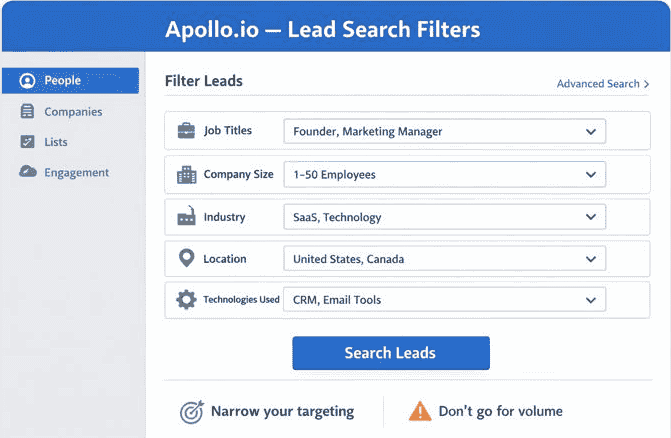
Use Apollo.io to build your lead list by filtering:
- Job titles
- Company size
- Industry
- Location
- Technology used
This ensures you don’t send emails blindly.
Beginner tip:
Start with narrow targeting, not volume.
Step 2: Clean & Prepare Your Lead List
Before exporting:
- Remove incomplete profiles
- Exclude generic emails (info@, support@)
- Double-check job relevance
Clean data = better deliverability.
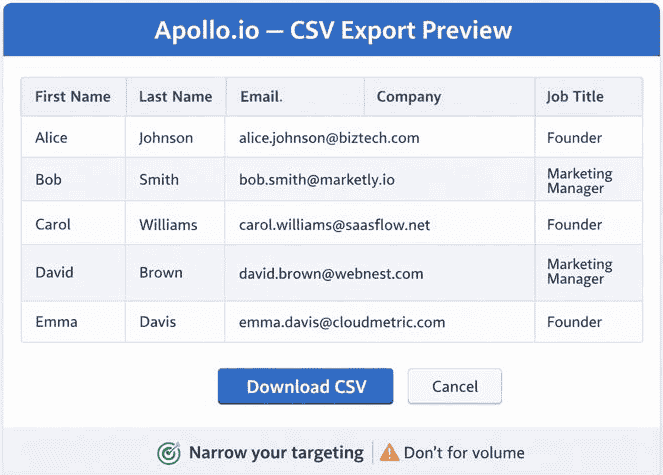
Step 3: Export Leads from Apollo.io
Export leads as CSV with:
- First name
- Last name
- Company name
- Job title
Keep it simple — you can enrich later.
Step 4: Upload Leads into Instantly.ai
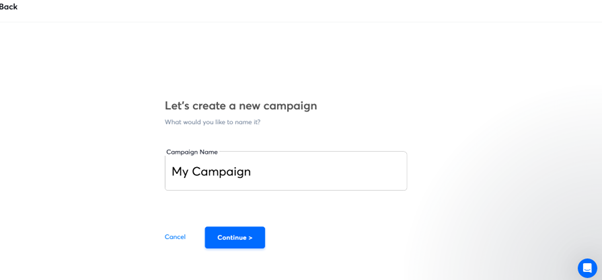
In Instantly.ai:
- Create a new campaign
- Upload your CSV
- Map fields correctly
This step connects your research with execution.
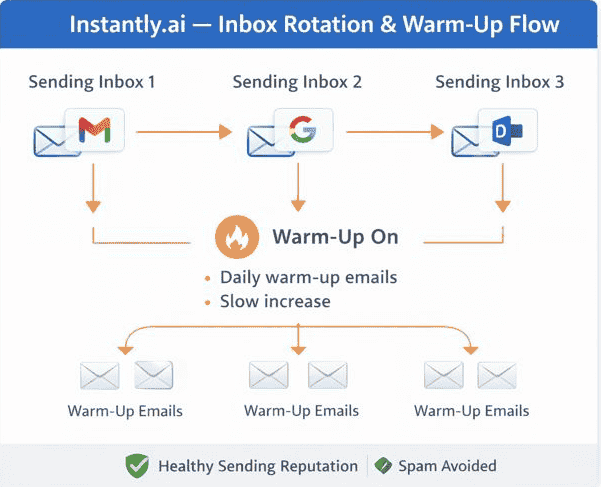
Step 5: Set Up Email Accounts & Warm-Up
This step protects your inbox reputation.
In Instantly.ai:
- Add multiple sending inboxes
- Enable warm-up
- Turn on inbox rotation
Why this matters:
It keeps your emails out of spam.
Step 6: Create Your Cold Email Sequence
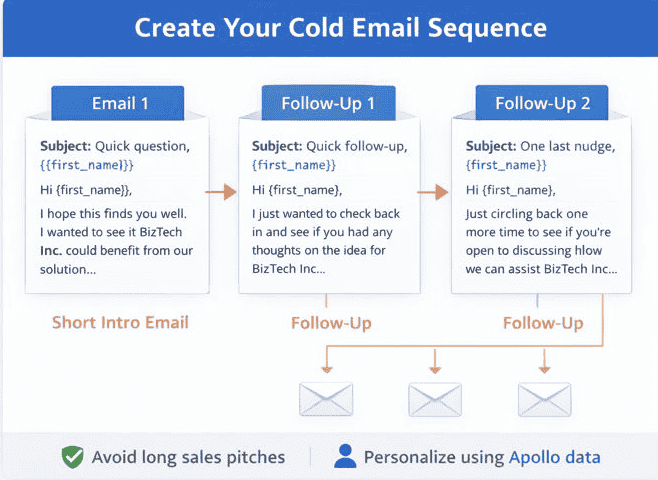
Keep it simple:
- 1 short intro email
- 1–2 follow-ups
- Personalize using Apollo data
Avoid long sales pitches.
Step 7: Launch the Campaign
Before launching:
- Start with low daily limits
- Monitor bounce rate
- Watch replies
Gradually scale once results are stable.
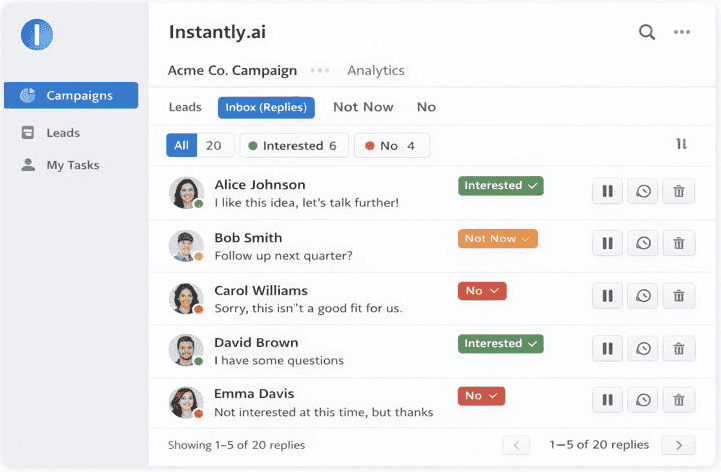
Step 8: Manage Replies & Optimize
Once replies come in:
- Respond manually (human touch matters)
- Pause uninterested leads
- Adjust subject lines if needed
Automation helps start conversations — humans close them.
Common Mistakes to Avoid
- Sending too many emails too fast
- Poor targeting
- Over-automation without review
- Ignoring warm-up
- Long, salesy email copy
When This Workflow Works Best
- B2B services
- Agencies
- SaaS startups
- Consultants
- Recruiters
- Small sales teams
If you’re new to outbound sales, this Apollo + Instantly workflow is one of the simplest systems to launch without technical skills.
Final Thought
You don’t need a complex tech stack to run outbound sales.
With:
- Apollo.io for leads
- Instantly.ai for execution
You get a clear, scalable, beginner-friendly workflow that grows with your business.
Automation isn’t about replacing effort —
it’s about using your time where it matters most.
FAQs
❓ Do I need technical skills to use Apollo.io and Instantly.ai together?
No. Both tools are beginner-friendly and designed for non-technical users.
❓ Can I use this workflow if I’m a solo founder?
Yes. This workflow is ideal for solo founders and small teams starting outbound sales.
❓ Should I warm up email accounts before launching campaigns?
Yes. Email warm-up is essential to avoid spam issues and protect deliverability.
❓ How many emails should I send per day as a beginner?
Start small (10–20 per inbox per day) and increase gradually once results are stable.
❓ Do I need to personalize every email?
Basic personalization using job title or company name is enough to start.
❓ Can I use Apollo.io only for leads and another tool for sending emails?
Yes. Many teams use Apollo for lead sourcing and Instantly.ai for email automation.
❓ Is this workflow suitable for agencies?
Yes. Agencies often use this setup to scale outbound campaigns safely.