
Table of Contents
How to Build a Cold Email List From Scratch
Building a cold email list is the foundation of any successful outreach campaign. Without the right list, even the best email copy won’t get results.
Most beginners make one critical mistake — they jump straight into writing emails and launching campaigns without first building a targeted, high-quality lead list.
The Result?
Low reply rates, Poor deliverability, and Wasted effort.
Here’s the reality:
👉 Your success in Cold email depends more on who you reach than what you write.
A well-built list ensures:
- You’re reaching the right decision-makers
- Your emails stay relevant and personalized
- Your campaigns generate consistent replies
On the other hand, a poor-quality list leads to:
- High bounce rates
- Low engagement
- Damaged sender reputation
That’s why list building isn’t just a step — it’s the foundation of your entire outbound strategy.
In this step-by-step guide, you’ll learn exactly how to build a cold email list from scratch, including:
- How to define your ideal customer profile (ICP)
- Where to find high-quality leads
- How to extract and verify email addresses
- How to organize and segment your list for better results
By the end of this guide, you’ll have a clear, repeatable system to build a list that doesn’t just look good on a spreadsheet — but actually converts into replies, meetings, and revenue.
🎯Step 1: Define Your Ideal Customer Profile (ICP)
Before you collect a single email, you need absolute clarity on who you’re targeting.
Most beginners skip this step—and that’s exactly why their cold emails fail.
👉 If your targeting is wrong, nothing else matters:
- Not your copy
- Not your follow-ups
- Not your tools
🧠 What Is an Ideal Customer Profile (ICP)?
Your Ideal Customer Profile (ICP) is a clear description of the type of business or person who is most likely to need your offer and respond to your outreach.
Think of it as:
👉 “Who is the easiest person for me to get a reply and convert?”
🔍 Key Factors to Define Your ICP
1. Industry (Where do they operate?)
Choose a specific niche instead of going broad.
Examples:
- SaaS companies
- eCommerce brands
- Marketing agencies
- Coaches / Consultants
👉 Tip: Start with one industry to avoid diluted messaging
2. Job Roles (Who are you contacting?)
You’re not emailing companies—you’re emailing decision-makers.
Examples:
- CEO / Founder → Final decision
- Marketing Manager → Campaign execution
- Sales Head → Lead generation focus
👉 Each role needs a different message
3. Company Size (Who can afford your solution?)
This impacts:
- Budget
- Needs
- Complexity
Examples:
- Startups (1–10 employees) → Need simple solutions
- SMBs (10–50) → Growth-focused
- Enterprises → Complex systems
4. Location (Where are they based?)
Location affects:
- Time zones
- Language tone
- Market maturity
👉 Example:
- US market → More competitive but higher ROI
- Local markets → Easier entry, lower competition
🛠️ Real Walkthrough
Let’s build a sample ICP together..
👉 Goal: Sell AI tools for sales automation
Step 1: Pick Industry
→ SaaS companies
Step 2: Choose Role
→ Sales Manager
Step 3: Define Company Size
→ 10–50 employees
Step 4: Location
→ US-based startups
✅ Final ICP Example:
👉 “Sales Managers at US-based SaaS companies with 10–50 employees who want to improve lead generation”
💡Why This Works
Now your messaging becomes:
- Clear
- Relevant
- Personalized
Instead of:
❌ “We help businesses grow”
You say:
✅ “Helping SaaS sales teams generate more qualified leads using AI”
📈 Impact on Your Results
When your ICP is clear:
- Open rates increase
- Reply rates improve
- Conversions become easier
👉 Because your message feels relevant, not random
⚠️ Common Mistakes to Avoid
❌ Targeting “everyone”
❌ Mixing multiple industries
❌ Ignoring job roles
❌ Using generic messaging
👉 Narrow targeting = Better results
🚀 Pro Tip (High Performance Strategy)
Start with:
👉 1 Industry
👉 1 Role
👉 1 Problem
Then expand after you see results.
🎯 Key Takeaway
👉 The more specific your ICP, the easier your outreach becomes
Because:
- You know what to say
- You know who to target
- You know what problem to solve
🚀 Your Next Step
👉 Before you send your next cold email:
Define your ICP in one sentence.That alone can double your reply rates.
🔍 Step 2: Find Target Leads on LinkedIn
Once your ICP is clear, the next step is to find the right people to reach out to.
And one of the most powerful platforms for B2B prospecting is
👉 LinkedIn
It gives you direct access to:
- Decision-makers
- Verified professional data
- Real-time company insights
🧠 Why LinkedIn Works for Lead Generation
Unlike random databases, LinkedIn profiles are:
- Regularly updated
- Professionally accurate
- Highly targeted
👉 This means better:
- Targeting
- Personalization
- Reply rates
🔍 How to Find Target Leads (Step-by-Step)
1. Use LinkedIn Search Filters
Start with LinkedIn’s search bar and switch to “People” search.
Then apply filters like:
- Location → Target your ideal market
- Current Company → Focus on specific companies or industries
- Industry → SaaS, marketing, eCommerce, etc.
- Connections → 2nd-degree (best for outreach)
👉 This helps narrow down high-quality prospects quickly
2. Filter by Job Title (Most Important Step)
Your ICP defines who you should contact.
Use keywords like:
- “Founder”
- “CEO”
- “Marketing Manager”
- “Sales Head”
👉 Pro Tip: Try variations
Example:
➤ “Head of Sales” vs “Sales Director”
3. Filter by Company Size & Type
Match this with your ICP:
- Small teams → Faster decisions
- Mid-size companies → Growth-focused
- Large companies → Structured processes
👉 This ensures your offer is relevant
4. Save Profiles That Match Your ICP
Once you find the right people:
- Save profiles manually
- Add to a list (spreadsheet or tool)
- Track:
- Name
- Role
- Company
- Profile link
👉 This becomes your lead database
🛠️ Real Walkthrough (Example)
👉 ICP: Sales Managers in SaaS (US, 10–50 employees)
Step 1:
Search:
“Sales Manager SaaS”
Step 2:
Apply filters:
- Location → United States
- Industry → Software / SaaS
- Connections → 2nd degree
Step 3:
Open profiles and check:
- Role relevance
- Company size
- Activity level
Step 4:
Save 20–50 profiles per session
📈 Pro Tips for Better Lead Quality
✅ Check Activity Level
- Are they posting or engaging?
👉 Active users reply more
✅ Look for Pain Signals
- Hiring posts
- Growth announcements
- Problems they mention
👉 These make your outreach highly personalized
✅ Focus on 2nd-Degree Connections
- Higher acceptance rate
- Warmer outreach
⚠️Common Mistakes to Avoid
❌ Targeting too broadly
❌ Ignoring ICP filters
❌ Saving irrelevant profiles
❌ Not tracking leads properly
👉 This leads to low-quality outreach
🚀 Advanced Tip (High ROI)
Don’t just collect leads—
👉 Collect qualified leads
Quality > Quantity every time.
🎯 Key Takeaway
LinkedIn is powerful not because of volume—
But because of precision targeting.
👉 The better your filtering, the better your results.
🚀 Your Next Step
👉 Open LinkedIn right now
Search your ICP
Save your first 20 leadsThat’s how your outreach system starts.
🧰 Step 3: Use Lead Generation Tools (Build a High-Quality Prospect List)
After finding prospects on LinkedIn, the next step is to organize, enrich, and scale your lead collection using dedicated tools.
Manual searching works—but it doesn’t scale.
👉 Lead generation tools help you:
- Find more prospects faster
- Get verified data (emails, company info)
- Build a structured outreach list
🧠 Why You Need Lead Generation Tools
LinkedIn gives you:
👉 Profiles
But tools give you:
👉 Usable data + scalability
Without tools:
- You waste time manually searching
- You miss verified contact details
- Your outreach becomes inconsistent
🛠️ Best Lead Generation Tools
🔹 1. All-in-One Platform (Best for Beginners)
👉 Apollo.io
What it does:
- B2B contact database
- Email finder + verification
- Basic outreach features
👉 Best for:
- Beginners
- Freelancers
- Small teams
🔹 2. Email Finder Tools
👉 Hunter.io
👉 Snov.io
What they do:
- Find professional emails
- Verify email accuracy
👉 Best for:
- Clean, verified contact data
🔹 3. Scraping Tools (For Advanced Users)
These tools extract data directly from platforms like LinkedIn.
👉 Use carefully (to avoid account risk)
👉 Best for:
- Scaling lead collection
- Bulk data extraction
🛠️ Real Walkthrough (Step-by-Step)
👉 Let’s continue your ICP:
Sales Managers in SaaS (US, 10–50 employees)
Step 1: Use LinkedIn for Discovery
Find profiles matching your ICP
Step 2: Use Tool to Expand Data
Go to Apollo.io
Search:
- Industry → SaaS
- Role → Sales Manager
- Location → US
Step 3: Filter Results
- Company size
- Job title
- Activity
Step 4: Build Your Lead List
Export or save leads with:
- Name
- Role
- Company
📊 What a Good Lead List Looks Like
| Name | Role | Company | Source | |
|---|---|---|---|---|
| John | Sales Manager | SaaS Co | john@… | Apollo |
👉 This becomes your outreach-ready database
📈 Pro Tips for Better Lead Quality
✅ Combine LinkedIn + Tools
- LinkedIn → Find people
- Tools → Extract & verify data
👉 Best of both worlds
✅ Focus on Intent-Based Leads
Look for:
- Hiring posts
- Growth signals
- Active profiles
👉 Higher reply chances
✅ Don’t Over-Collect Leads
- Start with 50–100 leads
- Test → then scale
⚠️ Common Mistakes to Avoid
❌ Relying only on scraping tools
❌ Collecting unverified data
❌ Ignoring ICP filters
❌ Going for quantity over quality
🚀 Advanced Strategy (High ROI)
👉 Build a hybrid system:
- LinkedIn → Targeting
- Apollo.io → Data + emails
- Email tools → Outreach
👉 This creates a complete lead generation engine
🎯 Key Takeaway
Lead generation tools don’t just save time—
They improve accuracy, scale, and results.
👉 Better leads = Better outreach = Better conversions
🚀 Your Next Step
👉 Pick one tool (like Apollo.io)
Build your first 50-lead list todayThat’s your starting point.
📥 Step 4: Find & Extract Email Addresses
Once you’ve built your lead list, the next step is to find accurate, verified email addresses so you can actually reach your prospects.
This is where your outreach either:
👉 Succeeds (clean data)
👉 Fails (bad data)
Because even the best campaign won’t work if your emails:
- Bounce
- Land in spam
- Never reach the inbox
🧠 Why Email Accuracy Matters
Your results depend on:
👉 Email quality, not just quantity
Bad emails lead to:
- High bounce rates
- Poor sender reputation
- Low deliverability
👉 Which means:
❌ No opens
❌ No replies
❌ No conversions
🛠️ Methods to Find & Extract Emails
🔹1. Use Email Finder Tools (Most Effective)
These tools are the fastest and most reliable way to find professional email addresses.
👉 Popular tools:
- Apollo.io
- Hunter.io
- Snov.io
How it works:
- Enter name or company domain
- Tool generates possible emails
- Shows verification status (valid / risky / unknown)
👉 Always choose verified emails
🔹2. Check Company Websites (Manual Method)
Sometimes emails are publicly available.
👉 Where to check:
- Contact page
- Team page
- About section
👉 Best for:
- Small businesses
- Agencies
- Startups
🔹3. Use LinkedIn Integrations (Fast Workflow)
Many tools integrate directly with
👉 LinkedIn
👉 What you can do:
- Visit a profile
- Click extension
- Extract email instantly
👉 Saves time and keeps workflow smooth
🛠️ Real Walkthrough
👉 Let’s continue your ICP:
Sales Managers in SaaS (US)
Step 1: Select a Lead
From your saved LinkedIn list
Step 2: Use Tool
Search in Apollo.io
Step 3: Extract Email
Example:
john@company.com
Check:
- Confidence score
- Validity
Step 4: Save in Sheet
| Name | Role | Company | Status | |
|---|---|---|---|---|
| John | Sales Manager | SaaS Co | john@… | Verified |
👉 Now your lead is outreach-ready
📈 Pro Tips for Better Results
✅ Always Verify Emails
- Avoid “risky” or “unknown” emails
👉 Keeps bounce rate low
✅ Prefer Domain-Based Emails
- name@company.com ✅
- Gmail/Yahoo ❌
👉 Improves trust + deliverability
✅ Extract in Small Batches
- 20–50 leads per day
👉 Better quality control
✅ Cross-Check with Multiple Tools
- Use 2 tools for accuracy
👉 Improves success rate significantly
⚠️ Common Mistakes to Avoid
❌ Using unverified emails
❌ Extracting bulk data blindly
❌ Ignoring bounce rate
❌ Rushing the process
🚀 Advanced Strategy
👉 Combine methods:
- Tool → Primary email
- Website → Backup validation
- LinkedIn → Context
👉 This creates a high-quality, reliable lead list
🎯 Key Takeaway
👉 Always focus on quality over quantity
Because:
- 50 good emails > 500 bad emails
🚀 Your Next Step
👉 Extract your first 20 verified emails today
Focus on accuracy—not speedThat’s how you build a winning outreach system.
✅ Step 5: Verify Email Addresses
Before you send a single email, you must verify your email list.
This is not optional—it’s one of the most critical steps in cold email outreach.
👉 Skipping verification is one of the fastest ways to:
- Damage your domain
- Land in spam
- Kill your campaign before it starts
🧠 Why Email Verification Matters
When you send emails to invalid or risky addresses, email providers (like Gmail/Outlook) flag your activity.
This directly impacts your:
- Sender reputation
- Deliverability
- Inbox placement
📉 What Happens Without Verification?
- High bounce rates
- Emails marked as spam
- Domain blacklisting risk
- Drastically lower open & reply rates
👉 Even a 5–10% bounce rate can hurt your campaigns
📈 Benefits of Email Verification
✅ Reduces Bounce Rates
- Removes invalid or non-existent emails
👉 Keeps your list clean and safe
✅ Protects Domain Reputation
- Maintains trust with email providers
👉 Ensures long-term outreach success
✅ Improves Inbox Placement
- More emails land in primary inbox, not spam
✅ Increases Campaign Performance
- Better open rates
- Higher reply rates
- More conversions
🛠️ Best Email Verification Tools
🔹 1. Dedicated Verification Tools
👉 NeverBounce
👉 ZeroBounce
What they do:
- Check email validity
- Detect risky or catch-all emails
- Remove bad data
👉 Best for:
- Bulk verification
- High-volume campaigns
🔹 2. Built-in Tool (All-in-One Option)
👉 Apollo.io
What it offers:
- Email verification within platform
- Confidence scoring
- Easy integration with lead lists
👉 Best for:
- Beginners
- Simple workflows
🛠️ Real Walkthrough
👉 Let’s continue your workflow:
Step 1: Upload Your Lead List
CSV file or manual list
Step 2: Run Verification
Use NeverBounce or ZeroBounce
Step 3: Check Results
Emails will be marked as:
- ✅ Valid
- ⚠️ Risky (catch-all)
- ❌ Invalid
Step 4: Clean Your List
👉 Keep:
- Valid emails
👉 Remove:
- Invalid
- Risky (if possible)
📊 What a Clean List Looks Like
| Status | |
|---|---|
| john@company.com | ✅ Valid |
| info@company.com | ⚠️ Risky |
| test@xyz.com | ❌ Invalid |
👉 Only use verified emails for outreach
📈 Pro Tips for Best Results
✅ Keep Bounce Rate Below 3%
👉 Ideal for safe campaigns
✅ Re-Verify Old Lists
Emails become outdated quickly
👉 Always verify before sending
✅ Avoid Catch-All Emails
These may bounce later
👉 Use carefully or skip
✅ Verify Before Every Campaign
👉 Don’t reuse old data blindly
⚠️ Common Mistakes to Avoid
❌ Skipping verification step
❌ Sending to “unknown” emails
❌ Using outdated lists
❌ Ignoring bounce rate metrics
🚀 Advanced Strategy (High Performance)
👉 Use a 2-layer verification system:
- Tool verification (NeverBounce / ZeroBounce)
- Built-in tool (Apollo) cross-check
👉 This gives:
- Higher accuracy
- Lower risk
- Better deliverability
🎯 Key Takeaway
👉 Clean data is the foundation of successful cold email
Because:
- Deliverability starts with data quality
- Not with copy or tools
🚀 Your Next Step
👉 Before launching your next campaign:
Verify your entire listThat one step can double your results
📊 Step 6: Organize Your Email List (Foundation for Scalable Outreach)
Once you’ve collected and verified your emails, the next step is to organize your data properly.
This step is often ignored—but it directly impacts:
- Personalization
- Campaign performance
- Scaling ability
👉 A messy list = Messy outreach = Poor results
🧠 Why List Organization Matters
When your data is unstructured:
- You send generic emails
- You miss personalization opportunitie
- You lose track of leads
👉 Result:
❌ Low reply rates
❌ Poor conversions
❌ Confusion while scaling
📋 What Data You Should Organize
Your lead list should include:
- Name → For personalization
- Company → Context for outreach
- Email → Verified contact
- Job Title → Tailor your message
- Source → Where you found the lead
📊 Example of a Clean List
| Name | Job Title | Company | Source | |
|---|---|---|---|---|
| John Smith | Sales Manager | SaaS Co | john@… | |
| Sarah Lee | Founder | Agency Co | sarah@… | Apollo |
👉 This structure makes your outreach:
- Targeted
- Organized
- Easy to scale
🛠️ Tools to Organize Your Email List
🔹1. Spreadsheet Tools (Best for Beginners)
👉 Google Sheets
Why use it:
- Simple and free
- Easy to manage small lists
- Great for beginners
👉 Best for:
- 50–500 leads
🔹2. CRM Systems (For Scaling)
👉 CRM (Customer Relationship Management tools)
What they do:
- Track leads
- Manage interactions
- Organize campaigns
👉 Best for:
- Agencies
- Growing businesses
- Large datasets
🛠️ Real Walkthrough
Step 1: Create a Master Sheet
Use Google Sheets
Step 2: Add Columns
Include:
- Name
- Company
- Role
- Source
Step 3: Group Your Leads
Segment by:
- Industry
- Role
- Campaign type
👉 This helps with targeted messaging
Step 4: Clean Your Data
- Remove duplicates
- Fix formatting
- Ensure consistency
📈 Pro Tips for Better Results
✅ Segment Your List
Group leads by:
- Industry
- Role
- Use case
👉 Improves personalization
✅ Add Notes Column
Track:
- Personal insights
- LinkedIn activity
- Pain points
👉 Helps you write better emails
✅ Use Tags (Advanced)
Example:
- “Warm lead”
- “Cold lead”
- “Follow-up required”
✅ Keep Data Updated
- Remove inactive leads
- Update roles/company
⚠️ Common Mistakes to Avoid
❌ Keeping unstructured data
❌ Mixing different ICPs in one list
❌ Not segmenting leads
❌ Ignoring duplicates
🚀 Advanced Strategy
👉 Build a segmented outreach system:
Instead of one list:
- Create multiple lists by ICP
Example:
- SaaS Sales Managers
- Agency Founders
👉 Then send custom campaigns for each segment
🎯 Key Takeaway
👉 Organized data = Better personalization = Better results
Because:
- You send relevant messages
- You track performance
- You scale easily
🚀 Your Next Step
👉 Take 10 minutes today
Organize your first 50 leadsThat alone can improve your reply rates instantly
⚙️ Step 7: Segment Your List for Better Results
One of the biggest mistakes in cold email outreach is this:
👉 Sending the same email to everyone
That approach doesn’t work anymore.
If your message feels generic, people ignore it.
👉 Segmentation is what turns:
- Generic emails → Personalized outreach
- Low replies → High engagement
🧠 Why Segmentation Matters
Your leads are not the same.
They have:
- Different roles
- Different problems
- Different goals
👉 So your message should not be the same.
When you segment your list:
- Your emails feel relevant
- Your messaging becomes targeted
- Your reply rates increase
🔍 How to Segment Your Email List
🔹1. Segment by Industry
Different industries have different needs.
Examples:
- SaaS → Focus on scaling leads
- Agencies → Focus on client acquisition
- eCommerce → Focus on conversions
👉 Your messaging should match their business model
🔹2. Segment by Job Role
You’re emailing people—not companies.
Each role cares about different outcomes:
- CEO / Founder → Growth, revenue
- Marketing Manager → Campaign performance
- Sales Head → Lead generation
👉 Same offer, different angle
🔹3. Segment by Pain Points (Most Powerful)
This is where real personalization happens.
👉 Ask:
- What problem are they facing?
- What are they trying to improve?
Examples:
- Low reply rates
- Poor lead quality
- Time-consuming outreach
👉 Speak directly to that pain
🛠️ Real Walkthrough
Step 1: Open Your Lead Sheet
(From previous step)
Step 2: Create Segments
Example:
| Segment | Description |
|---|---|
| SaaS Sales Managers | Focus on lead generation |
| Agency Founders | Focus on client acquisition |
| Marketing Managers | Focus on campaign ROI |
Step 3: Group Your Leads
Assign each lead to a segment
Step 4: Customize Messaging
Instead of one email:
❌ Generic:
“We help businesses grow”
✅ Segmented:
“We help SaaS sales teams generate more qualified leads”
📈 Impact on Your Results
When you segment properly:
- Open rates improve
- Replies increase
- Conversions become easier
👉 Because your message feels relevant, not random
📊 Simple Segmentation Example
| Name | Role | Industry | Segment |
|---|---|---|---|
| John | Sales Manager | SaaS | SaaS Sales |
| Sarah | Founder | Agency | Agency Owners |
⚠️ Common Mistakes to Avoid
❌ Sending one message to all leads
❌ Ignoring job roles
❌ Not identifying pain points
❌ Overcomplicating segmentation
🚀 Advanced Strategy
👉 Use micro-segmentation:
Instead of:
- SaaS companies
Break into:
- SaaS (early-stage)
- SaaS (growth-stage)
👉 This leads to:
- Hyper-personalization
- Higher reply rates
🎯 Key Formula
👉 Segmentation = Higher Personalization = Better Replies
🔥 Pro Tip
Start simple:
- 2–3 segments
Then expand as you grow.
🚀 Your Next Step
👉 Take your current lead list
Create at least 2 segments based on role or industryThen write one custom email per segment
That alone can significantly improve your results.
🚀 Step 8: Prepare for Outreach (Before Sending Emails)
Before you launch your first cold email campaign, you need to prepare your email setup properly.
This step is where most beginners fail.
👉 They start sending emails immediately—
and end up in spam.
🧠 Why Preparation Matters
Email providers (like Gmail/Outlook) evaluate:
- Your domain reputation
- Sending behavior
- Technical setup
👉 If these are not configured correctly:
- Your emails won’t reach inbox
- Your domain can get flagged
- Campaign performance drops
⚙️ What You Need to Do Before Sending Emails
🔹1. Warm Up Your Email Domain
If your email account is new, you cannot start sending emails at scale immediately.
👉 You need to “warm up” your inbox.
What is Email Warm-Up?
It’s a process where your email account:
- Gradually sends and receives emails
- Builds trust with email providers
How to Do It:
- Start sending 5–10 emails/day
- Gradually increase volume
- Use warm-up tools or manual replies
👉 Many tools (like outreach platforms) offer automatic warm-up
📈 Why It Matters:
- Improves deliverability
- Prevents spam flags
- Builds domain reputation
🔹2. Set Up SPF, DKIM, and DMARC
These are email authentication protocols.
They tell email providers:
👉 “This sender is legitimate”
✅ SPF (Sender Policy Framework)
- Verifies sending servers
✅ DKIM (DomainKeys Identified Mail)
- Adds signature to emails
✅ DMARC (Domain-based Message Authentication)
- Protects domain from misuse
💡 Simple Explanation:
👉 Without these:
• Your emails look suspicious
👉 With these:
• Your emails look trusted
⚙️ How to Set Them Up:
- Go to your domain DNS settings
- Add records provided by your email tool
- Verify setup
👉 Most tools guide you step-by-step
🔹3. Start With Low Sending Volume
Don’t send hundreds of emails on Day 1.
That’s a major red flag.
📊 Safe Sending Plan:
- Day 1–3 → 10–20 emails/day
- Day 4–7 → 20–40 emails/day
- Gradually increase
💡 Why This Works:
- Looks natural to email providers
- Reduces spam risk
- Protects your domain
🛠️ Real Setup Workflow
Step 1: Create Email Account
Use your domain (e.g., name@yourcompany.com)
Step 2: Configure SPF, DKIM, DMARC
→ Add DNS records
Step 3: Start Warm-Up
→ Let inbox build reputation
Step 4: Begin Sending Slowly
→ Follow gradual increase plan
📈 Pro Tips for Better Deliverability
✅ Use Multiple Inboxes (Advanced)
Spread sending volume
👉 Reduces risk
✅ Avoid Spam Words
“Buy now”, “Free”, “Urgent”
👉 Keeps emails clean
✅ Keep Emails Simple
Plain text > heavy design
✅ Monitor Performance
Track:
• Open rate
• Bounce rate
• Spam rate
⚠️ Common Mistakes to Avoid
❌ Skipping warm-up
❌ Sending too many emails too fast
❌ Ignoring authentication setup
❌ Using new domains aggressively
🚀 Advanced Strategy
👉 Use a multi-inbox system:
- 2–5 email accounts
- Low volume per inbox
👉 This allows:
- Safer scaling
- Better deliverability
- Higher outreach volume
🎯 Key Takeaway
👉 Deliverability is more important than volume
Because:
- 50 emails in inbox > 500 in spam
🚀 Your Next Step
👉 Set up your email domain properly
Warm it up for a few days
Start sending slowlyThat’s how you build a safe and scalable outreach system
👉 If you’re getting low opens, this Cold email deliverability guide will help you fix it.
📈 Best Practices for Building a High-Quality Lead List
Building a successful cold email campaign doesn’t start with sending emails—it starts with data quality.
👉 A high-quality list = better targeting + better replies + better conversions
✅ Focus on Targeted Leads, Not Volume
Most beginners think:
👉 “More leads = more results”
That’s wrong.
👉 The reality:
100 targeted leads > 1,000 random leads
💡 Why this works:
- Your message becomes relevant
- Higher reply rates
- Better conversion potential
✅ Keep Your List Clean and Updated
Data gets outdated quickly:
- People change jobs
- Companies shut down
- Emails become inactive
👉 Always:
- Remove inactive leads
- Update roles and companies
- Re-verify old lists
✅ Avoid Buying Email Lists
Buying lists may seem like a shortcut—but it’s risky.
👉 Problems:
- Low-quality data
- High bounce rates
- Spam complaints
👉 Result:
❌ Damaged domain reputation
✅ Always Verify Emails
Before sending any campaign:
👉 Verify every email
This helps:
- Reduce bounce rates
- Protect your domain
- Improve deliverability
Common Mistakes to Avoid
❌ Building a Broad, Unqualified List
Targeting everyone = targeting no one
👉 Leads to:
- Generic messaging
- Low engagement
❌ Skipping Email Verification
Even a small percentage of invalid emails can:
- Hurt deliverability
- Reduce inbox placement
❌ Ignoring Personalization
Generic emails get ignored.
👉 People respond to:
- Relevant messages
- Specific pain points
❌ Scaling Too Early
Many beginners:
- Send hundreds of emails too soon
👉 Result:
- Spam flags
- Poor performance
🧠 Pro Workflow (Simple System)
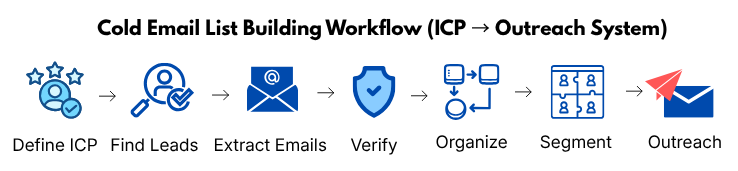
Here’s a proven step-by-step system you can follow 👇
🔁 Complete Workflow
👉 Define ICP → Find Leads → Extract Emails → Verify → Organize → Segment → Outreach
🛠️ Real Walkthrough (Example)
Let’s break this into a real scenario 👇
Step 1: Define ICP
👉 Example:
Sales Managers in SaaS (US, 10–50 employees)
Step 2: Find Leads
Use platforms like
👉 LinkedIn
Filter by:
- Role
- Industry
- Location
Step 3: Extract Emails
Use tools like:
- Apollo.io
- Hunter.io
Step 4: Verify Emails
Use:
- NeverBounce
- ZeroBounce
Step 5: Organize Data
Use:
- Google Sheets
Step 6: Segment Leads
Group by:
- Industry
- Role
- Pain points
Step 7: Start Outreach
- Send personalized emails
- Start with low volume
- Scale gradually
📊 What This System Does
👉 Instead of random outreach, you now have:
- Structured process
- High-quality data
- Better targeting
🎯 Key Takeaway
👉 Cold email success is not about sending more emails
It’s about:
- Sending the right emails
- To the right people
- With the right message
🚀 Your Next Step
👉 Build your first 50-lead list using this workflow
Don’t rush—focus on:
- Accuracy
- Relevance
- Quality
That’s how you get real results.
⚡ Final Checklist Before You Start
- Define your ICP clearly
- Build a targeted lead list
- Extract and verify emails
- Organize and segment your data
- Warm up your email account
- Start with low-volume outreach
FAQs
Here are answers to common questions about building a cold email list :
-
What is the best way to build a cold email list from scratch?
The best way is to follow a structured process:
Define your Ideal Customer Profile (ICP)
Find targeted leads
Extract and verify email addresses
Organize and segment your list
👉 Focusing on quality and targeting gives better results than collecting large amounts of random data. -
How many leads should I start with as a beginner?
Start with 50–100 highly targeted leads.
👉 This allows you to:
Test your messaging
Avoid deliverability issues
Learn before scaling
Quality matters more than quantity. -
Is it legal to collect emails from LinkedIn for cold outreach?
Collecting publicly available business data is generally allowed for B2B outreach, but you must:
Follow local data protection laws (like GDPR, CAN-SPAM)
Provide a clear opt-out option
Avoid spammy behavior
👉 Always use ethical and compliant practices. -
What tools can I use to find and verify emails?
Popular tools include:
Apollo.io (all-in-one lead generation)
Hunter.io (email finding & verification)
NeverBounce (email validation)
👉 Using the right tools improves accuracy and saves time. -
Why is email verification important in cold email outreach?
Email verification helps:
Reduce bounce rates
Protect your domain reputation
Improve inbox placement
👉 Sending emails to invalid addresses can damage your deliverability quickly. -
Should I buy email lists to save time?
No, buying email lists is not recommended.
👉 It often leads to:
Low-quality leads
High bounce rates
Spam complaints
Building your own targeted list is always more effective. -
How do I improve my cold email reply rates?
To improve replies:
Target the right audience
Personalize your emails
Address specific pain points
Keep your message short and clear
👉 Relevance is the biggest factor in getting replies. -
What is the ideal cold email sending volume?
Start small:
10–20 emails per day
Gradually increase over time
👉 This helps maintain deliverability and avoids spam filters. -
How do I segment my email list effectively?
Segment your list based on:
Industry
Job role
Pain points
👉 This allows you to send more personalized and relevant emails. -
How long does it take to see results from cold email outreach?
Results can vary, but typically:
Initial replies: within a few days
Consistent results: within 2–4 weeks
👉 Success depends on targeting, data quality, and messaging.
🎯 Conclusion
Building a cold email list from scratch isn’t complicated—
but it does require the right process and discipline.
Most people fail not because cold email doesn’t work,
but because they skip the fundamentals:
- Targeting
- Data quality
- Proper structure
When you follow a structured system:
- Your emails reach the right people
- Your messaging becomes relevant
- Your reply rates improve naturally
👉 Cold email stops feeling like spam—and starts working like a predictable system
💡 What Actually Makes the Difference
It’s not about:
❌ Sending more emails
❌ Using more tools
It’s about:
✅ Reaching the right audience
✅ Using clean, verified data
✅ Sending thoughtful, personalized messages
📈 The Real Advantage
When your foundation is strong:
- You avoid deliverability issues
- You build long-term outreach success
- You can scale safely without damaging your domain
👉 That’s how beginners turn into consistent performers
🎯 Final Reminder
👉 A small, targeted list will always outperform a large, random one
Because:
- Relevance beats volume
- Quality beats quantity
- Strategy beats shortcuts
🚀 Your Next Step
Start simple:
- Define your ICP
- Build a small, clean list
- Send your first batch of personalized emails
👉 Focus on learning—not scaling