
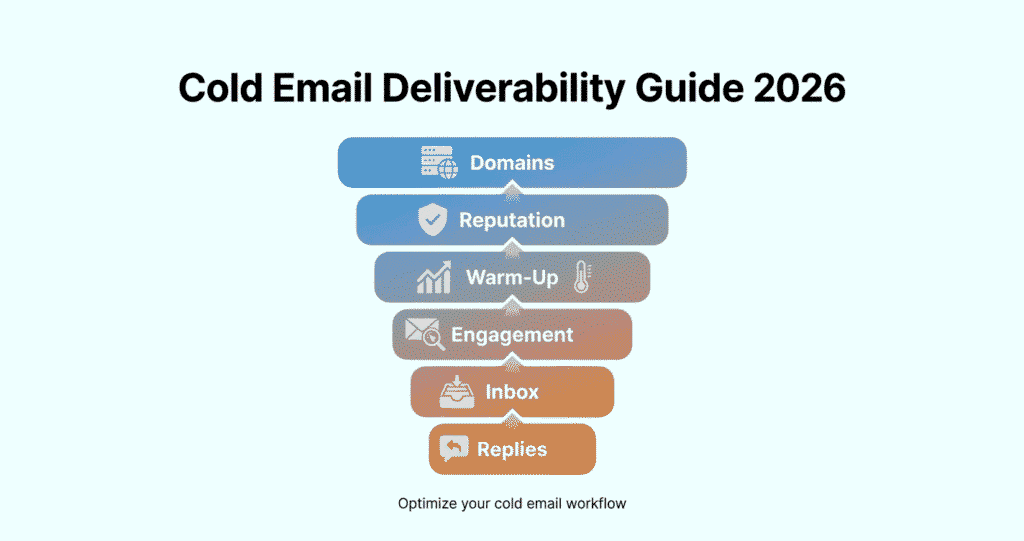
Cold Email Deliverability Guide (2026): How to Avoid Spam & Land in the Inbox
Cold email still works — but only if your emails reach the inbox.
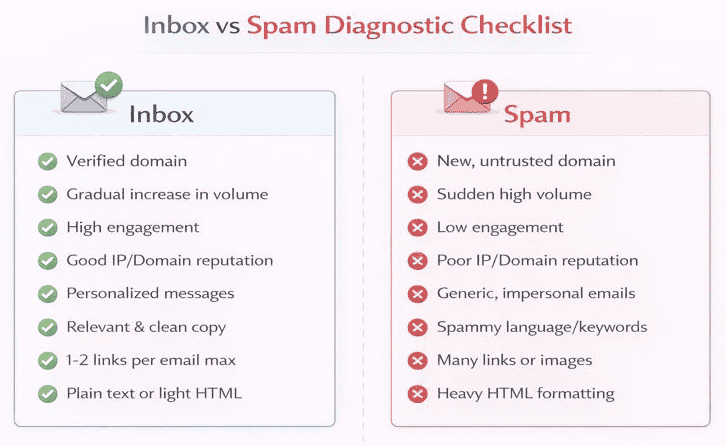
In 2026, inbox providers like Gmail, Outlook, Yahoo, and Apple Mail use advanced AI spam filters that analyze not just your email content, but your domain reputation, sending behavior, authentication, list quality, engagement signals, and sender history.
This means:
- Even well-written emails can go to spam
- Even premium tools can’t fix poor deliverability foundations
- Scaling without warm-up can destroy your domain reputation
This complete cold email deliverability guide shows you:
✔ Why emails go to spam
✔ How to build inbox trust from scratch
✔ How to configure technical email authentication
✔ How to improve open rates, reply rates, and inbox placement
✔ How to safely scale cold outreach without burning domains
Whether you’re a beginner, founder, freelancer, or sales team — this guide gives you a future-proof deliverability system.
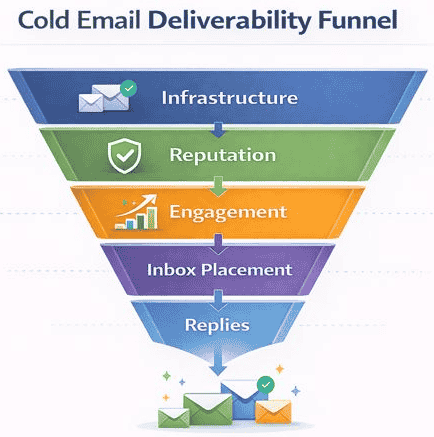
What Is Cold Email Deliverability (And Why It Matters More Than Open Rates)
Cold email deliverability is the ability of your emails to:
- Reach the primary inbox
- Avoid spam, promotions, or junk folders
- Get opened, read, and replied to
Deliverability is not:
❌ Open rate
❌ Sending volume
❌ Email tool choice
It is:
✅ Inbox placement
✅ Sender trust
✅ Reputation preservation
Even a 30% open rate means nothing if half your emails are landing in spam.
How Modern Spam Filters Work in 2026 (Behind the Scenes)
Inbox providers now use AI-driven filtering systems that evaluate:
🔹1. Sender Reputation
- Domain age
- Sending consistency
- Spam complaints
- Bounce rates
- Engagement history
🔹2. Authentication & Infrastructure
- SPF, DKIM, DMARC alignment
- Domain/IP consistency
- Reverse DNS and TLS
🔹3. Email Behavior Signals
- Sudden volume spikes
- Cold-to-warm ratio
- Bounce patterns
- Reply and delete behavior
🔹4. Content Signals
- Spam-trigger phrases
- Overuse of links
- HTML formatting
- Personalization depth
🔹5. Recipient Engagement
- Opens
- Replies
- Deletes
- Mark-as-spam events
👉 One weak layer can ruin the entire campaign.
The 7 Core Pillars of Cold Email Deliverability
This guide is structured around these:
- Domain & infrastructure trust
- Domain warm-up
- Lead list quality & hygiene
- Technical authentication (SPF/DKIM/DMARC)
- Email content & personalization
- Sending behavior & volume scaling
- Monitoring, testing & optimization
Let’s go step by step.
1️⃣ Domain & Infrastructure Trust (Foundation Layer)
Your sending domain is your digital reputation identity.
If your domain looks suspicious — even perfect emails will land in spam.
Best Practices:
- Use a separate outreach domain (not your main business domain)
- Avoid brand-new domains without warm-up
- Match domain age with realistic volume expectations
- Avoid rotating domains too frequently
📌 Example:
Instead of:
yourcompany.com
Use:
getyourcompany.comtryyourcompany.comyourcompanyhq.com
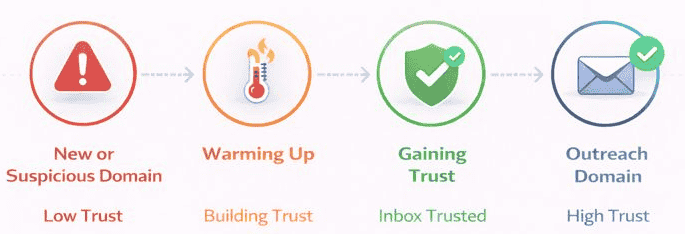
2️⃣ Email Domain Warm-Up (Critical for Inbox Trust)
Sending 50–100 cold emails/day from a new domain signals spam behavior.
Warm-up builds sender trust gradually.
What Happens Without Warm-Up:
- Immediate spam placement
- Domain reputation damage
- Long-term deliverability issues
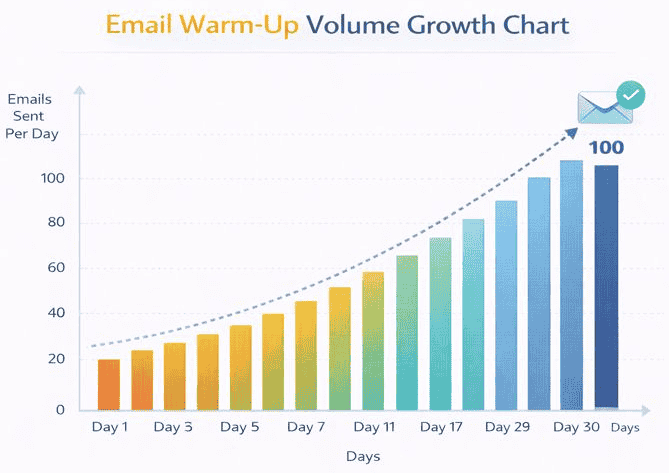
Proper Warm-Up Strategy:
| Day | Daily Sends |
|---|---|
| 1–3 | 5–10 |
| 4–7 | 15–25 |
| 8–14 | 30–50 |
| 15–30 | 60–100 |
Use warm-up tools that:
- Send realistic emails
- Generate replies
- Remove spam flags
- Mimic human patterns
👉 Read our full guide on How to Warm Up Email Domains (Beginner Guide).
3️⃣ Lead List Quality & Hygiene (Deliverability Killer or Multiplier)
Bad leads destroy deliverability faster than bad content.
Common Lead Problems:
❌ Scraped emails
❌ Invalid domains
❌ Generic inboxes (info@, sales@)
❌ Wrong ICP
❌ Cold purchased lists
What Happens:
- High bounce rates
- Spam complaints
- ISP reputation decay
- Blacklisting risk
Best Practices:
- Verify emails before sending
- Use ICP filtering
- Remove catch-all risks
- Clean lists regularly
- Avoid buying leads
👉 Learn how Email verification improves cold email deliverability and reduces bounce risk.
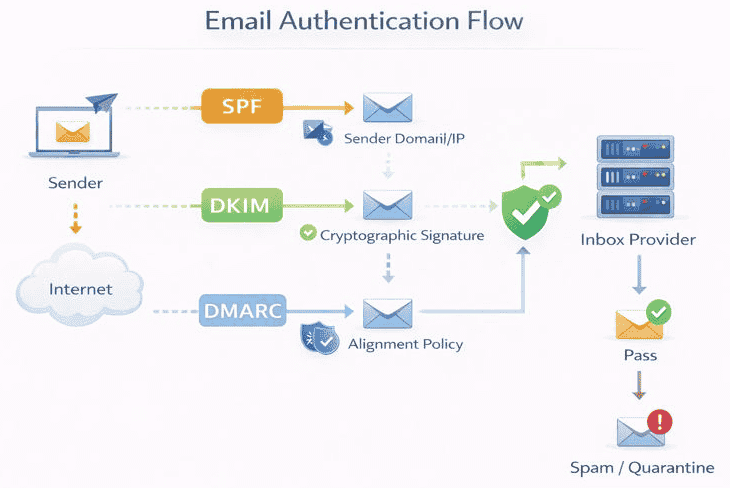
4️⃣ Technical Setup: SPF, DKIM & DMARC (Non-Negotiable)
Without authentication, inbox providers cannot trust your sender identity.
SPF (Sender Policy Framework)
Verifies which servers are allowed to send on behalf of your domain.
DKIM (DomainKeys Identified Mail)
Cryptographically signs your emails so they can’t be altered in transit.
DMARC (Domain-based Message Authentication Reporting & Conformance)
Tells inbox providers what to do when SPF/DKIM fails and gives visibility into abuse.
Best Practice:
- SPF = pass
- DKIM = pass
- DMARC = set to quarantine or reject
👉 See our step-by-step SPF, DKIM & DMARC setup guide for cold outreach.
5️⃣ Cold Email Content Optimization (Human > Marketing)
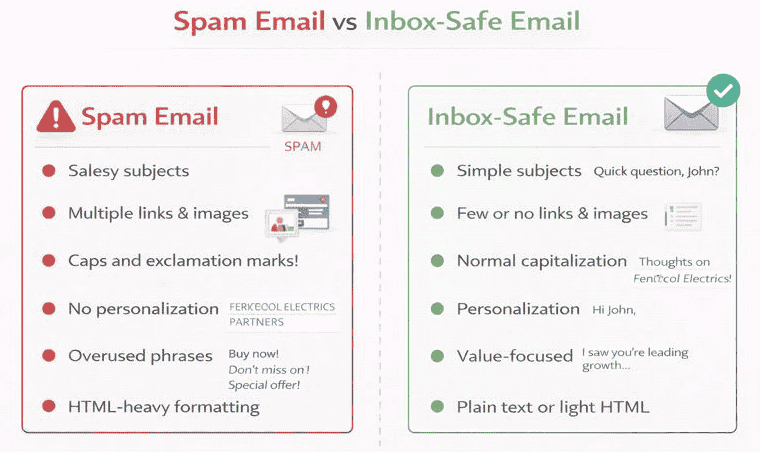
Spam filters now analyze tone, language, structure, formatting, and personalization depth.
Common Spam Triggers:
❌ Sales-heavy language
❌ Too many links
❌ All caps
❌ Overused phrases (“Guaranteed”, “Limited time”)
❌ Over-designed HTML
❌ Image-heavy emails
Inbox-Safe Best Practices:
✅ Plain text or light HTML
✅ One clear CTA
✅ Short sentences
✅ Natural tone
✅ Real personalization
✅ No links in first email
High-Converting Email Structure:
- Personal opener
- Context relevance
- Value insight
- Soft CTA
- Signature
👉 See real Cold email personalization examples that actually get replies.
6️⃣ Sending Behavior & Volume Control (Reputation Layer)
Inbox providers monitor how you send, not just what you send.
Risky Behaviors:
❌ Sudden volume spikes
❌ Large blasts
❌ Sending 24/7
❌ No reply monitoring
❌ Ignoring bounce feedback
Best Practices:
- Ramp volume gradually
- Use human-like send windows
- Limit daily per inbox (30–50 safe)
- Rotate mailboxes
- Pause when spam signs appear
7️⃣ Engagement Signals (What Actually Boosts Inbox Placement)
Inbox providers reward:
✅ Replies
✅ Opens
✅ Forwarding
✅ Threaded conversations
They punish:
❌ Deletes without opening
❌ Spam complaints
❌ Ignored emails
This means:
Your goal isn’t just sending — it’s starting conversations.
8️⃣ Monitoring Deliverability (How to Know If You’re in Spam)
You should actively track:
- Inbox vs spam placement
- Open rate drops
- Reply rate trends
- Bounce rates
- Spam complaint feedback loops
Warning Signs:
🚨 Sudden open rate drop
🚨 No replies
🚨 Gmail spam placement
🚨 Outlook quarantine
🚨 ESP warning emails
Use inbox placement testing tools and seed lists.
👉 Want inbox-safe cold email campaigns without technical headaches? Check out our full review of Instantly.ai, one of the best beginner-friendly cold outreach platforms.
9️⃣ Best Tools for Cold Email Deliverability (2026)
🔹Warm-Up & Reputation:
- Instantly Warmup
- Warmbox
- Mailreach
🔹Email Verification:
- NeverBounce
- Hunter.io
- ZeroBounce
🔹Outreach & Sending:
- Instantly.ai
- Reply.io
- Smartlead.ai
🔹Monitoring & Testing:
- GlockApps
- Mailreach Monitor
- InboxAlly
👉 If you’re building a complete cold outreach stack, check out our Reply.io review, and our guide to The best cold email tools for small businesses to compare platforms side by side.
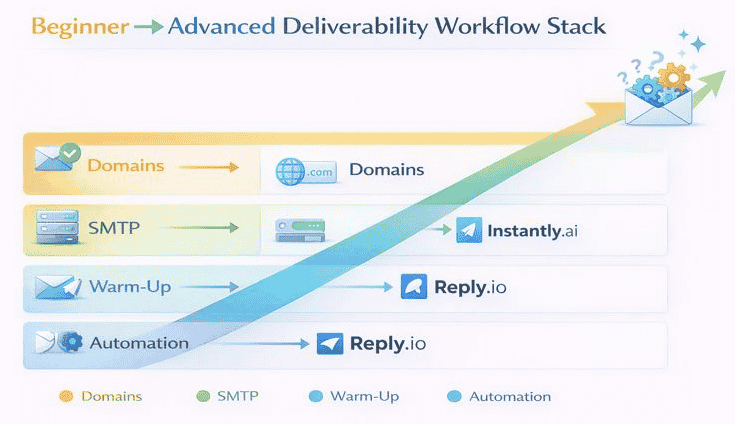
1️⃣0️⃣ Cold Email Deliverability Workflow (Beginner → Advanced)
Beginner Setup:
- Buy outreach domain
- Create inbox
- Set SPF/DKIM/DMARC
- Warm up domain
- Verify leads
- Send 10–20/day
Intermediate:
- Add multiple inboxes
- Increase volume gradually
- Segment ICPs
- Add personalization
- Track inbox placement
Advanced:
- Use domain pools
- Rotate inboxes
- A/B test content
- Monitor reputation
- Scale across channels
1️⃣1️⃣Common Cold Email Deliverability Mistakes (That Kill Campaigns)
| Mistake | Impact |
|---|---|
| Skipping domain warm-up | Immediate spam placement |
| Sending to unverified leads | Bounce spikes |
| No SPF/DKIM/DMARC | Authentication failure |
| Too many links | Spam filtering |
| Over-automation | Low replies |
| Large blasts | Reputation decay |
| Ignoring inbox placement | Blind scaling |
1️⃣2️⃣ How Long Does It Take to Fix Deliverability?
| Issue | Recovery Time |
|---|---|
| New domain warm-up | 2–4 weeks |
| Spam placement | 2–6 weeks |
| Reputation damage | 1–3 months |
| Blacklisting | 1–6 months |
Deliverability is fragile but repairable — with consistency.
1️⃣3️⃣ Cold Email Deliverability Benchmarks (2026)
| Metric | Healthy Range |
|---|---|
| Bounce rate | <2% |
| Open rate | 40–70% |
| Reply rate | 5–15% |
| Spam complaint rate | <0.1% |
| Inbox placement | >85% |
1️⃣4️⃣ Compliance & Legal Layer (Often Ignored)
Deliverability is tied to trust + legality.
Key Requirements:
- CAN-SPAM (US)
- GDPR (EU)
- CASL (Canada)
Best practices:
- Include unsubscribe
- Use business identity
- Honor opt-outs
- Avoid deceptive subject lines
1️⃣5️⃣ Cold Email Deliverability Checklist (Save This)
✅ Outreach domain
✅ Inbox created
✅ SPF/DKIM/DMARC set
✅ Warm-up active
✅ Leads verified
✅ ICP segmented
✅ Email content personalized
✅ Volume controlled
✅ Replies monitored
✅ Inbox placement tested
👉 Struggling with spam placement? Read our step-by-step guide on why cold emails go to spam and how tools fix it before scaling your campaigns.
FAQs
1. What is cold email deliverability?
Cold email deliverability is the ability of your outreach emails to land in recipients’ primary inbox instead of spam or promotions folders.
2. Why do cold emails go to spam?
Cold emails go to spam due to poor domain reputation, lack of email authentication, sending to unverified leads, spam-trigger content, sudden volume spikes, or low recipient engagement.
3. How long does it take to warm up an email domain?
Proper warm-up usually takes 14–30 days depending on domain age, sending volume, and engagement signals.
4. Do I need SPF, DKIM, and DMARC for cold email?
Yes. These authentication protocols are mandatory for inbox trust and are required by Gmail, Yahoo, and Microsoft for reliable deliverability.
5. What is a good cold email open rate in 2026?
A healthy cold email open rate ranges between 40%–70% when deliverability foundations are strong.
6. How many cold emails can I safely send per day?
Per inbox: 30–50/day
Per domain: 100–200/day
Scaling beyond this requires multiple domains and inbox rotation.
7. Does email personalization improve deliverability?
Yes. Personalization increases replies and engagement — which inbox providers use as positive deliverability signals.
8. Are cold email tools bad for deliverability?
No. Poor setups damage deliverability — not tools. Platforms like Instantly.ai and Reply.io include warm-up, throttling, and compliance features that protect reputation when used correctly.
9. Can I recover a burned domain?
Yes, but recovery may take 1–3 months and sometimes requires migrating to a new domain.
10. Is cold email still legal in 2026?
Yes — when compliant with CAN-SPAM, GDPR, and regional email laws. Always include unsubscribe options and avoid deceptive messaging.
Final Takeaway
Cold email success is no longer about sending more emails — it’s about building sender trust.
When you master:
✔ Infrastructure
✔ Warm-up
✔ Authentication
✔ Lead hygiene
✔ Content quality
✔ Engagement signals
You don’t just avoid spam — you create predictable pipeline growth.