
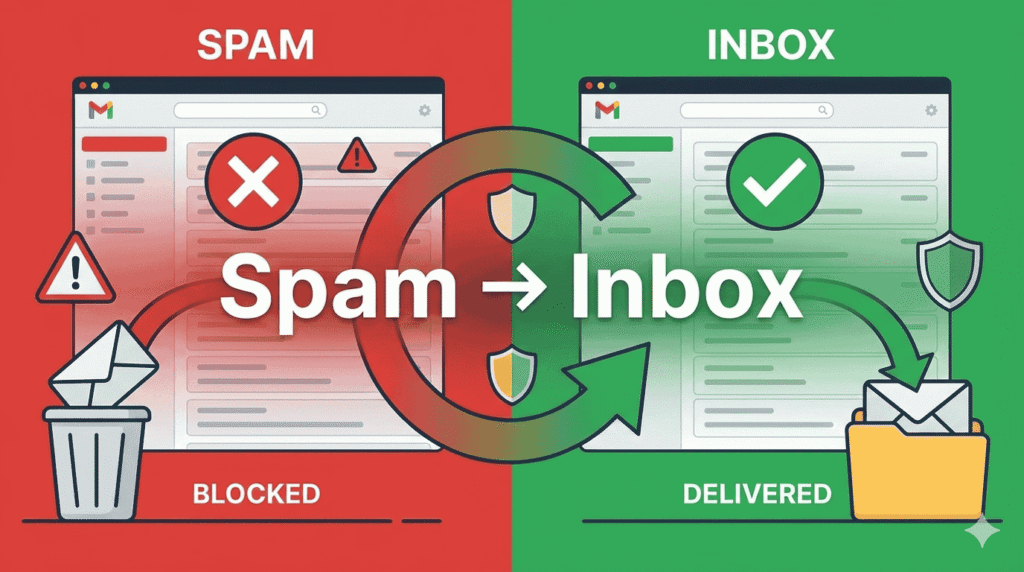
Why Cold Emails Go to Spam (And How Tools Fix It): Complete Deliverability Guide for 2026
The Real Problem Isn’t Cold Email — It’s Deliverability
Cold email still works in 2026 — but only if your emails reach the inbox. Most cold email failures happen before the message is even read. Spam filters, poor sender reputation, wrong setup, and bad outreach practices silently kill campaigns.
This guide explains:
- Why cold emails go to spam (technical + behavioural reasons)
- How spam filters actually work
- How modern cold email tools fix these issues
- Exact tools, workflows, and setups that improve inbox placement
Suitable for Users : SaaS founders, B2B marketers, agencies, recruiters, solopreneurs, and beginners running cold email campaigns.
How Spam Filters Decide Where Your Email Goes (Inbox vs Spam)
Spam filters don’t judge a single email — they judge you as a sender.
Key Evaluation Areas:
- Sender reputation (domain + IP)
- Authentication (SPF, DKIM, DMARC)
- Engagement signals (opens, replies)
- Content patterns
- Sending behavior
- Recipient behavior
📌 Important: Even a perfectly written email goes to spam if your sender reputation is weak.
1. No Domain Authentication (SPF, DKIM, DMARC Missing)
What Happens
If your domain isn’t authenticated, email providers can’t verify that you are allowed to send emails from it.
Result
- Emails flagged as spoofed
- High spam probability
How Tools Fix This
Modern cold email tools:
- Auto-check authentication
- Provide step-by-step DNS setup
- Warn before sending campaigns
Tools That Help:
- Google Workspace / Outlook
- Instantly.ai
- Mailreach
- Smartlead
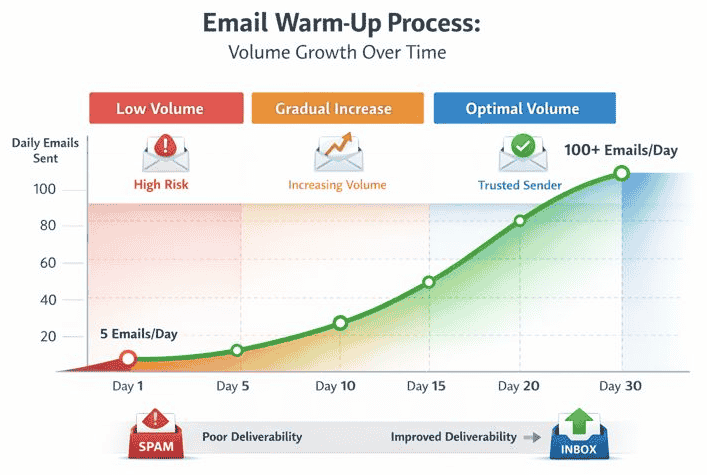
2. New or Cold Domains Without Warm-Up
What Happens
New domains have zero trust. Sending 50–100 emails/day instantly looks suspicious.
Result
- Domain reputation damage
- Long-term deliverability issues
How Tools Fix This
Email warm-up tools:
- Send human-like emails
- Generate replies automatically
- Gradually increase volume
Recommended Tools:
- Instantly Warmup
- Mailreach
- Warmbox
3. High Sending Volume & Unnatural Sending Patterns
What Happens
Spam filters track:
- Emails/hour
- Sudden spikes
- Time consistency
Red Flags
- 200 emails in 10 minutes
- Same subject line to all leads
How Tools Fix This
Cold email tools:
- Randomize send times
- Throttle volume
- Mimic human behavior
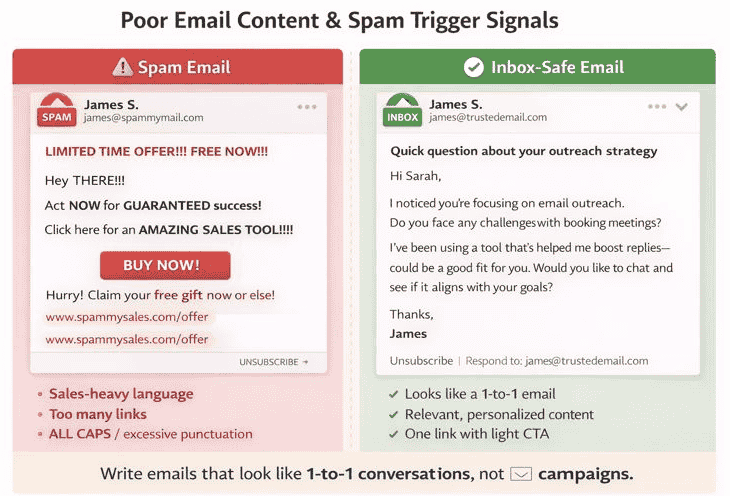
4. Poor Email Content & Spam Trigger Signals
Common Content Mistakes
- Sales-heavy language
- Too many links
- All caps / excessive punctuation
- Overused phrases (“Guaranteed”, “Free now”)
How Tools Fix This
- Spam score testing
- Content analysis
- AI-assisted personalization
Best Practice: Write emails that look like 1-to-1 conversations, not campaigns.
5. Low Engagement (No Opens, No Replies)
What Happens
Spam filters track recipient behavior:
- Opens
- Replies
- Deletes without reading
Low engagement = future emails go to spam.
How Tools Fix This
- Personalization at scale
- Smart follow-ups
- A/B testing subject lines
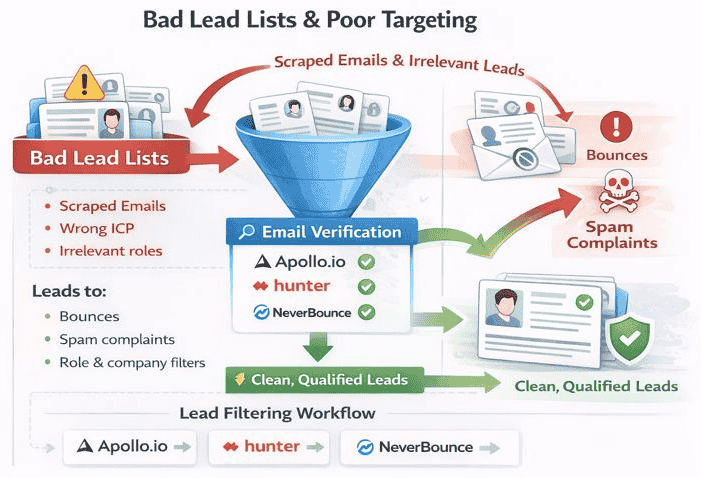
6. Bad Lead Lists & Poor Targeting
What Happens
Sending to:
- Scraped emails
- Wrong ICP
- Irrelevant roles
Leads to:
- Bounces
- Spam complaints
How Tools Fix This
- Email verification
- ICP-based targeting
- Role & company filters
Recommended Tools:
- Apollo.io
- Hunter.io
- NeverBounce
7. High Bounce Rates & Invalid Emails
Safe Benchmarks
- Bounce rate: < 3%
- Spam complaints: < 0.1%
How Tools Fix This
- Built-in email verification
- Bounce protection
- Auto-removal of risky emails
8. No Reply Handling or Manual Interaction
What Happens
If recipients reply and you never respond, engagement drops.
How Tools Fix This
- Unified inbox
- Auto-pause on reply
- Manual reply reminders
📌 Inbox interaction = positive reputation signal
9. Over-Automation & Robotic Outreach
Spam Signals
- Same email to everyone
- Same follow-up timing
- No contextual relevance
How Tools Fix This
- Spintax personalization
- Dynamic fields
- Behavior-based follow-ups
10. Ignoring Deliverability Monitoring
What Happens
Problems go unnoticed until campaigns fail.
How Tools Fix This
- Inbox placement tests
- Spam folder monitoring
- Domain health alerts
Monitoring Tools:
- GlockApps
- MailTester
Complete Cold Email Deliverability Stack (Recommended)
| Purpose | Tool Type |
| Email account | Google Workspace |
| Warm-up | Instantly / Mailreach |
| Lead sourcing | Apollo.io |
| Verification | NeverBounce |
| Outreach | Smartlead / Instantly |
| Monitoring | GlockApp |
Q1. Why do cold emails go to spam even with good content?
Because sender reputation and authentication matter more than content.
Q2. How long does email warm-up take?
Usually 14–30 days for safe sending.
Q3. Do cold email tools guarantee inbox placement?
No — but they significantly reduce risks when used correctly.
Q4. Is cold email legal?
Yes, when compliant with CAN-SPAM and GDPR (B2B context)
Final Takeaway
Cold emails don’t fail because outreach is dead — they fail because deliverability is ignored. Modern cold email tools don’t magically fix spam issues; they systematically remove the causes.
If you focus on:
- Proper setup
- Clean lists
- Smart tools
- Human-like behavior
Cold email remains one of the highest ROI channels in B2B.
FAQs
-
Why do cold emails go to spam?
Cold emails go to spam mainly due to poor sender reputation, missing domain authentication (SPF, DKIM, DMARC), sending from new or un-warmed domains, low engagement rates, and spam-like sending behavior. Content alone doesn’t cause spam — technical setup and sender trust matter more.
-
What are the main reasons cold emails don’t reach the inbox?
The most common reasons are unverified email domains, high bounce rates, sending too many emails too fast, poor targeting, low reply rates, and lack of email warm-up. Email providers judge the sender’s behavior over time, not just one campaign.
-
How do spam filters detect cold emails?
Spam filters analyze sender reputation, email authentication, engagement signals, sending patterns, content structure, and recipient actions. If multiple signals indicate automation, low trust, or irrelevant outreach, the email is redirected to spam or promotions.
-
Does email content alone cause cold emails to go to spam?
No. Email content plays a role, but most cold emails fail due to technical issues like missing authentication, domain reputation problems, or poor engagement history. Even well-written emails can go to spam if the sending setup is weak
-
How long does it take to warm up a cold email domain?
Typically, email warm-up takes 14 to 30 days. New domains should start with very low daily sending volumes and gradually increase while generating opens and replies. Rushing this process can permanently damage domain reputatio
-
Do cold email tools improve deliverability?
Yes, when used correctly. Cold email tools improve deliverability by automating warm-up, controlling sending volume, randomizing send times, personalizing emails at scale, verifying leads, and monitoring inbox placement. They reduce risk but don’t guarantee inbox placement
-
Can cold emails go to spam even after warm-up?
Yes. Warm-up only builds initial trust. Poor targeting, spam complaints, low replies, or aggressive automation after warm-up can still push cold emails to spam. Deliverability must be maintained continuously.
-
What bounce rate is safe for cold email campaigns?
A safe bounce rate is below 3%. Anything higher signals poor list quality and can harm sender reputation. Email verification tools should always be used before launching a cold email campaign.
-
How many cold emails should I send per day per inbox?
For safe deliverability, send 20–40 emails per inbox per day after warm-up. Higher volumes increase spam risk unless managed across multiple inboxes with controlled sending behavior
-
Does personalization help prevent cold emails from going to spam?
Yes. Personalized emails increase opens and replies, which are positive engagement signals for spam filters. Generic, mass-sent emails are more likely to be flagged as automated or irrelevant.
-
Why do cold emails land in spam even with good tools?
Tools can’t fix bad strategy. Poor ICP targeting, irrelevant messaging, low-quality lead lists, and lack of manual engagement can still cause spam placement. Tools support deliverability — they don’t replace good outreach practices.
-
Are cold emails legal if they go to spam?
Cold emails are legal in most regions when compliant with CAN-SPAM, GDPR (B2B context), and local laws. Spam placement is a technical issue, not a legal one, but repeated spam complaints can create compliance risks
-
How can I test if my cold emails are going to spam?
You can test inbox placement using deliverability tools, seed inbox testing, spam score checkers, and by monitoring open rates, bounce rates, and reply rates. Sudden drops usually indicate spam placement issues.
-
Do links in cold emails increase spam risk?
Yes, especially multiple or shortened links. Cold emails should ideally have one link or no links at all. Excessive linking looks promotional and increases spam filter suspicion.
-
What is the best cold email setup to avoid spam?
A safe setup includes a dedicated sending domain, proper SPF/DKIM/DMARC authentication, email warm-up, verified lead lists, low daily sending volume, personalized messaging, and consistent engagement monitoring using cold email tools