
Reply.io Pricing Explained: Plans, Costs & Which One Is Right for You?
Quick takeaway: Reply.io pricing is designed for outbound-focused teams that need multichannel outreach automation. You’re paying for automation depth, channels, and team workflows — not just email sending.
What Is Reply.io & Why Pricing Matters
Reply.io is a sales engagement and outreach automation platform that helps businesses:
- Run cold email campaigns
- Automate LinkedIn, calls, and tasks
- Manage multichannel sales sequences
- Scale outbound outreach with teams
Pricing matters because:
- Reply.io plans differ by channels and automation depth
- Beginners often overpay for features they don’t use
- Team-based pricing impacts scalability and ROI
Reply.io Pricing Plans (Overview)
| Feature | Starter | Professional | Custom / Enterprise |
|---|---|---|---|
| Best for | Solopreneurs & small teams | Growing sales teams | Large teams & agencies |
| Monthly pricing | Entry-level | Mid-range | Custom quote |
| Email outreach | ✅ Yes | ✅ Yes | ✅ Yes |
| Multichannel sequences (email, LinkedIn, calls) | ❌ Limited | ✅ Full access | ✅ Advanced |
| Automation workflows | ❌ Basic | ✅ Advanced | ✅ Custom-built |
| Team collaboration | ❌ No | ✅ Yes | ✅ Yes |
| Analytics & reporting | ❌ Basic | ✅ Detailed | ✅ Advanced & custom |
| CRM integrations | ❌ Limited | ✅ Popular CRMs | ✅ Custom integrations |
| API access | ❌ No | ❌ Limited | ✅ Yes |
| Dedicated support | ❌ Standard | ❌ Standard | ✅ Priority support |
1. Starter Plan
Best for: Solo users & small teams starting cold outreach
Includes:
- Email outreach automation
- Basic sequences
- Limited team features
- Analytics & reporting
Limitations:
- Fewer channels
- Limited advanced automation
2. Professional Plan
Best for: Growing sales teams & agencies
Includes:
- Multichannel outreach (Email + LinkedIn + Calls)
- Advanced sequences & conditions
- CRM integrations
- Team collaboration
3. Custom / Enterprise Plan
Best for: Large sales teams & enterprises
Includes:
- Custom pricing
- Advanced permissions & security
- Dedicated onboarding & support
- API & custom integrations
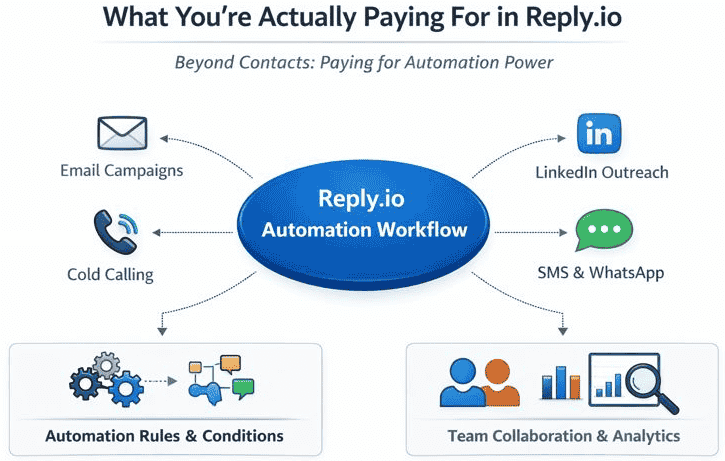
What You’re Actually Paying For in Reply.io
Reply.io pricing isn’t about contacts — it’s about automation capability.
You’re paying for:
- 🔄 Multichannel sequences
- 🧠 Automation logic & conditions
- 👥 User seats & collaboration
- 📊 Advanced analytics & reporting
Reply.io Pricing: Starter vs Professional
Choose Starter if:
- You’re new to cold outreach
- You only run email-based campaigns
- You work solo or with a small team
Choose Professional if:
- You use LinkedIn + email together
- You manage multiple campaigns
- You need CRM syncing & automation
Start with Starter if you’re learning outreach — upgrade only when multichannel automation becomes necessary
Common Pricing Mistakes to Avoid
❌ Paying for multichannel before mastering email
❌ Ignoring seat-based pricing
❌ Using Reply.io without a lead data tool
⚠️ Important: Reply.io does not provide lead databases — you’ll need tools like Apollo.io or Hunter.io.
If you’re evaluating Reply.io against other outreach tools, see our detailed Apollo.io vs Reply.io comparison to understand the feature and pricing differences clearly.
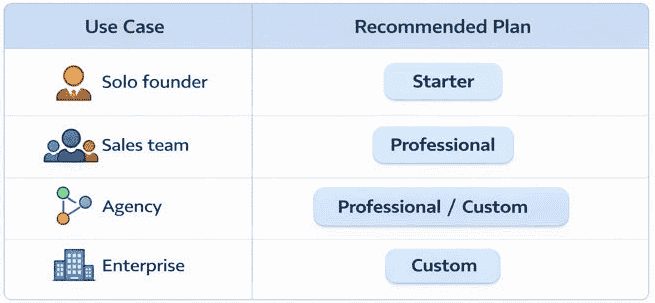
Best Reply.io Plan by Use Case
| Use Case | Recommended Plan |
| Solo founder | Starter |
| Sales team | Professional |
| Agency | Professional / Custom |
| Enterprise | Custom |
Reply.io Pricing vs Competitors
Reply.io is often compared with:
- Instantly.ai (email-first automation)
- Smartlead.ai (deliverability-focused)
- Apollo.io (lead generation)
You can also check out our list of the best Reply.io alternatives for comparison.
Is Reply.io Pricing Worth It?
Pros:
- Powerful automation engine
- True multichannel outreach
- Scales well with teams
Cons:
- No built-in lead database
- Can feel complex for beginners
Verdict: Reply.io pricing is worth it if you need structured, multichannel outbound automation, especially for teams.
Final Recommendation
If you’re running serious outbound campaigns and want automation across multiple channels, Reply.io pricing makes sense. Pair it with a lead data tool for best results.
Try Reply.io’s Starter Plan and scale to Professional when your outreach matures.
FAQs
Does Reply.io offer a free plan?
Reply.io usually offers a trial, but not a permanent free plan.
Is Reply.io good for beginners?
Yes, but beginners should start with email-only workflows.
Can I use Reply.io without LinkedIn automation?
Yes. LinkedIn steps are optional.