
Best Email Verification Tools for Cold Outreach
Cold email success doesn’t start with writing — it starts with deliverability.
You can have the perfect offer, compelling copy, and a highly targeted list… but if your emails don’t land in the inbox, none of it matters.
That’s where most people get it wrong.
They focus on subject lines, templates, and automation — while ignoring the one thing that actually determines results:
👉 Whether your emails get delivered in the first place.
Here’s the reality:
- If your emails bounce → your domain reputation drops
- If your reputation drops → your emails land in spam
- If you land in spam → your campaign fails
It’s a chain reaction — and it all starts with your email list quality.
That’s exactly where email verification tools come in.
👉 They help you clean your email list, reduce bounce rates, and protect your domain reputation — ensuring your emails reach real inboxes instead of spam folders.
In 2026, this is no longer a “nice-to-have” step.
It’s critical infrastructure for anyone serious about cold outreach.
Whether you’re a founder, marketer, or part of a sales team, mastering email verification gives you a massive advantage:
- Better deliverability
- Higher open and reply rates
- Safer and more scalable outreach
In this guide, you’ll learn everything you need to build a clean, high-performing email list:
- What email verification tools actually do
- The best tools to use for different needs
- A step-by-step verification workflow you can follow
- Common mistakes that hurt deliverability (and how to avoid them)
By the end, you’ll have a clear, repeatable system to ensure your emails don’t just get sent — they actually get seen and answered.
📧 What Are Email Verification Tools?
Email verification tools are software solutions that check whether an email address is valid, safe to send, and capable of receiving messages.
But in reality, they do much more than just “check emails.”
They act as a filter layer between your lead list and your outreach campaigns, ensuring that only high-quality, deliverable contacts make it into your sending process.
👉 Think of them as your first line of defense for deliverability.
Without verification, you’re essentially sending emails blindly — risking bounces, spam flags, and damaged domain reputation.
🔍What Email Verification Tools Actually Do
🟩 Validate Email Addresses
- Check if the email format is correct (syntax validation)
- Verify the domain exists (e.g., company domain is active)
- Ping the mail server to confirm inbox availability
👉 Example:
If you have john@company.com, the tool checks:
- Is “company.com” active?
- Does the inbox exist?
🟩 Remove Invalid Emails
- Identify non-existent email addresses
- Detect inactive or disabled mailboxes
- Filter out hard bounce risks
👉 Why this matters:
Sending to invalid emails = High bounce rate → Damages your sender reputation
🟩 Detect Risky Emails
- Catch-all domains (accept all emails but may bounce later)
- Disposable emails (temporary inboxes)
- Role-based emails (info@, admin@, support@)
- Spam traps (used to catch spammers)
👉 These emails are not always “invalid” — but they are risky for cold outreach
🟩 Improve Deliverability
- Reduce bounce rates
- Protect your domain reputation
- Increase chances of landing in the primary inbox
👉 Clean lists = Better inbox placement = Higher reply rates
⚙️How Email Verification Works
Here’s what happens behind the scenes when you verify a list:
- Upload Your Email List
→ CSV file or direct integration - Run Verification Scan
→ Tool checks syntax, domain, and mailbox - Classification Happens
→ Emails are categorized into different groups - Download Clean List
→ You only use safe emails for outreach
📊Email Classification (What You’ll See in Tools)
Most email verification tools categorize results like this:
- Valid
Safe to send — real inbox exists - Invalid
Do not send — will bounce - Risky
Use cautiously — may affect deliverability
💡Real Example
Let’s say you upload 1,000 emails:
- 750 → Valid
- 150 → Invalid
- 100 → Risky
👉 If you skip verification and send to all 1,000:
- Your bounce rate increases
- Your domain reputation drops
👉 If you send only to the 750 valid emails:
- Better deliverability
- Higher open rates
- More replies
🧠 Key Insight
Most people think email verification is about cleaning lists.
👉 But the real benefit is:
Protecting your sending reputation and improving campaign performance.
⚠️Why Email Verification Is Critical for Cold Outreach
Email verification isn’t just a technical step — it’s the foundation of successful cold email campaigns.
No matter how good your copy or targeting is, your results depend on one thing first:
👉 Whether your emails actually reach real inboxes.
Here’s why email verification is critical:
🟩 Reduce Bounce Rates
- Eliminate Invalid Emails
Verification removes email addresses that don’t exist or are inactive. - Protect Your Sender Score
High bounce rates signal spam-like behavior to email providers. - Maintain Sending Reputation
Keeping bounce rates below 2% is crucial for healthy campaigns.
👉 Real Example:
If you send 1,000 emails without verification and 150 bounce → your domain gets flagged quickly.
If you verify and reduce that to 10–20 bounces → your campaigns stay safe.
🟩 Protect Your Domain Reputation
- Avoid Blacklisting Risks
Sending to bad emails can get your domain flagged or blocked. - Build Long-Term Trust
Email providers (Gmail, Outlook) track your sending behavior over time. - Prevent Spam Classification
Poor data quality increases chances of landing in spam folders.
👉 Think of your domain like a credit score:
Bad sending behavior lowers it. Clean data protects it.
🟩 Improve Inbox Placement
- Increase Deliverability Rates
Clean lists help emails land in the primary inbox instead of spam. - Boost Open Rates
Emails that reach real users get opened more often. - Improve Campaign Performance
Better inbox placement = more replies and conversions.
👉 Clean data directly impacts:
Open rate → Reply rate → Revenue
🟩Scale Outreach Safely
- Send Higher Volumes Without Risk
Verified lists allow you to scale campaigns gradually and safely. - Avoid Sudden Reputation Drops
Clean lists reduce negative signals when increasing volume. - Build a Predictable System
Verification ensures consistent performance as you grow.
👉 Without verification, scaling = higher risk
👉 With verification, scaling = controlled growth
⚙️Real Walkthrough (How It Impacts Campaigns)
Let’s compare two scenarios:
❌ Without Email Verification
- Upload 1,000 random emails
- 10–20% bounce rate
- Domain reputation drops
- Emails start landing in spam
- Reply rate = very low
✅ With Email Verification
- Upload 1,000 emails → clean to 750 valid
- Bounce rate < 2%
- Domain reputation stays strong
- Emails land in inbox
- Reply rate improves significantly
🧠 Key Insight
Most people think cold email success depends on:
- Copywriting
- Subject lines
- Automation tools
👉 But in reality, data quality is the hidden factor that drives everything
If your list is bad → nothing works
If your list is clean → everything improves
🚀Final Thought
Email verification is not an optional step —
it’s the difference between failed campaigns and scalable outbound success.
👉 Clean data = Better deliverability = More replies = More revenue
🧰 Best Email Verification Tools (2026)
1. MillionVerifier
Best For:
Cost-effective bulk email verification for cold outreach campaigns
🔑Key Features
- Fast Bulk Verification
Upload large email lists and verify thousands of contacts quickly without delays. - High Accuracy for Large Lists
Reliable validation results that help reduce bounce rates and improve list quality. - Simple Bulk Upload Workflow
Easy-to-use interface — just upload your CSV file and start verification in minutes.
✅ Pros
- Affordable Pricing
One of the most budget-friendly tools for bulk verification. - Quick Processing Speed
Ideal for users handling large datasets regularly. - Beginner-Friendly Setup
No technical knowledge required to get started.
❌ Cons
- Limited Advanced Insights
Doesn’t offer deep analytics like email scoring or domain health tracking. - Basic UI Experience
Functional, but not as feature-rich as premium tools.
⚙️ How to Use MillionVerifier (Step-by-Step)
- Upload Your List → Import CSV file with email contacts
- Start Verification → Tool scans emails for validity and risks
- Review Results → Emails categorized as valid, invalid, or risky
- Download Clean List → Export only safe emails for outreach
- Launch Campaigns → Use clean list in your email tool
💡 Pro Tips for Better Results
- Always Clean Before Sending
Never upload raw lists directly into outreach tools - Focus on Valid Emails First
Prioritize safe contacts to protect deliverability - Re-Verify Old Lists
Email data decays over time — recheck before campaigns
🎯 Who Should Use MillionVerifier?
- Beginners → Looking for a simple, low-cost solution
- Sales Teams → Verifying large lead lists regularly
- Agencies → Managing bulk outreach campaigns
If you’re starting out, this guide shows How to build a high-quality cold email list from scratch.
2. ZeroBounce
Best For:
Advanced deliverability insights combined with accurate email verification
🔑Key Features
- Email Scoring + Analytics
Get a quality score for each email, helping you prioritize the safest and most valuable contacts. - Spam Trap Detection
Identify dangerous emails that can harm your sender reputation if contacted. - Domain Health Insights
Monitor domain activity and risk levels to improve overall deliverability strategy.
✅ Pros
- Advanced Data Insights
Goes beyond basic verification with detailed analytics and scoring. - High Accuracy Verification
Reliable results for both small and large email lists. - Strong Deliverability Focus
Helps improve inbox placement, not just list cleaning.
❌ Cons
- Higher Pricing
More expensive compared to basic verification tools. - Slight Learning Curve
Advanced features may take time for beginners to fully utilize.
⚙️How to Use ZeroBounce (Step-by-Step)
- Upload Your Email List → Import contacts via CSV or integration
- Run Verification Scan → Tool checks validity, spam traps, and risks
- Analyze Email Scores → Identify high-quality vs risky contacts
- Filter Your List → Keep valid emails, remove or isolate risky ones
- Export Clean Data → Use verified list for outreach campaigns
💡 Pro Tips for Better Results
- Prioritize High-Score Emails
Start outreach with the safest contacts for better deliverability - Remove Spam Traps Immediately
Never send emails to flagged addresses - Use Insights for Optimization
Adjust your targeting based on data quality feedback
🎯 Who Should Use ZeroBounce?
- Sales Teams → Focused on improving deliverability and performance
- Agencies → Managing multiple outreach campaigns
- Advanced Users → Needing deeper insights beyond basic verification
👉 Learn how to avoid spam and improve results with our cold email deliverability guide.
3. NeverBounce
Best For:
Continuous email list cleaning and real-time verification for ongoing outreach campaigns
🔑Key Features
- Real-Time Email Verification
Instantly verify emails at the point of entry (forms, CRM, signups) to prevent bad data from entering your system. - Bulk Verification
Upload and clean large email lists before launching cold email campaigns. - Continuous List Cleaning
Automatically keep your email database updated and free from invalid or outdated contacts.
✅ Pros
- Ongoing Data Hygiene
Perfect for teams that regularly add new leads and need continuous cleaning. - Reliable Verification Accuracy
Helps maintain low bounce rates across campaigns. - Flexible Use Cases
Works for both one-time list cleaning and ongoing verification needs.
❌ Cons
- Pricing Can Add Up
Frequent usage may become costly for large-scale campaigns. - Limited Advanced Insights
Focuses more on verification than deep analytics like scoring.
⚙️ How to Use NeverBounce (Step-by-Step)
- Upload or Connect Your Data Source → Import email lists or connect CRM
- Run Bulk Verification → Clean existing lists before campaigns
- Enable Real-Time Verification → Validate emails during lead capture
- Review Results → Identify valid, invalid, and risky emails
- Export Clean List → Use verified contacts for outreach
💡Pro Tips for Better Results
- Enable Real-Time Verification Early
Prevent bad data instead of fixing it later - Clean Lists Regularly
Especially before every campaign launch - Combine with Deliverability Setup
Clean data works best with proper domain configuration
🎯 Who Should Use NeverBounce?
- Sales Teams → Running ongoing outreach campaigns
- Agencies → Managing multiple client databases
- Growing Businesses → Continuously generating new leads
4. Bouncer
Best For:
High-accuracy email verification with a simple, easy-to-use interface
🔑Key Features
- High Precision Email Validation
Delivers highly accurate verification results, helping you confidently remove invalid and risky emails. - Clear Email Categorization
Classifies emails into valid, invalid, and risky categories with easy-to-understand labels. - Bulk Verification Support
Upload and verify large email lists quickly without complexity.
✅ Pros
- Strong Accuracy Levels
Ideal for maintaining low bounce rates and protecting deliverability. - Simple and Clean Interface
Easy to use even for beginners with no technical background. - Transparent Results
Clear categorization makes decision-making faster and easier.
❌ Cons
- Limited Advanced Features
Doesn’t offer deep analytics like email scoring or domain insights. - Less Known Compared to Competitors
Fewer integrations compared to larger tools in the market.
⚙️How to Use Bouncer (Step-by-Step)
- Upload Your Email List → Import CSV file with contacts
- Run Verification Scan → Tool checks validity and risk levels
- Review Categorized Results → Identify safe vs risky emails
- Filter Your List → Keep only high-quality contacts
- Export Clean Data → Use verified list for outreach campaigns
💡Pro Tips for Better Results
- Focus on High-Confidence Emails First
Start campaigns with verified “safe” contacts - Handle Risky Emails Carefully
Test in small batches before full campaigns - Use Regularly for List Maintenance
Keep your data clean over time
🎯 Who Should Use Bouncer?
- Beginners → Wanting a simple and accurate verification tool
- Sales Teams → Needing reliable results without complexity
- Small Businesses → Looking for easy list cleaning solutions
5. Emailable
Best For:
Flexible credit-based email verification for frequent list uploads and ongoing campaigns
🔑Key Features
- Flexible Credit Usage Model
Pay only for what you use, making it ideal for teams with varying verification needs. - Handles Unknown Emails Better
Advanced detection helps classify tricky or uncertain email addresses more accurately. - Bulk + Real-Time Verification
Supports both large list uploads and real-time validation for lead capture.
✅ Pros
- Cost-Efficient for Frequent Users
Great for users who verify lists regularly without committing to fixed plans. - Balanced Accuracy + Flexibility
Performs well across different types of email lists. - Easy Integration Options
Works with common tools and workflows for smoother operations.
❌ Cons
- Limited Advanced Analytics
Doesn’t offer deep insights like email scoring or domain tracking. - Interface Can Feel Basic
Focuses more on functionality than advanced UI experience.
⚙️How to Use Emailable (Step-by-Step)
- Upload Your Email List → Import CSV or connect your data source
- Run Verification Scan → Tool checks validity and risk categories
- Review Results → Identify valid, invalid, and unknown emails
- Filter Your List → Keep high-quality contacts for outreach
- Export Clean Data → Use verified list for campaigns
💡 Pro Tips for Better Results
- Re-Verify Unknown Emails
Run a second check or test in small batches before sending - Use Credits Strategically
Focus on high-priority lists to maximize value - Combine with Segmentation
Treat unknown/risky emails differently in campaigns
🎯 Who Should Use Emailable?
- Agencies → Managing multiple client lists
- Sales Teams → Frequently uploading and verifying new leads
- Growing Businesses → Needing flexible and scalable verification
📊 Email Verification Tools Comparison
| Tool | Best For | Pricing Level | Accuracy | Key Features |
|---|---|---|---|---|
| MillionVerifier | Bulk verification (budget) | $ | High | Fast processing, bulk upload, affordable |
| ZeroBounce | Deliverability insights | $$$ | Very High | Email scoring, spam trap detection, analytics |
| NeverBounce | Continuous list cleaning | $$ | High | Real-time + bulk verification, automation |
| Bouncer | Accuracy + simplicity | $$ | Very High | Clean UI, precise validation, clear results |
| Emailable | Flexible usage & unknown emails | $$ | High | Credit-based pricing, handles risky emails well |
🎯 Quick Decision Guide
👉 Choose the right tool based on your needs:
- On a budget? → MillionVerifier
- Need advanced insights? → ZeroBounce
- Running ongoing campaigns? → NeverBounce
- Want simplicity + accuracy? → Bouncer
- Need flexibility? → Emailable
💡Pro Tip
👉 “Still not sure? Here’s exactly which tool you should choose based on your use case.”
➡️ Then move into:
“Which Email Verification Tool Should You Choose?”
🎯 Which Email Verification Tool Should You Choose?
Choosing the right email verification tool isn’t about picking the “best” one — it’s about picking the one that fits your current needs, workflow, and scale.
Instead of overcomplicating it, use this simple breakdown to make a clear decision 👇
🔍 Choose Based on Your Use Case
☑️ If You’re a Beginner (Just Starting Cold Email)
Go with MillionVerifier
- Simple to use
- Affordable pricing
- Perfect for cleaning your first lead lists
👉 Best for learning and getting started without over-investing
☑️ If You Want Better Deliverability & Insights
Go with ZeroBounce
- Advanced email scoring
- Spam trap detection
- Domain-level insights
👉 Best if you care about long-term inbox placement and performance
☑️ If You Run Ongoing Campaigns (Continuous Outreach)
Go with NeverBounce
- Real-time + bulk verification
- Keeps your list clean automatically
- Ideal for growing databases
👉 Best for teams that constantly add new leads
☑️ If You Want Accuracy + Simplicity
Go with Bouncer
- Clean interface
- Highly accurate results
- Easy to understand categories
👉 Best if you want reliable results without complexity
☑️ If You Need Flexibility (Frequent Uploads)
Go with Emailable
- Credit-based pricing
- Good for repeated verification
- Handles unknown emails better
👉 Best for agencies and flexible workflows
⚙️Simple Decision Framework
If you’re still unsure, use this:
- Low budget + beginner → MillionVerifier
- Performance + insights → ZeroBounce
- Scaling campaigns → NeverBounce
- Ease of use → Bouncer
- Flexible usage → Emailable
🧠 Real-World Recommendation
If you want the best results (Advanced strategy):
- Use MillionVerifier / Emailable → for bulk cleaning
- Use ZeroBounce → for final quality check & insights
👉 This hybrid approach gives you:
- Cost efficiency
- High accuracy
- Better deliverability
⚠️ Important Tip
No tool will fix bad data.
👉 If your targeting is wrong:
⛔Even verified emails won’t reply
👉 So always combine:
❇️Good targeting
❇️Clean data
❇️Proper outreach strategy
🚀 Final Takeaway
The right tool doesn’t just clean your list —
It helps you protect your domain, improve deliverability, and scale outreach safely.
👉 Start simple → Test results → Upgrade as you grow
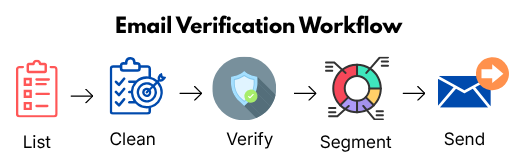
⚙️How Email Verification Works (Step-by-Step Workflow)
Email verification isn’t complicated — but doing it the right way makes a huge difference in your campaign results.
Think of this as a pre-launch checklist before sending any cold emails.
Step 1: Upload Your Email List
This is where everything starts.
- Import Your Data
Upload a CSV file from your lead database, CRM, or scraping tool - Connect Your Tools (Optional)
Some tools allow direct integrations with platforms like CRMs or outreach tools - Ensure Data is Structured
Keep fields like name, email, company, and role properly organized
👉 Real Tip:
Before uploading, quickly scan your list — remove obvious junk data to save credits and improve accuracy.
Step 2: Run Verification Scan
Once your list is uploaded, the tool begins scanning each email.
What Happens Behind the Scenes:
- Syntax Check
Ensures the email format is correct (e.g., no missing “@” or domain errors) - Domain Validation
Confirms the company domain is active and can receive emails - Mailbox Verification
Checks whether the inbox actually exists
👉 Real Tip:
This step may take a few minutes depending on list size — avoid interrupting the process for accurate results.
Step 3: Remove Invalid Emails
After the scan, you’ll get a list of invalid emails.
- Delete Hard Bounce Risks
These emails will definitely fail if you send to them - Remove Non-Existent Inboxes
These addresses don’t belong to real users
⏩ Why this matters:
Even a small number of invalid emails can damage your sender reputation quickly.
👉 Real Tip:
Never “test” invalid emails — always remove them completely.
Step 4: Identify Risky Emails
Not all emails are clearly valid or invalid — some fall into a gray area.
Common Risky Categories:
- Catch-All Domains
Accept all emails but may bounce later - Role-Based Emails
Addresses like info@, sales@, support@ - Disposable Emails
Temporary inboxes often used for signups
👉 Real Tip:
Don’t remove all risky emails — instead, handle them strategically (next step).
Step 5: Segment Your Clean List
This is where most people make a mistake — they treat all emails the same.
Instead, split your list into segments:
- Safe Emails (High Confidence)
→ Send campaigns here first - Risky Emails (Medium Confidence)
→ Test with lower volume and caution
⏩ Why this works:
- Protects your domain
- Improves early campaign performance
- Gives you better control when scaling
👉 Real Tip:
Start with your cleanest segment — this builds positive sending signals.
Step 6: Export & Use for Outreach
Now your list is ready for actual campaigns.
- Export Verified List
Download only valid and filtered emails - Upload to Outreach Tool
Import into tools like your email automation platform - Start Campaign Gradually
Begin with low sending volume and increase over time
👉 Real Tip:
Even with a clean list, don’t blast emails immediately — warm up your sending gradually.
🧠 Real Campaign Walkthrough (Putting It All Together)
Let’s say you start with 1,000 raw emails:
- After verification → 750 valid
- 150 invalid → removed
- 100 risky → segmented
⏩ Smart Approach:
- Send first campaign to 750 valid emails
- Monitor performance (opens, replies)
- Gradually test risky segment
👉 Result:
- Lower bounce rate
- Better inbox placement
- Higher reply rates
⚠️ Common Mistake in This Process
Most people:
🔴Verify → then send to everyone
👉 Correct approach:
🟢Verify → Clean → Segment → send strategically
🚀 Key Takeaway
Email verification is not just about cleaning data —
It’s about creating a safe, structured system for outreach success.
👉 When done correctly, this workflow helps you:
- Protect your domain
- Improve deliverability
- Scale campaigns confidently
📊Best Practices for Email Verification
Email verification isn’t a one-time task — it’s an ongoing process that directly impacts your deliverability and campaign success.
Follow these best practices to maintain a clean, high-performing email list:
• Verify Every New List Before Sending
- Never Upload Raw Data into Campaigns
Always run verification before sending your first email - Catch Errors Early
Remove invalid and risky emails before they affect performance
👉 Why this matters:
Starting with a clean list sets the foundation for strong deliverability
• Re-Verify Old Lists Regularly
- Email Data Changes Over Time
People change jobs, domains expire, inboxes get deactivated - Prevent Hidden Risks
Previously valid emails can become invalid or risky
👉 Best Practice:
Re-verify lists every 2–4 weeks before launching campaigns
• Avoid Sending to Risky Emails
- Limit Catch-All Emails
These can increase bounce rates unpredictably - Be Careful with Role-Based Emails
Addresses like info@ or sales@ often perform poorly - Test Before Scaling
If you must use risky emails, send in small batches first
👉 Goal :
Protect your domain while maximizing reach
• Maintain List Hygiene Consistently
- Remove Inactive Contacts
Clean your list regularly to keep it fresh - Track Engagement Signals
Remove contacts that never open or respond - Update Data Frequently
Keep your database accurate and relevant
👉 Think of your email list like an asset — it needs maintenance to perform well
💡Key Insight
👉 Email data decays over time — typically 20–30% per year
That means:
- A list that’s 3 months old is already outdated
- A list that’s 1 year old is highly unreliable
👉 Regular cleaning = Consistent performance
✅ Email Verification Checklist (Before You Send Any Campaign)
👉 Use this quick checklist to ensure your email list is clean, safe, and ready for outreach:
📋 Pre-Send Checklist
✔ Defined your target audience (ICP)
✔ Built or imported a fresh email list
✔ Uploaded list into verification tool
✔ Removed all invalid email addresses
✔ Identified and separated risky emails
✔ Segmented list (safe vs risky contacts)
✔ Exported clean, verified email list
✔ Uploaded list into your outreach tool
✔ Started with low sending volume
✔ Planned follow-ups for better reply rates
⚠️ Quick Reminders (Don’t Skip These)
❗ Never send emails without verification
❗ Avoid blasting to the full list at once
❗ Re-verify old lists before reuse
❗ Monitor bounce rate (keep it below 2%)
🎯Pro Tip
👉 Save this checklist and use it before every campaign —
It can be the difference between landing in Inbox vs Spam
Common Mistakes to Avoid
Even small mistakes in verification can lead to poor results. Avoid these to protect your campaigns:
❌ Skipping Verification Before Campaigns
- Sending without verification increases bounce rates
- Damages domain reputation quickly
👉 Fix: Always verify before every campaign launch
❌ Sending to Catch-All Emails Blindly
- These emails may accept messages but still bounce later
- Creates unpredictable deliverability issues
👉 Fix: Segment and test instead of sending at scale
❌ Using Outdated Lists
- Old data = higher bounce rates
- Lower engagement and response rates
👉 Fix: Re-verify and refresh your list regularly
❌ Treating Verification as a One-Time Process
- Data quality changes constantly
- One-time cleaning isn’t enough
👉 Fix: Make verification part of your standard workflow
🧠 Real-World Scenario
❌ Without Best Practices
- Use old, unverified list
- High bounce rate
- Emails land in spam
- Low replies
✅ With Best Practices
- Verify + clean list before sending
- Remove invalid + segment risky emails
- Maintain list hygiene
👉 Result:
- Better inbox placement
- Higher open rates
- More replies
🚀 Final Takeaway
Email verification is not just a technical step —
it’s a continuous system that protects and improves your outreach performance.
👉 Clean list + Consistent maintenance = Scalable cold email success
🧠 Pro Insight
Most people assume cold email failure comes down to:
- Bad copy
- Weak offers
- Poor subject lines
And while those things matter… they’re not the root problem in most cases.
👉 The real issue is usually something far more fundamental:
Poor data quality.
⚠️What Actually Happens
If your email list is weak:
- You’re targeting the wrong people
- You’re sending to invalid or inactive emails
- You’re hitting spam traps or risky addresses
👉 Result:
- High bounce rates
- Low inbox placement
- Almost zero replies
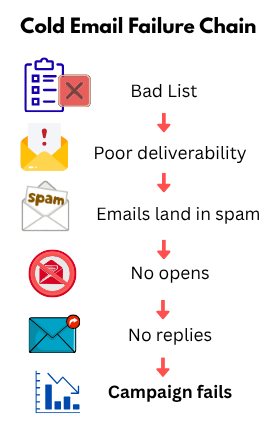
🔄The Chain Reaction Most People Miss
❌ What Most People Think
Bad copy → No replies
👉 So they keep tweaking subject lines, rewriting emails, and switching tools.
🔄 What Actually Happens
Bad list →
Poor deliverability →
Emails land in spam →
No opens →
No replies →
Campaign fails
👉 The problem starts before you hit send.
👉 And then people blame the copy.
🚀 What You Should Do Instead
1️⃣Verify your email list before every campaign
2️⃣Remove invalid and risky emails
3️⃣Start with high-quality, targeted leads
4️⃣Scale only after ensuring good deliverability
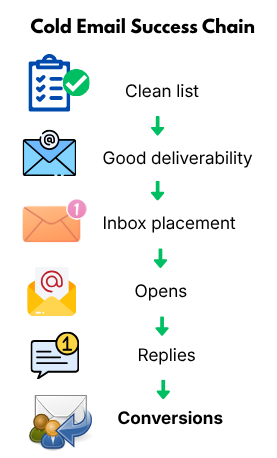
✅ What Winning Campaigns Do
Clean list →
Good deliverability →
Inbox placement →
Opens →
Replies →
Conversions
👉 Same outreach effort — completely different results.
💡 Key Insight
👉 You don’t have a copy problem —
you have a data quality problem.
🎯 Final Takeaway
Cold email success isn’t about sending more emails —
it’s about sending to the right people with clean data.
👉 Fix your list → Fix your deliverability → Fix your results
✅ What Happens When You Fix Your Data
When you improve your list quality:
- Emails reach real, relevant people
- Inbox placement improves
- Open rates increase
- Replies start coming in
👉 Same copy. Same offer.
👉 Completely different results.
💡 Pro Tip
👉 “Better data = Better inbox = Better revenue.”
💡 Real-World Perspective
Two campaigns with identical emails can perform very differently:
- One with a clean, targeted list → gets replies
- One with a poor-quality list → gets ignored
👉 The difference isn’t the message — it’s the audience and data quality
🎯 Key Takeaway
Cold email success isn’t just about writing better emails —
it’s about sending emails to the right people, at the right time, with clean data.
👉 Fix your list first.
Everything else becomes easier.
🚀 Final Thought
Before you optimize your copy or tools, ask yourself:
👉 “Am I sending to the right, verified, high-quality contacts?”
Because in cold outreach:
Data quality isn’t a small detail — it’s the foundation of results.
FAQs
-
What is an email verification tool?
An email verification tool checks whether an email address is valid, active, and safe to send. It helps remove invalid or risky emails to improve deliverability and reduce bounce rates.
-
Why is email verification important for cold outreach?
Email verification is important because it reduces bounce rates, protects your domain reputation, and increases the chances of your emails landing in the inbox instead of spam.
-
What is a good bounce rate for cold email campaigns?
A good bounce rate is below 2%. Higher bounce rates can harm your sender reputation and reduce deliverability.
-
How often should I verify my email list?
You should verify your email list before every campaign and re-verify old lists every 2–4 weeks, as email data changes frequently.
-
Can I send emails to catch-all addresses?
Yes, but cautiously. Catch-all emails can accept messages but still bounce later, so it’s best to test them in small batches instead of sending at scale.
-
What happens if I don’t verify my email list?
If you don’t verify your list, you risk high bounce rates, poor deliverability, spam folder placement, and potential domain damage.
-
Which is the best email verification tool for beginners?
Tools like MillionVerifier or Bouncer are great for beginners due to their simplicity, affordability, and ease of use.
-
Do email verification tools guarantee 100% accuracy?
No, no tool guarantees 100% accuracy. However, good tools significantly reduce risk and improve overall email list quality.
-
What are risky emails in verification results?
Risky emails include catch-all domains, role-based emails (like info@), and disposable addresses. These may work but can negatively impact deliverability.
-
Is email verification a one-time process?
No, email verification is an ongoing process. Lists degrade over time, so regular cleaning is necessary for consistent performance.
-
Can email verification improve reply rates?
Yes, indirectly. By ensuring your emails reach real and relevant recipients, verification improves deliverability, which leads to higher open and reply rates.
-
Should I remove all risky emails from my list?
Not necessarily. You can segment risky emails and test them in small batches instead of removing them completely.
🎯Conclusion
Email verification is one of the most important steps in cold outreach — yet it’s often ignored.
When you verify your email list properly, you:
- Protect your domain reputation
- Improve deliverability and inbox placement
- Increase open and reply rates
👉 Clean data isn’t optional — it’s your competitive advantage
🚀 Final Closing
At the end of the day, cold email success isn’t just about sending more —
it’s about sending smarter.
You can optimize your copy, test subject lines, and automate workflows…
but none of it works if your emails never reach real people.
👉 That’s why the smartest outbound strategies always start with clean, verified data.
🧠 Final Thought
Before launching your next campaign, ask yourself:
👉 “Is my list clean enough to trust my results?”
Because in cold outreach:
Better data → Better deliverability → Better results