
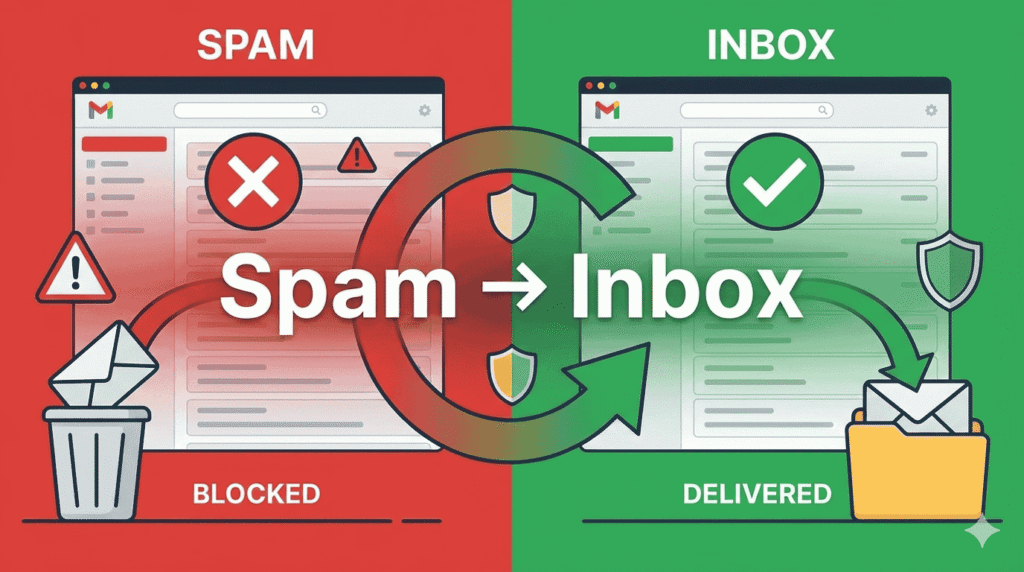
Why Cold Emails Go to Spam (And How Tools Fix It): Complete Deliverability Guide for 2026
The Real Problem Isn’t Cold Email — It’s Deliverability
Cold email still works in 2026 — but only if your emails actually reach the inbox.
Many businesses assume cold outreach fails because of:
• Weak copy
• Poor offers
• Lack of personalization
• Low response rates
But in reality, the biggest problem often happens before the prospect even reads the email.
The message never reaches the primary inbox.
Modern inbox providers like Gmail and Outlook have become significantly more advanced at filtering email traffic. Today, cold email success depends heavily on email deliverability, sender reputation, domain health, authentication setup, and recipient engagement signals.
That means even a well-written cold email campaign can completely fail if the technical foundation behind it is weak.
In many cases:
❌ Emails land in spam
❌ Emails go to Promotions
❌ Inbox placement drops over time
❌ Sender reputation gets damaged
❌ Domains lose trust with mailbox providers
As a result, businesses continue sending more emails without realizing their deliverability system is already failing.
Why Deliverability Matters More Than Ever in 2026
Cold outreach has changed dramatically over the last few years.
Previously, many outbound campaigns relied on:
• Mass email volume
• Generic templates
• Aggressive automation
• Large unverified email databases
That approach no longer works effectively.
Modern spam filtering systems now analyze:
✔ Sender behavior
✔ Inbox engagement
✔ Domain reputation
✔ Authentication records
✔ Sending consistency
✔ Recipient interactions
✔ Complaint patterns
✔ Bounce rates
This means cold email deliverability is no longer just a “technical setup.”
It has become part of the entire outbound growth system.
Today, successful cold email campaigns require:
• Clean infrastructure
• Verified lead lists
• Proper domain configuration
• Realistic sending behavior
• Strong personalization
• Gradual scaling
• Healthy sender reputation
Without these foundations, cold emails struggle to reach inboxes consistently.
What This Deliverability Guide Covers
This guide explains the complete modern cold email deliverability system for 2026, including:
✔ Why cold emails go to spam
✔ How spam filters actually work
✔ Common deliverability mistakes businesses make
✔ How sender reputation affects inbox placement
✔ The role of SPF, DKIM, and DMARC
✔ Why email warm-up matters
✔ How modern cold email tools improve deliverability
✔ Best practices for safe cold email scaling
✔ How to improve inbox placement over time
Whether you are a:
• SaaS founder
• B2B marketer
• Lead generation agency
• Recruiter
• Solopreneur
• Outbound sales team
• Beginner learning cold email
understanding deliverability is now essential for running successful outreach campaigns.
How Spam Filters Decide Where Your Email Goes
One of the biggest misconceptions in cold email outreach is believing spam filters evaluate only the email message itself.
In reality:
spam filters evaluate the sender first.
Modern inbox providers do not simply scan for “spam words.”
They analyze the overall trustworthiness of your sending infrastructure and behavior.
When an email is sent, mailbox providers like Gmail, Outlook, and Yahoo evaluate multiple trust signals before deciding whether the message should land in:
✔ Primary Inbox
✔ Promotions Tab
✔ Updates Folder
✔ Spam Folder
Key Factors Spam Filters Analyze
1. Sender Reputation (Domain + Inbox Reputation)
Your domain reputation is one of the biggest factors affecting inbox placement.
Mailbox providers track:
• Sending history
• Complaint rates
• Bounce rates
• Recipient engagement
• Spam reports
• Consistency of sending activity
If your reputation becomes weak, future emails are more likely to land in spam — even if the content itself looks good.
2. Email Authentication (SPF, DKIM, DMARC)
Authentication records help inbox providers verify that your emails are legitimate.
Proper SPF, DKIM, and DMARC setup improves:
✔ Sender trust
✔ Domain credibility
✔ Email authenticity
✔ Inbox placement stability
Without authentication, mailbox providers may treat emails as suspicious or unsafe.
3. Engagement Signals
Modern deliverability systems heavily depend on recipient behavior.
Mailbox providers monitor:
• Opens
• Replies
• Forwards
• Deletes
• Spam complaints
• Positive interactions
If recipients consistently engage with your emails, inbox providers see your campaigns as more trustworthy.
Low engagement creates negative deliverability signals over time.
4. Sending Behavior
Spam filters also analyze how emails are being sent.
Risky patterns include:
✖ Sudden volume spikes
✖ Inconsistent sending activity
✖ Mass outreach from new domains
✖ Unrealistic sending frequency
✖ Aggressive automation
Stable and gradual sending patterns usually perform better for long-term cold email deliverability.
5. Content & Structural Patterns
Email content still matters — but not in the old “avoid spam words” way many people think.
Mailbox providers now evaluate:
• Link usage
• Image-heavy layouts
• Formatting patterns
• Duplicate messaging
• Personalization quality
• Template similarity across campaigns
Highly repetitive or overly promotional emails can increase spam risk.
Important Deliverability Insight
Even a perfectly written cold email can still go to spam if:
✖ Your domain reputation is weak
✖ Your email list quality is poor
✖ Your infrastructure is misconfigured
✖ Your sending behavior appears suspicious
This is why modern cold email success depends less on “writing tricks” and more on building a trustworthy outbound system.
Deliverability is no longer optional.
It is the foundation behind every successful cold email campaign.
Inbox Placement vs Deliverability
One of the biggest misconceptions in cold email is assuming:
sent emails = successful delivery.
But modern email systems work very differently.
An email can technically be:
✔ Sent
✔ Accepted By The Server
✔ Marked As Delivered
while still never reaching the primary inbox.
Instead, the email may land in:
✔ Promotions
✔ Spam
✔ Junk
✔ Updates Tabs
This is why:
delivered does not always mean inboxed.
And in cold email outreach, inbox placement directly affects:
✔ Open Rates
✔ Replies
✔ Engagement
✔ Campaign Performance
Many campaigns fail not because the email copy is bad —
but because recipients never properly see the message.
Understanding Modern Inbox Placement
Email providers like Gmail and Outlook now organize inboxes using advanced filtering systems.
Their goal is to improve user experience by separating:
✔ Important Conversations
✔ Promotions
✔ Automated Emails
✔ Spam Content
based on:
✔ Sender Reputation
✔ Engagement Signals
✔ Sending Behavior
✔ Email Structure
✔ Recipient Interaction Patterns
Primary Inbox
This is the ideal placement for cold email outreach.
Emails landing in the primary inbox are more likely to:
✔ Get Opened
✔ Generate Replies
✔ Create Conversations
✔ Improve Engagement Signals
Strong inbox placement usually indicates healthier sender trust.
Promotions Tab
The Promotions tab commonly contains:
✔ Marketing Emails
✔ Newsletters
✔ Bulk Campaigns
✔ Sales Promotions
Landing here is not necessarily bad.
However, emails placed in Promotions often experience:
✔ Lower Visibility
✔ Reduced Open Rates
✔ Delayed Engagement
This is why many cold email systems try to maintain more conversational sending behavior.
Spam / Junk Folder
Spam placement is the most damaging outcome for cold email campaigns.
Emails landing here usually experience:
✔ Extremely Low Visibility
✔ Very Poor Engagement
✔ Weak Reply Rates
✔ Reputation Decline
Repeated spam placement can gradually weaken:
✔ Domain Reputation
✔ Sender Trust
✔ Future Inbox Placement
Updates & Other Tabs
Some inbox providers categorize emails into secondary tabs based on:
✔ Automation Signals
✔ Notification Patterns
✔ Sender Behavior
✔ Email Formatting
These tabs generally receive less user attention than the primary inbox.
Why Inbox Placement Matters More Than Delivery Status
Many businesses only monitor:
✔ Emails Sent
✔ Delivery Status
✔ Campaign Activity
But they fail to monitor:
where the emails actually land.
This creates a major blind spot in cold outreach.
A campaign may appear successful technically while:
❌ Most Emails Go To Promotions
❌ Spam Placement Increases
❌ Engagement Quietly Declines
That’s why modern deliverability optimization focuses heavily on:
inbox placement quality — not just sending success.
Important Deliverability Insight
Modern cold email success depends less on:
✔ Sending More Emails
and more on:
✔ Reaching Visible Inbox Placement
✔ Building Sender Trust
✔ Maintaining Healthy Engagement Signals
Because ultimately:
an email only creates results if people actually see it.
Gmail vs Outlook Deliverability Differences
Not all inbox providers evaluate emails the same way.
Two of the biggest platforms:
✔ Gmail
✔ Outlook / Microsoft 365
use different filtering systems and deliverability signals.
Understanding these differences helps businesses:
✔ Improve Inbox Placement
✔ Reduce Spam Risks
✔ Build Better Outreach Systems
especially when targeting:
✔ SMBs
✔ Enterprises
✔ B2B Decision-Makers
Gmail Deliverability Behavior
Gmail strongly prioritizes:
✔ Engagement Signals
✔ User Interaction
✔ Conversation Quality
✔ Behavioral Reputation
Gmail closely monitors:
✔ Opens
✔ Replies
✔ Spam Complaints
✔ Deletes Without Reading
✔ Inbox Interaction
This means Gmail deliverability often depends heavily on:
recipient engagement quality.
Low engagement campaigns may gradually experience:
❌ Promotions Placement
❌ Spam Filtering
❌ Reduced Inbox Visibility
even if technical setup is correct.
That’s why successful Gmail cold outreach usually focuses on:
✔ Personalization
✔ Relevant Messaging
✔ Smaller Sending Volumes
✔ Human-Like Communication
Outlook Deliverability Behavior
Outlook and Microsoft 365 environments often apply:
✔ Stronger Corporate Filtering
✔ Enterprise Security Policies
✔ Reputation-Based Evaluation
Many corporate inboxes use:
✔ Additional Spam Gateways
✔ Security Firewalls
✔ Company-Level Filtering Rules
This can make Outlook deliverability more sensitive to:
✔ Authentication Issues
✔ Domain Reputation Problems
✔ Aggressive Sending Patterns
Corporate Outlook systems may block emails before users even see them.
That’s why Outlook outreach often requires:
✔ Strong Domain Setup
✔ Clean Authentication
✔ Stable Reputation Signals
✔ Safer Sending Practices
Different Spam Behaviors
Gmail and Outlook may categorize the same email differently.
For example:
✔ Gmail may place emails in Promotions
while:
✔ Outlook may send them directly to Junk folders
because both systems evaluate:
✔ Reputation
✔ Content
✔ Engagement
✔ Infrastructure
using different filtering logic.
This is why deliverability testing across:
✔ multiple providers
is extremely important.
Important Deliverability Insight
A campaign performing well in Gmail does not automatically mean:
✔ strong Outlook deliverability
and vice versa.
Modern cold email systems increasingly optimize for:
✔ multi-provider inbox placement
instead of relying on:
✔ one platform’s results.
Because successful deliverability today depends on:
✔ Reputation Stability
✔ Cross-Platform Trust
✔ Consistent Engagement Signals
✔ Healthy Sending Infrastructure.
Cold Email vs Email Marketing Deliverability
Many beginners assume:
cold email and email marketing work the same way.
But inbox providers like Gmail and Outlook treat them very differently.
Both use email as a communication channel —
but their:
✔ Sending Behavior
✔ Engagement Patterns
✔ Recipient Expectations
✔ Deliverability Signals
are completely different.
Understanding this difference is important because:
strategies that work for email marketing can damage cold email deliverability.
Cold Email Deliverability
Cold email usually involves:
✔ First-Time Outreach
✔ Unknown Recipients
✔ Smaller Sending Volumes
✔ Personalized Communication
✔ Direct Business Conversations
Since recipients may not recognize the sender, inbox providers evaluate cold emails very carefully.
Modern cold email deliverability depends heavily on:
✔ Sender Reputation
✔ Human-Like Sending Behavior
✔ Personalization
✔ Engagement Signals
✔ Consistent Inbox Activity
That’s why successful cold outreach systems often focus on:
✔ Smaller Daily Volumes
✔ Gradual Scaling
✔ Personalized Messaging
✔ Natural Sending Patterns
Cold email works best when emails resemble:
real one-to-one business communication.
Email Marketing Deliverability
Email marketing usually targets:
✔ Existing Subscribers
✔ Customers
✔ Newsletter Audiences
✔ Opt-In Users
Recipients already recognize the sender and have previously interacted with the brand.
Because of this, inbox providers expect email marketing campaigns to behave differently.
Email marketing commonly includes:
✔ Larger Sending Volumes
✔ Promotional Content
✔ Newsletters
✔ Product Updates
✔ Marketing Designs
✔ Bulk Campaign Structures
These campaigns are more likely to land in:
✔ Promotions Tabs
✔ Updates Tabs
instead of the primary inbox.
Why Cold Email Requires Human-Like Sending
Cold email deliverability depends heavily on trust-building.
Mailbox providers monitor:
✔ Sending Patterns
✔ Reply Activity
✔ Recipient Engagement
✔ Conversation Signals
✔ Behavioral Consistency
Aggressive automation or mass outreach often creates:
❌ Spam-Like Signals
❌ Low Engagement
❌ Reputation Problems
That’s why modern cold email systems prioritize:
✔ Personalization
✔ Relevant Messaging
✔ Gradual Sending
✔ Real Conversations
instead of pure sending volume.
Why Newsletters Often Land In Promotions
Promotions tabs are designed for:
✔ Marketing Campaigns
✔ Subscriber Emails
✔ Sales Announcements
✔ Automated Brand Communication
Inbox providers detect signals like:
✔ Large HTML Designs
✔ Multiple Links
✔ Marketing Templates
✔ Bulk Sending Patterns
✔ Promotional Language
This does not necessarily mean the email is “bad.”
It simply means the system categorizes the content as:
marketing-oriented communication.
Key Difference Between Cold Email And Email Marketing
Cold email aims to create:
✔ New Conversations
✔ Direct Responses
✔ Business Relationships
Email marketing focuses more on:
✔ Audience Nurturing
✔ Content Distribution
✔ Promotions
✔ Subscriber Engagement
Because the goals are different, inbox providers evaluate their deliverability differently as well.
Important Deliverability Insight
One of the biggest cold email mistakes is copying:
email marketing behavior into cold outreach.
Examples include:
❌ Large Bulk Sending
❌ Heavy Promotional Design
❌ Newsletter-Style Formatting
❌ Aggressive Automation
❌ Mass Generic Campaigns
These patterns often reduce cold email deliverability.
Successful cold outreach in 2026 increasingly depends on:
✔ Human-Like Communication
✔ Relevant Conversations
✔ Controlled Sending Behavior
✔ Trust-Based Engagement Signals
because inbox providers now prioritize:
authentic communication over mass automation.
The Biggest Reasons Cold Emails Go to Spam
Most cold email campaigns do not fail because of bad copy alone.
In many cases, the real problem starts much earlier — at the infrastructure, reputation, and deliverability level.
Modern inbox providers like Gmail and Outlook evaluate hundreds of trust signals before deciding whether your email should reach the inbox, Promotions tab, or spam folder.
Even strong offers and personalized outreach can underperform if:
❌ Domain authentication is missing
❌ Sender reputation is weak
❌ Email lists contain bad data
❌ Sending behavior looks suspicious
❌ Inbox infrastructure is poorly configured
The good news is that most deliverability problems are preventable once you understand how modern cold email systems work.
Below are some of the most common reasons cold emails go to spam — along with the tools, setups, and best practices that help improve inbox placement and sender reputation.
1. No Domain Authentication (SPF, DKIM, DMARC Missing)
One of the most common reasons cold emails go to spam is missing or incomplete domain authentication.
Modern email providers like Gmail, Outlook, and Yahoo no longer trust domains automatically. Before deciding whether your email should reach the inbox, mailbox providers first verify whether your domain is properly authenticated.
If SPF, DKIM, and DMARC are not configured correctly, your cold email campaigns immediately appear less trustworthy.
As a result:
❌ Inbox placement drops
❌ Emails get flagged as suspicious
❌ Sender reputation weakens
❌ Spam filtering risk increases
This is why domain authentication has become one of the most important parts of modern cold email deliverability.
What Happens When SPF, DKIM, and DMARC Are Missing
If your domain is not authenticated, inbox providers cannot properly verify:
• Who is sending the email
• Whether the sender is legitimate
• Whether the message has been altered
• Whether the domain is authorized to send emails
This creates trust issues with mailbox providers.
In many cases, emails may:
❌ Land directly in spam
❌ Get filtered into Promotions
❌ Show security warnings
❌ Fail authentication checks
❌ Damage long-term sender reputation
Even a good cold email copy will struggle to perform if the sending domain itself appears untrusted.
Understanding SPF, DKIM, and DMARC (Beginner-Friendly Explanation)
💠 SPF (Sender Policy Framework)
SPF tells inbox providers:
which servers are allowed to send emails from your domain.
It helps prevent:
• Fake senders
• Domain spoofing
• Unauthorized email usage
Without SPF:
email providers may not trust your sending server.
💠 DKIM (DomainKeys Identified Mail)
DKIM adds a digital signature to your emails.
This helps inbox providers verify:
✔ The email content was not modified
✔ The message genuinely came from your domain
DKIM improves:
• Sender credibility
• Email authenticity
• Deliverability trust signals
💠 DMARC (Domain-based Message Authentication)
DMARC works together with SPF and DKIM.
It tells mailbox providers:
what to do if authentication fails.
DMARC helps:
✔ Protect domain reputation
✔ Reduce spoofing risks
✔ Improve trust with inbox providers
✔ Monitor authentication issues
Why Domain Authentication Matters for Cold Email Deliverability
Modern spam filters heavily prioritize:
✔ Trust
✔ Authentication
✔ Domain credibility
Cold email domains without proper SPF, DKIM, and DMARC setup often appear:
• Risky
• Unverified
• Low-trust
• Potentially spoofed
This becomes especially dangerous when combined with:
❌ High sending volume
❌ Unverified email lists
❌ Aggressive outreach
❌ New domains without warm-up
The result is usually:
poor inbox placement.
Common Deliverability Problems Caused by Missing Authentication
🔶 High Spam Placement
Unauthenticated emails are more likely to trigger spam filtering systems.
🔶 Domain Reputation Damage
Repeated authentication failures reduce sender trust over time.
🔶 Email Spoofing Risks
Attackers can misuse unauthenticated domains more easily.
🔶 Reduced Inbox Placement
Mailbox providers prioritize authenticated senders for inbox delivery.
🔶 Lower Campaign Stability
Cold email campaigns become inconsistent and unpredictable.
How Modern Cold Email Tools Fix Authentication Problems
One major improvement in modern cold email tools is that many platforms now help users configure deliverability correctly.
Instead of manually troubleshooting technical records, tools increasingly provide:
✔ Automated checks
✔ DNS guidance
✔ Setup verification
✔ Deliverability monitoring
✔ Authentication warnings
This makes cold email infrastructure more beginner-friendly than before.
Features Modern Cold Email Tools Provide
❇️ Auto-Check Authentication Status
Many cold email platforms automatically detect:
• Missing SPF
• Invalid DKIM
• Incomplete DMARC records
This helps users identify problems before launching campaigns.
❇️ Step-by-Step DNS Setup Guidance
Modern tools simplify DNS configuration with:
✔ Guided tutorials
✔ Copy-paste records
✔ Setup walkthroughs
✔ Validation testing
This reduces technical confusion for beginners.
❇️ Deliverability Warnings Before Sending
Some tools warn users if:
❌ Authentication is incomplete
❌ Domains are not warmed properly
❌ Inbox health looks risky
❌ Sending reputation appears weak
This helps prevent damaging campaigns.
❇️ Domain Health Monitoring
Advanced platforms monitor:
• Inbox reputation
• Deliverability signals
• Authentication health
• Spam risks
• Blacklist issues
This improves long-term cold email stability.
Tools That Help Configure and Monitor Authentication
✅ Google Workspace / Outlook
Used for:
✔ Professional business email hosting
✔ Domain-based sending
✔ Authentication setup support
These platforms allow proper SPF, DKIM, and DMARC configuration.
✅ Instantly.ai
Helps with:
✔ Inbox management
✔ Deliverability monitoring
✔ Authentication checks
✔ Outreach infrastructure
Popular for scaling cold email campaigns safely.
✅ Mailreach
Focused primarily on:
✔ Deliverability optimization
✔ Inbox placement testing
✔ Authentication monitoring
✔ Warm-up systems
Useful for improving sender reputation.
✅ Smartlead
Provides:
✔ Multi-inbox management
✔ Domain monitoring
✔ Authentication guidance
✔ Scalable cold email infrastructure
Often used for outbound automation workflows.
Best Practices for SPF, DKIM, and DMARC Setup
✔️ Use a Proper Business Domain
Avoid sending cold emails from free Gmail accounts at scale.
✔️ Configure All Three Records
SPF alone is not enough.
For stronger deliverability:
✔ SPF
✔ DKIM
✔ DMARC
should work together.
✔️ Test Authentication Regularly
Incorrect DNS changes can break authentication later.
Monitor records consistently.
✔️ Warm Up Authenticated Domains Slowly
Authentication improves trust,
but reputation still needs gradual development.
✔️ Keep Infrastructure Stable
Frequent inbox changes and inconsistent setups can reduce trust signals.
Important Deliverability Insight
Many businesses focus heavily on:
• Subject lines
• Personalization
• AI copywriting
• Automation tools
while completely ignoring authentication setup.
But in reality:
deliverability problems often begin at the infrastructure level.
Even the best cold email strategy struggles if inbox providers cannot trust your domain.
That’s why SPF, DKIM, and DMARC are no longer optional technical settings.
They are now part of the foundation behind successful cold email campaigns in 2026.
2. New or Cold Domains Without Warm-Up
One of the fastest ways to damage cold email deliverability is sending high email volume from a brand-new domain without proper warm-up.
New domains start with:
zero reputation and zero trust.
Mailbox providers like Gmail, Outlook, and Yahoo do not automatically trust newly created sending domains. When a new domain suddenly begins sending dozens or hundreds of cold emails per day, spam filtering systems often treat that behavior as suspicious.
This is one of the biggest reasons cold emails go to spam during the early stages of outreach campaigns.
Many beginners unknowingly scale too quickly by:
❌ Sending 50–100 emails immediately
❌ Launching mass outreach on day one
❌ Using multiple inboxes aggressively
❌ Skipping gradual reputation building
As a result, the domain can develop long-term deliverability problems very quickly.
What Happens When You Skip Domain Warm-Up
Mailbox providers continuously monitor:
✔ Sending patterns
✔ Domain age
✔ Engagement signals
✔ Inbox reputation
✔ Sending consistency
When a new domain suddenly sends large outbound volume without historical trust, it creates abnormal behavior signals.
Spam filters may interpret this as:
• Spam activity
• Automated abuse
• Phishing risk
• Low-trust outbound behavior
This often leads to:
❌ Spam folder placement
❌ Lower inbox rates
❌ Blocked emails
❌ Reputation instability
❌ Reduced campaign performance
In many cases, businesses continue optimizing copywriting and personalization while the real issue is:
the domain itself was never trusted properly.
Why Domain Warm-Up Matters for Cold Email Deliverability
Domain warm-up is the process of gradually building trust with inbox providers before scaling outreach campaigns.
Instead of sending high email volume immediately, warm-up systems slowly increase sending activity over time while generating positive engagement signals.
The goal is to help mailbox providers see your domain as:
✔ Legitimate
✔ Consistent
✔ Human-like
✔ Trustworthy
This process improves:
• Sender reputation
• Inbox placement
• Domain trust signals
• Campaign stability
• Long-term deliverability
How Modern Spam Filters Evaluate New Domains
Modern email providers do not evaluate only:
email content.
They also analyze:
✔ Sending velocity
✔ Domain history
✔ Reply activity
✔ Engagement quality
✔ Inbox interactions
✔ Behavioral consistency
A completely new domain suddenly sending aggressive cold outreach often appears unnatural.
Even well-written emails may still land in spam because the domain reputation has not been developed gradually.
Common Mistakes That Damage New Domain Reputation
🔶 Sending Too Many Emails Too Quickly
Large sending spikes from new domains create major trust issues.
🔶 Launching Multiple Campaigns Immediately
Running several cold email campaigns at once increases spam risk significantly.
🔶 Using Unverified Lead Lists
Poor-quality lists increase bounce rates and damage sender reputation faster.
🔶 Skipping Inbox Warm-Up
Without positive engagement history, domains struggle to gain trust.
🔶 Using Aggressive Automation
Unnatural sending behavior often triggers spam filtering systems.
How Email Warm-Up Tools Fix Deliverability Problems
Modern email warm-up tools help simulate natural inbox behavior while gradually improving sender reputation.
Instead of manually warming domains, these platforms automate the trust-building process.
Warm-up tools typically:
✔ Send emails automatically
✔ Generate engagement signals
✔ Create reply activity
✔ Simulate human interactions
✔ Increase sending volume gradually
This helps inbox providers recognize the domain as more legitimate over time.
How Warm-Up Systems Work
❇️ Send Human-Like Emails
Warm-up platforms exchange emails between real inbox networks to create natural activity patterns.
This helps improve:
• Sender trust
• Inbox reputation
• Engagement signals
❇️ Generate Replies Automatically
Replies are one of the strongest positive trust signals in email deliverability.
Warm-up systems automatically generate:
✔ Replies
✔ Conversations
✔ Inbox interactions
This helps build healthier sender reputation.
❇️ Gradually Increase Sending Volume
Instead of sudden outreach spikes, warm-up tools slowly scale daily sending activity.
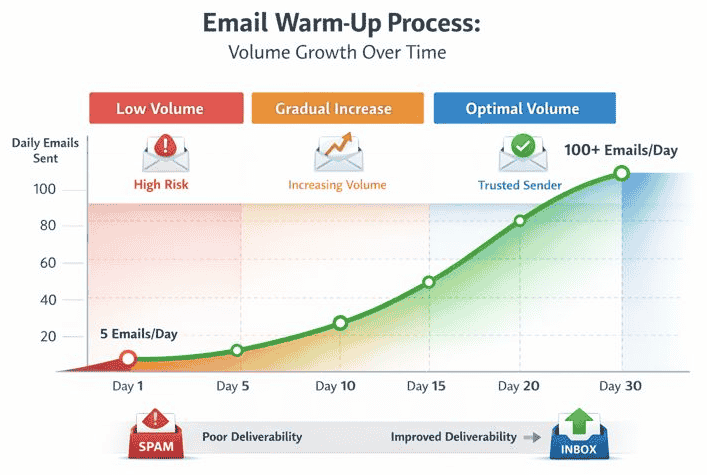
Example:
• Day 1 → 5 emails
• Day 5 → 15 emails
• Day 14 → 30 emails
• Day 30 → Higher stable volume
This gradual growth appears more natural to mailbox providers.
Recommended Warm-Up Tools
✅ Instantly Warmup
Popular for:
✔ Automated inbox warm-up
✔ Multi-inbox scaling
✔ Deliverability optimization
✔ Sender reputation management
Widely used in cold email workflows.
✅ Mailreach
Focused heavily on:
✔ Inbox placement
✔ Reputation monitoring
✔ Domain warm-up
✔ Deliverability testing
Useful for improving long-term sender health.
✅ Warmbox
Helps automate:
✔ Warm-up sequences
✔ Engagement simulation
✔ Sender reputation building
✔ Inbox trust development
Designed for cold email infrastructure support.
Best Practices for Safe Domain Warm-Up
✔️ Start With Low Daily Volume
New domains should begin slowly to avoid triggering spam filters.
✔️ Increase Sending Gradually
Stable growth patterns build trust more effectively than aggressive scaling.
✔️ Warm Up Before Launching Campaigns
Avoid starting cold outreach immediately after domain setup.
✔️ Maintain Consistent Sending Behavior
Consistency improves long-term inbox reputation.
✔️ Use Verified Lead Lists
Clean data reduces bounce-related reputation damage.
Important Deliverability Insight
Many businesses think cold email scaling is about:
• Sending more emails
• Adding more inboxes
• Increasing automation
But modern deliverability systems reward:
✔ Consistency
✔ Trust
✔ Gradual reputation building
✔ Realistic sending behavior
That is why domain warm-up is no longer optional for serious cold email outreach.
It has become a foundational part of sustainable outbound infrastructure in 2026.
3. High Sending Volume & Unnatural Sending Patterns
One of the most overlooked reasons cold emails go to spam is aggressive or unnatural sending behavior.
Modern spam filters no longer evaluate only:
✔ Email Content
✔ Spam Keywords
✔ Subject Lines
They also analyze:
✔ Sending Velocity
✔ Email Frequency
✔ Behavioral Consistency
✔ Daily Volume Patterns
✔ Engagement Signals
This means mailbox providers like Gmail and Outlook continuously monitor how your emails are being sent — not just what is written inside them.
If sending activity appears automated, aggressive, or unrealistic, inbox providers may reduce inbox placement even if the email copy itself looks legitimate.
What Happens When Sending Patterns Look Suspicious
Cold email deliverability problems often begin when businesses scale outreach too quickly without considering natural sending behavior.
Common risky behaviors include:
❌ Sending Hundreds Of Emails Immediately
❌ Launching High-Volume Campaigns Overnight
❌ Using Identical Sending Patterns Daily
❌ Sending Emails Too Fast Per Hour
❌ Running Multiple Campaigns Aggressively
These behaviors create abnormal activity signals for spam filtering systems.
As a result:
❌ Emails Start Landing In Spam
❌ Inbox Placement Drops
❌ Sender Reputation Weakens
❌ Domain Trust Declines
❌ Long-Term Deliverability Becomes Unstable
In many cases, businesses continue increasing outreach volume while unknowingly damaging domain reputation in the background.
How Spam Filters Analyze Sending Behavior
Modern inbox providers use behavioral analysis systems to detect unnatural outreach activity.
Spam filters commonly evaluate:
✔ Emails Sent Per Hour
✔ Sudden Volume Spikes
✔ Daily Sending Consistency
✔ Engagement Patterns
✔ Inbox Interaction Rates
✔ Sending Timing Variations
✔ Recipient Response Signals
The goal is to identify whether the sender behaves like:
✔ A Legitimate Human Sender
or
❌ A Mass Automation System
Common Red Flags That Trigger Spam Filtering
🔶 Sending 200 Emails In 10 Minutes
Large sending bursts from a single inbox appear highly unnatural.
This often signals:
✔ Bulk Automation
✔ Spam Activity
✔ Unsafe Sending Behavior
🔶 Using The Same Subject Line For All Leads
Highly repetitive messaging patterns reduce trust signals.
Mailbox providers may detect:
✔ Template Repetition
✔ Low Personalization
✔ Mass Campaign Behavior
🔶 Sending At The Exact Same Time Daily
Predictable robotic timing patterns can look automated.
Human behavior usually appears more randomized.
🔶 Scaling Volume Too Quickly
Sudden jumps from:
✔ 20 Emails/Day
to
✔ 300 Emails/Day
can severely damage sender reputation.
🔶 Running Multiple Aggressive Sequences Simultaneously
Too many active campaigns from limited inbox infrastructure increases spam risk significantly.
Why Natural Sending Behavior Matters for Cold Email Deliverability
Mailbox providers prioritize:
✔ Trust
✔ Stability
✔ Consistency
✔ Human-Like Patterns
The more your outreach resembles realistic human behavior, the better your long-term deliverability usually becomes.
Modern cold email systems are increasingly optimized around:
✔ Gradual Scaling
✔ Controlled Sending Velocity
✔ Natural Timing
✔ Personalized Engagement
✔ Consistent Activity Patterns
This is why aggressive mass blasting strategies perform poorly in 2026.
How Cold Email Tools Fix Sending Pattern Problems
Modern cold email platforms now include behavioral optimization features designed to reduce spam risk.
Instead of sending emails in robotic bulk patterns, these tools help simulate more natural outbound activity.
Features Modern Cold Email Tools Use
❇️ Randomize Send Times
Instead of sending all emails simultaneously, tools distribute emails across realistic time intervals.
This creates:
✔ Natural Sending Patterns
✔ Better Timing Variation
✔ Reduced Spam Signals
❇️ Throttle Sending Volume
Volume throttling helps control:
✔ Emails Per Hour
✔ Daily Sending Limits
✔ Inbox Capacity
✔ Gradual Scaling
This prevents dangerous sending spikes.
❇️ Mimic Human Behavior
Modern tools attempt to simulate realistic outbound behavior using:
✔ Sending Delays
✔ Timing Variations
✔ Natural Activity Distribution
✔ Controlled Campaign Flow
This improves sender trust over time.
❇️ Distribute Emails Across Multiple Inboxes
Some platforms spread campaigns across multiple inboxes to avoid overloading a single sender account.
This supports:
✔ Safer Scaling
✔ Reputation Protection
✔ Better Deliverability Stability
Why Gradual Scaling Works Better
Cold email infrastructure performs best when growth appears:
✔ Stable
✔ Predictable
✔ Consistent
✔ Controlled
Inbox providers generally trust domains more when:
✔ Volume Increases Slowly
✔ Engagement Remains Healthy
✔ Sending Patterns Stay Natural
This is why modern outbound systems focus heavily on:
sustainable scaling instead of aggressive volume.
Best Practices for Safe Cold Email Sending
✔️ Start With Low Daily Sending Limits
New inboxes should scale gradually to protect sender reputation.
✔️ Maintain Consistent Sending Behavior
Stable activity patterns improve trust with mailbox providers.
✔️ Avoid Massive Sending Spikes
Sudden campaign growth increases spam filtering risk significantly.
✔️ Use Personalized Subject Lines
Variation helps reduce repetitive bulk-email signals.
✔️ Spread Campaigns Across Multiple Inboxes Carefully
Balanced infrastructure reduces pressure on individual sender accounts.
Important Deliverability Insight
Many businesses believe cold email success comes from:
✔ Higher Volume
✔ More Automation
✔ Faster Scaling
But modern spam filters reward:
✔ Controlled Sending Behavior
✔ Realistic Activity Patterns
✔ Stable Reputation Growth
✔ Consistent Engagement Signals
That’s why high sending volume without proper infrastructure often damages cold email deliverability faster than expected.
In 2026, successful cold outreach is increasingly about:
behaving like a trusted sender — not just sending more emails.
4. Poor Email Content & Spam Trigger Signals
Even with proper domain authentication, warm-up, and good sender reputation, poor email content can still push cold emails into spam folders.
Modern spam filters no longer scan only for obvious spam words.
Today, inbox providers analyze:
✔ Content Quality
✔ Language Patterns
✔ Formatting Behavior
✔ Link Usage
✔ Personalization Signals
✔ Engagement Probability
✔ Campaign Similarity
This means cold email deliverability is influenced not only by:
who sends the email
but also by:
how the email looks, reads, and behaves.
If your email resembles a mass marketing blast instead of a genuine conversation, spam filters may reduce inbox placement significantly.
Why Email Content Affects Deliverability
Mailbox providers like Gmail and Outlook are designed to protect users from:
✔ Spam Campaigns
✔ Promotional Abuse
✔ Phishing Attempts
✔ Low-Quality Bulk Outreach
To do this, modern filtering systems evaluate whether emails appear:
✔ Natural
✔ Relevant
✔ Human-Written
✔ Contextual
or
✖ Mass-Generated
✖ Aggressively Promotional
✖ Artificially Automated
This is why even technically healthy domains can experience poor deliverability when content quality is weak.
Common Content Mistakes That Trigger Spam Filters
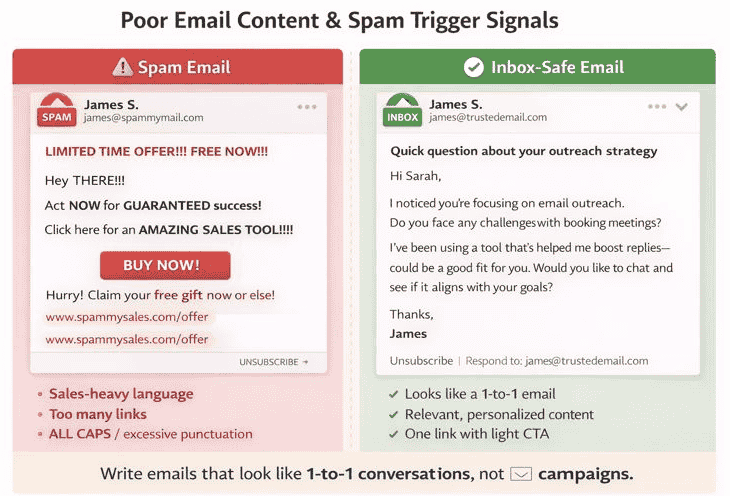
🔶 Sales-Heavy Language
Overly aggressive sales messaging is one of the most common spam signals.
Examples include:
✖ “Limited-Time Offer”
✖ “Act Now”
✖ “Guaranteed Results”
✖ “Instant Growth”
✖ “100% Success”
These phrases often resemble promotional spam campaigns.
Modern spam filters associate excessive sales pressure with:
✔ Low-Trust Marketing Behavior
✔ Bulk Outreach Patterns
✔ Promotional Spam Risk
🔶 Too Many Links
Cold emails overloaded with links frequently trigger filtering systems.
Problems increase when emails contain:
✖ Multiple External Links
✖ Tracking URLs
✖ Redirect Chains
✖ Suspicious Shortened Links
Mailbox providers may interpret excessive linking as:
✔ Promotional Activity
✔ Unsafe Redirection
✔ Spam Distribution Behavior
For cold outreach, simpler email structures usually perform better.
🔶 All Caps And Excessive Punctuation
Formatting patterns also affect deliverability.
Examples:
✖ “FREE CONSULTATION NOW!!!”
✖ “LIMITED OFFER”
✖ “URGENT RESPONSE NEEDED!!!”
These patterns appear highly promotional and unnatural.
Modern spam filters detect:
✔ Aggressive Formatting
✔ Emotional Trigger Patterns
✔ Artificial Urgency Signals
🔶 Overused Spam Trigger Phrases
Certain phrases are heavily abused across spam campaigns.
Common examples include:
✖ “Guaranteed”
✖ “Free Now”
✖ “Risk-Free”
✖ “Earn Money Fast”
✖ “No Obligation”
While these words alone may not cause spam placement, repeated use combined with other weak signals increases filtering risk significantly.
Why Modern Spam Filters Focus On Content Quality
Inbox providers increasingly prioritize:
✔ User Experience
✔ Relevance
✔ Engagement
✔ Authenticity
The goal is not simply blocking spam words.
Instead, modern systems attempt to predict:
whether recipients are likely to value the email.
This includes analyzing:
✔ Reading Patterns
✔ Reply Probability
✔ Personalization Depth
✔ Message Structure
✔ Campaign Similarity Across Recipients
As a result, generic mass outreach performs far worse than personalized conversational messaging.
How Cold Email Tools Help Improve Email Content
Modern cold email platforms now include deliverability-focused content optimization features.
These tools help identify risky messaging patterns before campaigns are launched.
Features Modern Cold Email Tools Provide
❇️ Spam Score Testing
Many platforms analyze emails for:
✔ Spam Trigger Keywords
✔ Risky Formatting
✔ Excessive Links
✔ Promotional Language
This helps users reduce spam-filtering risks before sending campaigns.
❇️ Content Analysis
Advanced tools evaluate:
✔ Readability
✔ Structure
✔ Natural Language Flow
✔ Personalization Quality
✔ Deliverability Risk Signals
This improves inbox-friendliness.
❇️ AI-Assisted Personalization
Modern platforms increasingly use AI to generate:
✔ Personalized Openers
✔ Contextual First Lines
✔ Relevant Messaging Variations
✔ Dynamic Outreach Content
Personalized emails often generate:
✔ Better Engagement
✔ Higher Reply Rates
✔ Improved Deliverability Signals
because recipients interact more naturally with them.
❇️ Subject Line Optimization
Some tools help improve:
✔ Subject Line Length
✔ Natural Wording
✔ Engagement Potential
✔ Spam Risk Reduction
Overly promotional subject lines often hurt inbox placement.
Why Personalized Emails Improve Deliverability
Many people associate personalization only with:
higher reply rates.
But personalization also helps improve:
✔ Open Rates
✔ Positive Engagement Signals
✔ Inbox Trust
✔ Recipient Interaction
✔ Deliverability Stability
Mailbox providers observe how recipients interact with emails.
When emails receive:
✔ Replies
✔ Opens
✔ Positive Engagement
sender reputation strengthens over time.
Best Practices For Writing Deliverability-Friendly Cold Emails
✔️ Write Like A Real Conversation
Cold emails should feel:
✔ Personal
✔ Simple
✔ Direct
✔ Human
not like mass advertising campaigns.
✔️ Keep Emails Short And Natural
Short conversational emails often outperform heavily formatted sales pitches.
✔️ Limit Link Usage
Use only essential links when necessary.
Too many links increase spam risk.
✔️ Avoid Aggressive Sales Language
Focus on:
✔ Relevance
✔ Clarity
✔ Value
instead of hype-driven messaging.
✔️ Use Personalized Context
Mention:
✔ Relevant Pain Points
✔ Industry Context
✔ Specific Observations
✔ Real Business Relevance
This improves authenticity.
Best Practice: Write Emails Like 1-To-1 Conversations
One of the biggest deliverability improvements comes from changing how cold emails are written.
Instead of writing:
marketing campaigns
write emails that resemble:
genuine business conversations.
The best-performing cold emails usually feel:
✔ Personal
✔ Relevant
✔ Contextual
✔ Human
✔ Low-Pressure
rather than:
✖ Promotional
✖ Over-Automated
✖ Template-Heavy
✖ Sales Aggressive
Important Deliverability Insight
Many businesses focus heavily on:
✔ Scaling Outreach
✔ Adding More Inboxes
✔ Increasing Automation
✔ Sending Higher Volume
while underestimating how strongly email content influences deliverability.
In 2026, inbox providers increasingly reward:
✔ Authentic Communication
✔ Human-Like Messaging
✔ Relevant Outreach
✔ Positive Recipient Engagement
That is why cold email success is no longer only about:
sending more emails.
It is increasingly about:
sending emails that look trustworthy, valuable, and genuinely human.
5. Low Engagement (No Opens, No Replies)
One of the strongest signals modern spam filters evaluate is:
recipient engagement.
Mailbox providers like Gmail, Outlook, and Yahoo continuously monitor how people interact with your emails after delivery.
This means cold email deliverability is influenced not only by:
✔ Technical Setup
✔ Domain Reputation
✔ Sending Infrastructure
but also by:
✔ Open Rates
✔ Reply Activity
✔ Reading Behavior
✔ Inbox Interaction Signals
If recipients consistently ignore, delete, or avoid engaging with your emails, inbox providers may gradually reduce your sender reputation and future inbox placement.
Over time, low engagement becomes a major reason cold emails go to spam.
Why Engagement Matters For Cold Email Deliverability
Modern spam filtering systems are increasingly behavior-driven.
Their goal is to understand:
whether recipients actually value your emails.
Mailbox providers interpret engagement as a trust signal.
Positive engagement suggests:
✔ The Email Is Relevant
✔ The Sender Is Legitimate
✔ The Recipient Finds Value In The Message
Negative engagement suggests:
❌ Low Relevance
❌ Unwanted Outreach
❌ Spam-Like Behavior
❌ Poor Recipient Experience
This is why cold email success today depends heavily on generating healthy engagement signals.
What Spam Filters Track
Modern inbox providers analyze multiple recipient actions after email delivery.
Opens
Consistent open activity suggests recipients recognize or trust the sender.
Low open rates may indicate:
✔ Weak Targeting
✔ Poor Subject Lines
✔ Low Sender Reputation
✔ Spam Folder Placement
Replies
Replies are among the strongest positive deliverability signals.
Reply activity suggests:
✔ Real Human Interaction
✔ Relevant Communication
✔ Valuable Outreach
This improves long-term sender trust.
Deletes Without Reading
When recipients repeatedly delete emails without opening them, mailbox providers may interpret the sender as unwanted.
High delete rates can weaken:
✔ Domain Reputation
✔ Inbox Placement
✔ Future Deliverability
Ignoring Emails Completely
Consistent non-engagement across campaigns may reduce inbox provider trust over time.
Spam Complaints
When users manually mark emails as spam, sender reputation can decline rapidly.
Even small complaint rates can impact deliverability significantly.
Why Low Engagement Pushes Emails To Spam
Mailbox providers prioritize:
✔ User Satisfaction
✔ Relevant Communication
✔ Valuable Inbox Experience
If recipients rarely interact with your emails, spam filters may assume:
future emails are also unlikely to provide value.
As a result:
❌ Inbox Placement Declines
❌ Spam Filtering Increases
❌ Sender Reputation Weakens
❌ Campaign Stability Drops
This creates a negative deliverability cycle where poor engagement leads to even lower visibility.
Common Reasons Cold Emails Generate Low Engagement
Poor Targeting
Sending emails to irrelevant prospects reduces:
✔ Opens
✔ Replies
✔ Engagement Quality
Strong ICP targeting is critical.
Generic Messaging
Mass-template emails often feel impersonal and easy to ignore.
Weak Subject Lines
Poor subject lines reduce open rates dramatically.
Overly Long Emails
Large blocks of text often reduce reading engagement.
Aggressive Sales Tone
Recipients engage more with conversational messaging than hard-selling campaigns.
How Cold Email Tools Help Improve Engagement
Modern cold email platforms increasingly focus on:
engagement optimization.
Instead of only automating sending, these tools help improve how recipients interact with outreach campaigns.
Features Modern Cold Email Tools Provide
Personalization At Scale
Modern tools personalize:
✔ First Lines
✔ Company References
✔ Industry Context
✔ Pain Points
✔ Dynamic Variables
This helps emails feel more relevant and human.
Personalized outreach typically improves:
✔ Open Rates
✔ Reply Rates
✔ Inbox Engagement
✔ Deliverability Signals
Smart Follow-Ups
Most replies happen after follow-ups — not the first email.
Smart follow-up systems help:
✔ Maintain Consistency
✔ Improve Response Rates
✔ Increase Engagement Signals
✔ Avoid Manual Tracking Errors
Well-structured follow-ups improve long-term inbox performance.
A/B Testing Subject Lines
Testing subject lines helps optimize:
✔ Open Rates
✔ Curiosity
✔ Relevance
✔ Deliverability Performance
Modern tools allow businesses to identify which messaging patterns generate healthier engagement.
Engagement Tracking
Advanced platforms monitor:
✔ Opens
✔ Replies
✔ Bounce Rates
✔ Click Activity
✔ Campaign Performance
This helps optimize outreach quality over time.
Why Personalization Improves Deliverability
Many businesses think personalization exists only to:
increase replies.
But personalization also improves:
✔ Positive Recipient Signals
✔ Reading Activity
✔ Open Rates
✔ Inbox Trust
✔ Sender Reputation
When recipients interact positively with emails, mailbox providers view the sender more favorably.
This strengthens long-term cold email deliverability.
Best Practices For Improving Cold Email Engagement
Target The Right ICP
Relevance is one of the strongest engagement drivers.
Better targeting improves:
✔ Opens
✔ Replies
✔ Conversations
✔ Deliverability Stability
Write Conversational Emails
Simple human messaging usually performs better than heavily optimized sales copy.
Keep Emails Short And Clear
Concise emails improve readability and response probability.
Use Personalized Subject Lines
Relevant subject lines improve open behavior significantly.
Follow Up Consistently
Many opportunities are lost because businesses stop after one email.
Important Deliverability Insight
Modern cold email systems increasingly reward:
✔ Positive Engagement
✔ Human Interaction
✔ Relevant Communication
✔ Consistent Recipient Interest
while reducing visibility for:
❌ Ignored Emails
❌ Generic Outreach
❌ Low-Value Campaigns
❌ Mass Spam-Like Messaging
That’s why cold email deliverability is no longer only about:
technical setup.
It is also heavily influenced by:
how real people respond to your emails.
In 2026, engagement itself has become part of the deliverability system.
6. Bad Lead Lists & Poor Targeting
Even with strong domain setup, proper warm-up, and good email copy, cold email campaigns can still fail because of one major problem:
poor lead quality.
Many deliverability issues begin long before the email is sent.
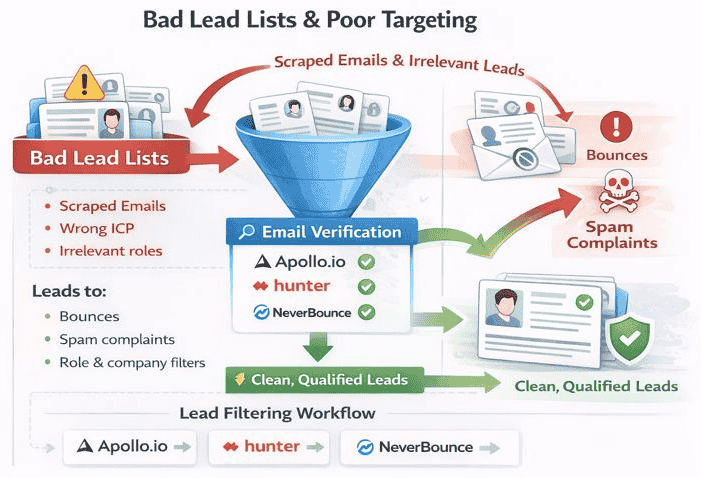
If your lead list contains:
❌ Invalid Emails
❌ Wrong ICP Contacts
❌ Irrelevant Job Roles
❌ Outdated Data
❌ Low-Quality Scraped Leads
then inbox performance usually declines very quickly.
Modern spam filters closely monitor how recipients respond to your outreach.
When campaigns generate:
✔ High Bounce Rates
✔ Low Engagement
✔ Spam Complaints
✔ Negative User Signals
mailbox providers gradually reduce sender trust and inbox placement.
This is why list quality and ICP targeting are now critical parts of modern cold email deliverability.
Why Lead Quality Directly Affects Deliverability
Many businesses think deliverability depends only on:
✔ Domain Authentication
✔ Warm-Up
✔ Sending Infrastructure
But inbox providers also evaluate:
✔ Recipient Relevance
✔ Engagement Quality
✔ Bounce Behavior
✔ Complaint Signals
✔ Sender Consistency
If your outreach repeatedly targets the wrong people, spam filters may interpret your campaigns as:
❌ Low-Value Outreach
❌ Unwanted Communication
❌ Mass Spam Activity
As a result:
❌ Emails Begin Landing In Spam
❌ Domain Reputation Weakens
❌ Open Rates Drop
❌ Future Campaign Stability Declines
What Happens With Poor Lead Lists
Bad lead lists damage both:
deliverability
and
campaign performance.
Sending To Scraped Emails
Mass scraped databases often contain:
✔ Invalid Emails
✔ Abandoned Accounts
✔ Spam Traps
✔ Outdated Contacts
This increases bounce risk significantly.
Mailbox providers treat high bounce activity as a strong negative trust signal.
Targeting The Wrong ICP
Even technically valid emails can hurt deliverability when the targeting is poor.
If recipients consistently ignore outreach because it is irrelevant:
✔ Engagement Drops
✔ Open Rates Decline
✔ Spam Complaints Increase
Low relevance weakens sender reputation over time.
Contacting Irrelevant Roles
Sending cold emails to people outside the actual buying decision process reduces campaign quality significantly.
Examples:
❌ Wrong Department
❌ Junior Roles Without Decision Power
❌ Non-Relevant Teams
❌ Generic Company Addresses
This often leads to:
✔ Low Engagement
✔ Email Ignoring
✔ Negative Sender Signals
Why Bounce Rates Are Dangerous
Bounce rates are one of the strongest deliverability risk indicators.
When too many emails fail to deliver:
✔ Mailbox Providers Lose Trust
✔ Sender Reputation Weakens
✔ Spam Filtering Increases
✔ Domain Health Declines
Repeated bounce problems may eventually cause:
❌ Inbox Blocking
❌ Sending Restrictions
❌ Deliverability Instability
This is why clean lead data is essential for sustainable cold email outreach.
Why Spam Complaints Hurt Deliverability
Spam complaints are even more damaging than low engagement.
When recipients manually mark emails as spam, mailbox providers interpret this as:
✔ Poor Sender Quality
✔ Unwanted Outreach
✔ Negative User Experience
Even a small number of complaints can reduce:
✔ Inbox Placement
✔ Domain Trust
✔ Long-Term Deliverability
This is why highly targeted outreach usually performs far better than mass generic campaigns.
How Modern Cold Email Tools Improve Lead Quality
Modern cold email platforms increasingly focus on:
data quality and targeting accuracy.
Instead of sending to massive random lists, these tools help businesses build:
✔ Cleaner Lead Databases
✔ Better ICP Segmentation
✔ Higher-Relevance Prospect Lists
This improves both:
✔ campaign performance
and
✔ deliverability stability.
Features Modern Lead Generation Tools Provide
Email Verification
Verification tools help detect:
✔ Invalid Emails
✔ Disposable Addresses
✔ Catch-All Domains
✔ High-Risk Accounts
This reduces bounce rates significantly.
Clean lists improve:
✔ Sender Reputation
✔ Inbox Placement
✔ Campaign Stability
ICP-Based Targeting
Modern platforms allow filtering prospects by:
✔ Industry
✔ Company Size
✔ Revenue Range
✔ Geography
✔ Technology Stack
✔ Team Size
Better ICP targeting improves:
✔ Relevance
✔ Engagement
✔ Reply Rates
✔ Deliverability Signals
Role And Company Filters
Advanced lead tools help target:
✔ Founders
✔ Marketing Leaders
✔ Sales Teams
✔ Recruiters
✔ Decision Makers
instead of random contacts.
Role-based targeting increases campaign quality significantly.
Recommended Tools For Lead Quality And Targeting
Apollo.io
Popular for:
✔ B2B Lead Database Access
✔ ICP Filtering
✔ Prospect Research
✔ Outreach Workflows
✔ Company Intelligence
Widely used for outbound prospecting.
Hunter.io
Useful for:
✔ Email Discovery
✔ Domain-Based Prospecting
✔ Email Verification
✔ Contact Validation
Helps improve lead accuracy.
NeverBounce
Focused primarily on:
✔ Email Verification
✔ Bounce Reduction
✔ Database Cleaning
✔ Deliverability Protection
Useful for maintaining clean outreach lists.
Why Better Targeting Improves Deliverability
Many businesses associate targeting only with:
conversion rates.
But targeting also affects:
✔ Open Rates
✔ Replies
✔ Engagement Signals
✔ Inbox Reputation
✔ Spam Complaint Rates
When recipients find outreach relevant, they are more likely to:
✔ Open Emails
✔ Reply Positively
✔ Engage Naturally
This strengthens sender reputation over time.
Best Practices For Building Healthier Cold Email Lists
Focus On ICP Relevance
Strong targeting usually outperforms large-volume generic outreach.
Verify Emails Before Sending
Always clean lists before launching campaigns.
Avoid Massive Scraped Databases
Low-quality scraped lists create major deliverability risks.
Prioritize Decision-Maker Relevance
Target people connected to the actual business problem you solve.
Update Lead Databases Regularly
Outdated data increases bounce rates and engagement problems.
Important Deliverability Insight
Many businesses think cold email scaling depends mainly on:
✔ More Automation
✔ More Inboxes
✔ Higher Sending Volume
But modern deliverability systems increasingly reward:
✔ Better Data Quality
✔ Higher Relevance
✔ Stronger Engagement
✔ Cleaner Targeting
✔ Lower Complaint Rates
That is why successful cold email outreach in 2026 is becoming less about:
sending to more people
and more about:
sending relevant emails to the right people.
7. High Bounce Rates & Invalid Emails
High bounce rates are one of the fastest ways to destroy cold email deliverability.
Modern mailbox providers closely monitor whether your emails are successfully reaching real recipients. When too many emails fail to deliver, inbox providers begin losing trust in your domain, inboxes, and sending infrastructure.
This is because high bounce activity often signals:
✔ Poor List Quality
✔ Unsafe Outreach Practices
✔ Mass Scraping Activity
✔ Low Sender Reliability
As bounce rates increase, spam filtering systems may gradually reduce inbox placement and future campaign performance.
That’s why managing bounce rates has become a critical part of sustainable cold email systems in 2026.
What Is A Bounce Rate In Cold Email?
Bounce rate refers to:
the percentage of emails that fail to deliver successfully.
This usually happens when:
✔ Email Addresses Are Invalid
✔ Inboxes No Longer Exist
✔ Domains Are Misconfigured
✔ Recipient Servers Reject Emails
High bounce rates create negative trust signals for mailbox providers like Gmail and Outlook.
Why High Bounce Rates Hurt Deliverability
Mailbox providers interpret repeated delivery failures as a sign of:
✔ Poor Sender Quality
✔ Unsafe Outreach Behavior
✔ Unverified Email Databases
✔ Spam-Like Sending Activity
As a result:
❌ Inbox Placement Drops
❌ Sender Reputation Weakens
❌ Spam Filtering Increases
❌ Domain Trust Declines
❌ Long-Term Campaign Stability Becomes Risky
Even strong email copy and personalization cannot fully compensate for unhealthy bounce behavior.
Safe Deliverability Benchmarks
Modern cold email campaigns generally aim to maintain healthy deliverability metrics.
Safe Bounce Rate Benchmark
✔ Bounce Rate: < 3%
Keeping bounce rates below 3% helps maintain healthier sender reputation and inbox trust.
Higher bounce rates increase deliverability risks significantly.
Safe Spam Complaint Benchmark
✔ Spam Complaints: < 0.1%
Even small complaint rates can damage sender trust quickly.
Low complaint levels are essential for stable outreach performance.
Common Causes Of High Bounce Rates
Sending To Invalid Emails
Old or incorrect addresses create immediate delivery failures.
Using Poorly Scraped Databases
Large scraped lead lists often contain:
✔ Outdated Contacts
✔ Fake Emails
✔ Abandoned Accounts
✔ Spam Traps
These lists create major deliverability risks.
Skipping Email Verification
Without verification, businesses unknowingly send campaigns to unsafe addresses.
Poor ICP Targeting
Sending irrelevant outreach often leads to:
✔ Higher Complaints
✔ More Blocking
✔ Lower Engagement
✔ Deliverability Decline
Outdated Lead Databases
Business contacts change frequently.
Old databases become less reliable over time.
Why Invalid Emails Are Dangerous
Invalid emails do more than simply reduce campaign efficiency.
They also damage:
✔ Domain Reputation
✔ Sender Trust
✔ Inbox Placement
✔ Deliverability Stability
Repeated invalid sending behavior signals low-quality outreach infrastructure to spam filtering systems.
Over time, mailbox providers may begin filtering future campaigns more aggressively.
How Modern Cold Email Tools Reduce Bounce Problems
Modern cold email platforms now include deliverability protection systems designed to reduce risky sending behavior before campaigns launch.
These tools help businesses:
✔ Clean Lead Databases
✔ Identify Invalid Contacts
✔ Protect Sender Reputation
✔ Improve Deliverability Stability
Features Modern Deliverability Tools Provide
Built-In Email Verification
Many cold email tools automatically verify:
✔ Email Validity
✔ Domain Status
✔ Mailbox Existence
✔ Catch-All Detection
✔ High-Risk Addresses
This reduces bounce-related risks significantly.
Bounce Protection Systems
Advanced platforms monitor bounce activity in real time.
If bounce rates increase, tools may:
✔ Pause Campaigns
✔ Warn Users
✔ Limit Sending Volume
✔ Flag Risky Lists
This helps prevent large-scale reputation damage.
Auto-Removal Of Risky Emails
Modern systems increasingly remove:
✔ Invalid Emails
✔ Duplicate Contacts
✔ High-Risk Domains
✔ Unsafe Addresses
before campaigns are sent.
This improves:
✔ List Quality
✔ Sender Reputation
✔ Inbox Placement
✔ Campaign Stability
Why Email Verification Matters So Much
Email verification is one of the simplest ways to improve:
✔ Deliverability
✔ Reputation
✔ Engagement Quality
✔ Campaign Performance
Even highly personalized cold emails perform poorly when sent to unhealthy databases.
Clean lead lists create:
✔ Lower Bounce Rates
✔ Better Inbox Trust
✔ Healthier Engagement Signals
✔ More Stable Scaling Opportunities
Best Practices For Reducing Bounce Rates
Verify Emails Before Every Campaign
Lead databases change constantly.
Always validate contacts before sending.
Avoid Buying Low-Quality Lists
Cheap bulk databases often contain high bounce risk.
Focus On ICP Accuracy
Better targeting improves both engagement and deliverability.
Clean Databases Regularly
Remove:
✔ Inactive Leads
✔ Invalid Contacts
✔ Non-Relevant Accounts
consistently.
Monitor Deliverability Metrics Closely
Track:
✔ Bounce Rates
✔ Complaint Rates
✔ Open Rates
✔ Reply Signals
✔ Inbox Placement Trends
to identify problems early.
Why Bounce Management Is Becoming More Important
Modern mailbox providers increasingly prioritize:
✔ Sender Reliability
✔ Data Quality
✔ Recipient Relevance
✔ Healthy Engagement Patterns
while penalizing:
❌ Poor Databases
❌ Invalid Sending Behavior
❌ High Bounce Activity
❌ Spam-Like Outreach Practices
This means cold email success today depends heavily on maintaining:
clean, healthy, and verified lead data.
Important Deliverability Insight
Many businesses focus heavily on:
✔ Automation
✔ AI Personalization
✔ Outreach Volume
✔ Cold Email Tools
while underestimating how dangerous poor data quality can become.
But in reality:
bad lead data silently destroys deliverability systems.
That’s why high-performing cold email operations in 2026 treat:
✔ Email Verification
✔ Bounce Protection
✔ Database Hygiene
✔ ICP Accuracy
as foundational parts of sustainable outbound growth.
8. No Reply Handling Or Manual Interaction
Many businesses focus heavily on:
✔ Sending More Emails
✔ Automating Campaigns
✔ Scaling Outreach
but overlook one critical part of cold email deliverability:
handling replies properly.
Modern mailbox providers closely monitor recipient interaction after delivery.
This means deliverability is influenced not only by:
✔ Opens
✔ Clicks
✔ Sending Volume
but also by:
✔ Reply Conversations
✔ Ongoing Interaction
✔ Human Engagement Signals
If recipients respond to your cold emails and those conversations are ignored, inbox providers may gradually reduce trust in your sender reputation.
In simple terms:
engagement without interaction weakens long-term deliverability.
Why Reply Handling Matters For Cold Email Deliverability
Mailbox providers like Gmail and Outlook increasingly evaluate:
✔ Conversation Quality
✔ Human Interaction Patterns
✔ Real Engagement Behavior
Their goal is to identify whether an email sender behaves like:
✔ A Legitimate Human Business
or
❌ A One-Way Bulk Automation System
When recipients reply and meaningful interaction continues, inbox providers often interpret this as:
✔ Positive User Experience
✔ Relevant Communication
✔ Trusted Sender Activity
This strengthens long-term inbox trust.
What Happens When Replies Are Ignored
Many cold email campaigns generate replies that are:
❌ Missed
❌ Delayed
❌ Unanswered
❌ Poorly Managed
This creates negative engagement patterns over time.
Common consequences include:
❌ Lower Sender Reputation
❌ Reduced Inbox Placement
❌ Declining Engagement Signals
❌ Weak Conversation Quality
❌ Deliverability Instability
Ignoring replies also damages:
✔ Prospect Trust
✔ Brand Perception
✔ Conversion Opportunities
Why Inbox Interaction Is A Positive Reputation Signal
Modern spam filtering systems increasingly reward:
✔ Real Conversations
✔ Human Interaction
✔ Ongoing Engagement
✔ Natural Communication Behavior
When recipients:
✔ Reply
✔ Continue Conversations
✔ Ask Questions
✔ Interact Naturally
mailbox providers often view the sender more favorably.
This is why:
inbox interaction itself has become part of modern deliverability systems.
Common Problems In Reply Management
Missing Important Replies
Without proper tracking, businesses often overlook:
✔ Interested Prospects
✔ Positive Responses
✔ Follow-Up Opportunities
This weakens engagement quality.
Continuing Automated Sequences After Replies
One of the biggest outreach mistakes is continuing automation after a recipient responds.
This creates:
✔ Poor User Experience
✔ Robotic Interaction
✔ Negative Trust Signals
Recipients may interpret this as spam-like behavior.
Slow Manual Response Times
Delayed replies reduce conversation momentum and engagement quality.
Managing Multiple Inboxes Poorly
As outreach scales, reply handling becomes difficult without organized systems.
This often leads to:
✔ Missed Opportunities
✔ Inconsistent Follow-Up
✔ Conversation Confusion
How Modern Cold Email Tools Improve Reply Handling
Modern cold email platforms now focus heavily on:
conversation management.
Instead of functioning only as sending systems, many tools now help businesses manage:
✔ Replies
✔ Inbox Activity
✔ Human Interaction Workflows
more effectively.
Features Modern Cold Email Tools Provide
Unified Inbox Systems
Unified inboxes centralize replies from multiple outreach inboxes into one interface.
This helps teams:
✔ Manage Conversations Faster
✔ Track Prospect Responses
✔ Reduce Missed Replies
✔ Improve Workflow Organization
As outreach scales, unified inboxes become increasingly important.
Auto-Pause On Reply
Modern tools can automatically stop email sequences when recipients respond.
This prevents:
✔ Over-Automation
✔ Duplicate Follow-Ups
✔ Spam-Like Behavior
✔ Poor Conversation Experience
Auto-pause systems help maintain more natural communication flow.
Manual Reply Reminders
Some platforms generate reminders for:
✔ Unanswered Replies
✔ Pending Conversations
✔ Follow-Up Opportunities
This improves:
✔ Response Consistency
✔ Engagement Quality
✔ Relationship Management
Conversation Tracking
Advanced platforms help track:
✔ Prospect Status
✔ Reply History
✔ Engagement Activity
✔ Follow-Up Progress
This creates more organized outreach systems.
Why Human Interaction Improves Deliverability
Many people think cold email deliverability depends mainly on:
✔ Technical Setup
✔ Authentication
✔ Warm-Up
But mailbox providers increasingly reward:
✔ Genuine Conversations
✔ Human Engagement
✔ Two-Way Communication
✔ Recipient Interaction
The more your outreach behaves like:
real business communication
the healthier your long-term deliverability usually becomes.
Best Practices For Managing Cold Email Replies
Respond To Replies Quickly
Faster responses improve:
✔ Engagement Quality
✔ Prospect Experience
✔ Conversation Momentum
Stop Automation After Responses
Never continue automated sequences after meaningful replies.
Use Human Conversational Tone
Natural communication improves trust and interaction quality.
Organize Multi-Inbox Workflows Properly
Centralized reply management reduces missed opportunities.
Prioritize Relationship Building
Modern cold outreach performs better when conversations feel:
✔ Helpful
✔ Relevant
✔ Human
✔ Contextual
instead of overly automated.
Why Deliverability Is Becoming More Conversation-Driven
Modern spam filtering systems increasingly prioritize:
✔ Human Engagement
✔ Meaningful Replies
✔ Conversation Continuity
✔ Positive Recipient Experience
while reducing trust in:
❌ One-Way Automation
❌ Ignored Conversations
❌ Robotic Outreach Behavior
This means cold email success today is no longer only about:
getting emails delivered.
It is increasingly about:
maintaining real interactions after delivery.
Important Deliverability Insight
Many businesses invest heavily in:
✔ Sending Infrastructure
✔ AI Personalization
✔ Cold Email Automation
✔ Scaling Outreach Volume
but underestimate the importance of:
✔ Reply Handling
✔ Conversation Management
✔ Human Interaction Quality
In 2026, inbox providers increasingly reward senders that behave like:
real communicators — not mass automation systems.
That’s why effective reply handling is becoming an important part of modern cold email deliverability strategy.
9. Over-Automation & Robotic Outreach
Automation has become a core part of modern cold email systems.
But one of the biggest mistakes businesses make is:
over-automating outreach until it no longer feels human.
Modern spam filters are increasingly sophisticated.
They no longer evaluate only:
✔ Technical Setup
✔ Domain Authentication
✔ Sending Volume
They also analyze:
✔ Messaging Similarity
✔ Behavioral Patterns
✔ Personalization Depth
✔ Conversation Quality
✔ Recipient Engagement
If outreach appears robotic, repetitive, or artificially automated, inbox providers may reduce inbox placement even when the technical infrastructure is healthy.
This is why:
over-automation itself has become a deliverability risk.
Why Robotic Outreach Hurts Cold Email Deliverability
Mailbox providers like Gmail and Outlook prioritize:
✔ Relevant Communication
✔ Human Interaction
✔ Natural Engagement
✔ Positive Recipient Experience
Their systems increasingly attempt to identify whether emails resemble:
✔ Real Business Conversations
or
❌ Mass Automation Campaigns
When cold emails feel repetitive, generic, or obviously automated, recipients are more likely to:
✔ Ignore Emails
✔ Delete Messages
✔ Mark Emails As Spam
✔ Avoid Engagement
These negative signals gradually weaken sender reputation.
Common Spam Signals Caused By Over-Automation
Modern spam filters can detect repetitive outreach patterns across campaigns.
Same Email Sent To Everyone
One of the biggest deliverability problems is sending identical templates to large numbers of recipients.
This creates:
✔ Low Relevance
✔ Predictable Messaging Patterns
✔ Weak Engagement Signals
Mailbox providers increasingly recognize template repetition across large-scale campaigns.
Same Follow-Up Timing
Sending follow-ups at identical intervals for every lead appears highly automated.
Examples:
❌ Every Follow-Up Sent Exactly 24 Hours Later
❌ Fixed Daily Sending Behavior
❌ Repetitive Campaign Timing
Human communication naturally varies over time.
No Contextual Relevance
Generic emails without:
✔ Company Context
✔ Industry Relevance
✔ Personalized Observations
✔ Role-Specific Messaging
often generate low engagement and spam-like signals.
Recipients quickly recognize irrelevant automation.
Why Spam Filters Detect Robotic Patterns
Modern filtering systems analyze:
✔ Behavioral Consistency
✔ Message Similarity
✔ Engagement Trends
✔ Recipient Reactions
✔ Campaign Repetition
Their goal is to identify whether the sender behaves like:
✔ A Genuine Human Communicator
or
❌ A Scaled Automation Engine
This means even well-written email copy can experience deliverability issues if campaigns appear too robotic.
How Over-Automation Reduces Engagement
Recipients increasingly ignore emails that feel:
❌ Artificial
❌ Mass-Generated
❌ Generic
❌ Template-Heavy
This reduces:
✔ Opens
✔ Replies
✔ Positive Interaction Signals
✔ Inbox Trust
Over time, declining engagement negatively impacts future inbox placement.
Why Human-Like Outreach Performs Better
Cold emails generally perform better when they feel:
✔ Personal
✔ Relevant
✔ Contextual
✔ Conversational
✔ Natural
Recipients are more likely to:
✔ Read The Email
✔ Reply
✔ Continue Conversations
when outreach resembles genuine communication instead of aggressive automation.
How Modern Cold Email Tools Reduce Robotic Outreach
Modern cold email platforms increasingly focus on:
making automation feel more human.
Instead of pure mass automation, advanced tools now help businesses create:
✔ Dynamic Messaging
✔ Personalized Workflows
✔ Behavioral Variations
✔ Contextual Outreach Systems
This improves both:
✔ deliverability
and
✔ engagement quality.
Features Modern Cold Email Tools Provide
Spintax Personalization
Spintax allows tools to rotate different:
✔ Sentences
✔ Phrases
✔ Introductions
✔ CTAs
across campaigns.
This reduces:
✔ Message Repetition
✔ Template Similarity
✔ Spam Detection Patterns
while making emails feel more natural.
Dynamic Fields
Dynamic personalization fields help customize emails using:
✔ First Names
✔ Company Names
✔ Industry Details
✔ Job Roles
✔ Custom Variables
This improves:
✔ Relevance
✔ Engagement
✔ Human-Like Communication
Personalized emails usually generate healthier deliverability signals.
Behavior-Based Follow-Ups
Modern tools can adjust follow-up sequences based on recipient behavior.
Examples:
✔ Opened But Did Not Reply
✔ Clicked A Link
✔ Replied Previously
✔ Ignored Earlier Emails
This creates more natural outreach flows instead of rigid automation patterns.
AI-Assisted Personalization
Some platforms now use AI to generate:
✔ Personalized Openers
✔ Company-Specific References
✔ Contextual Messaging Variations
✔ Dynamic Conversation Starters
This helps reduce robotic outreach behavior.
Why Contextual Relevance Matters
Modern inbox providers increasingly reward:
✔ Relevant Messaging
✔ Recipient Alignment
✔ Personalized Context
✔ Natural Communication Flow
Recipients engage more positively when emails demonstrate:
✔ Research
✔ Business Understanding
✔ Problem Relevance
✔ Human Intent
This strengthens:
✔ Open Rates
✔ Reply Rates
✔ Sender Reputation
✔ Deliverability Stability
Best Practices For Avoiding Robotic Cold Outreach
Personalize Beyond First Names
Real personalization includes:
✔ Business Context
✔ Industry Challenges
✔ Role-Specific Problems
✔ Relevant Observations
not just merge tags.
Vary Messaging Patterns
Avoid sending identical templates to every prospect.
Use Natural Follow-Up Timing
Human-like timing variations improve authenticity.
Focus On Relevance Over Scale
Highly targeted outreach usually outperforms mass automation.
Write Conversational Emails
Simple, human communication often generates stronger engagement than heavily optimized sales copy.
Why Modern Cold Email Is Shifting Away From Pure Automation
In earlier years, cold outreach focused heavily on:
✔ Volume
✔ Automation
✔ Scaling Speed
But inbox providers now prioritize:
✔ Recipient Experience
✔ Human Interaction
✔ Relevance
✔ Trust Signals
✔ Natural Engagement
This means:
automation alone is no longer enough.
Successful cold email systems increasingly combine:
✔ Automation Efficiency
with
✔ Human-Like Communication Quality
Important Deliverability Insight
Many businesses assume better cold email performance comes from:
✔ More Sequences
✔ More Automation
✔ More Templates
✔ Faster Scaling
But in reality, modern deliverability systems increasingly reward:
✔ Authentic Communication
✔ Relevant Outreach
✔ Dynamic Personalization
✔ Human Engagement Patterns
That’s why successful cold email campaigns in 2026 focus less on:
acting like automation systems
and more on:
behaving like trusted human communicators at scale.
10. Ignoring Deliverability Monitoring
One of the biggest mistakes businesses make in cold email outreach is:
assuming deliverability is working without actively monitoring it.
Many campaigns appear healthy on the surface because:
✔ Emails Are Sending
✔ Campaigns Are Running
✔ Automation Is Active
But behind the scenes:
❌ Emails May Be Landing In Spam
❌ Inbox Placement May Be Declining
❌ Sender Reputation May Be Weakening
❌ Domain Health May Be Damaged
The problem is that most deliverability issues develop gradually.
By the time businesses notice:
✔ Open Rates Collapse
✔ Replies Disappear
✔ Campaign Performance Drops
the sender reputation damage may already be significant.
This is why modern cold email systems increasingly treat:
deliverability monitoring as an ongoing operational process.
Why Deliverability Monitoring Matters
Cold email deliverability is not static.
Inbox providers continuously evaluate:
✔ Domain Reputation
✔ Sending Behavior
✔ Recipient Engagement
✔ Complaint Signals
✔ Authentication Quality
✔ Infrastructure Health
This means deliverability can change over time based on:
✔ Campaign Activity
✔ Sending Patterns
✔ List Quality
✔ Engagement Trends
Without monitoring systems, businesses often fail to detect problems early.
What Happens When Deliverability Is Not Monitored
Many outreach campaigns slowly decline because problems remain invisible.
Common consequences include:
❌ Emails Gradually Moving To Spam
❌ Reduced Inbox Placement
❌ Lower Open Rates
❌ Declining Reply Rates
❌ Weakening Domain Reputation
❌ Poor Campaign Scalability
In many cases, businesses mistakenly believe:
✔ Their Offer Is Weak
✔ Their Copy Is Bad
✔ Their Leads Are Poor
when the real issue is simply:
inbox placement failure.
Why Deliverability Problems Often Go Unnoticed
Deliverability issues are difficult to identify manually because:
✔ Emails Still Appear Sent
✔ Automation Continues Running
✔ Campaign Dashboards Look Normal
But mailbox providers may silently reduce:
✔ Inbox Visibility
✔ Sender Trust
✔ Message Placement
This creates hidden performance decline.
Common Deliverability Problems Monitoring Helps Detect
Spam Folder Placement
Emails may begin landing in:
✔ Spam
✔ Promotions
✔ Junk Folders
instead of the primary inbox.
Without testing tools, businesses often never realize this is happening.
Declining Domain Reputation
Poor engagement, bounce activity, or spam complaints may gradually weaken domain health.
Authentication Problems
SPF, DKIM, or DMARC misconfigurations can reduce inbox trust unexpectedly.
Blacklist Issues
Domains or IPs may appear on spam monitoring databases.
Sending Pattern Risks
Aggressive scaling or unusual sending behavior can create hidden deliverability problems.
Why Modern Cold Email Requires Ongoing Monitoring
Cold email deliverability in 2026 is increasingly dynamic.
Inbox providers continuously adapt filtering systems based on:
✔ Sender Behavior
✔ Engagement Signals
✔ Infrastructure Quality
✔ User Feedback
This means:
deliverability optimization is no longer a one-time setup task.
It requires:
✔ Continuous Monitoring
✔ Ongoing Adjustments
✔ Performance Tracking
✔ Reputation Management
How Modern Deliverability Tools Help
Modern cold email tools increasingly include monitoring systems designed to identify deliverability risks before campaigns fail completely.
These platforms help businesses:
✔ Track Inbox Placement
✔ Monitor Reputation Health
✔ Detect Spam Risks
✔ Improve Campaign Stability
Features Modern Deliverability Monitoring Tools Provide
Inbox Placement Tests
Inbox placement tools check whether emails land in:
✔ Primary Inbox
✔ Promotions Tab
✔ Spam Folder
✔ Junk Folder
across different mailbox providers like:
✔ Gmail
✔ Outlook
✔ Yahoo
This helps identify visibility problems early.
Spam Folder Monitoring
Monitoring systems detect when campaigns begin triggering spam placement.
Early detection helps businesses:
✔ Adjust Sending Behavior
✔ Improve Content Quality
✔ Protect Sender Reputation
before major damage occurs.
Domain Health Alerts
Advanced tools monitor:
✔ Reputation Trends
✔ Authentication Issues
✔ Blacklist Signals
✔ Deliverability Risks
and provide alerts when problems appear.
This helps maintain healthier outreach systems.
Engagement Monitoring
Some platforms track:
✔ Open Rates
✔ Replies
✔ Bounce Activity
✔ Complaint Signals
to identify early warning signs of deliverability decline.
Recommended Deliverability Monitoring Tools
GlockApps
Useful for:
✔ Inbox Placement Testing
✔ Spam Monitoring
✔ Deliverability Analysis
✔ Reputation Tracking
Popular among cold email teams and deliverability specialists.
MailTester
Helpful for:
✔ Spam Score Evaluation
✔ Authentication Testing
✔ Email Content Analysis
✔ Deliverability Diagnostics
Often used for quick deliverability checks before campaign launches.
Why Inbox Placement Matters More Than Open Rates
Many businesses rely heavily on:
✔ Open Rates
✔ Reply Metrics
✔ Click Tracking
But these metrics become unreliable if emails are already landing in spam folders.
That’s why:
inbox placement is the foundation of campaign performance.
Without inbox visibility:
✔ Opens Decline
✔ Replies Disappear
✔ Engagement Weakens
✔ Campaigns Fail
even when messaging quality is strong.
Best Practices For Deliverability Monitoring
Monitor Inbox Placement Regularly
Check where emails actually land across major providers.
Track Domain Health Continuously
Small reputation problems can grow quickly if ignored.
Review Authentication Records Frequently
SPF, DKIM, and DMARC issues should be monitored consistently.
Watch Engagement Trends Closely
Sudden drops in:
✔ Opens
✔ Replies
✔ Inbox Placement
often indicate deliverability problems.
Test Campaigns Before Scaling
Always validate deliverability before increasing sending volume.
Why Deliverability Monitoring Is Becoming A Competitive Advantage
Most businesses focus heavily on:
✔ Automation
✔ AI Tools
✔ Copywriting
✔ Outreach Volume
But fewer businesses actively monitor:
✔ Inbox Placement
✔ Sender Reputation
✔ Domain Health
✔ Deliverability Stability
This creates a major competitive advantage for teams that prioritize operational deliverability systems.
Because in modern cold outreach:
visibility comes before conversion.
If emails never reach the inbox, even great offers and strong copy cannot perform.
Important Deliverability Insight
Many cold email campaigns fail silently because businesses monitor:
✔ Sending Activity
but ignore:
✔ Deliverability Health
In 2026, successful outbound systems increasingly rely on:
✔ Continuous Monitoring
✔ Reputation Management
✔ Inbox Placement Optimization
✔ Early Problem Detection
That’s why deliverability monitoring is no longer just a technical task.
It has become:
a core part of scalable cold email growth systems.
Beginner Cold Email Sending Limits
One of the most common cold email mistakes is:
scaling sending volume too quickly.
Many beginners assume:
✔ more emails = more replies
But inbox providers closely monitor:
✔ Daily Sending Volume
✔ Sending Consistency
✔ Behavioral Patterns
✔ Reputation Signals
Aggressive scaling often leads to:
❌ Spam Placement
❌ Reputation Damage
❌ Lower Inbox Placement
❌ Deliverability Decline
That’s why modern cold outreach focuses heavily on:
gradual and controlled scaling.
Safe Daily Sending Limits
For newer domains and inboxes, lower sending volume is generally safer.
Typical beginner recommendations include:
✔ 10–20 Emails/Day During Initial Warm-Up
✔ 25–40 Emails/Day During Early Scaling
✔ 40–60 Emails/Day Per Inbox For More Stable Accounts
Many deliverability-focused teams avoid sending extremely high volume from a single inbox.
Instead, they scale using:
✔ Multiple Inboxes
✔ Multiple Domains
✔ Controlled Distribution
to reduce reputation risk.
Warm-Up Stage Limits
During the warm-up phase, the goal is not:
✔ lead generation
but:
building sender trust.
Inbox providers need time to observe:
✔ Healthy Sending Behavior
✔ Positive Engagement Signals
✔ Consistent Activity
This stage usually involves:
✔ Low Sending Volume
✔ Gradual Increases
✔ Human-Like Activity
✔ Stable Sending Patterns
Rushing this process often weakens deliverability long term.
Scaling Stage Limits
Once inboxes develop stronger reputation signals, businesses can slowly increase sending activity.
However, safe scaling still depends on:
✔ Domain Health
✔ Reply Rates
✔ Bounce Rates
✔ Inbox Placement Quality
✔ Engagement Consistency
Sudden spikes in volume can still trigger:
❌ Spam Filtering
❌ Reputation Warnings
❌ Deliverability Instability
That’s why scaling is usually done:
gradually — not aggressively.
Per Inbox Recommendations
Modern cold email systems often distribute campaigns across:
✔ Multiple Inboxes
✔ Multiple Sending Domains
instead of relying on:
✔ one inbox for high-volume outreach.
This approach helps:
✔ Protect Reputation
✔ Improve Stability
✔ Reduce Spam Risk
✔ Maintain Better Inbox Placement
Many outreach teams prioritize:
infrastructure stability over maximum sending volume.
Important Sending Insight
Successful cold outreach is rarely about:
✔ sending the highest number of emails.
Instead, long-term performance usually comes from:
✔ Controlled Scaling
✔ Consistent Reputation
✔ Healthy Engagement Signals
✔ Stable Inbox Placement
Because in modern cold email:
trust scales better than volume.
Common Cold Email Deliverability Myths
Cold email deliverability has become one of the most misunderstood parts of modern outreach.
Many beginners damage their campaigns because they follow:
✔ outdated advice
✔ social media shortcuts
✔ mass automation tactics
✔ misleading “growth hacks”
But inbox providers have evolved significantly.
Modern deliverability now depends more on:
✔ Reputation
✔ Engagement
✔ Sending Behavior
✔ Infrastructure Quality
✔ Trust Signals
Understanding the myths below can help businesses avoid some of the most common cold email mistakes.
Myth 1: “More Volume = More Replies”
One of the biggest misconceptions in cold outreach is believing:
sending more emails automatically creates better results.
In reality, aggressive sending often causes:
❌ Spam Placement
❌ Reputation Damage
❌ Lower Engagement
❌ Inbox Filtering
Modern inbox providers closely monitor:
✔ Sending Velocity
✔ Engagement Patterns
✔ Recipient Behavior
✔ Complaint Signals
In many cases:
better targeting outperforms higher volume.
Smaller campaigns with:
✔ Relevant Prospects
✔ Better Personalization
✔ Cleaner Lists
often generate stronger reply quality than mass outreach campaigns.
Myth 2: “Good Copy Guarantees Inbox Placement”
Strong copy helps improve:
✔ Engagement
✔ Replies
✔ Conversations
But even excellent email copy cannot overcome:
❌ Poor Sender Reputation
❌ Weak Authentication
❌ Spam Signals
❌ Bad Infrastructure
Inbox providers evaluate:
✔ domain trust
before:
✔ message quality.
That means deliverability problems can prevent even well-written emails from being seen.
Modern cold email success requires:
✔ Technical Setup
✔ Reputation Health
✔ Engagement Quality
✔ Good Messaging
working together.
Myth 3: “Warm-Up Fixes Everything”
Warm-up tools help build:
✔ Initial Trust Signals
✔ Sending Reputation
✔ Inbox Activity
But warm-up alone cannot fix:
❌ Poor Lead Lists
❌ Bad Personalization
❌ Spam Complaints
❌ Aggressive Scaling
❌ Low Engagement
Many businesses mistakenly believe warm-up is a “complete deliverability solution.”
In reality:
deliverability is an ongoing operational process.
Warm-up is only one part of a much larger system.
Myth 4: “Cold Email Is Dead”
Cold email still remains one of the highest ROI B2B acquisition channels when done correctly.
The real change is:
low-quality outreach is becoming less effective.
Inbox providers now prioritize:
✔ Trust
✔ Relevance
✔ Human-Like Communication
✔ Positive Engagement Signals
Businesses still achieving strong results usually focus on:
✔ Better Targeting
✔ Cleaner Infrastructure
✔ Relevant Messaging
✔ Reputation Management
✔ Consistent Optimization
Cold email is not disappearing —
but the standards required for success are becoming higher.
Myth 5: “Automation Alone Creates Results”
Automation helps improve:
✔ Efficiency
✔ Scaling
✔ Workflow Management
But excessive automation often creates:
❌ Robotic Outreach
❌ Generic Messaging
❌ Poor Engagement
❌ Deliverability Risks
The best-performing cold email systems usually combine:
✔ Automation
with:
✔ Human Relevance
✔ Contextual Messaging
✔ Controlled Sending Behavior
Modern outreach increasingly rewards:
authentic communication over mass automation.
Important Deliverability Insight
Many cold email problems are caused not by:
✔ lack of tools
but by:
✔ incorrect assumptions about how deliverability actually works.
Modern inbox systems prioritize:
✔ Reputation
✔ Engagement
✔ Trust
✔ User Experience
more than:
✔ raw sending volume.
That’s why successful cold outreach in 2026 increasingly depends on:
smarter systems — not louder outreach.
Complete Cold Email Deliverability Stack (Recommended)
Modern cold email success is no longer dependent on just:
✔ Writing Better Emails
or
✔ Sending Higher Volume
Today, successful outreach requires:
a complete deliverability infrastructure.
Each part of the stack plays a different role in improving:
✔ Inbox Placement
✔ Sender Reputation
✔ Campaign Stability
✔ Outreach Scalability
Below is a beginner-friendly cold email deliverability stack commonly used by:
✔ SaaS Companies
✔ B2B Agencies
✔ Recruiters
✔ Lead Generation Teams
✔ Outbound Sales Systems
Recommended Cold Email Deliverability Stack
| Purpose | Recommended Tool Type |
|---|---|
| Email Accounts | Google Workspace / Outlook 365 |
| Domain Warm-Up | Instantly / Mailreach |
| Lead Sourcing | Apollo.io |
| Email Verification | NeverBounce |
| Cold Email Outreach | Smartlead / Instantly |
| Deliverability Monitoring | GlockApps / MailTester |
Why Each Tool Matters
Email Accounts
Professional inbox providers like:
✔ Google Workspace
✔ Outlook 365
help improve:
✔ Sender Credibility
✔ Domain Trust
✔ Deliverability Stability
Free inbox providers are generally not recommended for scalable cold outreach.
Domain Warm-Up Tools
Warm-up platforms help build:
✔ Sending Reputation
✔ Inbox Trust
✔ Engagement Signals
by gradually simulating healthy email activity before scaling campaigns.
Lead Sourcing Platforms
Lead sourcing tools help businesses:
✔ Find ICP-Matched Prospects
✔ Filter Relevant Companies
✔ Identify Decision-Makers
✔ Improve Targeting Accuracy
Better targeting improves both:
✔ engagement
and
✔ deliverability.
Email Verification Tools
Verification systems reduce:
✔ Invalid Emails
✔ Bounce Rates
✔ Deliverability Risks
✔ Reputation Damage
Clean data is essential for long-term inbox placement.
Outreach Platforms
Cold email software helps manage:
✔ Sending Infrastructure
✔ Campaign Automation
✔ Follow-Ups
✔ Inbox Rotation
✔ Sending Control
Modern tools also include deliverability-focused features.
Deliverability Monitoring Tools
Monitoring platforms help track:
✔ Inbox Placement
✔ Spam Folder Activity
✔ Domain Reputation
✔ Authentication Health
✔ Deliverability Risks
Without monitoring, many deliverability problems remain invisible until campaign performance drops.
Important Deliverability Insight
Many beginners think cold email success depends mainly on:
✔ Better Copywriting
✔ More Leads
✔ Higher Sending Volume
But modern outbound systems increasingly depend on:
✔ Infrastructure Quality
✔ Deliverability Systems
✔ Sender Reputation
✔ Data Quality
✔ Engagement Signals
That’s why high-performing cold email operations treat deliverability as:
an operational system — not just a marketing tactic.
Quick Deliverability Insights
✔ Good Content Alone Cannot Fix Poor Deliverability
✔ Warm-Up Usually Takes 2–4 Weeks For Safer Scaling
✔ Cold Email Tools Reduce Risk — They Do Not Guarantee Inbox Placement
✔ Sustainable Outreach Depends On Reputation And Consistency
✔ Deliverability Optimization Is An Ongoing Process, Not A One-Time Setup
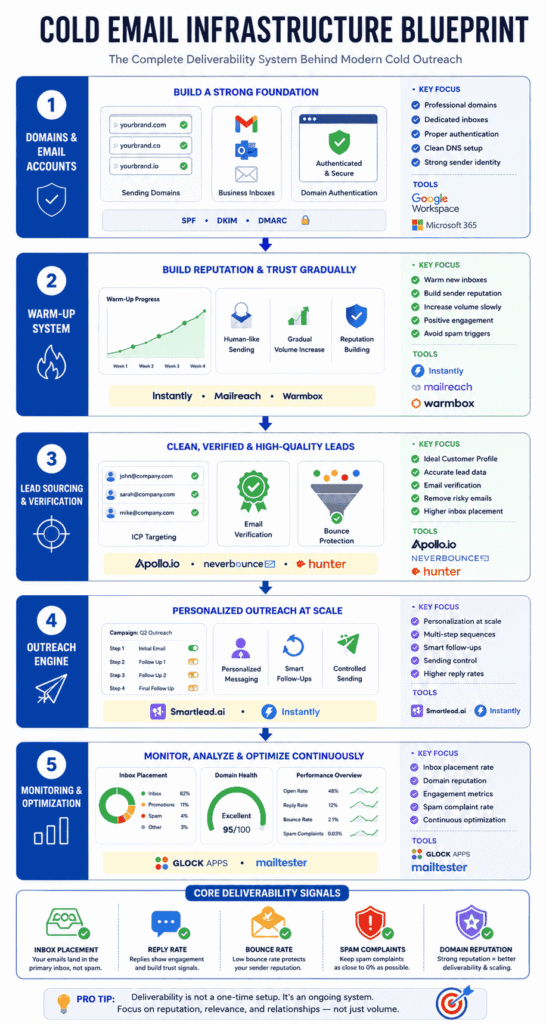
Deliverability Checklist Before Launching Cold Email Campaigns
Before launching any cold email campaign, verify that your deliverability foundation is properly configured.
Even strong outreach campaigns can fail if basic deliverability checks are ignored.
Use this checklist before scaling outreach activity.
Cold Email Deliverability Pre-Launch Checklist
✔ SPF Record Configured
Ensure your sending domain has a valid SPF record to authorize email servers.
✔ DKIM Authentication Enabled
Enable DKIM signing to improve sender authenticity and trust signals.
✔ DMARC Policy Added
Configure DMARC to help protect domain reputation and improve authentication consistency.
✔ Domain Warm-Up Completed
Warm up new domains and inboxes gradually before launching campaigns.
✔ Email Verification Completed
Verify lead lists to reduce bounce rates and invalid recipients.
✔ Sending Limits Configured
Avoid aggressive daily sending volume during early outreach stages.
✔ Inbox Rotation Setup
Distribute outreach across multiple inboxes instead of relying on one account.
✔ Personalization Added
Use relevant messaging instead of generic mass outreach templates.
✔ Reply Handling Enabled
Ensure campaigns pause automatically when recipients respond.
✔ Tracking & Monitoring Active
Monitor inbox placement, domain reputation, bounce rates, and spam risks continuously.
✔ Sending Schedule Optimized
Use human-like sending patterns instead of bulk blasts.
✔ Test Emails Sent First
Run inbox placement and deliverability tests before scaling campaigns.
Important Deliverability Insight
Many cold email problems begin before:
the first campaign is even launched.
A strong deliverability setup helps businesses:
✔ Protect Domain Reputation
✔ Improve Inbox Placement
✔ Reduce Spam Risks
✔ Scale Outreach More Safely
Because successful cold email systems are usually built on:
preparation and consistency — not just automation.
Deliverability Metrics That Actually Matter
One of the biggest cold email mistakes is focusing only on:
✔ Emails Sent
✔ Campaign Volume
✔ Automation Activity
while ignoring the metrics that actually indicate:
inbox health and sender reputation.
Modern cold email success depends heavily on monitoring:
✔ Deliverability Signals
✔ Engagement Quality
✔ Reputation Health
✔ Inbox Placement Performance
Because in many cases:
campaign problems appear in the metrics before they become visible in results.
Understanding these deliverability metrics helps businesses:
✔ Detect Problems Early
✔ Improve Inbox Placement
✔ Protect Domain Reputation
✔ Scale Outreach More Safely
Bounce Rate
Bounce rate measures how many emails fail to reach recipients successfully.
High bounce rates usually indicate:
✔ Invalid Emails
✔ Poor Lead Data
✔ Outdated Lists
✔ Risky Lead Sources
Excessive bounce activity damages:
✔ Sender Reputation
✔ Domain Trust
✔ Deliverability Stability
Recommended Benchmark
✔ Below 3% Bounce Rate
Lower bounce rates generally indicate:
✔ Better Lead Quality
✔ Healthier Outreach Systems
✔ Stronger Deliverability Foundations
Reply Rate
Reply rate is one of the strongest positive engagement signals in cold email.
Mailbox providers increasingly view replies as:
✔ Human Interaction
✔ Conversation Quality
✔ Sender Legitimacy
✔ Recipient Interest
Higher reply rates often strengthen:
✔ Sender Reputation
✔ Future Inbox Placement
✔ Deliverability Consistency
Low reply activity may signal:
✔ Weak Targeting
✔ Poor Relevance
✔ Low Engagement Quality
Open Rate
Open rates help indicate:
✔ Subject Line Effectiveness
✔ Inbox Visibility
✔ Initial Recipient Interest
However, open rates alone should not be treated as the most important deliverability metric.
A campaign may still experience:
✔ Promotions Placement
✔ Spam Filtering
✔ Weak Engagement
even with acceptable open rates.
That’s why open rate should be analyzed together with:
✔ Replies
✔ Inbox Placement
✔ Engagement Quality
Spam Complaint Rate
Spam complaints occur when recipients manually mark emails as spam.
This is one of the most damaging deliverability signals.
High complaint rates can quickly reduce:
✔ Inbox Placement
✔ Sender Trust
✔ Domain Reputation
and may eventually lead to:
✔ Account Restrictions
✔ Domain Reputation Damage
✔ Blacklisting Risks
Recommended Benchmark
✔ Below 0.1% Complaint Rate
Reducing spam complaints requires:
✔ Better Targeting
✔ Relevant Messaging
✔ Cleaner Lists
✔ Less Aggressive Automation
Domain Reputation
Domain reputation reflects how inbox providers evaluate your overall sending trustworthiness.
It is influenced by:
✔ Bounce Rates
✔ Spam Complaints
✔ Engagement Signals
✔ Sending Patterns
✔ Authentication Quality
✔ Recipient Interaction
A strong domain reputation improves:
✔ Inbox Placement
✔ Deliverability Stability
✔ Campaign Scalability
while poor reputation gradually increases:
✔ Spam Placement
✔ Filtering Risks
✔ Deliverability Decline
Inbox Placement Rate
Inbox placement rate measures how often emails land in:
✔ Primary Inbox
instead of:
✔ Spam
✔ Promotions
✔ Junk Folders
This is one of the most important deliverability metrics because:
visibility directly affects campaign performance.
Even strong copy and targeting cannot perform well if emails fail to reach visible inbox placement.
Modern cold email systems increasingly prioritize:
✔ Inbox Placement Quality
over simply:
✔ Delivery Status
Why Deliverability Metrics Matter More In 2026
Inbox providers now use increasingly advanced systems to evaluate:
✔ Sender Behavior
✔ Engagement Trends
✔ Conversation Signals
✔ Reputation Health
✔ Recipient Experience
This means successful cold outreach is becoming:
more data-driven and reputation-focused.
The businesses achieving consistent results usually monitor:
✔ Deliverability Metrics
✔ Engagement Patterns
✔ Reputation Signals
✔ Inbox Placement Trends
continuously — not just during campaign setup.
Important Deliverability Insight
Many cold email campaigns fail because businesses focus on:
✔ Sending More Emails
instead of monitoring:
✔ Deliverability Quality
✔ Engagement Health
✔ Reputation Stability
In modern outbound systems:
better metrics usually create better scalability.
Because long-term cold email success depends less on aggressive volume —
and more on maintaining:
✔ Healthy Infrastructure
✔ Positive Engagement Signals
✔ Trusted Sender Reputation
✔ Consistent Inbox Visibility
Why Deliverability Is Becoming An Operational Advantage
Most businesses still compete heavily on:
✔ Copywriting
✔ Automation
✔ AI Tools
✔ Outreach Volume
But fewer businesses focus deeply on:
✔ Deliverability Infrastructure
✔ Sender Reputation
✔ Domain Health
✔ Inbox Placement
✔ Operational Consistency
That creates a major opportunity.
Because in modern cold outreach:
visibility comes before conversion.
Even strong offers and well-written emails fail if they never reach the inbox.
The Shift Happening In Cold Email
For many years, cold outreach focused mainly on:
✔ Sending More Emails
✔ Scaling Faster
✔ Increasing Automation
But inbox providers have become significantly more advanced.
Modern systems now evaluate:
✔ Reputation Signals
✔ Sending Behavior
✔ Engagement Quality
✔ Inbox Trust
✔ Conversation Patterns
This means cold email success is increasingly tied to:
operational quality — not just outreach volume.
Businesses that build healthier outreach systems often achieve:
✔ Better Inbox Placement
✔ More Stable Performance
✔ Higher Reply Rates
✔ Lower Reputation Risk
✔ More Sustainable Scaling
even while sending fewer emails overall.
Why Operational Consistency Matters
Deliverability is no longer just a technical setup task handled once during campaign launch.
It now requires ongoing operational discipline, including:
✔ Consistent Sending Behavior
✔ Clean Lead Data
✔ Reputation Monitoring
✔ Controlled Scaling
✔ Inbox Management
✔ Engagement Optimization
Small operational improvements often compound over time.
That’s why many successful outbound teams increasingly treat deliverability like:
a long-term business system.
The Businesses Winning With Cold Outreach
The highest-performing cold email systems are usually not the most aggressive.
They are often the most:
✔ Consistent
✔ Structured
✔ Reputation-Focused
✔ Deliverability-Aware
These businesses understand that:
inbox trust is becoming a competitive advantage.
Because while many companies continue damaging reputation through:
❌ Poor Data
❌ Mass Automation
❌ High Spam Activity
❌ Aggressive Scaling
others are building:
✔ Healthier Infrastructure
✔ Better Engagement Signals
✔ More Trusted Sending Systems
This creates stronger long-term outreach performance.
Important Industry Trend
Cold outreach in 2026 is becoming increasingly:
✔ Reputation-Driven
✔ System-Oriented
✔ Operationally Managed
The future of outbound is likely to reward businesses that prioritize:
✔ Trust
✔ Relevance
✔ Deliverability Stability
✔ Human-Like Communication
✔ Sustainable Sending Practices
not just:
✔ sending volume.
Key Deliverability Insight
Many businesses still think successful cold email is about:
sending more emails.
But modern outreach increasingly depends on:
building systems that inbox providers actually trust.
And that shift is turning deliverability into:
an operational advantage — not just a technical detail.
Final Takeaway
Cold email is not dead.
What’s changing is the standard required to reach the inbox.
Most cold email campaigns fail long before prospects ever read the message. The real problem is usually not:
❌ The Offer
❌ The Copy
❌ The Outreach Channel
It’s:
poor deliverability infrastructure.
Modern inbox providers now evaluate far more than just email content. They analyze:
✔ Sender Reputation
✔ Domain Health
✔ Authentication
✔ Engagement Signals
✔ Sending Behavior
✔ List Quality
✔ Conversation Patterns
That means successful cold outreach in 2026 is no longer about:
sending more emails.
It’s about building systems that inbox providers actually trust.
The best-performing outbound systems usually focus on:
✔ Proper Technical Setup
✔ Clean And Verified Lead Lists
✔ Smart Deliverability Tools
✔ Human-Like Sending Behavior
✔ Personalized Communication
✔ Consistent Reputation Management
Cold email tools do not magically solve deliverability problems.
What they actually do is:
systematically reduce the risks that cause emails to land in spam.
When combined with:
✔ Good Targeting
✔ Healthy Infrastructure
✔ Relevant Messaging
✔ Strong Engagement
cold email still remains one of the:
highest ROI B2B growth channels available today.
The businesses winning with cold outreach are usually not the ones sending the highest volume.
They are the ones building:
reliable, trustworthy, and scalable deliverability systems.
FAQs
-
Why do cold emails go to spam?
Cold emails go to spam mainly due to poor sender reputation, missing domain authentication (SPF, DKIM, DMARC), sending from new or un-warmed domains, low engagement rates, and spam-like sending behavior. Content alone doesn’t cause spam — technical setup and sender trust matter more.
-
What are the main reasons cold emails don’t reach the inbox?
The most common reasons are unverified email domains, high bounce rates, sending too many emails too fast, poor targeting, low reply rates, and lack of email warm-up. Email providers judge the sender’s behavior over time, not just one campaign.
-
How do spam filters detect cold emails?
Spam filters analyze sender reputation, email authentication, engagement signals, sending patterns, content structure, and recipient actions. If multiple signals indicate automation, low trust, or irrelevant outreach, the email is redirected to spam or promotions.
-
Does email content alone cause cold emails to go to spam?
No. Email content plays a role, but most cold emails fail due to technical issues like missing authentication, domain reputation problems, or poor engagement history. Even well-written emails can go to spam if the sending setup is weak
-
How long does it take to warm up a cold email domain?
Typically, email warm-up takes 14 to 30 days. New domains should start with very low daily sending volumes and gradually increase while generating opens and replies. Rushing this process can permanently damage domain reputatio
-
Do cold email tools improve deliverability?
Yes, when used correctly. Cold email tools improve deliverability by automating warm-up, controlling sending volume, randomizing send times, personalizing emails at scale, verifying leads, and monitoring inbox placement. They reduce risk but don’t guarantee inbox placement
-
Can cold emails go to spam even after warm-up?
Yes. Warm-up only builds initial trust. Poor targeting, spam complaints, low replies, or aggressive automation after warm-up can still push cold emails to spam. Deliverability must be maintained continuously.
-
What bounce rate is safe for cold email campaigns?
A safe bounce rate is below 3%. Anything higher signals poor list quality and can harm sender reputation. Email verification tools should always be used before launching a cold email campaign.
-
How many cold emails should I send per day per inbox?
For safe deliverability, send 20–40 emails per inbox per day after warm-up. Higher volumes increase spam risk unless managed across multiple inboxes with controlled sending behavior
-
Does personalization help prevent cold emails from going to spam?
Yes. Personalized emails increase opens and replies, which are positive engagement signals for spam filters. Generic, mass-sent emails are more likely to be flagged as automated or irrelevant.
-
Why do cold emails land in spam even with good tools?
Tools can’t fix bad strategy. Poor ICP targeting, irrelevant messaging, low-quality lead lists, and lack of manual engagement can still cause spam placement. Tools support deliverability — they don’t replace good outreach practices.
-
Are cold emails legal if they go to spam?
Cold emails are legal in most regions when compliant with CAN-SPAM, GDPR (B2B context), and local laws. Spam placement is a technical issue, not a legal one, but repeated spam complaints can create compliance risks
-
How can I test if my cold emails are going to spam?
You can test inbox placement using deliverability tools, seed inbox testing, spam score checkers, and by monitoring open rates, bounce rates, and reply rates. Sudden drops usually indicate spam placement issues.
-
Do links in cold emails increase spam risk?
Yes, especially multiple or shortened links. Cold emails should ideally have one link or no links at all. Excessive linking looks promotional and increases spam filter suspicion.
-
What is the best cold email setup to avoid spam?
A safe setup includes a dedicated sending domain, proper SPF/DKIM/DMARC authentication, email warm-up, verified lead lists, low daily sending volume, personalized messaging, and consistent engagement monitoring using cold email tools