
Table of Contents
How to Install the Apollo Chrome Extension for LinkedIn Prospecting (Step-by-Step Guide)
If you want to speed up lead generation on LinkedIn and eliminate manual prospecting work, installing the Apollo.io Chrome extension is the perfect starting point.
This lightweight browser tool helps you find contact data, capture leads instantly, and manage your outreach workflow directly from LinkedIn—without switching between multiple tools or tabs.
In this beginner-friendly guide, you’ll learn exactly how to install, set up, and get the extension ready for real prospecting, step by step—even if you’re completely new to it. written for complete beginners—especially small business owners, freelancers, and people without a tech background.
👉 “Works with free and paid plans”
👉 New to Apollo.io? Start with our in-depth Apollo.io review to understand how the full platform works for lead generation and outreach.
⚙️ What You Need Before Installing
Before you install the Apollo.io Chrome extension, it’s important to have a few basics ready. This ensures a smooth setup process without errors or interruptions.
🧩 1. Google Chrome Browser
The extension is designed specifically for Google Chrome.
👉 Make sure you:
- Have Chrome installed on your device
- Are using the latest version for best performance
💡 Why this matters: Older versions may cause compatibility issues or prevent the extension from working properly.
2. Active Apollo.io Account
You’ll need an account with Apollo.io to use the extension.
👉 You can:
- Sign up for a free account
- Or log in with your existing credentials
💡 Why this matters: The extension pulls data directly from your Apollo account—without it, the tool won’t function.
🌐 3. LinkedIn Account (Basic or Sales Navigator)
Since you’ll be using the extension for prospecting, you need access to LinkedIn.
👉 Works with:
- Free LinkedIn accounts
- LinkedIn Sales Navigator (recommended for advanced use)
💡 Why this matters: LinkedIn is where you’ll find and interact with potential leads.
⚡ 4. Stable Internet Connection
Make sure you have a reliable internet connection during installation and setup.
💡 Why this matters: The extension fetches real-time data, so connectivity is essential for smooth performance.
🔒 5. Basic Browser Permissions Enabled
Chrome will ask for permissions during installation.
👉 Be ready to:
- Allow access to certain websites (like LinkedIn)
- Enable the extension to run properly
💡 Why this matters: Without permissions, the extension won’t be able to extract or display data.
🎯 Quick Setup Checklist
Before you move to the next step, confirm you have:
✅ Chrome browser installed and updated
✅ Active Apollo.io account
✅ LinkedIn account ready
✅ Stable internet connection
✅ Permissions enabled
💡 Key Takeaway
👉 Setting up these basics in advance ensures you can install and start using the extension without delays, saving time and avoiding common beginner issues.
🔹Step 1: Install the Chrome Extension
Installing the Apollo.io Chrome extension takes less than a minute and is the first step to unlocking faster prospecting.
👉 Follow These Steps:
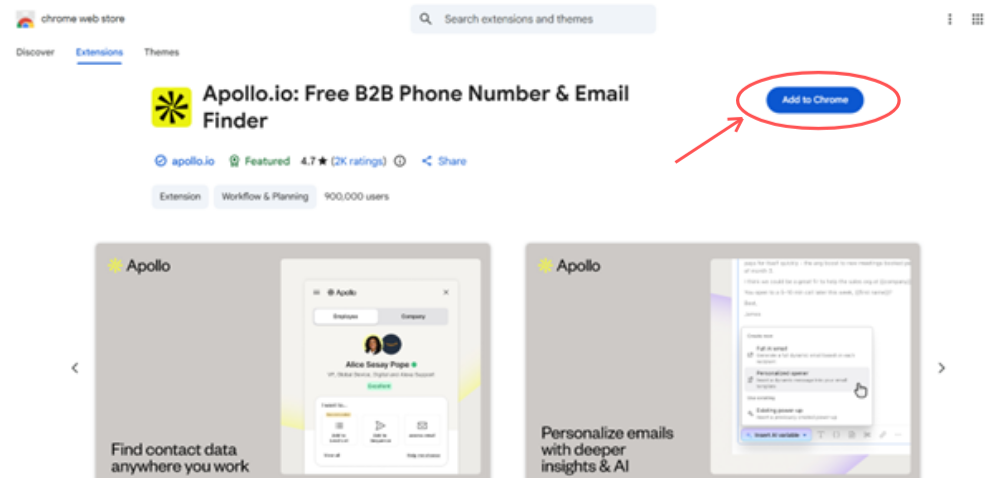
- Open the Chrome Web Store in your browser
- Search for “Apollo Chrome Extension”
- Click on the official extension from Apollo.io
- Hit the “Add to Chrome” button
- Confirm by clicking “Add Extension”
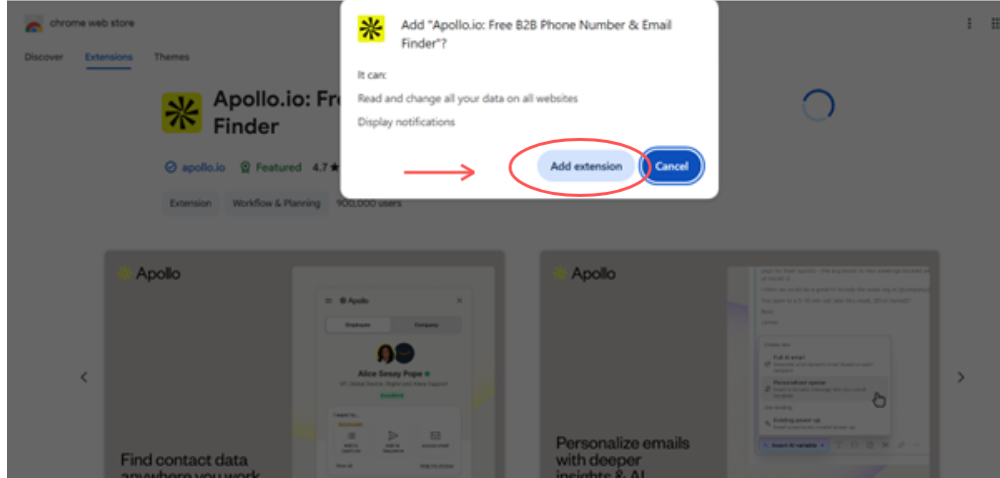
✅ What Happens After Installation
Once installed:
- The Apollo icon will appear in your browser toolbar
- The extension is now active and ready to connect with your account
- You can access it anytime with a single click
🎯 Real Walkthrough Tip
👉 If you don’t see the icon immediately:
- Click the puzzle icon (Extensions) in Chrome
- Find Apollo and click “Pin”
🟢 Pro Tip
👉 Always keep the extension pinned so you can access it instantly while browsing LinkedIn or any website—this saves time during prospecting.
💡 Why This Step Matters
👉 This simple setup turns your browser into a lead generation tool, allowing you to start capturing data in the next steps.
🔹Step 2: Log In to Your Account
Once the extension is installed, the next step is to connect it with your Apollo.io account so you can start accessing lead data.
👉 Follow These Steps:
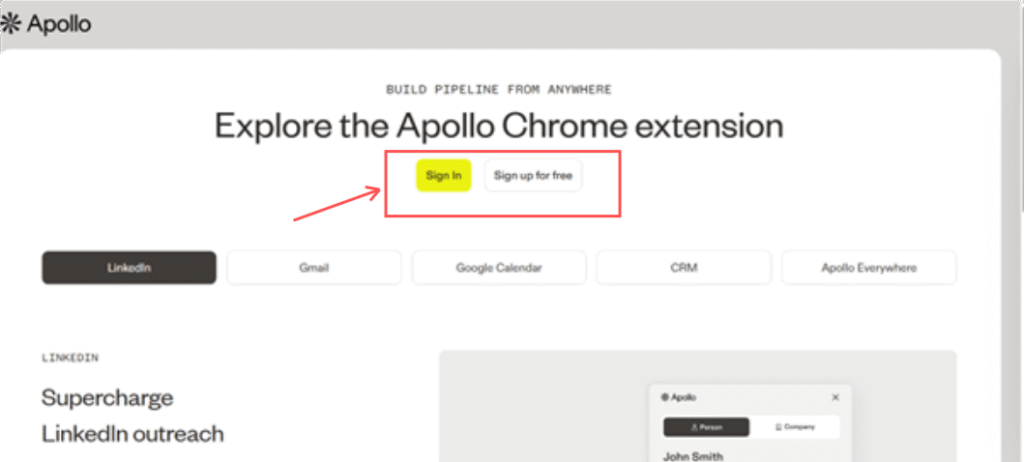
- Click the Apollo icon in your browser toolbar
- A small popup window will open
- Click on “Log In”
- Enter your email and password
OR choose “Sign in with Google” for faster access
✅ What Happens After Login
Once you’re logged in:
- The extension connects directly to your Apollo account
- Your saved lists, contacts, and settings are synced automatically
- You can now start accessing contact data while browsing
🎯 Real Walkthrough Tip
👉 After logging in:
- Click the extension icon again
- Make sure you see your dashboard view or account info instead of the login screen
👉 This confirms your login is successful.
⚠️ Common Issue to Watch
👉 If the extension keeps asking you to log in:
- Or log out and log back in
- Refresh your browser
💡 Why This Step Matters
👉 Without logging in, the extension won’t be able to:
- Fetch contact data
- Save leads
- Sync with your CRM
🚀 Quick Insight
👉 This step essentially activates the extension, turning it from a simple add-on into a fully functional lead generation tool.
🔹Step 3: Grant Required Permissions
For the Apollo.io Chrome extension to work correctly, you need to allow the required browser permissions.
These permissions enable the extension to access pages, read data, and display contact information while you browse.
👉 What You Need to Do
During or after installation, Chrome will ask for permissions.
Follow these steps:
- Click “Allow” when the permission popup appears
- Make sure the extension is allowed to run on relevant websites (like LinkedIn)
- If prompted later, click “Enable access” or similar options
🎯 Real Walkthrough Tip
👉 If you missed the permission step:
- Click the Apollo extension icon
- Go to Manage Extensions
- Find Apollo
- Enable:
- “Allow access to this site”
- “Allow on all sites” (recommended for smooth usage)
⚠️ Common Mistake
👉 Many beginners skip this step, and then:
- The extension opens but shows no data
- Lead details don’t load
👉 This is usually a permission issue—not a tool problem
💡 Key Takeaway
👉 Granting permissions ensures the extension can fully function and deliver accurate, real-time data, making your prospecting smooth and uninterrupted.
🔹Step 4: Verify the Extension Is Working
Now that everything is installed and connected, it’s time to test and confirm that the Apollo.io Chrome extension is working correctly.
This step ensures your setup is complete and ready for real prospecting.
👉 How to Check
Follow these simple steps:
- Open LinkedIn in your browser
- Visit any profile (preferably a professional or decision-maker profile)
- Click the Apollo extension icon in your toolbar
- Wait a few seconds for the panel to load
✅ What You Should See
If everything is working properly, you’ll see:
- Contact details (such as email, if available)
- Job title and role information
- Company details (industry, size, etc.)
- Action buttons like:
- Add to list
- Save contact
- Start sequence
🎯 Real Walkthrough Tip
👉 Try opening 2–3 different profiles to confirm:
- Some profiles may not show full data
- This is normal and depends on data availability
👉 The key is that the extension loads and displays information consistently
⚠️ If It’s Not Working
Check these quickly:
- Refresh the page
- Make sure you’re logged in
- Confirm permissions are enabled
- Click the extension icon again
🎉 Success Indicator
👉 If the panel opens and displays data, your setup is complete
👉 You’re now ready to:
- Capture leads
- Save contacts
- Start building your prospecting workflow
💡 Why This Step Matters
👉 This final check confirms that your extension is:
- Properly installed
- Fully connected
- Ready for real-time lead generation
🚀 Next Step
👉 Now that everything is working, you can move to the next stage:
→ Learn how to use the extension for LinkedIn prospecting effectively
🔧Common Setup Issues & Fixes
Even with a simple setup, you might run into small issues while using the Apollo.io Chrome extension.
Here’s how to quickly identify and fix the most common problems:
❌ Extension Not Showing in Browser
👉 What happens:
You’ve installed the extension, but you don’t see the Apollo icon in your toolbar.
👉 How to fix it:
- Click the Extensions (puzzle icon) in Chrome
- Find Apollo in the list
- Click “Pin” to make it visible
- Refresh your browser
💡 Tip: Sometimes Chrome hides new extensions by default—pinning fixes this instantly.
❌ Extension Not Loading on LinkedIn
👉 What happens:
The extension opens, but no data appears on LinkedIn pages.
👉 How to fix it:
- Check if permissions are enabled
- Go to Chrome → Extensions → Apollo → Manage
- Enable:
- “Allow access to this site”
- Or “Allow on all sites”
- Refresh the LinkedIn page
💡 Tip: This is the most common issue—usually caused by missing permissions.
❌ Login Issues or Auto Logout
👉 What happens:
The extension keeps asking you to log in or doesn’t stay connected.
👉 How to fix it:
- Log out and log back into your Apollo.io account
- Clear browser cache if needed
- Restart your browser
💡 Tip: Using “Sign in with Google” can sometimes resolve login sync issues faster.
❌ No Data Showing for Profiles
👉 What happens:
The extension loads, but you don’t see contact details.
👉 How to fix it:
- Try different profiles (not all have available data)
- Check your account credits or plan limits
- Ensure you’re connected to your Apollo account
💡 Tip: Data availability depends on the database—not every contact will have full details.
⚠️ Bonus: Slow Loading or Lag
👉 What happens:
The extension takes time to load or respond.
👉 How to fix it:
- Check your internet connection
- Close unused tabs
- Refresh the page
🎯 Key Takeaway
👉 Most issues with the Apollo.io Chrome extension are quick to fix and usually related to:
- Permissions
- Login status
- Browser settings
👉 Once resolved, the extension runs smoothly and reliably.
🚀 Pro Tip
👉 If something doesn’t work, refresh + recheck permissions + re-login—this solves 90% of problems.
📸 How It Looks After Setup
Once installed and connected, the Apollo.io Chrome extension appears as a side panel directly within your browser while you browse.
👉 This panel gives you instant access to contact and company data without switching tabs.
💡 What You’ll Notice
- Quick actions for outreach
- Contact details (email, job title – if available)
- Company insights
- Options to save or add the lead
🎯 Why This Matters
👉 This is where all the action happens—you can view, evaluate, and capture leads instantly, turning simple browsing into a real-time prospecting workflow.
🚀 What to Do Next
🚀 Next Step: Start Using the Extension
Now that your setup is complete, it’s time to put the Apollo.io Chrome extension into action.
👉 Learn how to find leads, capture contacts, and build targeted lists step by step:
→ Explore our Apollo Chrome Extension LinkedIn Prospecting Guide
🎯 Why This Matters
👉 Installation is just the beginning—the real value comes from how you use the extension to generate leads and drive outreach results.
🚀 What You Can Do After Installation
Once your Apollo.io Chrome extension is set up, you can immediately:
- View contact and company data while browsing
- Capture and save leads to your lists
- Build a structured prospect database
- Prepare leads for outreach campaigns
👉 Want to see how to actually find leads and build lists? Check out our complete Apollo Chrome Extension LinkedIn Prospecting Guide.
⚠️ Common Beginner Mistakes to Avoid
- Using the extension without logging in properly
- Not enabling permissions (leads to “no data” issues)
- Trying to use it without LinkedIn open
- Expecting data on every profile
- Not organizing saved leads into lists
👉 Avoiding these ensures a smooth and frustration-free setup experience.
🏁 Final Thoughts
Installing the Apollo.io Chrome extension takes just a few minutes—but the impact on your prospecting workflow can be significant.
Once everything is set up correctly, you can:
- Capture leads faster without manual effort
- Access contact data instantly while browsing
- Work directly from LinkedIn without switching between tools
- Stay organized with synced lists and CRM integration
👉 Instead of juggling multiple tabs and tools, you turn your browser into a real-time lead generation system.
👉 Not sure if this tool is right for you? Read our detailed Apollo Chrome Extension review to explore features, pros, cons, and real use cases.
🎯 Final Takeaway
👉 The setup process is simple, but it unlocks a much more efficient, streamlined, and scalable way to find and manage prospects.
👉 If you’re serious about improving your outreach workflow, this is the first step worth taking.
FAQs
-
How do I install the Apollo.io Chrome extension?
To install the extension, go to the Chrome Web Store, search for the Apollo Chrome extension, and click “Add to Chrome.” Once installed, log in to your Apollo account to activate it.
-
Is the Apollo Chrome extension free to install?
Yes, the extension is completely free to install. However, you need an active Apollo.io account to use its features.
-
Why is the Apollo Chrome extension not showing in my browser?
If the extension is not visible, click the Extensions (puzzle icon) in Chrome and pin the Apollo extension to your toolbar. You may also need to refresh your browser.
-
Why is the extension not working on LinkedIn?
This usually happens due to missing permissions. Make sure you’ve allowed the extension to access LinkedIn pages in your Chrome settings and refresh the page.
-
Do I need a LinkedIn Sales Navigator account to use the extension?
No, the extension works with a basic LinkedIn account. However, Sales Navigator can provide more advanced prospecting capabilities.
-
Why is the extension not working on LinkedIn?
This usually happens due to missing permissions. Make sure you’ve allowed the extension to access LinkedIn pages in your Chrome settings and refresh the page.
-
Do I need a LinkedIn Sales Navigator account to use the extension?
No, the extension works with a basic LinkedIn account. However, Sales Navigator can provide more advanced prospecting capabilities.
-
How do I know if the extension is working properly?
After installation and login, open a LinkedIn profile and click the extension icon. If you see contact details and action buttons, the extension is working correctly.
-
Can beginners install and use the Apollo Chrome extension?
Yes, the setup process is simple and beginner-friendly. Most users can install and start using it within a few minutes.
-
What permissions does the extension require?
The extension requires permission to access certain web pages (like LinkedIn) to display contact and company data. These permissions are necessary for it to function properly.
-
Why am I not seeing contact data for some profiles?
Not all profiles have available data. This depends on the database and your account limits. Try checking multiple profiles for better results.
-
What should I do after installing the extension?
After installation, the next step is to learn how to use it effectively for prospecting and lead generation.
👉 Check your Apollo Chrome Extension LinkedIn Prospecting Guide to get started.